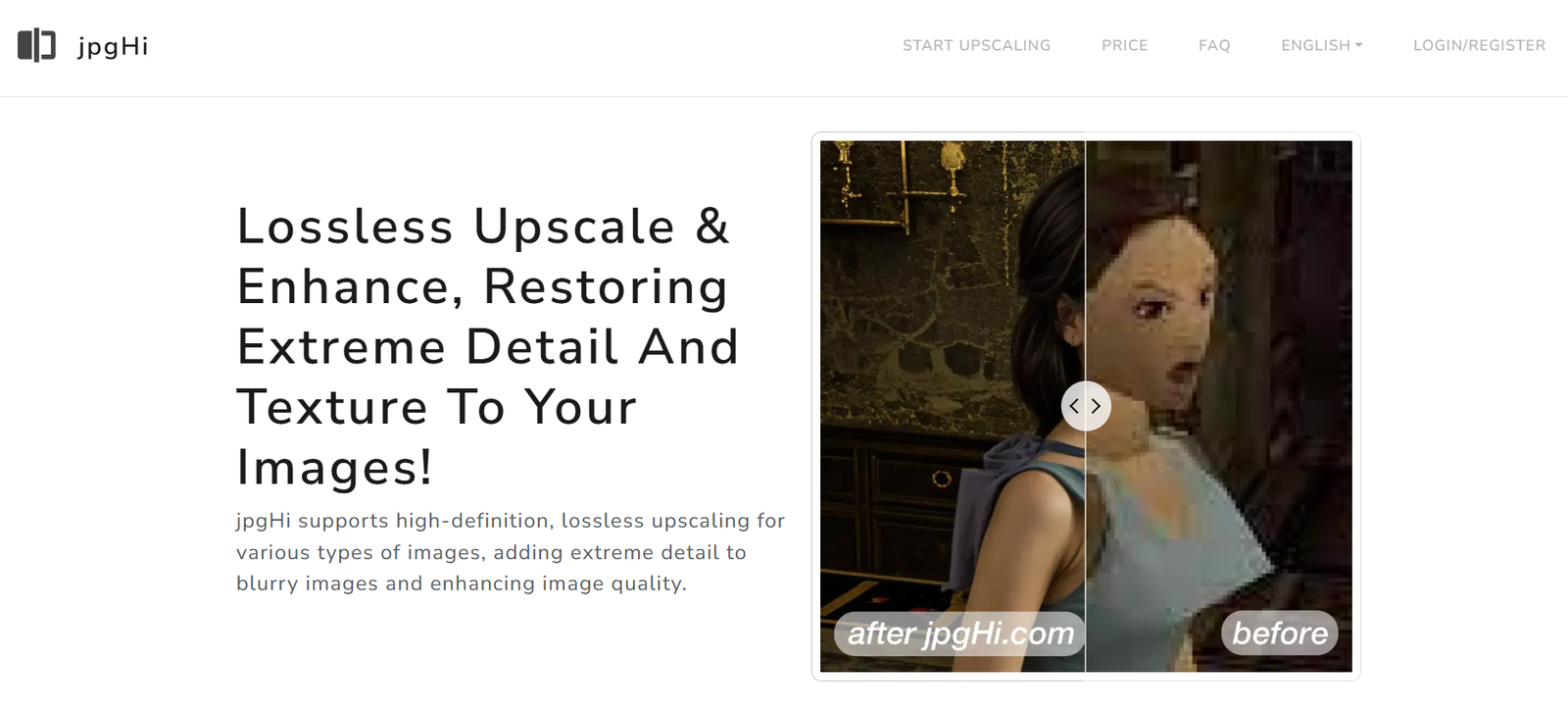
JPGHi is a web-based AI image upscaler that uses deep learning models to enhance images up to 4x or more their original resolution. The tool is designed to upscale, denoise, and sharpen images without introducing artifacts, blurring, or distortion.
Unlike traditional upscaling tools that stretch pixels, JPGHi uses AI to predict and reconstruct image details intelligently. This results in clearer, more detailed images that are suitable for professional use—whether for printing, publishing, or online display.
No installation is required. Users simply upload an image to the website, choose the desired enhancement settings, and download the improved result in seconds.
Features
AI Image Upscaling
Increase image resolution up to 2x, 4x, or higher using artificial intelligence. Ideal for converting low-res images into HD or 4K formats.
Noise Reduction and Sharpening
Automatically clean up noise and sharpen blurry edges while maintaining natural textures.
Browser-Based Interface
No software installation needed. JPGHi runs fully online and supports all major browsers.
Fast Processing
Enhanced images are generated quickly, with most processing completed within seconds depending on file size.
Preserves Details and Colors
Unlike standard resizing tools, JPGHi maintains original color tones and adds realistic detail reconstruction.
Supports Multiple Image Formats
Compatible with JPG, PNG, and other common image file types.
Simple UI and Drag-and-Drop Upload
Designed for ease of use, even for non-designers. Drag, drop, and enhance without any learning curve.
No Watermark (Premium Only)
Images can be downloaded without watermarks on paid plans.
How It Works
The process of using JPGHi is straightforward:
Visit the Website
Go to https://jpghi.com on your browser.Upload Your Image
Click “Upload” or drag and drop your image file onto the upload area.Choose Enhancement Settings
Select the level of upscaling (e.g., 2x or 4x) and toggle any additional settings like denoising.AI Processing
The image is processed by JPGHi’s AI model, typically in less than 30 seconds.Download the Result
Preview and download your enhanced image in high resolution.
No technical knowledge or graphic design background is needed. The tool is fully automated and designed for all skill levels.
Use Cases
Photographers
Restore and upscale old or low-resolution images for printing or digital portfolios.
E-commerce Sellers
Enhance product images to meet platform quality standards and increase conversion rates.
Graphic Designers
Improve stock images or logos that need to be used in large-scale print materials.
Content Creators
Generate high-res images for thumbnails, social media posts, and video backgrounds.
Marketing Teams
Ensure crisp visuals for landing pages, newsletters, and advertising creatives.
Students and Educators
Improve image clarity in academic presentations, infographics, or reports.
Pricing
JPGHi operates on a freemium model. As of the most recent update:
Free Plan
Limited image uploads per day
Maximum resolution cap
Watermarked downloads
Slower processing queue
Premium Plan – $9.99/month
Unlimited uploads
High-resolution downloads (up to 4x enhancement)
No watermark
Priority processing
Access to advanced enhancement settings
Pay-As-You-Go Option
Starting at $5 for 10 image credits
Ideal for occasional users who don’t want a subscription
Users can view the latest pricing and subscribe at https://jpghi.com.
Strengths
AI-Powered Accuracy
Uses deep learning to enhance images with realistic detail, far outperforming basic resizing tools.
User-Friendly
Minimal steps required. Ideal for users with no design or technical background.
Quick Turnaround
Processing is fast, even for large images—typically under 30 seconds.
Browser-Based Convenience
Accessible from any device with internet access. No software installation needed.
No Quality Loss
Preserves visual integrity by reconstructing textures, edges, and color profiles naturally.
Affordable for Individuals and Businesses
Reasonable pricing plans and credit-based options for users with varying needs.
Drawbacks
Free Tier Limitations
Free users face resolution caps, watermarks, and slower processing speeds.
No Batch Processing Yet
Each image must be uploaded and enhanced individually. No bulk upload support as of now.
Limited Editing Controls
Primarily focused on upscaling—does not include other image editing tools (e.g., cropping, filtering).
Dependent on Internet Connection
Being browser-based, it requires a stable internet connection for optimal performance.
No Cloud Storage or Account History
Once images are processed and downloaded, there’s no built-in history or cloud archive feature.
Comparison with Other Tools
JPGHi vs Let’s Enhance
Let’s Enhance offers more editing tools and cloud storage but has higher pricing. JPGHi is more lightweight and affordable.
JPGHi vs Topaz Gigapixel AI
Topaz offers offline, desktop-based software with advanced settings. JPGHi provides fast, browser-based processing with no installation.
JPGHi vs VanceAI
VanceAI provides a suite of tools. JPGHi focuses purely on quality upscaling with fewer distractions.
JPGHi vs Adobe Photoshop
Photoshop offers professional manual control but requires expertise and a subscription. JPGHi is automated and beginner-friendly.
Customer Reviews and Testimonials
“JPGHi helped me turn a blurry image into a crisp print-ready file in seconds. No Photoshop skills needed.”
— Freelance Photographer
“As an Etsy seller, I use it to clean up and upscale product shots. Saves me so much time.”
— E-commerce Business Owner
“I was amazed at how easy it is to use. Just upload, click, and download. The results are better than most free tools out there.”
— Digital Artist
“This is the perfect tool for upscaling thumbnails and visuals without needing to learn graphic design.”
— YouTube Creator
Conclusion
JPGHi offers a simple yet powerful solution for enhancing image resolution using AI. Its web-based interface, fast processing, and high-quality results make it ideal for anyone needing to upgrade visual assets without complexity or expensive software. Whether you’re working with digital photos, social media graphics, or product imagery, JPGHi makes it easy to upscale and enhance images with just a few clicks.
If you’re looking for an affordable, effective, and user-friendly AI image upscaler, JPGHi is well worth trying.