
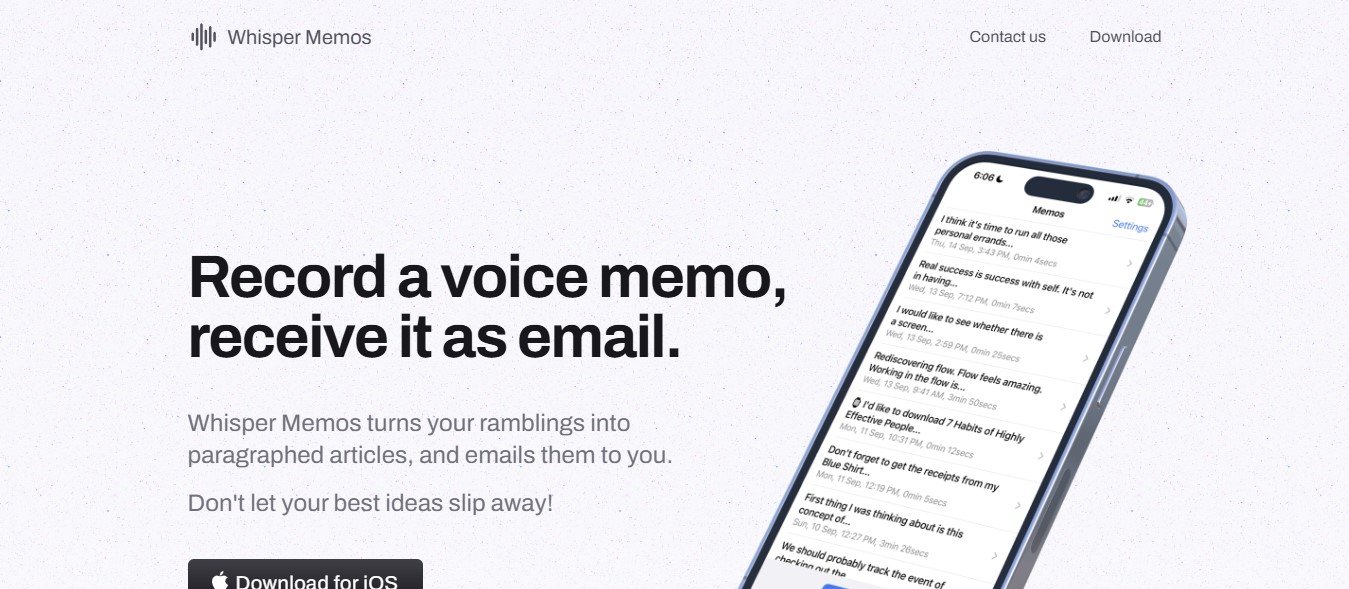
WhisperMemos is a voice note app powered by advanced AI transcription technology. It allows users to record voice memos, transcribe them into text, and organize their thoughts, tasks, and ideas effortlessly.
Unlike traditional note-taking apps, WhisperMemos focuses on capturing information quickly through voice and enhancing it with features like transcription, categorization, and searchability. It’s ideal for anyone looking to boost productivity, eliminate manual transcription, and keep their ideas organized in one place.
Key Features of WhisperMemos
WhisperMemos offers a wide range of features designed to simplify voice note-taking and enhance productivity. Here’s a closer look at its standout functionalities:
1. AI-Powered Transcription
WhisperMemos automatically converts your voice recordings into accurate, editable text, saving you the hassle of manual transcription.
2. Multi-Language Support
The app supports transcription in multiple languages, making it suitable for global users.
3. Organized Notes with Categories and Tags
Users can categorize their voice memos with tags or folders, making it easy to find specific notes later.
4. Searchable Transcripts
Transcriptions are fully searchable, so you can quickly locate key phrases or topics in your voice notes.
5. Hands-Free Recording
WhisperMemos allows hands-free operation with voice commands, perfect for when you’re driving or multitasking.
6. Integration with Productivity Tools
Sync your notes with tools like Google Drive, Microsoft OneNote, Trello, or Slack to ensure they fit seamlessly into your workflow.
7. Offline Mode
Record voice notes without an internet connection, and the app will transcribe them once you’re back online.
8. Secure Cloud Storage
All your notes are securely stored in the cloud, allowing you to access them from any device.
9. Audio File Export
Export your voice recordings in MP3 or WAV formats for sharing or archiving.
10. Custom Reminders
Set reminders based on your notes to ensure you follow through on your ideas or tasks.
How Does WhisperMemos Work?
Using WhisperMemos is simple and intuitive. Here’s how it works:
Step 1: Download and Install
Install the WhisperMemos app from the official website or app store on your preferred device.
Step 2: Record Your Voice Note
Open the app, press the record button, and start speaking. WhisperMemos will capture your voice with crystal-clear quality.
Step 3: AI Transcription
Once you finish recording, the app automatically transcribes your voice note into text.
Step 4: Organize and Tag
Categorize your notes with folders or tags, or let the app suggest categories based on the content of your note.
Step 5: Search or Export
Use the search feature to find specific notes, or export them as text, audio, or both.
Step 6: Sync with Tools
Integrate your notes with tools like Google Drive or Slack for seamless access and collaboration.
Use Cases for WhisperMemos
WhisperMemos is a versatile tool that caters to a wide range of users and scenarios. Here are some common use cases:
1. Professionals
Record meeting notes, brainstorming sessions, or client calls, and instantly transcribe them into actionable insights.
2. Students
Capture lecture notes or study ideas on the go, and use the searchable transcripts to review specific topics.
3. Content Creators
Dictate blog ideas, video scripts, or podcast outlines directly into WhisperMemos to save time and organize creative thoughts.
4. Freelancers and Entrepreneurs
Stay organized by recording tasks, project updates, and reminders, all categorized and searchable.
5. Personal Productivity
Use WhisperMemos to journal, plan your day, or keep track of ideas, goals, and reminders for personal growth.
Pricing
WhisperMemos offers flexible pricing plans to cater to different user needs. While specific details are available on the official WhisperMemos Pricing Page, here’s a general breakdown:
- Free Plan: Includes a limited number of voice recordings and transcriptions per month, ideal for casual users.
- Pro Plan: A monthly or annual subscription that unlocks unlimited transcriptions, multi-language support, and integrations with other tools.
- Team Plan: Custom pricing designed for teams and businesses, offering collaborative features, priority support, and centralized storage.
Visit the official website for the most up-to-date pricing and available discounts.
Strengths of WhisperMemos
- Accuracy: WhisperMemos provides highly accurate transcriptions, even for accents or moderately noisy environments.
- Ease of Use: The app’s intuitive interface makes recording and managing notes a breeze.
- Multi-Language Support: Ideal for global teams and individuals working in multiple languages.
- Integration-Friendly: Sync with popular productivity tools to fit seamlessly into your workflow.
- Flexible Plans: Offers both free and premium options, making it accessible to various user types.
Drawbacks of WhisperMemos
While WhisperMemos is a powerful tool, there are a few limitations to consider:
- Free Plan Limitations: The free plan includes a restricted number of recordings and lacks advanced features like integrations.
- Audio Quality Dependency: As with most voice recognition tools, transcription accuracy may decrease with poor audio quality or heavy background noise.
- Subscription Cost: The Pro Plan may feel pricey for casual users who only need basic features occasionally.
How Does WhisperMemos Compare to Other Tools?
WhisperMemos competes with popular voice note apps like Otter.ai, Google Keep, and Evernote. Here’s how it stacks up:
- Compared to Otter.ai: Both offer AI-powered transcriptions, but WhisperMemos stands out with its focus on organization and tagging features.
- Compared to Google Keep: Google Keep is a general note-taking app, whereas WhisperMemos specializes in voice-to-text transcription and categorization.
- Compared to Evernote: Evernote offers broader note-taking features, but WhisperMemos excels in voice recording and transcription accuracy.
Customer Reviews and Testimonials
Here’s what users have to say about WhisperMemos:
- “I’ve tried several transcription tools, but WhisperMemos is by far the easiest to use. The transcription accuracy is excellent, and I love the tagging feature!” – Sarah L., Marketing Consultant
- “This app has saved me hours of work. I use it to capture ideas for my podcasts, and the searchable transcripts make editing so much faster.” – James T., Content Creator
- “As a student, WhisperMemos has been a lifesaver. I no longer worry about missing important points during lectures.” – Sophia R., College Student
While reviews are generally positive, some users have noted that transcription accuracy can drop slightly in noisy environments.
Conclusion
WhisperMemos is a powerful, user-friendly tool that transforms how you capture and manage ideas. With its AI-powered transcription, organization features, and integration options, it’s an excellent choice for anyone looking to boost productivity and simplify note-taking.
Whether you’re a professional managing tasks, a student recording lectures, or a creative capturing ideas, WhisperMemos offers the flexibility and functionality you need to stay organized and focused.
Ready to elevate your productivity? Visit WhisperMemos today and take the first step toward effortless voice note management.













