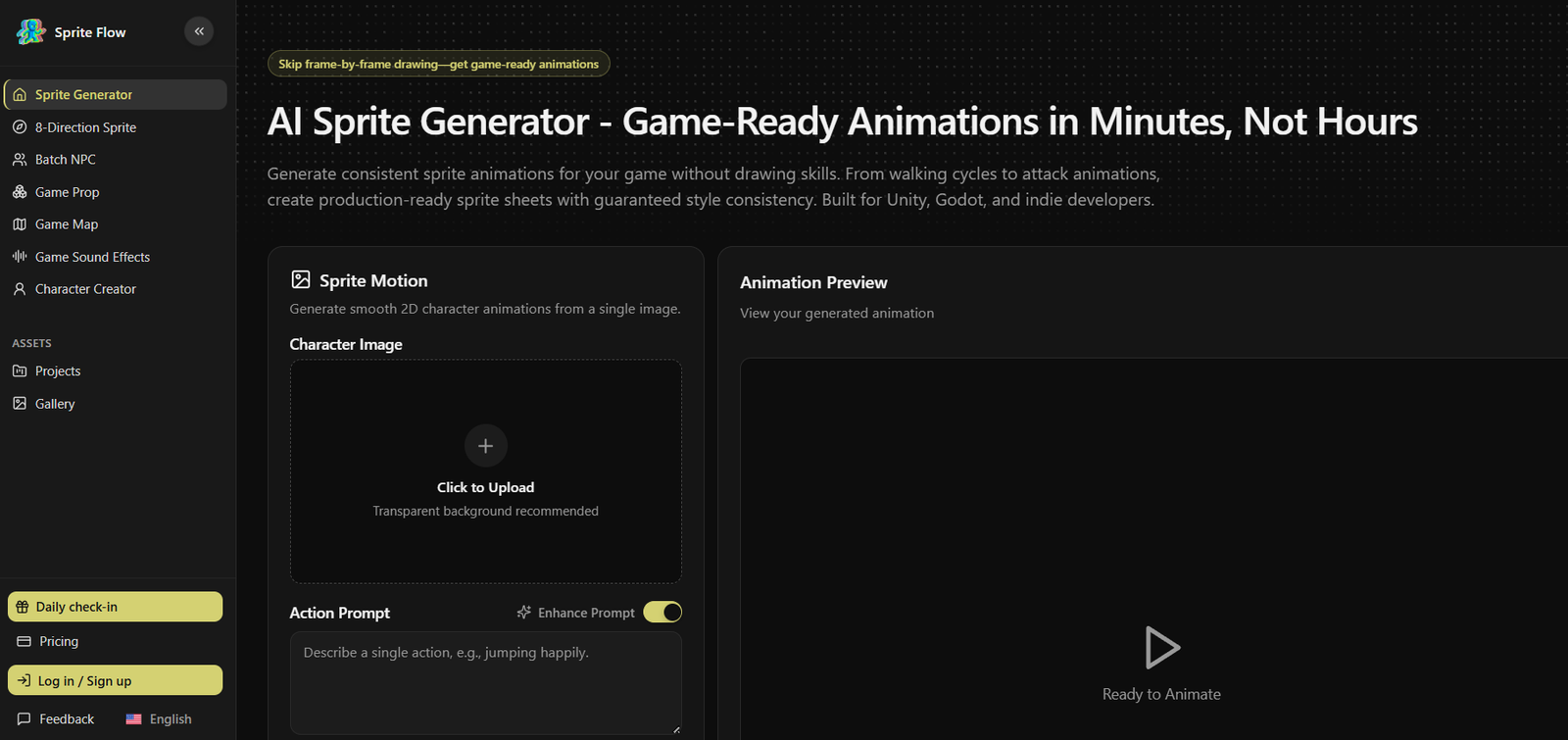
Sprite Flow is an AI-powered sprite generation platform built specifically for indie game developers, hobbyists, and small game studios. It helps users create consistent 2D character sprites and animation sheets without requiring advanced pixel art skills. By generating complete animation sequences from text descriptions or reference artwork, Sprite Flow significantly reduces the time required to produce game-ready assets.
The platform focuses on maintaining visual consistency across animation frames, making it suitable for game development workflows where matching character proportions, colors, and styles are essential. Sprite Flow also provides export options designed for popular game engines such as Unity, Godot, and Unreal Engine, allowing developers to integrate generated assets into their projects more efficiently.
Features
AI Sprite Generation
Generate complete animated sprite sheets from character descriptions or reference images. The AI creates multiple animation frames while maintaining a consistent visual style.
Style Consistency
Sprite Flow emphasizes keeping character proportions, color palettes, and artistic styles consistent across every animation frame, reducing the need for manual editing.
Multiple Animation Types
Create animations such as idle, walking, attacking, jumping, and other common character movements for 2D games.
Multi-Directional Sprites
Generate four-directional and eight-directional character sprites suitable for RPGs, adventure games, strategy games, and top-down games.
Character Variations
Create multiple versions of a character by changing outfits, weapons, armor, or color schemes without redesigning the entire sprite from scratch.
Game Engine Export
Export sprite sheets in formats compatible with Unity, Godot, and Unreal Engine. The platform also supports engine-friendly animation data to simplify integration.
Reference-Based Generation
Upload existing artwork to guide the AI so newly generated sprites better match the visual identity of your game.
Commercial Usage
Generated sprites can be used in commercial games without royalties, and uploaded reference artwork remains private to the user’s account.
How It Works
Step 1
Create a Sprite Flow account.
Step 2
Describe your character using a text prompt or upload reference artwork.
Step 3
Choose animation types, viewing directions, and style preferences.
Step 4
Allow the AI to generate animated sprite sheets.
Step 5
Review the generated assets and regenerate or adjust settings if needed.
Step 6
Export the sprite sheets and import them into Unity, Godot, Unreal Engine, or another compatible game engine.
Use Cases
Indie game developers can rapidly create player characters, enemies, NPCs, and animation sets.
Small game studios can speed up asset production while maintaining a consistent visual style.
Game jam participants can generate production-ready sprites within tight development timelines.
Students learning game development can create original game assets without mastering pixel art.
Hobby developers can prototype games quickly using custom AI-generated sprites.
Game designers can experiment with different character appearances before finalizing artwork.
Developers building RPGs, platformers, strategy games, and adventure games can create directional character animations more efficiently.
Pricing
Sprite Flow offers a free tier with limited generation credits, allowing users to test the platform before subscribing. Paid subscription plans unlock additional generation capacity and premium features such as watermark removal, one-click sprite sheet downloads, and permanent data retention. The official website does not clearly publish detailed plan pricing.
Strengths
Designed specifically for 2D game development rather than general image generation.
Maintains strong consistency between animation frames.
Supports multiple animation directions and character variations.
Exports assets for Unity, Godot, and Unreal Engine.
Suitable for solo developers and small studios with limited art resources.
Allows commercial use of generated sprites.
Protects uploaded reference artwork from being used to train public AI models.
Drawbacks
The platform primarily focuses on 2D sprite creation and is not intended for 3D asset generation.
Generated assets may still require manual refinement for highly detailed commercial projects.
Advanced customization depends on the quality of prompts and reference images.
Some premium features require a paid subscription.
Comparison with Other Platforms
Unlike general AI image generators that produce standalone artwork, Sprite Flow is built specifically for game development workflows. Its emphasis on animation consistency, multi-directional sprites, and direct integration with Unity, Godot, and Unreal Engine makes it more suitable for creating production-ready game assets. Developers seeking AI tools focused on 2D sprite animation may find Sprite Flow more practical than broader image generation platforms.
Customer Reviews and Testimonials
Customer reviews and testimonials are not clearly available on the official website.
Conclusion
Sprite Flow is a specialized AI platform for creating animated 2D game sprites with consistent visual quality. Its focus on game-ready exports, animation workflows, and engine compatibility makes it a valuable solution for indie developers, game studios, students, and hobbyists who want to accelerate sprite creation without sacrificing consistency. For teams building 2D games on Unity, Godot, or Unreal Engine, Sprite Flow can help reduce art production time while simplifying the animation pipeline.