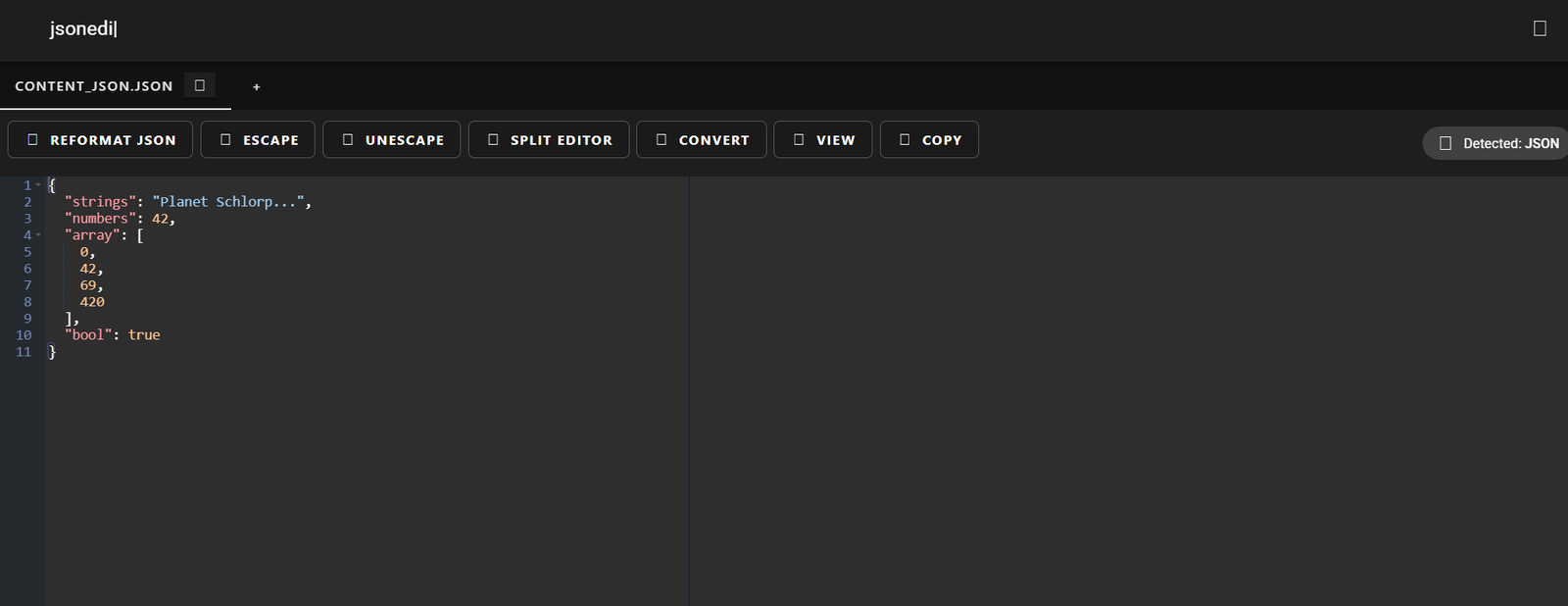
JSONEditor.io is a free, web-based tool that allows developers and data professionals to edit, validate, view, and format JSON data quickly and easily. Whether you’re debugging API responses, formatting complex data structures, or building applications, JSONEditor.io provides a clean, intuitive interface to manage JSON without the need for third-party software or browser extensions.
With support for both tree and code views, real-time validation, and various editing options, JSONEditor.io is a must-have utility for anyone who works with JSON regularly.
Features
JSONEditor.io offers a range of robust features built for technical users:
Dual Editing Modes: Use the Tree View for a structured, visual representation or the Code View for direct JSON editing.
Real-Time Validation: Instantly checks JSON syntax and highlights errors.
Auto-Formatting: Automatically formats and indents JSON data for improved readability.
Import & Export: Easily upload JSON files or paste JSON code; export results as a file.
Schema Support: Add and validate against JSON schemas (advanced use case).
Collapsible Nodes: Expand or collapse JSON structures for easier navigation.
Dark & Light Themes: Choose the interface that suits your preference.
Keyboard Shortcuts: Improve productivity with support for key commands in the editor.
Web-Based Interface: No installations or plugins—runs in any modern browser.
Free to Use: All features are available at no cost.
These features make it one of the most complete and user-friendly JSON tools available online.
How It Works
JSONEditor.io simplifies JSON editing and visualization in just a few steps:
Visit the Website: Go to https://jsoneditor.io.
Paste or Upload JSON: Input JSON data directly into the editor or upload a .json file.
Select View Mode: Toggle between Tree and Code view depending on your preference.
Edit, Format, or Validate: Make changes, auto-format, and identify any syntax issues.
Export or Copy: Once editing is complete, copy the JSON output or download it as a file.
Everything is done inside your browser—no account or installation required.
Use Cases
JSONEditor.io is ideal for a variety of users and workflows:
Frontend and Backend Developers: Format API responses, debug JSON payloads, and validate request/response bodies.
Data Engineers: Clean, reformat, or inspect large JSON data structures.
QA Testers: Create and edit mock JSON files for testing APIs and applications.
Students and Educators: Use for learning and teaching JSON syntax and structure.
Technical Writers: Prepare documentation with clean, readable JSON examples.
Product Managers: Review or generate sample payloads for specs and wireframes.
Support Teams: Analyze logs or error reports that contain JSON snippets.
The tool supports both casual inspection and advanced editing, making it universally applicable in software workflows.
Pricing
JSONEditor.io is currently 100% free to use.
Free Plan Includes:
Unlimited JSON editing and formatting
No login or registration
Full access to Tree and Code view
Real-time syntax validation
Import/export capability
Secure, browser-based usage
There are no premium plans, subscriptions, or hidden fees as of the latest available information on https://jsoneditor.io.
Strengths
JSONEditor.io offers several advantages:
Fast and Lightweight: Loads quickly and performs efficiently even with large JSON files.
No Learning Curve: Intuitive interface suitable for beginners and experts alike.
Feature-Rich Yet Simple: Combines powerful features with minimal complexity.
Cross-Platform Access: Works seamlessly across Windows, macOS, and Linux via the browser.
Zero Installation: Requires no downloads or plugins.
Secure and Private: All operations happen locally in your browser—your data is not uploaded or stored.
These strengths make JSONEditor.io a go-to tool for anyone working with JSON on a regular basis.
Drawbacks
While highly effective, JSONEditor.io does have some limitations:
No Collaboration Tools: Cannot share or co-edit JSON documents in real-time.
No Version Control: Lacks version history or undo/redo stack beyond browser support.
Offline Use Not Available: Requires an internet connection to access the tool.
Limited Advanced Data Features: Does not support CSV-to-JSON conversion, large dataset pagination, or data merging.
No Save to Cloud: You cannot directly save documents to cloud services like Google Drive or Dropbox.
These are minor trade-offs for a free and simple tool, especially when used for quick JSON editing tasks.
Comparison with Other Tools
Here’s how JSONEditor.io compares with other JSON editing tools:
JSONEditor.io vs. Postman
Postman includes JSON editing but is mainly focused on API testing. JSONEditor.io is more lightweight and purpose-built for JSON formatting and validation.
JSONEditor.io vs. VS Code
VS Code is a full-featured IDE with JSON support. JSONEditor.io is simpler, browser-based, and doesn’t require installation.
JSONEditor.io vs. JSONLint
JSONLint is mainly a validator. JSONEditor.io combines validation with editing, visualization, and formatting features.
JSONEditor.io vs. jq (CLI Tool)jq is powerful for command-line users but requires a learning curve. JSONEditor.io is GUI-based and beginner-friendly.
Customer Reviews and Testimonials
While JSONEditor.io does not display customer testimonials on its site, positive mentions are widespread across developer forums and communities:
“I use JSONEditor.io daily to inspect and clean up API responses. It’s fast and always reliable.”
— Backend Developer
“Super helpful when I’m debugging nested objects from our frontend app.”
— Full-Stack Engineer
“I recommend this tool to students learning REST APIs—it’s visual, intuitive, and free.”
— Coding Bootcamp Instructor
The tool’s utility and accessibility have made it a favorite in developer communities worldwide.
Conclusion
JSONEditor.io is a simple yet powerful online tool for viewing, editing, validating, and formatting JSON data. With dual editing modes, real-time error checking, and a clean UI, it provides an excellent experience for developers, data analysts, testers, and learners.
Whether you’re working on APIs, building web apps, or just exploring JSON for the first time, JSONEditor.io is a must-have tool for your workflow. Its free access, browser-based setup, and robust feature set make it one of the most effective and convenient JSON utilities on the web today.