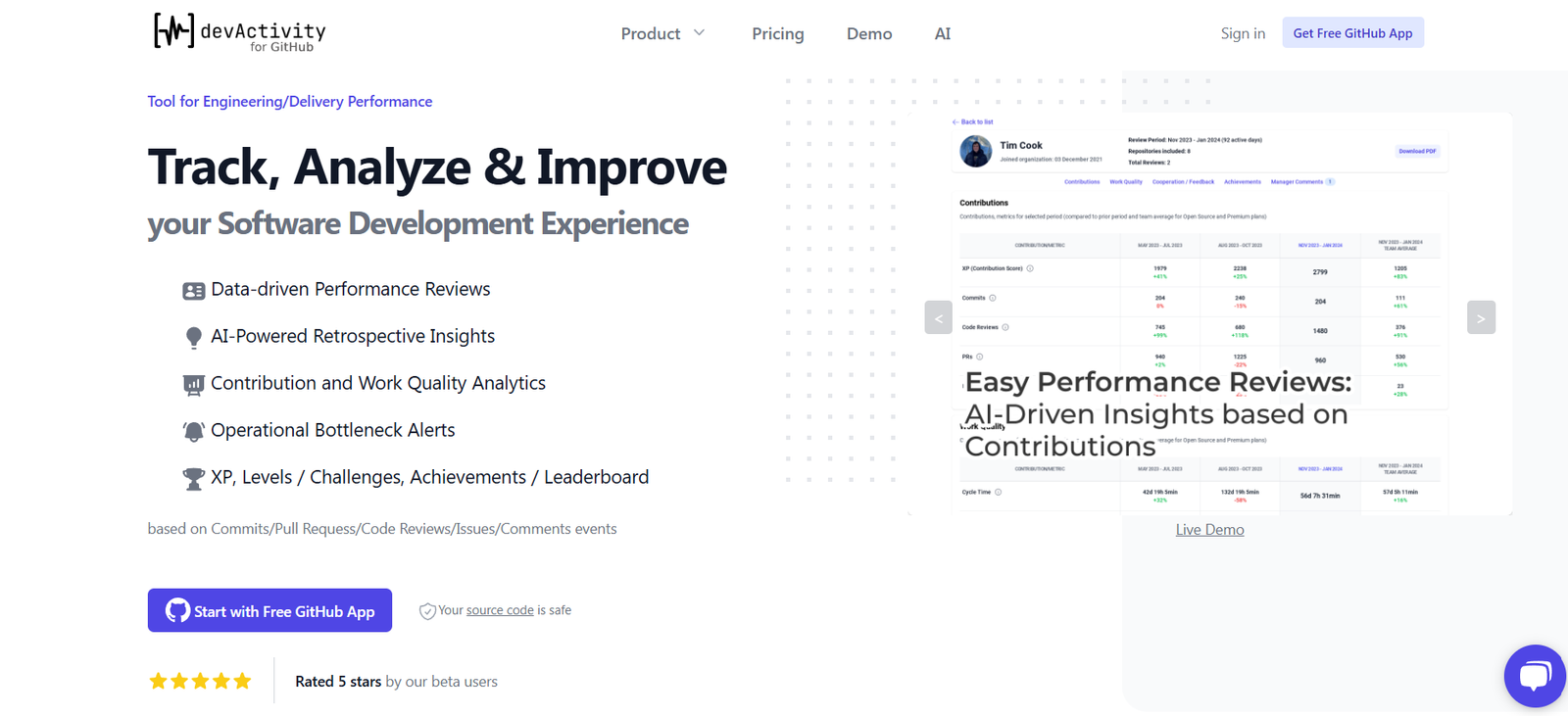
DevActivity.com is a developer-centric productivity tracking tool designed to give engineering managers, team leads, and developers real-time insights into coding activity and team performance—all without invasive monitoring. By integrating directly with Git repositories, DevActivity provides clear visibility into commit frequency, code changes, review cycles, and other developer workflow metrics.
Focused on transparency and trust, DevActivity aims to answer one of the hardest questions in software engineering: “How is my team really doing?” It replaces guesswork with actionable metrics that help leaders improve workflow efficiency, spot bottlenecks, and celebrate progress—without micromanaging or disrupting developers’ processes.
Features
DevActivity.com offers a robust suite of features that support engineering productivity and team alignment:
Git Activity Tracking
Tracks commit frequency, lines of code changed, branches created, and pull requests to provide a real-time picture of development activity.Daily Developer Summaries
Each team member receives a personalized summary of their own coding activity to help reflect and plan.Team Dashboard
Offers an overview of all developer activity with filters by project, time frame, or team.Time-Zone Aware Reports
Understand when and where your team is working, perfect for distributed teams.Non-Invasive Tracking
No screen monitoring, no keyloggers—only Git-based data for complete privacy and respect for developer autonomy.Work Patterns and Trends
Spot long review times, merge delays, or inconsistent contribution cycles to identify improvement opportunities.Automated Standups
Summarizes what each team member has worked on, helping remote teams stay in sync without long meetings.Multi-Repo and Multi-Org Support
Ideal for larger teams with multiple Git repositories and organizations.
How It Works
DevActivity integrates directly with your team’s existing Git repositories to deliver insights effortlessly:
Connect Repositories
Link your GitHub, GitLab, or Bitbucket repositories to start tracking activity.Configure Team Members
Map Git usernames to team members and define teams or squads for reporting purposes.Start Tracking
DevActivity begins analyzing Git commit history, PRs, and merges, generating clean visualizations and summaries.Review Dashboards
Use the web-based dashboard to see individual and team performance, daily summaries, and historical trends.Automate Standups and Reports
Set up daily or weekly summaries delivered via Slack or email to keep teams aligned and reduce meeting fatigue.
Use Cases
DevActivity.com supports a variety of real-world use cases across tech teams:
Engineering Managers
Get an accurate overview of team contributions without micromanagement.Scrum Masters
Track sprint progress and ensure alignment between goals and delivery.Remote Development Teams
Keep everyone in sync across time zones without the need for constant check-ins.Startup CTOs
Gain clarity on developer velocity and identify roadblocks early in the dev cycle.Developers
Reflect on personal progress and plan work more effectively using your own data.
Pricing
As of May 2025, DevActivity.com offers the following pricing plans:
Free Plan
1 organization
Up to 5 developers
Basic Git activity tracking
Personal summaries
Limited team dashboard access
Pro Plan – $39/month
Up to 20 developers
Full access to team dashboards
Automated reports and standups
Multi-repo and time zone support
Priority support
Team Plan – $99/month
Up to 50 developers
All Pro features
Advanced filters and historical trends
Slack/email integration
Exportable reports
Enterprise Plan – Custom Pricing
Unlimited developers
Dedicated account manager
SSO & advanced permissions
API access and SLA-backed uptime
A 14-day free trial is available for Pro and Team plans, with no credit card required.
Strengths
DevActivity.com offers clear advantages for teams looking to measure and improve software delivery:
Developer-First Approach
Non-invasive, Git-based metrics that respect developer privacy.Actionable Insights
Clear visualizations and summaries help teams identify problems and take action.Remote-Ready
Ideal for distributed teams needing asynchronous updates and time-zone-aware reporting.Easy Setup
Integration with GitHub, GitLab, and Bitbucket takes only minutes.Encourages Autonomy
Personal dashboards empower developers to self-manage and reflect on their work.
Drawbacks
Despite its strengths, DevActivity.com has a few limitations:
Git-Only Metrics
Does not track issue management tools like Jira or project planning workflows.No Code Quality Analysis
Focuses on activity metrics, not code quality or test coverage.Limited Third-Party Integrations
Currently supports Git platforms and Slack/email—additional integrations may be needed for full workflow tracking.Performance Data May Be Misread
Like any activity tracker, metrics can be misinterpreted without context.Early-Stage UI
Some users may find the interface basic compared to larger, enterprise-grade dev tools.
Comparison with Other Tools
Here’s how DevActivity.com compares to similar developer productivity platforms:
Versus LinearB
LinearB tracks Git, Jira, and project metrics. DevActivity is simpler, focused only on Git-based activity with less complexity.Versus GitPrime (Pluralsight Flow)
GitPrime is enterprise-focused with deeper analytics. DevActivity is more lightweight, affordable, and less invasive.Versus Code Climate Velocity
Code Climate offers in-depth performance metrics and code quality tracking. DevActivity prioritizes simplicity and privacy-first tracking.Versus Haystack
Both tools track Git activity, but DevActivity is more affordable and streamlined for smaller teams and startups.
For lean teams focused on transparency and developer empowerment, DevActivity strikes the right balance between insights and simplicity.
Customer Reviews and Testimonials
Early users of DevActivity.com have praised its focus on actionable data and developer autonomy:
“Finally, a Git-based tracker that doesn’t feel like surveillance.” – Senior Engineer
“DevActivity gave us the confidence to eliminate daily standups and go async.” – Startup CTO
“I can see team bottlenecks before they become problems, and developers love that it respects their privacy.” – Engineering Manager
“This tool shows me what I did every day without me having to track anything manually.” – Full-Stack Developer
Conclusion
DevActivity.com is a powerful, privacy-first productivity tool built specifically for developers and the leaders who support them. By focusing on Git-based data, it avoids intrusive monitoring while still delivering valuable insights into how code is written, reviewed, and shipped across teams.
Whether you’re a startup founder, an engineering lead, or an individual contributor looking for more visibility into your workflow, DevActivity.com is a smart, respectful way to track progress and improve delivery velocity—without micromanagement.
If your goal is to enhance engineering effectiveness and stay aligned without friction, DevActivity.com deserves a place in your dev toolkit.