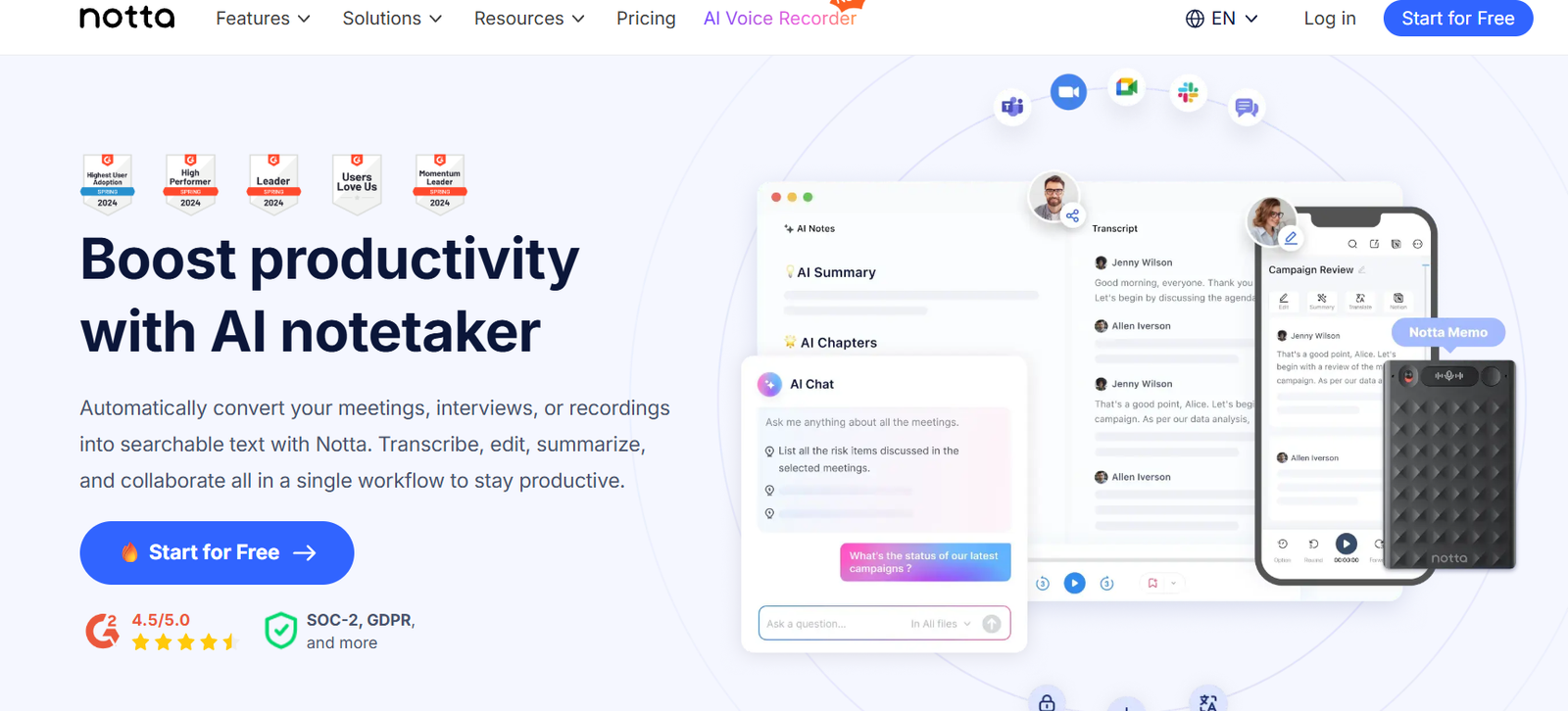
Notta.ai is an AI transcription platform designed to convert live meetings, recorded audio, and video content into accurate, time-stamped transcripts. Targeted toward professionals, teams, and organizations, Notta.ai excels in productivity workflows by offering real-time transcription, speaker identification, and seamless integrations with tools like Zoom, Microsoft Teams, and Google Meet.
Whether you’re recording a live meeting or uploading a video, Notta makes the transcription process fast, automated, and collaborative. The platform is especially valuable for note-taking during business meetings, customer calls, academic interviews, and content repurposing.
Notta is accessible on web and mobile platforms, making it an ideal solution for modern professionals on the go.
Features
Notta.ai includes a wide range of productivity-focused features to streamline transcription and note-taking:
Real-Time Transcription – Capture conversations as they happen in Zoom, Google Meet, Microsoft Teams, and in-person settings.
Automatic Audio & Video Transcription – Upload MP3, MP4, M4A, or WAV files to generate transcripts within minutes.
Speaker Identification – Distinguish between speakers in multi-person conversations, useful for meetings and interviews.
Multilingual Support – Transcribe content in 100+ languages, including English, Spanish, Japanese, German, and more.
Voice Recording via App – Use the Notta mobile app (iOS & Android) to record and transcribe directly on the spot.
Text Summarization – AI automatically creates a short summary of each transcript for quick review.
File Export Options – Download transcripts in TXT, DOCX, PDF, or SRT formats for documentation or subtitle use.
Integrations – Connect with Zoom, Google Meet, Microsoft Teams, Google Calendar, and Outlook for automated meeting capture.
Cloud Sync & Storage – Access transcripts from any device with automatic cloud backup and syncing.
How It Works
Notta is designed to offer both real-time and recorded transcription with minimal setup:
Sign In & Connect Tools – Users create a Notta account and can link video conferencing tools like Zoom or Google Calendar for automated transcription scheduling.
Choose Input Type – Users can start a live transcription, record audio via mobile, or upload an existing audio/video file.
AI Transcription & Processing – Notta’s AI generates a transcript in real time or shortly after processing, with support for speaker labels and multilingual content.
Edit & Export – Users can edit the transcript in-browser or in the mobile app, and export it in various formats.
The process is fast, secure, and tailored to business, education, and content creation workflows.
Use Cases
Notta.ai is widely used across multiple industries and roles:
Business Professionals – Automatically transcribe meetings, sales calls, and internal discussions for better documentation.
Content Creators – Turn video or podcast content into searchable text for repurposing and SEO.
Educators & Students – Record lectures or interviews and transcribe them for study and note-taking.
Journalists & Researchers – Transcribe interviews or conferences quickly and accurately with speaker labeling.
Customer Support & Sales Teams – Analyze conversations and create follow-up notes automatically.
Remote Teams – Sync meeting recordings from Zoom or Teams and keep searchable records of all conversations.
Pricing
Notta.ai offers both free and paid subscription tiers with flexible pricing to accommodate individual users and organizations:
Free Plan
120 minutes/month of transcription
3-minute per file upload limit
Real-time transcription (limited)
Access to core editing and export tools
Pro Plan – $8.25/month (billed annually)
1,800 minutes/month
Uploads up to 5 hours per file
Priority processing
Unlimited transcription history
Summarization and integrations included
Business Plan – $44/month (billed annually)
Unlimited transcription
Team collaboration features
Admin console
Shared workspace and permissions
Priority support
Custom enterprise plans are also available for large teams needing API access, custom integrations, and security compliance.
Strengths
Notta.ai delivers multiple advantages that make it a competitive transcription tool:
Real-Time & Post-Upload Transcription – Supports live and recorded content, giving users flexible options.
Cross-Platform Support – Available on desktop, web, iOS, and Android for productivity across devices.
Accurate Multilingual Transcription – Supports over 100 languages and dialects with reasonable accuracy.
Speaker Detection – Ideal for interviews and group conversations.
Easy Integrations – Seamlessly connects with Zoom, Google Meet, Teams, and major calendar platforms.
Text Summaries – Saves time by auto-generating brief overviews of meetings and calls.
Generous Pro Plan – Offers a high value for individuals at a modest cost with useful features included.
Drawbacks
While Notta.ai is a feature-rich platform, there are some limitations:
Limited Free Tier – The free version restricts uploads to 3 minutes per file and offers only basic functionality.
No In-Depth Audio Editing – Unlike tools like Descript, Notta focuses on transcription, not audio content production.
Requires Manual Edits for Accuracy – AI-generated transcripts may still need light editing, especially for accents or low-quality audio.
Team Collaboration Requires Higher Tier – The Business plan is necessary for shared workspace and admin features.
Comparison with Other Tools
Compared to competitors like Otter.ai, Sonix, and Descript, Notta.ai offers a flexible mix of affordability, real-time transcription, and seamless integrations.
Otter.ai is strong in live meeting transcription and team collaboration, but can be more expensive at higher tiers.
Sonix delivers excellent AI transcription and subtitle tools but lacks real-time meeting capture and calendar syncing.
Descript focuses on audio and video editing, making it better for content production but more complex for simple transcription workflows.
Notta.ai stands out as a well-rounded solution for professionals seeking easy, accurate transcription with calendar-based automation and mobile accessibility.
Customer Reviews and Testimonials
Notta.ai has earned praise from users across platforms like Product Hunt and app stores for its intuitive interface and productivity features.
User feedback includes:
“Perfect for Zoom meeting notes and summaries.”
“The mobile app is a game changer—super easy to use on the go.”
“Real-time transcription with speaker ID has been incredibly helpful for interviews.”
Users highlight ease of use, fast processing, and useful integrations as key benefits.
Conclusion
Notta.ai is a powerful, AI-powered transcription tool that meets the needs of modern professionals by offering real-time and recorded transcription, speaker identification, multi-language support, and seamless calendar and video platform integration.
Its free tier makes it accessible for light users, while the affordable Pro and Business plans cater to individuals and teams needing more robust transcription capabilities.
For anyone looking to streamline meeting documentation, interview transcription, or content repurposing, Notta.ai is a smart, well-designed tool that delivers on both usability and value.