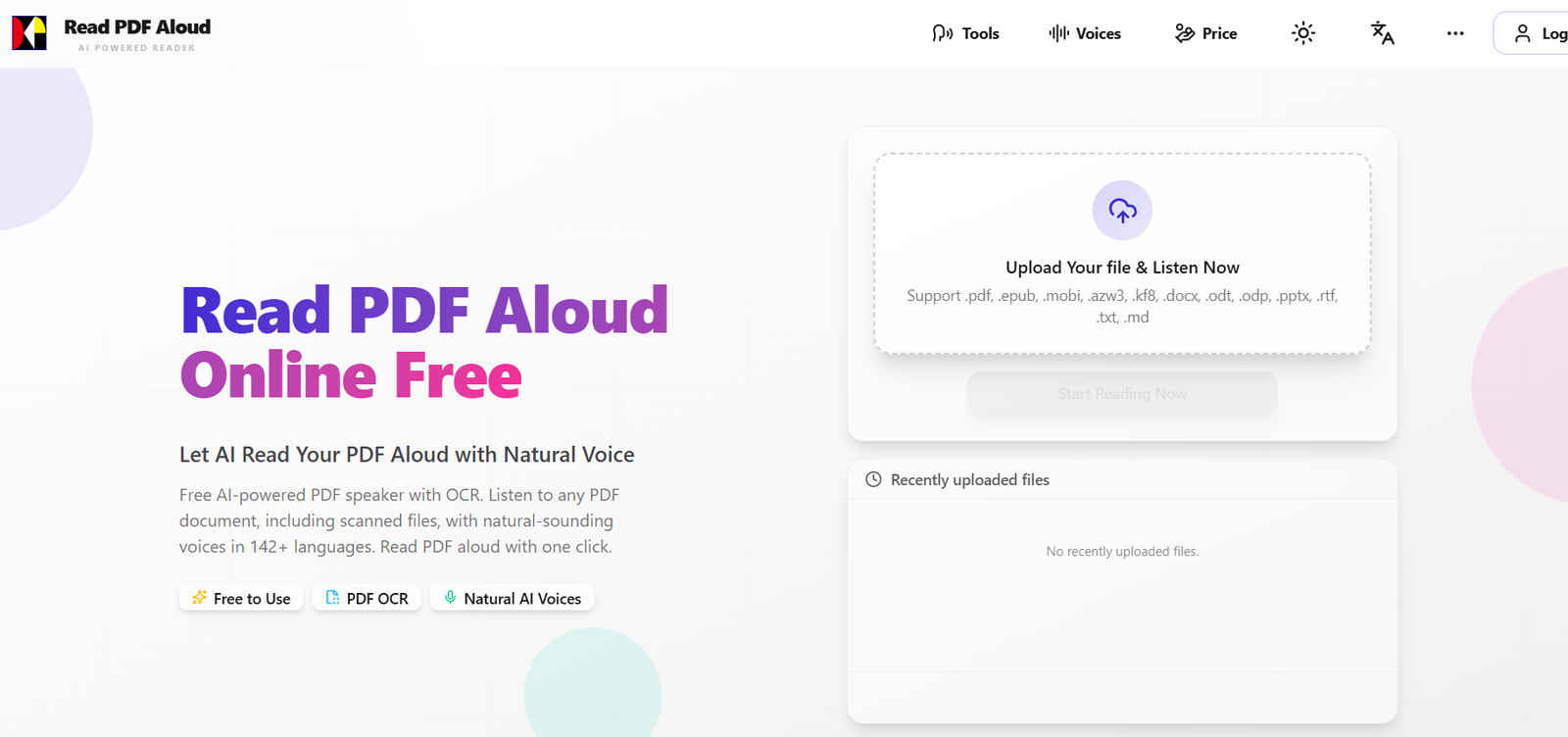
Read PDF Aloud is an online AI-powered document reader that converts written documents into natural-sounding speech.
Despite its name, the platform works with much more than PDF files. Users can upload PDFs, ebooks, Word documents, presentations, text files and other supported formats and listen to their content directly through a web browser.
The platform currently supports 142 languages and provides more than 600 AI voice options across different languages, accents and speaking styles.
For ordinary text-based PDFs, text extraction happens locally in the user’s browser. This local-first approach means the original PDF does not need to be uploaded to Read PDF Aloud’s servers simply to extract its text.
The platform also supports scanned PDFs through OCR. This allows documents containing scanned pages or images of text to be converted into readable text and then spoken aloud.
Users can control playback, jump directly to a particular sentence and move backward or forward through the document.
Another useful feature is MP3 export. Instead of listening only through the website, users can convert document content into audio and save it for offline listening.
Read PDF Aloud uses a credit-based pricing model rather than a mandatory monthly subscription. Registered users receive free credits, including daily login credits, while additional credits can be purchased as one-time packages.
Features
AI PDF Reader
Read PDF Aloud converts the text inside PDF documents into spoken audio.
Users upload a document, select a voice and begin listening through the built-in reader.
Natural AI Voices
The platform uses AI text-to-speech technology designed to provide more natural narration than traditional robotic computer voices.
600+ AI Voices
Read PDF Aloud currently advertises more than 600 voice options.
The available voices cover different languages, accents, tones and speaking characteristics.
Standard and Premium Voices
Users can choose between standard and premium voice options.
Premium voices consume more credits but are intended to provide higher-quality narration.
142 Languages
Read PDF Aloud supports 142 languages.
Supported languages include major options such as:
English
Hindi
Spanish
French
German
Chinese
Japanese
Korean
Arabic
Portuguese
and many others.
Voice Preview
Users can preview available voices before selecting one.
This makes it easier to compare narration styles before spending credits on a longer document.
Voice Filtering
The voice library can be filtered according to language and other characteristics.
Favorite Voices
Registered users can save preferred voices.
Favorites can then be accessed more quickly in future reading sessions.
PDF OCR
Read PDF Aloud includes OCR technology for documents where text cannot be extracted normally.
This makes it possible to work with scanned PDFs and image-based documents.
Scanned Document Reading
A scanned PDF can be converted into text through OCR and then read aloud using an AI voice.
Handwritten Text Recognition
The website states that OCR can also recognize handwritten notes in suitable scanned material.
Results will naturally depend on handwriting clarity and image quality.
Local PDF Parsing
For ordinary text-based documents, PDF text extraction takes place inside the browser.
The original PDF is therefore not uploaded to Read PDF Aloud’s servers for standard text parsing.
Local Storage
Extracted document text can be saved locally in the user’s browser for the reading workflow.
Click-to-Read
Users can click a sentence and begin playback from that point.
This is useful when returning to a particular section of a long document.
Forward and Back Controls
The reader allows users to move between sentences without manually searching through the document.
Adjustable Reading Speed
Users can change playback speed according to their listening preference.
MP3 Export
Generated speech can be exported as MP3 audio.
This allows users to listen to documents offline.
Cross-Platform Access
Read PDF Aloud works through modern web browsers on:
Windows
macOS
Linux
iPhone
iPad
Android
No dedicated application is required for the main browser experience.
Text-to-Speech Tool
Users can also paste or type text directly into the platform and have it read aloud.
PDF to Text
The broader tool collection includes PDF-to-text conversion.
OCR support makes this useful for scanned PDFs as well as ordinary digital documents.
Ebook Reading
Read PDF Aloud supports multiple ebook formats.
Users can convert compatible ebooks into spoken audio without first converting them manually to PDF.
Word Document Reading
Word and compatible document formats can also be read aloud.
Presentation Support
The supported file list includes presentation formats such as PPTX and ODP.
Supported File Formats
Read PDF Aloud currently supports:
EPUB
MOBI
AZW3
KF8
DOCX
ODT
ODP
PPTX
RTF
TXT
MD
This makes the platform more accurately described as a document-to-speech reader rather than only a PDF reader.
How It Works
- Open Read PDF Aloud.
- Upload a supported document.
- For ordinary text-based files, the platform extracts the document text locally in the browser.
- If the PDF contains scanned pages, use OCR to recognize the text.
- Select the language of the document.
- Browse the available voices.
- Preview voices if necessary.
- Select the preferred AI voice.
- Click Play.
- The selected voice begins reading the document.
- Adjust the playback speed if necessary.
- Click any sentence to jump directly to that section.
- Use forward and back controls to navigate through the content.
- Export the generated speech as MP3 if you want to listen offline.
Use Cases
Students
Students can listen to textbooks, lecture notes, assignments and study material instead of reading everything on screen.
Professionals
Professionals can listen to reports, documents and other business material while travelling or performing other tasks.
Researchers
Researchers can convert papers and reports into audio for easier review.
Book Lovers
Users can turn supported ebooks and PDF books into audiobook-style listening experiences.
Commuters
Documents can be exported as MP3 files for listening while commuting.
Multitasking
Users can listen to a report or document while completing other activities.
Language Learning
Support for 142 languages makes the platform useful for listening and pronunciation practice.
Accessibility
Text-to-speech can make written documents more accessible to people who find extended screen reading difficult.
Visually Impaired Users
Audio narration can provide another way to consume written material.
Dyslexic Readers
Users who prefer auditory learning can listen while following written text.
Teachers
Teachers can convert educational documents into spoken content for students.
Parents
Parents can use natural voices to read suitable documents and learning material aloud.
Scanned Documents
OCR makes older scanned books, reports and documents accessible to the speech reader.
Audiobook Creation
Users can turn compatible documents into MP3 audio for personal listening, subject to copyright and usage rights.
Pricing
Read PDF Aloud uses credits rather than a mandatory subscription.
Free Credits
New users currently receive:
100 credits on signup
Registered users can also receive:
5 free credits each day they log in
This means occasional users may be able to use the service without purchasing credits.
Starter
$5.90 one-time
Includes:
500 credits
Approximately $0.012 per credit
Most Popular
$19.90 one-time
Includes:
4,000 credits
Approximately $0.005 per credit
Best Value
$99 one-time
Includes:
40,000 credits
Approximately $0.002 per credit
How Credits Are Used
Credit consumption depends on the feature.
Standard AI Voices
1 credit per 1,000 characters
Premium AI Voices
5 credits per 1,000 characters
Premium voices therefore consume credits five times faster than standard voices.
OCR
2 credits per page
OCR credits are used when text recognition is required for scanned material.
The platform states that credits will also serve as the unified payment method for additional paid features introduced in the future.
Strengths
Supports much more than PDF files.
142 supported languages.
More than 600 AI voice options.
Natural-sounding AI narration.
Standard and premium voices.
Voice previews.
Users can save favorite voices.
Supports scanned PDFs.
Built-in OCR.
Can process suitable handwritten notes through OCR.
Local browser-based text extraction for ordinary PDFs.
Original standard PDF files do not need to be uploaded for basic text extraction.
Works on Windows.
Works on macOS.
Works on Linux.
Works on iPhone and iPad.
Works on Android.
No app installation required.
Supports ebooks.
Supports Word documents.
Supports presentation files.
Provides direct text-to-speech.
Adjustable reading speed.
Sentence-level navigation.
Forward and back controls.
MP3 export.
Free signup credits.
Daily free credits.
No mandatory subscription.
Low-cost pay-as-you-go credit packages.
Useful for students and researchers.
Useful for language learning.
Can improve accessibility to written material.
Drawbacks
Premium voices consume significantly more credits than standard voices.
OCR requires additional credits.
A long scanned document can therefore consume a substantial number of credits.
OCR accuracy depends on scan quality.
Poor scans can produce recognition errors.
Handwritten notes can be more difficult to recognize than printed text.
Complex document layouts may not always be read in the ideal order.
Tables, mathematical notation, footnotes and multi-column academic papers can be difficult for automated document readers.
Text-to-speech may pronounce unusual names and specialist terminology incorrectly.
Users need an account to receive and manage credits.
The service is primarily a document reader rather than a full audiobook production studio.
Users seeking detailed control over narration, emotion and audio production may prefer a dedicated professional AI voice platform.
Privacy
Read PDF Aloud takes a local-first approach to ordinary document processing.
According to its Privacy Policy, text parsing from standard PDF files takes place locally inside the user’s browser.
The platform states that it does not upload or store the original PDF on its servers during ordinary local parsing.
Extracted text is stored locally on the user’s device for use by the reader.
Scanned documents require OCR processing, which follows a different processing workflow because image recognition is necessary.
Users can use basic functionality anonymously, while account information is collected when they register for premium features.
Account information can include an email address, name and profile picture when provided through an OAuth service such as Google.
Users working with confidential or sensitive scanned documents should review the current privacy terms before using cloud-dependent OCR or premium AI functionality.
Comparison with Other Platforms
Read PDF Aloud competes with text-to-speech and document-reading services such as NaturalReader, Speechify and ElevenLabs Reader.
Its strongest advantage is the combination of broad document support and pay-as-you-go pricing.
Many competing speech platforms rely heavily on monthly or annual subscriptions. Read PDF Aloud instead provides free daily credits and allows users to purchase additional credits only when needed.
The platform is also more than a simple PDF reader. EPUB, MOBI, AZW3, KF8, DOCX, ODT, PPTX, RTF, TXT and Markdown files are supported.
Another important advantage is local-first document parsing. Ordinary PDF text is extracted in the browser rather than requiring the complete original document to be uploaded for parsing.
Compared with specialized AI voice platforms such as ElevenLabs, Read PDF Aloud is more focused on convenient document consumption. Dedicated voice-generation platforms may provide greater creative control over professional narration.
Read PDF Aloud is therefore particularly suitable for people who primarily want to listen to existing documents rather than produce sophisticated voiceovers from scratch.
Customer Reviews and Testimonials
Read PDF Aloud presents several user testimonials on its official website.
One testimonial highlights the MP3 export feature for listening to reports during flights and commutes.
Another describes using the tool across multiple devices for both family and work-related reading.
A teacher testimonial praises the availability of free daily credits and the quality of the natural AI voices.
Another user describes using multilingual text-to-speech for pronunciation practice.
These testimonials are selected and published directly by Read PDF Aloud. They should therefore be treated as company-presented customer feedback rather than independently verified reviews.
Because users receive free credits, prospective users can evaluate voice quality and document compatibility directly before purchasing a credit package.
Conclusion
Read PDF Aloud is a practical AI document-to-speech platform for people who prefer listening to written material.
Its name focuses on PDFs, but the service supports a much broader collection of formats, including EPUB, MOBI, AZW3, KF8, DOCX, ODT, PPTX, RTF, TXT and Markdown.
The platform currently offers 142 languages and more than 600 AI voices. Users can select a voice, control reading speed, jump to individual sentences and export generated narration as MP3 audio.
OCR extends the platform to scanned PDFs and image-based documents, while local browser-based text extraction provides a privacy advantage for ordinary text-based PDFs.
Pricing is flexible. Users receive 100 credits when signing up and another 5 free credits on daily logins. Paid packages currently cost $5.90 for 500 credits, $19.90 for 4,000 credits and $99 for 40,000 credits. Standard voices cost 1 credit per 1,000 characters, premium voices cost 5 credits per 1,000 characters, and OCR costs 2 credits per page.
Overall, Read PDF Aloud is best suited to students, professionals, researchers, language learners, book readers and anyone who wants to convert documents into natural-sounding speech without committing to a recurring subscription.