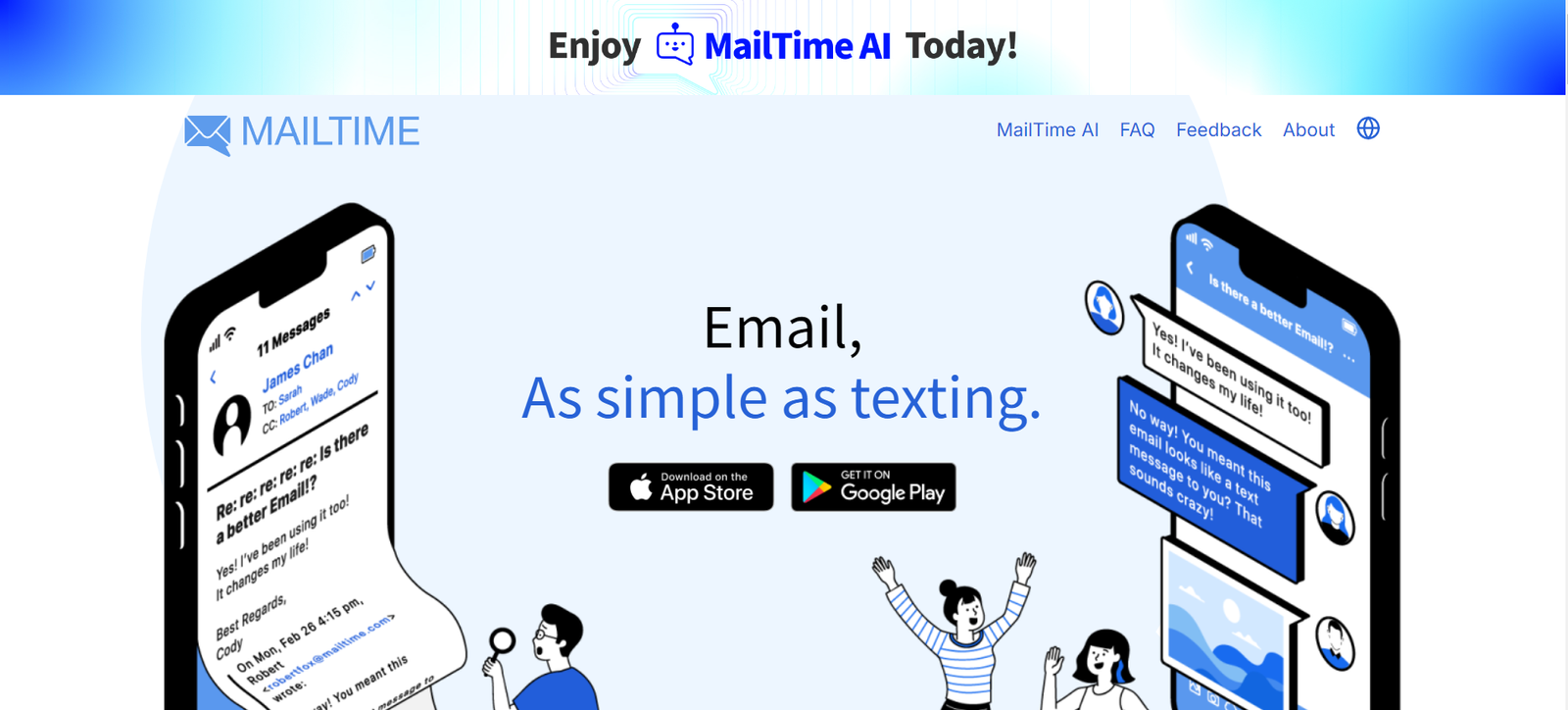
MailTime is an innovative app that converts emails into a chat-like interface, making it easier to manage and respond to emails on mobile devices.
MailTime is an innovative app that converts emails into a chat-like interface, making it easier to manage and respond to emails on mobile devices. Designed to simplify email communication, MailTime presents emails in a messaging format, eliminating the clutter of traditional email threads. The app is particularly useful for people who prefer the simplicity of messaging apps but need to manage emails efficiently.
Personal Email Management, Team Collaboration, Mobile Professionals
Chat-Like Interface, Thread Management, Multi-Account Support
Yes
MailTime offers a free version with basic features, as well as premium plans with additional functionalities such as priority support and advanced collaboration tools.
Is MailTime right for you?
- use it for personal email management
- use it for team collaboration
- use it for mobile professionals
Key features
Chat-Like Interface
Transforms emails into an easy-to-read, conversational format.
Thread Management
Automatically organizes email threads for better readability.
Multi-Account Support
Allows users to manage multiple email accounts in one place.
Team Collaboration
Share and discuss emails with team members directly within the app.
Smart Compose
Offers AI-driven suggestions for quick and efficient email replies.
Pros and cons
- Ease of Use: Simplifies email management by presenting messages in a familiar, chat-like format.
- Enhanced Productivity: Reduces the time spent managing and replying to emails, especially on mobile devices.
- Collaboration Features: Facilitates team discussions directly within email threads.
- Limited Advanced Features: Some users may find the app lacks the depth of features found in traditional email clients.
- Adaptation Period: Users accustomed to traditional email layouts might need time to adjust to the chat-like interface.
How to get started
- MailTime connects to your email accounts and converts traditional email threads into a chat-like interface, similar to messaging apps like WhatsApp or iMessage.
MailTime: frequently asked questions
What is MailTime?
MailTime is an innovative app that converts emails into a chat-like interface, making it easier to manage and respond to emails on mobile devices.
What are the main features of MailTime?
Chat-Like Interface, Thread Management, Multi-Account Support, Team Collaboration.
How much does MailTime cost?
MailTime offers a free version with basic features, as well as premium plans with additional functionalities such as priority support and advanced collaboration tools. Check the official site for current prices.
More about MailTime
MailTime is an innovative app that converts emails into a chat-like interface, making it easier to manage and respond to emails on mobile devices. Designed to simplify email communication, MailTime presents emails in a messaging format, eliminating the clutter of traditional email threads. The app is particularly useful for people who prefer the simplicity of messaging apps but need to manage emails efficiently.
Features
- Chat-Like Interface: Transforms emails into an easy-to-read, conversational format.
- Thread Management: Automatically organizes email threads for better readability.
- Multi-Account Support: Allows users to manage multiple email accounts in one place.
- Team Collaboration: Share and discuss emails with team members directly within the app.
- Smart Compose: Offers AI-driven suggestions for quick and efficient email replies.
How It Works
MailTime connects to your email accounts and converts traditional email threads into a chat-like interface, similar to messaging apps like WhatsApp or iMessage. The app groups emails into conversations, making it easier to follow and respond to multiple threads. It also allows users to collaborate by sharing and discussing emails within the app, making team communication more seamless.
Use Cases
- Personal Email Management: Ideal for individuals who prefer the simplicity of messaging apps over traditional email clients.
- Team Collaboration: Facilitates quick discussions and decision-making based on email communication.
- Mobile Professionals: Provides a streamlined way to manage emails on the go, with a focus on efficiency.
Pricing
MailTime offers a free version with basic features, as well as premium plans with additional functionalities such as priority support and advanced collaboration tools. Pricing details can be found on the MailTime website.
Strengths
- Ease of Use: Simplifies email management by presenting messages in a familiar, chat-like format.
- Enhanced Productivity: Reduces the time spent managing and replying to emails, especially on mobile devices.
- Collaboration Features: Facilitates team discussions directly within email threads.
Drawbacks
- Limited Advanced Features: Some users may find the app lacks the depth of features found in traditional email clients.
- Adaptation Period: Users accustomed to traditional email layouts might need time to adjust to the chat-like interface.
Comparison with Other Tools
MailTime stands out by transforming the email experience into a more user-friendly, chat-style interface, which is a unique approach compared to traditional email clients. While other tools may focus on enhancing email functionalities, MailTime simplifies the process, making it particularly appealing to users who prioritize ease of use and mobile efficiency.
Customer Reviews and Testimonials
Users generally appreciate MailTime for its simplicity and the way it streamlines email management on mobile devices. The chat-like interface is particularly popular among those who prefer messaging apps over traditional email clients. However, some users mention that the transition from a traditional email format can require an adjustment period.
Conclusion
MailTime is an excellent choice for individuals and teams looking to simplify their email management, especially on mobile devices. Its chat-like interface and collaboration features make it a valuable tool for anyone seeking a more intuitive and efficient way to handle emails.
⇄ Compare MailTime with similar tools
Want more tools like this?
Get the best new AI tools in your inbox every two weeks. Free, no spam, unsubscribe anytime.