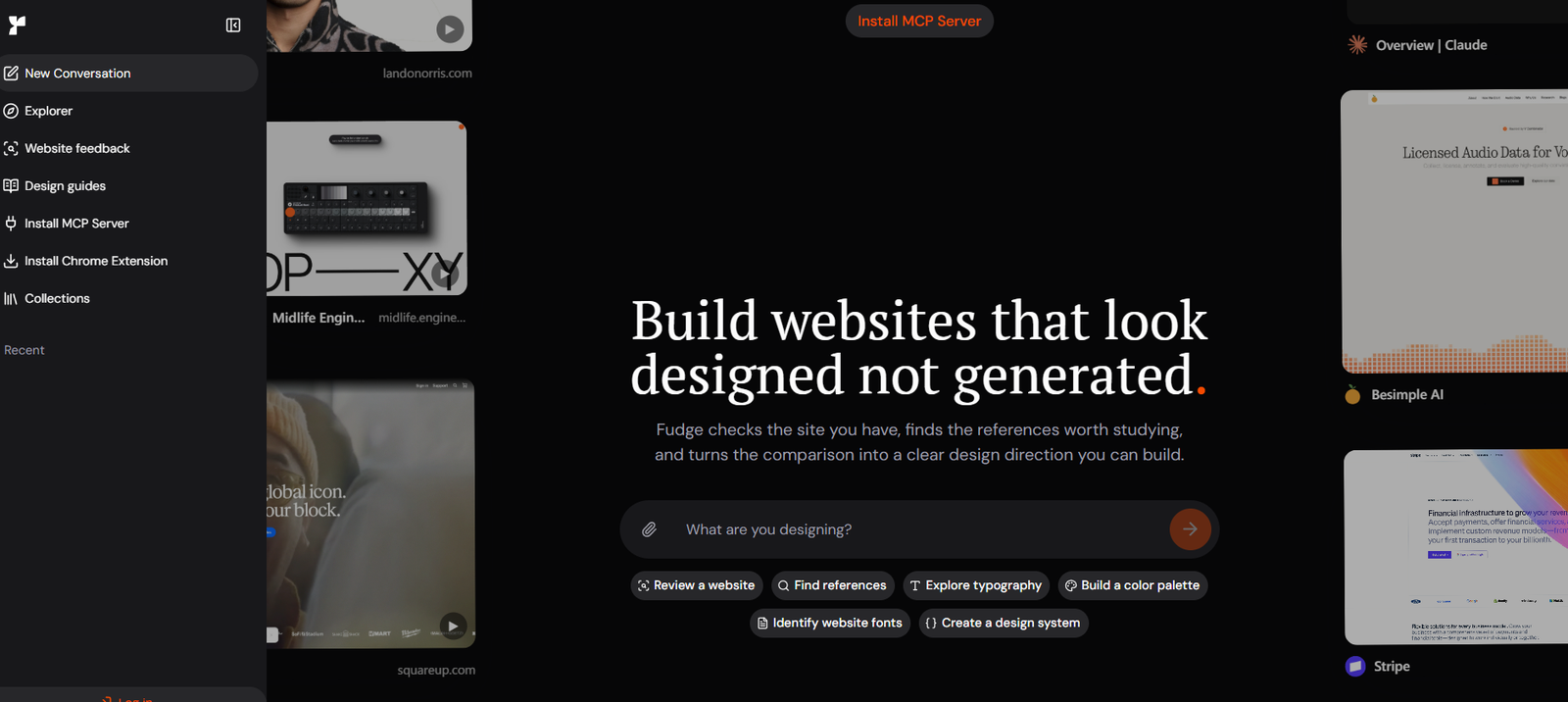
Fudge is an AI-powered design research and website reference platform built for designers, developers, product teams, and people using AI coding agents.
Instead of asking an AI tool to create a website from vague instructions such as “make it modern” or “make it premium,” Fudge helps users ground their design decisions in real website examples.
Users can search Fudge for website references based on industry, page type, layout, color, font, visual direction, screenshot, URL, and other design characteristics. They can then inspect how those websites are actually designed.
Fudge can analyze typography, colors, spacing, layout, components, borders, radii, shadows, gradients, imagery, and other visual details from captured websites.
It also provides AI-powered website reviews. Users can submit a public URL or screenshot, and Fudge evaluates the design, identifies important problems, compares the page with relevant real-world references, and suggests improvements.
For developers using AI coding tools, Fudge provides a hosted Model Context Protocol server. This allows compatible AI agents to search and inspect design references while they are building an interface.
Fudge currently integrates with tools such as Cursor, Claude Code, Codex, Windsurf, VS Code, Gemini CLI, Zed, OpenCode, and other compatible MCP clients.
Features
AI Design Research
Fudge helps users research website design through real examples rather than relying entirely on generic AI-generated recommendations.
Website Reference Search
Users can search for relevant website examples by industry, page type, layout, font, color, component, visual style, screenshot, domain, or other design characteristics.
Real Website Examples
Search results are based on captured real-world websites, allowing designers and AI agents to examine actual design decisions.
Fudge Chat
Fudge Chat provides a conversational interface for design research.
Users can ask questions about website design, request references, compare visual directions, analyze websites, investigate typography, and develop color palettes.
AI Website Reviews
Users can paste a public website URL and ask Fudge to evaluate the site’s design.
The platform can identify strengths, important problems, and priorities for improvement.
Multi-Page Website Analysis
Fudge can go beyond the homepage and inspect other relevant pages when they are important to the review.
Desktop and Mobile Reviews
Website reviews consider both desktop and mobile presentation.
Screenshot Reviews
Users do not need to have a publicly available website. They can upload a screenshot of an unfinished, private, or conceptual interface for analysis.
Competitor and Reference Comparisons
Fudge can find similar websites and relevant competitors and use them as evidence when explaining what could be improved.
Design Comparison
Users can provide multiple website references and ask Fudge to compare their layout, hierarchy, typography, color systems, components, and page structure.
Typography Inspection
Fudge can identify font families, font stacks, sizes, weights, line heights, and where different typography styles appear.
Font Alternatives
The platform can suggest visually similar alternatives to a typeface and help users narrow choices according to availability or licensing considerations.
Color Analysis
Fudge extracts colors from websites and organizes them into useful palettes.
Contrast Checking
Users can examine contrast between selected text and background colors to help evaluate readability.
Layout Analysis
The platform can inspect page structure, spacing, sections, content organization, and other layout characteristics.
Component Inspection
Users can study visible UI components and understand how they fit within the broader design system.
Spacing and Styling Analysis
Fudge can provide evidence about spacing, borders, corner radii, shadows, gradients, and other interface details.
Design System Creation
Users can turn observations from a website into structured design guidance for implementation.
DESIGN.md Generation
Fudge can create DESIGN.md guidance that AI coding agents can use as a clearer design reference while building an interface.
Tailwind Output
Observed design information can be translated into Tailwind-oriented implementation guidance.
CSS Variables
Users can turn supported visual observations into CSS variables for implementation.
Design Tokens
Fudge can structure design information into reusable tokens.
JSON Output
Design observations can also be prepared as structured JSON for use in development workflows.
Fudge MCP
The hosted Fudge MCP server connects the platform directly with compatible AI coding tools.
This allows an AI agent to search for design references and inspect them without forcing the developer to repeatedly move between separate tools.
AI Coding Tool Integration
The Fudge setup process can configure several supported AI coding environments, including Cursor, Claude Code, Codex, Windsurf, VS Code, Gemini CLI, OpenCode, Zed, and Claude Desktop when detected.
Fudge Explorer
Explorer provides a way to browse and search Fudge’s website reference library.
Chrome Extension
The Fudge Chrome extension allows users to capture design inspiration while browsing the web.
Website Capture
Users can save websites or selected sections for later research.
Captured references preserve useful visual information such as screenshots, fonts, colors, spacing, and layout details.
Saved References
Design references can be bookmarked and reused across future projects.
Collections
Users can organize inspiration and saved references instead of repeatedly searching for the same websites.
Public Conversations
Fudge conversations can be shared publicly while retaining relevant references, screenshots, fonts, colors, and comparison details.
How It Works
Step 1: Start with a Design Question
Describe the website, page, industry, visual direction, font, color, or layout you want to research.
Step 2: Search Real References
Fudge searches its captured website library for examples that match the requested direction.
Step 3: Open Relevant Websites
Users can examine saved page views and follow source information to understand the original reference.
Step 4: Inspect the Design
Analyze typography, colors, layout, spacing, components, borders, shadows, gradients, and other supported design details.
Step 5: Compare References
Users can compare several websites to understand how different products solve similar design problems.
Step 6: Review Your Own Website
Paste a URL or upload a screenshot to receive AI-powered design feedback.
Step 7: Identify Priorities
Fudge highlights strengths, weaknesses, and the most important changes to consider.
Step 8: Create Implementation Guidance
Turn selected references into DESIGN.md, Tailwind guidance, CSS variables, design tokens, or structured JSON.
Step 9: Connect Fudge to an AI Coding Tool
Pro and Studio users can install the hosted MCP server in a compatible AI development environment.
Step 10: Build with Design Context
The coding agent can search and inspect references while generating or improving the interface.
Use Cases
AI-Assisted Web Development
Developers using AI coding agents can provide those agents with concrete design evidence instead of relying on vague design prompts.
Website Design Inspiration
Designers can search real websites for relevant visual directions before starting a new project.
Landing Page Design
Users can research how successful websites structure hero sections, product demonstrations, pricing pages, calls to action, and other landing-page elements.
Website Redesigns
Teams can analyze an existing website, identify weaknesses, compare alternatives, and develop a more specific redesign direction.
AI Website Reviews
Founders and developers can receive structured feedback on websites generated with AI tools.
Typography Research
Users can identify fonts used on websites and examine sizes, weights, line heights, and related typography decisions.
Color Palette Research
Designers can study real website color systems and translate useful observations into palettes or design tokens.
Competitor Research
Teams can compare their website with competitors or visually related products.
Design System Development
Fudge can help convert website references into practical design-system guidance.
Vibe Coding
Developers building interfaces through natural-language AI coding workflows can give their coding agents stronger visual context.
Agency Work
Studios and agencies can research and compare references across multiple client projects.
Design Handoff to AI Agents
Design research can be transformed into structured information that coding agents can use during implementation.
Pricing
Fudge currently offers Free access along with Pro and Studio subscriptions.
Free
Free users currently receive 6 Fudge Chat queries each month.
These queries can be used for activities such as website reviews.
Usage resets each calendar month.
Pro: $117 Quarterly
Pro costs $117 every three months when using quarterly billing.
It includes a three-day free trial with quarterly or yearly billing.
Pro currently provides 3,000 queries per month.
The plan is intended for independent builders and focused product work.
Studio: $297 Quarterly
Studio costs $297 every three months with quarterly billing.
It also provides a three-day free trial when using quarterly or yearly billing.
Studio currently includes 15,000 queries per month.
It is intended for teams and studios working across multiple products or client projects.
Yearly Billing
Fudge currently advertises a 17% saving for yearly subscriptions compared with quarterly billing.
Paid Plan Features
Both Pro and Studio include the hosted Fudge MCP server, Fudge Chat, Fudge Explorer, Chrome extension, bookmarks, saved references, website reviews, reference research, and design-system guidance.
Fudge notes that complex multi-page reviews can consume more queries than short design questions.
Businesses that want to incorporate Fudge into a commercial product they sell need to contact the company regarding licensing.
Pricing and usage allowances may change, so users should verify current information before subscribing.
Strengths
Uses Real Design References
Fudge grounds design research in actual captured websites instead of relying entirely on AI-generated examples.
Built for AI Coding
MCP support allows design research to become part of an AI coding workflow.
Detailed Design Inspection
Users can go beyond screenshots and examine typography, colors, spacing, components, layout, and other visual characteristics.
Website Review Capability
Fudge can analyze an existing website and suggest priorities for improvement.
Reference-Based Feedback
Recommendations can be supported by relevant website comparisons rather than only generic best practices.
Implementation-Ready Outputs
DESIGN.md, Tailwind, CSS, JSON, and design-token outputs help bridge the gap between inspiration and implementation.
Chrome Extension
Users can capture inspiration while browsing instead of relying only on the existing Fudge library.
Useful for Designers and Developers
The platform connects visual research with technical implementation, making it relevant to both disciplines.
Multiple AI Tool Integrations
Compatibility with several major AI coding environments gives developers flexibility in how they use the service.
Drawbacks
Fudge is primarily focused on website and interface design research. It is not a complete graphic design platform for creating illustrations, logos, marketing graphics, or other visual assets.
The platform provides references and implementation guidance rather than replacing a complete UI design application.
The Free tier is limited to 6 Fudge Chat queries each month, which may be insufficient for frequent design research.
Paid subscriptions currently start at $117 per quarter, which may be expensive for casual users who only occasionally need design inspiration.
Complex multi-page website reviews can consume more queries than simple questions.
Users should also treat existing websites as design references rather than templates to copy directly. Brand assets, distinctive illustrations, text, and other protected creative elements should not be reproduced without appropriate rights.
Comparison with Other Platforms
Fudge overlaps with website inspiration galleries, design research libraries, UI reference platforms, AI design assistants, and MCP tools for coding agents.
Traditional inspiration galleries are useful for browsing attractive websites and collecting visual ideas. Fudge goes further by extracting and organizing information about how captured interfaces are constructed.
Instead of only viewing a screenshot, users can investigate typography, colors, spacing, layout, components, and other implementation-relevant details.
Compared with generic AI design assistants, Fudge emphasizes evidence from real websites. This can help reduce generic AI-generated interfaces that rely on repeated design patterns without a clear reference direction.
Fudge also differs from conventional design software. It is not primarily a canvas where designers manually create interfaces. Its role is research, analysis, comparison, critique, and design context.
Its MCP support is particularly relevant for AI coding workflows because an agent can access the same design research while generating the actual interface.
Fudge is therefore best suited to users who want to connect real-world design inspiration with AI-assisted implementation.
Customer Reviews and Testimonials
A substantial collection of verified customer reviews is not yet available.
Fudge is a relatively new product launched in 2026, and independent review coverage remains limited.
Its Chrome extension currently shows a small number of public ratings, but the volume is not sufficient to draw broad conclusions about customer satisfaction.
Users should therefore evaluate Fudge through its Free access, available product demonstrations, and the three-day trial offered with eligible paid billing options.
Conclusion
Fudge is a design research platform built around a simple idea: AI coding agents produce better interfaces when they have concrete visual references rather than vague adjectives.
It allows users to find real website examples, inspect their typography and colors, understand layouts and components, compare design directions, review existing websites, and turn useful observations into practical implementation guidance.
Its Fudge Chat and website-review capabilities make the platform useful even before coding begins. Fudge Explorer and the Chrome extension help users build a reusable library of inspiration, while the hosted MCP server brings that research directly into AI coding environments.
The ability to generate DESIGN.md guidance, Tailwind information, CSS variables, structured JSON, and design tokens makes Fudge particularly relevant to developers working with AI-generated interfaces.
It is not a replacement for full design software, and its paid plans are more appropriate for regular builders, teams, and studios than occasional users.
For designers and developers who want their AI-generated websites to be informed by real design evidence rather than generic prompts, Fudge provides a focused bridge between design research and AI-assisted development.