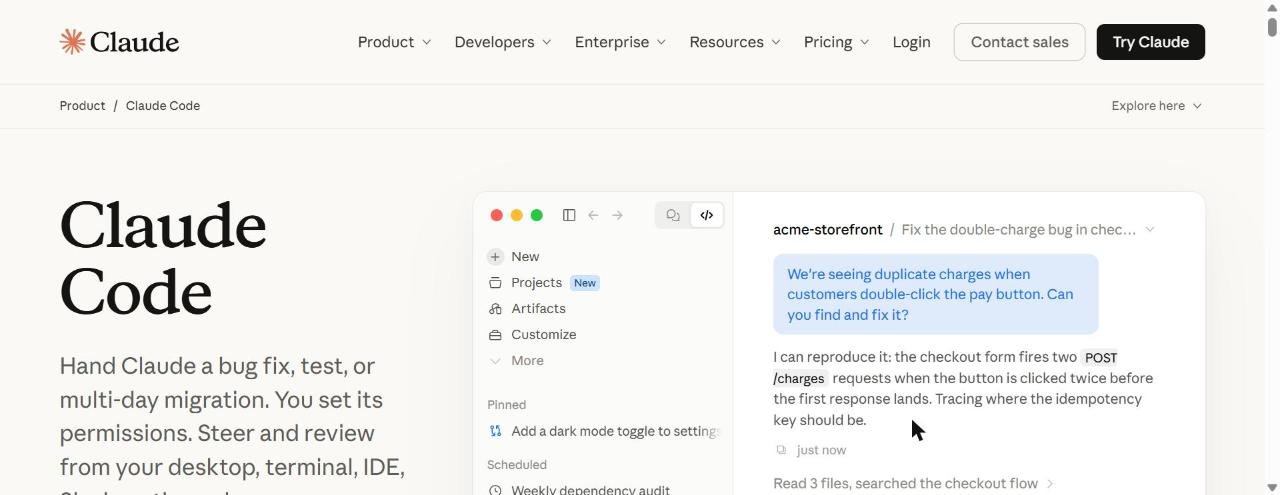
Claude Code is Anthropic’s AI coding agent: you hand it bug fixes, tests, refactors or migrations, and it plans the work, edits code, runs tests and opens pull requests while you review.
Facts checked: November 2026 · Sources: claude.com/product/claude-code and claude.com/pricing
Claude Code, made by Anthropic, works in your terminal and editor. It searches your codebase to understand it, then carries out tasks that can run for hours, asking you when it needs a decision.
Developers and teams handing off coding tasks to an AI agent
Included with paid Claude plans, or pay-as-you-go via the API
No (not on the free Claude plan)
Terminal, VS Code, JetBrains, desktop app, web, iOS, Android, Slack
Is Claude Code right for you?
- want an agent that can take on whole tasks, not just autocomplete lines
- work in the terminal or VS Code/JetBrains and use Git and GitHub
- already pay for Claude, since Claude Code is included
- want a free coding assistant
- only need inline code suggestions as you type (Copilot or Cursor may suit you better)
- cannot review AI changes before they go live
Claude Code pricing
| Plan | Price shown on claude.com | Claude Code |
|---|---|---|
| Free | €0 | Not included |
| Pro | €15/month billed annually (€18 monthly) | Included, shares Pro usage limits |
| Max | €90/month | Included, 5x Pro usage |
| Ultra | €180/month | Included, 10x Pro weekly usage |
| Team / Enterprise | Per seat | Included |
| Claude Console (API) | Pay as you go | Uses API tokens at standard API pricing |
Prices on claude.com are shown in your local currency and exclude tax, so they vary by country. Claude Code shares usage limits with the rest of your Claude plan. Check claude.com/pricing for current prices.
Key features
Codebase onboarding
Maps and explains large codebases using agentic search, without you picking context files.
Issues to pull requests
Reads issues in GitHub or GitLab, writes code, runs tests and opens pull requests.
Long-running work
Handles refactors and migrations that run for hours, following imports and re-running tests.
Works where you code
Terminal, VS Code, JetBrains, the Claude desktop app, web, mobile and Slack.
Your tools
Uses command line tools like Git and MCP servers like GitHub to extend what it can do.
Permission controls
Permission modes, allow and deny rules, and hooks decide what runs with or without approval.
Pros and cons
- Takes on whole tasks, from planning to pull request
- Works across terminal, IDEs, desktop, web and mobile
- Included in paid Claude plans at no extra charge
- Fine-grained control over what it can do on its own
- No free plan
- Heavy use can hit plan usage limits
- You still need to review its changes carefully
How to get started
- Get a paid Claude plan (or a Claude Console account for pay-as-you-go).
- Download Claude Code for your system, or install the VS Code or JetBrains extension, and sign in.
- Open your project and describe the task; review the plan and the changes before merging.
Claude Code alternatives
⇄ Compare Claude Code side by side
Claude Code: frequently asked questions
Is Claude Code free?
No. Claude Code is not part of the free Claude plan. It is included in all paid Claude plans (Pro, Max, Ultra, Team and Enterprise), or you can use it with a Claude Console account and pay for API tokens as you go.
How much does Claude Code cost?
It comes with a paid Claude plan; on claude.com, Pro is shown from €15 a month billed annually (€18 monthly), Max at €90 and Ultra at €180 a month, with prices varying by region. With a Console account it uses API tokens at standard API pricing.
Where can I use Claude Code?
In the terminal on macOS, Linux and Windows, in VS Code and JetBrains IDEs, in the Claude desktop app, on the web, on iOS and Android, and from Slack and GitHub.
Is Claude Code safe to use on my codebase?
You control it with permission modes, allow and deny rules, and hooks that decide what can run without your approval. Anthropic notes that its automatic safeguards reduce but do not eliminate risk, so review what it changes.
What are the best Claude Code alternatives?
GitHub Copilot, Cursor, OpenAI Codex, Windsurf and Aider are popular AI coding assistants. Copilot and Cursor work inside your editor, while Codex and Aider also offer terminal-based agents.
⇄ Compare Claude Code with similar tools
Want more tools like this?
Get the best new AI tools in your inbox every two weeks. Free, no spam, unsubscribe anytime.