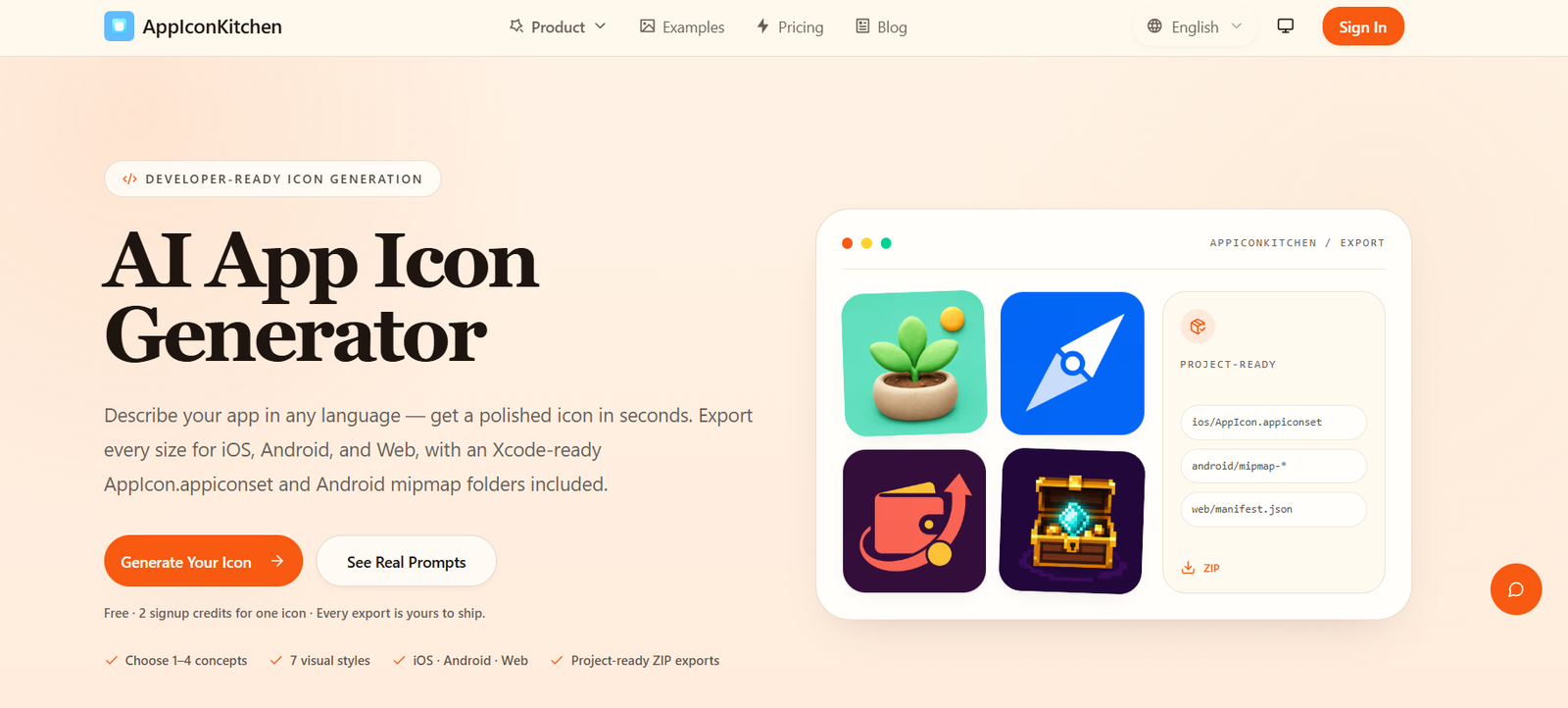
AppIconKitchen is an AI-powered app icon generation platform designed to help developers, startups, designers, and indie makers create professional app icons without using complex design software. Users simply describe their app idea, and the AI generates custom icons in various visual styles. The platform also prepares complete icon packages for iOS, Android, and web applications, eliminating the need to manually resize images for different platforms.
The platform focuses on simplifying one of the most time-consuming parts of app publishing by combining AI image generation with automatic icon formatting. It is particularly useful for developers who want production-ready app icons quickly without hiring a graphic designer.
Features
AI App Icon Generator
Users can generate original app icons by entering a simple text prompt describing their application or brand. The AI creates unique icon concepts within seconds.
Multiple Design Styles
AppIconKitchen supports several icon styles, including Clay 3D, Flat, Mac-style, and Pixel Art, allowing users to match different app themes and branding preferences.
Automatic Platform Exports
The platform automatically generates icon sizes required for iOS, Android, and web applications, saving developers from manually resizing images for each platform.
Ready-to-Use ZIP Downloads
Generated icons are packaged into downloadable ZIP files containing all required assets, making deployment easier during the app publishing process.
Fast AI Workflow
Users can move from an idea to a production-ready icon within minutes using a streamlined interface designed for rapid icon creation.
Developer-Friendly
The platform is built specifically for software developers, indie hackers, SaaS founders, and startup teams that need app icons quickly without extensive graphic design experience.
How It Works
Step 1: Visit AppIconKitchen and describe your app idea.
Step 2: Select your preferred icon style.
Step 3: Let the AI generate one or more app icon concepts.
Step 4: Review the generated icons and choose your favorite design.
Step 5: Download the complete icon package.
Step 6: Import the generated assets directly into your iOS, Android, or web application project.
Use Cases
Indie developers can quickly create App Store-ready icons.
Startups can generate branding assets for new mobile applications.
SaaS companies can design dashboard and web application icons.
Designers can generate concept icons for client presentations.
Game developers can create unique game icons.
Students can prepare icons for academic or personal app projects.
Pricing
The official website does not clearly display pricing information. Based on publicly available information, the platform offers free usage without requiring sign-up, while future paid plans may be introduced. Pricing details are not clearly mentioned on the official website.
Strengths
- Creates app icons from simple text prompts.
- Generates complete icon sets for multiple platforms.
- Supports several modern design styles.
- Eliminates manual resizing for iOS and Android assets.
- Fast and beginner-friendly workflow.
- Useful for developers without graphic design experience.
Drawbacks
- Limited information about advanced customization options.
- Pricing details are not clearly published.
- Professional branding projects may still require manual refinement.
- The platform is primarily focused on app icon generation rather than full graphic design workflows.
Comparison with Other Platforms
Compared with general AI image generators, AppIconKitchen is built specifically for app developers. Rather than creating standalone artwork, it produces platform-ready icon packages that include the required asset sizes for iOS, Android, and web applications. This specialized workflow reduces preparation time and simplifies the app publishing process for developers.
Customer Reviews and Testimonials
Customer reviews and testimonials are not clearly available on the official website.
Conclusion
AppIconKitchen is a practical AI-powered icon creation platform for developers, startups, and designers who need professional app icons quickly. By combining AI-generated artwork with automatic export of platform-specific icon sizes, it streamlines one of the final steps in app development and helps users prepare polished assets for mobile and web applications with minimal effort.