
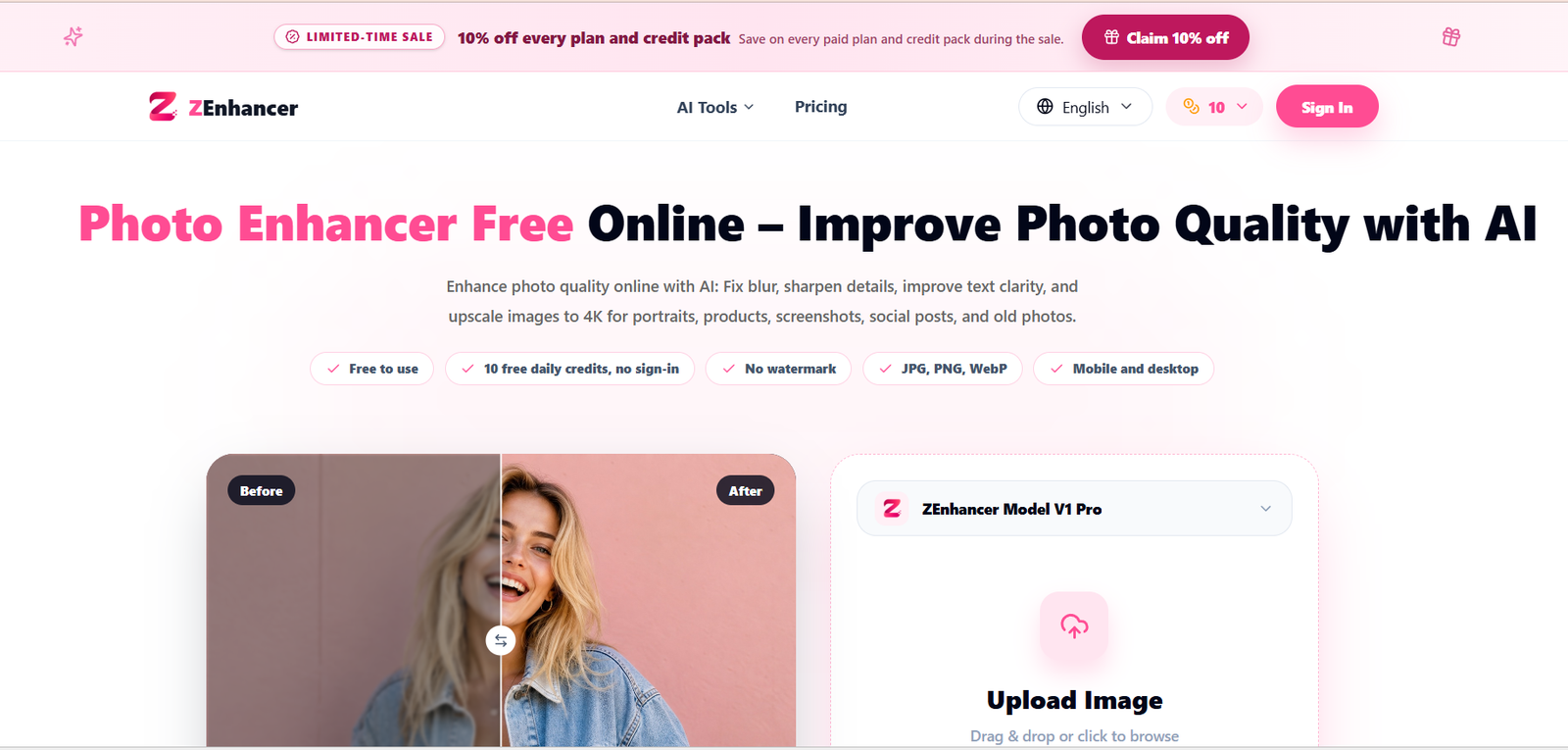
ZEnhancer is an online AI powered image enhancement platform designed to improve the quality of photos without requiring complex editing software. Users can upload an image and use AI to improve sharpness, clarity, lighting, color, noise levels, and overall visual quality.
The platform is useful for portraits, product images, old photographs, screenshots, social media content, low light pictures, and other images that need improvement. Its main photo enhancer automatically analyzes different aspects of an uploaded image and applies suitable enhancements.
ZEnhancer also provides a wider collection of image tools for specific tasks. These include image upscaling, unblurring, sharpening, photo restoration, noise reduction, photo colorization, background removal, glare reduction, text clarification, watermark removal, and image format conversion.
The service works directly through a web browser and supports common formats including JPG, PNG, and WebP. Its straightforward workflow makes it suitable for people who want quick image improvements without learning professional photo editing software.
Features
AI Photo Enhancer
ZEnhancer automatically analyzes an image and improves areas such as sharpness, clarity, lighting, color, noise, and visible details. This can be useful for improving everyday photographs without manually adjusting multiple settings.
AI Image Upscaler
The image upscaling tool increases image resolution while attempting to preserve useful visual details. The platform supports enhancement and upscaling for higher resolution outputs, including use cases where images need to be prepared for larger displays or online publishing.
Unblur Image
Users can improve photos affected by soft focus, slight camera movement, compression, or general loss of definition. The AI attempts to recover clarity and make important details more visible.
Photo Restoration
ZEnhancer includes a restoration tool for old, faded, scratched, or damaged photographs. It can improve contrast, clean up visible damage, and recover details in older family photos and scanned images.
Noise Reduction
The denoise feature is designed to reduce grain and visual noise in low light photographs, night images, older camera photos, and other noisy pictures while retaining useful details.
AI Photo Colorizer
Black and white photographs can be converted into color images using AI. The system attempts to add natural looking colors while maintaining important details in faces, clothing, and backgrounds.
Sharpen Image
The sharpening tool improves edge definition and fine details in slightly soft photographs. It can be useful when an image needs more clarity without extensive restoration.
Background Remover
Users can remove image backgrounds to create cleaner cutouts. This can be helpful for product photographs, profile pictures, presentations, ecommerce content, and creative projects.
Unblur Text
ZEnhancer provides a dedicated tool for improving blurry text in screenshots, documents, signs, labels, notes, and presentation slides.
Remove Image Glare
The glare reduction feature can help reduce distracting reflections from glasses, photographs, glossy products, and other reflective surfaces.
Image Format Conversion
The platform includes tools for converting between common formats such as JPG, JPEG, PNG, and WebP.
Batch Enhancement
ZEnhancer supports batch processing for paid users, allowing multiple images to be processed instead of enhancing every picture individually.
How It Works
Step 1: Open ZEnhancer
Visit the website and select the photo enhancement tool that matches the task, such as Photo Enhancer, Image Upscaler, Unblur Image, Photo Restoration, or Denoise Photo.
Step 2: Upload an Image
Upload a JPG, PNG, or WebP image from a computer, phone, or tablet. The main enhancer also provides drag and drop uploading.
Step 3: Let the AI Process the Image
ZEnhancer analyzes the uploaded photo for issues such as blur, noise, lighting, color, and resolution. It then applies AI based improvements according to the selected tool.
Step 4: Preview the Result
Users can review the processed image and compare it with the original to see how much the image has improved.
Step 5: Choose an Output Format
Depending on the workflow, users can select an appropriate output format such as PNG, JPG, or WebP.
Step 6: Download the Enhanced Image
Once satisfied with the result, users can download the processed image for further editing, sharing, publishing, or storage.
Use Cases
Content Creators
Creators can improve photographs for social media posts, thumbnails, websites, blogs, and other visual content without spending significant time on manual photo editing.
Ecommerce Sellers
Online sellers can improve product photographs by sharpening details, cleaning up images, increasing resolution, or removing backgrounds.
Photographers
Photographers can use ZEnhancer for quick image cleanup, noise reduction, sharpening, and previews before moving to more advanced editing software when necessary.
Students and Teachers
Students and educators can improve screenshots, presentation images, scanned photographs, and blurry text for reports, assignments, and slides.
Marketing Professionals
Marketing teams can enhance images before using them in social media campaigns, advertisements, websites, presentations, and promotional materials.
Families and Personal Users
Old family photographs can be restored, sharpened, cleaned, or colorized. The platform can also improve everyday mobile photographs that are blurry, dark, grainy, or low resolution.
Designers
Designers can use ZEnhancer for quick previews, image cleanup, background removal, upscaling, and preparing source images before further creative work.
Pricing
ZEnhancer provides free daily usage through a credit based system. The official website states that users receive 10 free credits each day at 00:00 UTC. These daily free credits expire at the end of the day and do not accumulate.
The platform also offers paid subscriptions that provide additional monthly credits and batch processing. Subscription credits reset with each monthly renewal and unused subscription credits do not roll over.
Users can also purchase one time credit packs. According to the official website, these purchased credits are permanent and do not expire.
Specific subscription prices and credit pack prices are not clearly displayed in the publicly accessible pricing information reviewed, so exact pricing should be checked directly on the platform.
Strengths
Easy to Use
The simple upload, process, preview, and download workflow makes ZEnhancer accessible to users without professional photo editing experience.
Multiple AI Image Tools
Instead of focusing only on basic enhancement, ZEnhancer provides specialized tools for upscaling, restoration, sharpening, denoising, colorization, background removal, glare reduction, and other common image tasks.
Free Daily Credits
The daily free credit allowance makes it possible to try and regularly use the platform for smaller image enhancement tasks.
Browser Based
There is no need to install desktop editing software. Users can process images directly through a web browser.
Common Image Formats
Support for formats such as JPG, PNG, and WebP makes the platform practical for common online image workflows.
Useful for Different Image Types
The platform can work with portraits, product photos, screenshots, old photographs, low light images, pets, scenery, and social media images.
Drawbacks
The free version operates through a daily credit allowance, so users processing many images may need additional credits or a paid subscription.
Subscription credits do not roll over to the next billing cycle, meaning unused paid monthly credits are cleared when the subscription renews.
AI enhancement results can vary depending on the quality and condition of the original image. Extremely blurry, damaged, or very low resolution photographs may not always produce ideal results.
Professional photographers and designers who require detailed manual control over individual adjustments may still need dedicated editing software for advanced work.
Exact paid plan prices are not clearly visible in the publicly accessible pricing information reviewed.
Comparison with Other Platforms
ZEnhancer competes with AI photo enhancement and upscaling platforms that automatically improve image quality. Its main advantage is that several common image improvement tasks are available within the same browser based platform.
Unlike traditional professional image editors that provide extensive manual controls, ZEnhancer focuses more on quick AI assisted processing. This can make it easier for beginners and users who simply want to upload an image and improve it without learning complex editing techniques.
Compared with broader design platforms that combine photo editing with templates, graphics, presentations, and social media design, ZEnhancer is more focused on image enhancement, restoration, cleanup, and conversion.
The best choice will therefore depend on the user’s needs. ZEnhancer may suit users looking for quick AI based photo improvement, while advanced editors or complete design platforms may be better for projects requiring extensive creative control.
Customer Reviews and Testimonials
The official website displays several user testimonials from different types of users, including a boutique owner, teacher, graduate student, and designer.
The feedback presented on the website highlights uses such as improving product photographs, restoring old class photos, making screenshot text clearer, and preparing quick client previews.
The website also displays a 4.9 out of 5 user rating and states that it is used by more than 10,000 creators. These figures and testimonials are claims presented by ZEnhancer on its own website and should be understood as first party information rather than independently verified customer ratings.
Conclusion
ZEnhancer is a practical AI image enhancement platform for people who want to improve photos quickly without using complicated editing software. It combines general photo enhancement with specialized tools for upscaling, sharpening, unblurring, restoration, noise reduction, colorization, background removal, and other common image tasks.
It can be particularly useful for content creators, ecommerce sellers, marketers, students, teachers, designers, and everyday users who regularly work with images but do not need the complexity of professional photo editing software.
The availability of daily free credits also makes ZEnhancer accessible for occasional users who want to test AI photo enhancement before considering a paid option. For users who mainly need fast, browser based image improvement, ZEnhancer offers a straightforward collection of useful tools in one platform.


