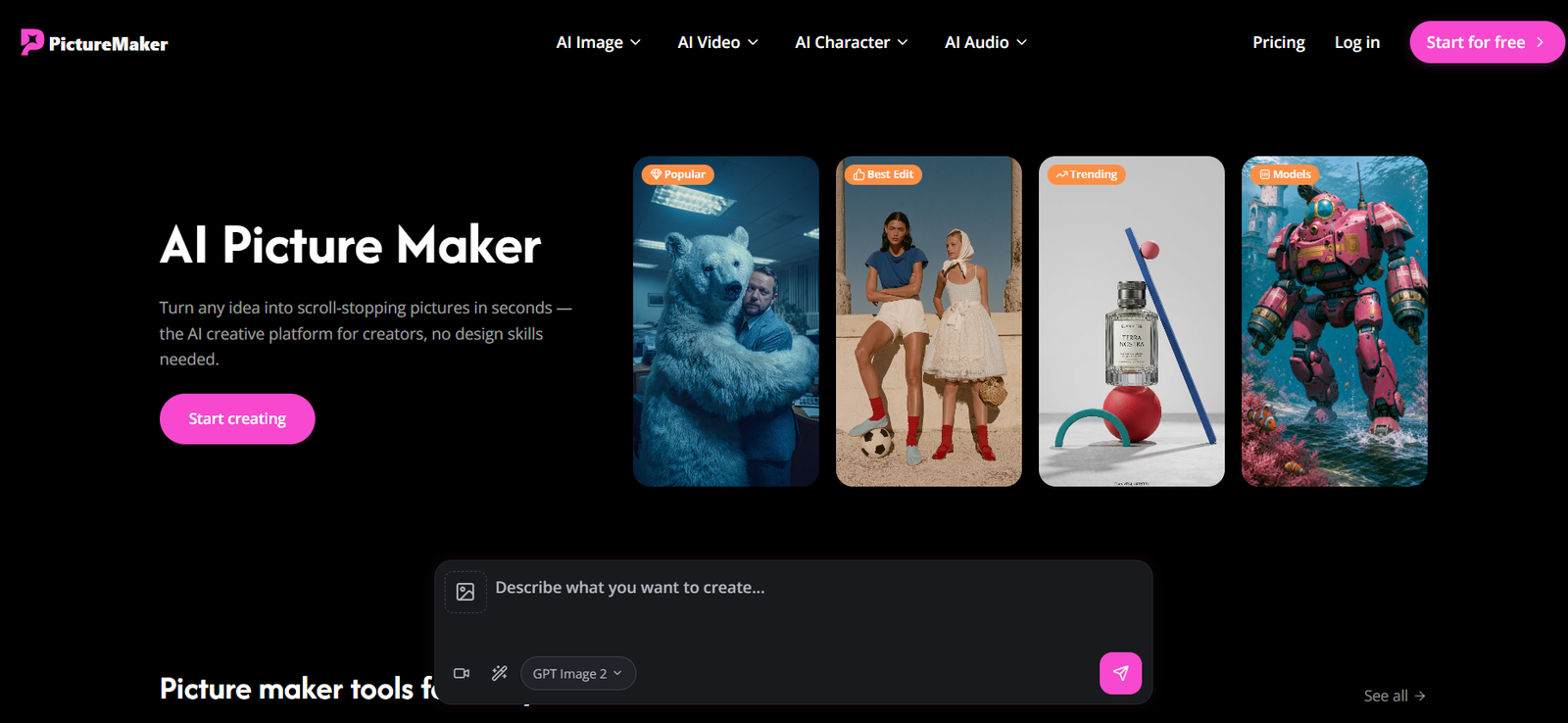
PictureMaker AI is an online AI creative platform for generating and editing images, videos, characters and audio. It is designed for creators, marketers, social media users, designers and businesses that want to produce visual content without relying on complicated design software.
The platform brings multiple AI models and creative tools into one workspace. For image creation, users can access models such as GPT Image 2, Google’s Nano Banana 2, Midjourney and ByteDance’s Seedream 5.0.
Users can generate images from text prompts, transform existing photographs, remove backgrounds, upscale images, swap faces, transfer visual styles and edit images with AI.
PictureMaker AI also provides a substantial collection of video tools. Users can generate and edit videos, create lip-synced content, synchronize motion, extend clips, upscale videos, add sound effects and restyle existing footage.
The platform further includes AI character creation and audio capabilities, making it broader than a conventional text-to-image generator.
Features
AI Image Generator
PictureMaker AI converts written descriptions into generated images. Users describe what they want to see and select an available AI model to produce the visual.
The tool can be used for illustrations, profile pictures, social media graphics, logos, concept images and other creative projects.
Multiple AI Models
PictureMaker AI provides access to several major image-generation models within the same platform.
Available options displayed on the website include GPT Image 2 from OpenAI, Nano Banana 2 from Google, Midjourney and Seedream 5.0 from ByteDance.
This allows creators to experiment with different models without relying on a single generation system.
Image-to-Image Generation
Users can upload an existing photograph or image and use it as the starting point for a new AI-generated visual.
This can be useful when creators want to preserve aspects of an original image while changing its style, appearance or surroundings.
AI Image Editing
The image editing tool allows users to modify existing pictures using AI. This can help with retouching, changing visual elements and refining generated content.
Style Transfer
Users can transform an existing photograph or generated image into a different visual style.
This can be useful for producing cartoon, anime, artistic and other creative interpretations of source images.
Background Removal
PictureMaker AI can automatically remove backgrounds from images and export transparent visuals.
This is useful for product images, profile pictures, stickers, logos, ecommerce graphics and marketing materials.
Image Upscaling
The AI Image Upscaler improves the resolution of existing pictures. This can help users prepare smaller or lower-resolution images for larger digital applications.
Camera Angle Control
PictureMaker AI includes a Camera Angle Control tool that provides additional control over how subjects appear within generated visuals.
Face Swap
Users can replace faces in supported images through the platform’s AI Face Swap functionality.
AI Video Generation
PictureMaker AI extends beyond static pictures and provides tools for creating AI-generated video content.
Its pricing page lists access to video models including Seedance, Veo and Kling families, with availability and usage varying according to the selected subscription.
Frame-to-Video
Users can transform still visual frames into video content, providing a way to add motion to existing creative assets.
AI Video Editing
PictureMaker AI includes tools for modifying existing video content with artificial intelligence.
Motion Sync
The Motion Sync feature helps synchronize character or subject movement for AI-generated video projects.
Lip Sync
Users can synchronize mouth movements with spoken audio, making the platform useful for talking characters, virtual presenters and other dialogue-based content.
Video Upscaling
The AI Video Upscaler is designed to improve the visual quality and resolution of video content.
Video Extension
Users can extend existing video clips with AI rather than limiting their projects to the original duration.
Add Sound Effects
PictureMaker AI can add sound effects to video content, bringing visual and audio creation into the same workflow.
Video Restyling
Users can change the visual style of existing video content through AI-powered restyling.
AI Character Creator
The platform includes dedicated tools for creating AI characters.
Users can develop character images, character videos and talking videos, making this useful for storytelling, social media and virtual personality projects.
AI Audio Tools
PictureMaker AI also provides audio creation capabilities.
Its listed audio tools include music creation, voice-over generation, voice cloning and voice changing.
How It Works
Step 1: Choose a Creative Tool
Users first decide whether they want to create an image, video, character or audio content.
Step 2: Select an AI Model
For supported workflows, users can choose from available AI models according to the type and style of content they want to produce.
Step 3: Enter a Prompt
Describe the desired visual or creative result in natural language.
Users can include information about the subject, background, composition, style, mood and other details.
Step 4: Upload Reference Content if Needed
For image editing, style transfer, face swapping and other transformation tasks, users can upload an existing image.
Step 5: Generate the Content
The selected AI model processes the prompt and generates the requested content.
Step 6: Refine the Result
Users can continue editing the output with tools such as background removal, image editing, style transfer or upscaling.
Step 7: Create Video or Character Content
Creators who want more than static images can use the platform’s video and character tools to animate, lip sync, restyle or extend their content.
Step 8: Download the Result
Completed content can be downloaded according to the capabilities and limits of the selected plan.
Use Cases
Social Media Creators
Creators can generate profile pictures, illustrations, short videos, talking characters and other visual content for social platforms.
YouTube Creators
YouTubers can create visual assets, characters, video clips, voice-overs and other creative elements for their content.
Marketers
Marketing teams can use PictureMaker AI to experiment with campaign visuals, advertisements, product graphics and promotional content.
Designers
Designers can use different AI models to explore visual concepts and generate early creative directions before further refinement.
Businesses
Companies can create visual content for websites, presentations, social media and promotional materials.
Ecommerce Sellers
Background removal, image editing and upscaling can help sellers prepare cleaner product visuals for online listings and promotional campaigns.
Content Creators
Creators can combine image, video and audio capabilities instead of moving between several separate AI services.
Character Creators
Users developing virtual personalities or fictional characters can create character images, videos, talking content and synchronized motion.
Logo Creation
PictureMaker AI can generate logo concepts and wordmark-style visuals from text instructions.
Profile Pictures
Users can generate customized avatars and profile images for platforms such as YouTube, Discord and Roblox.
Pricing
PictureMaker AI offers a Free plan along with Plus, Pro and Professional subscriptions. Monthly and annual billing options are available.
Free
The Free plan costs $0 per month.
It provides 10 credits per month, allowing up to approximately 5 images or 2 videos depending on the model used.
Plus
The Plus plan costs $29.90 per month with monthly billing.
With yearly billing, it is currently listed at $8.30 per month, with $100 charged annually.
The annual plan provides 2,400 credits per year and supports up to approximately 1,200 images or 600 videos depending on the models used.
Pro
The Pro plan costs $49.90 per month with monthly billing.
The yearly option is currently listed at $30 per month, with $360 charged annually.
It provides 21,600 credits per year and supports up to approximately 10,800 images or 5,400 videos, depending on the models selected.
Professional
The Professional plan costs $99.90 per month with monthly billing.
The annual subscription is currently listed at $49.90 per month, with $599 charged annually.
It provides 48,000 credits per year and supports up to approximately 24,000 images or 12,000 videos, depending on model usage.
Paid plans include features such as downloads, private generation, an ad-free experience and unlimited storage.
Actual credit consumption varies considerably between AI models. Users should therefore check the current pricing and model usage limits before subscribing.
Strengths
Multiple AI models: Users can access several leading image and video generation models from one platform.
More than image generation: PictureMaker AI combines image, video, character and audio tools.
Useful editing features: Background removal, upscaling, style transfer and image editing extend its usefulness beyond initial generation.
Video creation: Users can generate, edit, extend, upscale and restyle videos.
Character tools: Dedicated character image, video, talking video and motion features are useful for digital storytelling.
Audio capabilities: Music, voice-over, voice cloning and voice changing broaden the platform’s creative possibilities.
Free plan: Users can experiment with a limited number of generations before purchasing a subscription.
Commercial use: The official website states that generated pictures can be used for personal and commercial projects.
Suitable for beginners: The prompt-based workflow reduces the need for advanced graphic design skills.
Drawbacks
The Free plan provides only 10 credits each month, so it is mainly suitable for testing the platform rather than frequent content production.
Credit consumption varies between models. More advanced image and video models can therefore reduce the number of generations available under a particular plan.
The difference between monthly and annual pricing is substantial, so users should carefully review billing terms before subscribing.
AI-generated images and videos may still require additional editing when precise brand consistency, typography, character continuity or detailed visual control is required.
The large number of models and tools can also require some experimentation before new users identify which combination works best for their projects.
Comparison with Other Platforms
PictureMaker AI competes with general AI image generators, AI video platforms and multi-model creative services.
Its main distinction is the breadth of creative functionality available from one platform. Instead of concentrating exclusively on text-to-image generation, PictureMaker AI combines multiple image models with video generation, editing, AI characters and audio tools.
The multi-model approach can also be useful for creators who want to experiment with different generation technologies without maintaining separate workflows for every model.
Dedicated image or video platforms may provide deeper controls for their particular specialty. PictureMaker AI may be more attractive to creators who value having a broad collection of AI creative tools in one environment.
Customer Reviews and Testimonials
Customer reviews and testimonials are not clearly available on the official website.
The website presents examples and use cases for different creative workflows, but these should not be considered independent customer testimonials.
Conclusion
PictureMaker AI is a broad AI creative platform for users who want to generate and refine images while also having access to video, character and audio creation tools.
Its combination of models such as GPT Image 2, Nano Banana 2, Midjourney and Seedream 5.0 gives users flexibility when experimenting with different visual styles and generation approaches. Tools for video creation, lip sync, motion, characters and audio further expand what can be produced within the same platform.
PictureMaker AI may be particularly useful for social media creators, YouTubers, marketers, designers, ecommerce businesses and digital storytellers who regularly need different forms of AI-generated media.
For users who prefer a single creative workspace rather than separate tools for images, videos, characters and audio, PictureMaker AI offers a versatile collection of AI-powered creation features.