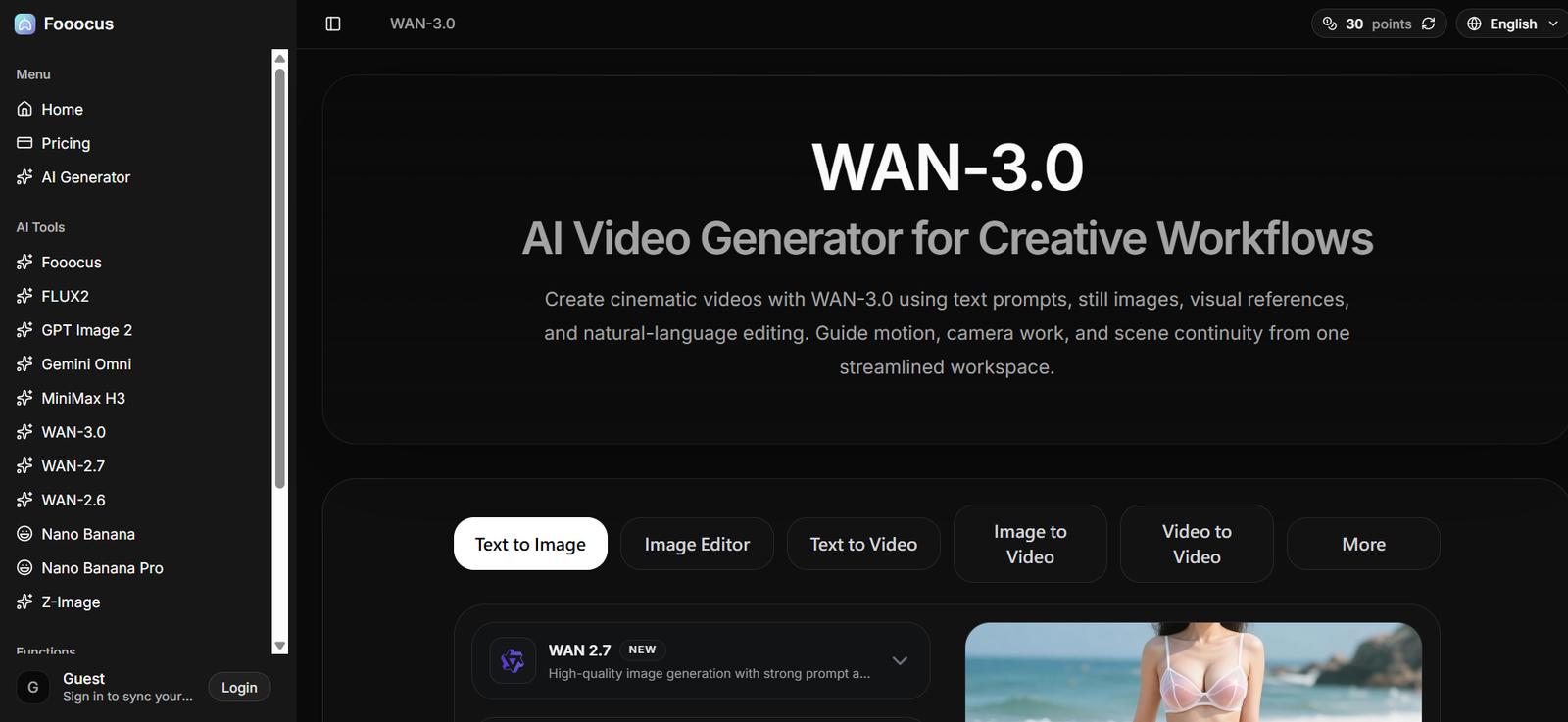
Fooocus.one is an online AI creative platform focused on image generation, image editing and visual transformation. It allows users to turn text prompts into images and provides additional tools for modifying and improving existing visuals.
The platform combines several AI models and creative functions within one interface. Users can access text-to-image generation, image editing, photo restoration, background removal, face swapping and image upscaling. It also provides access to newer image and video models and supports text-to-video, image-to-video and video-to-video workflows.
One of the main strengths of Fooocus is the level of control available during image creation. Users can work with multiple prompts, customize aspect ratios, adjust styles and use prompt weighting to influence specific parts of a generated image.
Fooocus can be useful for designers, content creators, marketers, artists and general users who want to experiment with AI-generated visuals without building their own AI generation workflow.
Features
AI Text-to-Image Generation
Users can enter a written prompt describing the image they want. Fooocus processes the description and creates an AI-generated visual based on the instructions.
Image Editing
Fooocus provides AI-assisted image editing for users who want to modify existing images rather than generate everything from scratch.
Advanced Inpainting
The inpainting feature allows users to modify selected areas of an image. It can be useful for replacing unwanted elements, filling missing areas or making targeted changes while preserving the rest of the picture.
Image Prompting
Users can provide images as visual references. This helps guide the AI toward a particular composition, style or appearance.
Multi-Prompt Support
Fooocus supports multiple prompts within the same generation process. This gives users greater flexibility when combining several subjects, styles or creative instructions.
Prompt Reweighting
The platform supports prompt weighting based on the A1111 approach. Users can increase or decrease the influence of particular words or concepts within their prompts.
Style Controls
Users can adjust visual characteristics such as contrast, sharpness and color to refine the appearance of generated content.
Custom Aspect Ratios
Fooocus allows users to choose different aspect ratios, making it easier to create images for social media, websites, presentations and other formats.
Multiple AI Models
The platform provides access to several AI models and technologies. Options shown on the website include Fooocus, FLUX2, GPT Image 2, Gemini Omni, Nano Banana, Nano Banana Pro, Z-Image, MiniMax H3 and WAN models.
SDXL Model Compatibility
Fooocus supports different SDXL models, allowing users to experiment with various artistic and photorealistic styles.
Face Swap
A dedicated face swapping capability is available for replacing faces in suitable images. Users should only use faces and photographs they have the necessary rights or permission to modify.
Photo Restoration
The platform provides a photo restoration tool designed to improve or repair older and damaged photographs.
Background Removal
Users can automatically remove backgrounds from images, which can be useful for product photography, marketing graphics and design projects.
Image Upscaling
Fooocus includes an AI image upscaler for improving image resolution and producing larger versions of existing visuals.
AI Video Generation
The AI Generator section also provides Text-to-Video, Image-to-Video and Video-to-Video options, expanding the platform beyond static image generation.
How It Works
Step 1: Open Fooocus.one
Visit the platform and select the AI generator or another creative tool.
Step 2: Select the Generation Mode
Choose the required workflow, such as Text to Image, Image Editor, Text to Video, Image to Video or Video to Video.
Step 3: Enter a Prompt
Describe the image or visual result you want. More specific descriptions can help the AI understand the desired subject, environment and style.
Step 4: Choose the AI Model
Select an available AI model based on the type of content you want to produce.
Step 5: Customize the Settings
Adjust available options such as style, aspect ratio and other generation parameters.
Step 6: Generate
Submit the prompt and allow the AI model to generate the requested visual.
Step 7: Edit and Refine
Use editing and inpainting capabilities to modify particular parts of the generated image or experiment with different prompts and settings.
Step 8: Use Additional Tools
When needed, users can apply functions such as image upscaling, background removal, face swapping or photo restoration.
Use Cases
Content Creators
Creators can produce original images for social media posts, videos, blogs and other digital content.
Graphic Designers
Designers can use Fooocus for concept generation, creative experimentation, image editing and early-stage visual development.
Digital Marketers
Marketing teams can generate advertising concepts, campaign visuals and social media graphics in different formats.
Artists
Digital artists can explore different styles and compositions and use AI-generated content as inspiration or as part of a broader creative workflow.
Businesses
Companies can create basic promotional visuals, website graphics, concept images and other digital assets.
Social Media Teams
Custom aspect ratios and AI generation make Fooocus useful for experimenting with content designed for different social media formats.
E-Commerce Sellers
Background removal, image editing and upscaling may help sellers prepare and improve suitable product visuals.
Students and Educators
Students can explore AI-assisted visual creation for appropriate educational projects, while educators can demonstrate generative image technology and creative AI concepts.
Video Creators
The available text-to-video, image-to-video and video-to-video modes can be used to experiment with AI-generated motion content.
Pricing
Fooocus.one has a dedicated pricing page, but clear subscription prices and complete plan details were not displayed in the publicly accessible pricing information reviewed.
The AI Generator currently shows that some generation options, such as Flux Schnell, may require 0 points.
Pricing details are not clearly mentioned on the official website.
Users should check the current pricing page before using paid models or purchasing credits because model availability and point requirements may vary.
Strengths
Fooocus combines several AI image creation and editing functions within one platform, reducing the need to move between separate tools for basic visual workflows.
Advanced inpainting provides greater control when users need to modify only selected areas of an image.
Multi-prompt support and prompt weighting can help experienced users create more detailed instructions and influence specific aspects of generated visuals.
Custom aspect ratios make the platform useful for content that needs to fit different publishing formats.
The availability of multiple AI models gives users flexibility to experiment with different generation technologies.
Additional tools such as photo restoration, background removal, face swapping and image upscaling broaden the platform’s usefulness beyond basic text-to-image generation.
Drawbacks
The number of models, prompts and advanced settings may require some experimentation for users who are completely new to AI image generation.
Results can vary significantly depending on the quality of the prompt, selected model and generation settings.
Advanced image generation still cannot guarantee that every detail in a complicated prompt will appear exactly as requested.
Face swapping requires responsible use, particularly when real people’s photographs are involved.
Clear pricing information was not available from the publicly accessible pricing page reviewed, which can make it difficult to estimate the cost of extensive usage in advance.
Comparison with Other Platforms
Compared with simple AI image generators that primarily provide a prompt box and a small number of styles, Fooocus offers more detailed creative controls. Features such as inpainting, image prompts, multi-prompt generation, prompt weighting and aspect ratio customization make it suitable for users who want more influence over their results.
The platform also provides access to multiple image and video technologies instead of concentrating on a single model.
Compared with traditional image editing software, Fooocus focuses more heavily on AI-driven generation and automated transformations. Professional editing applications may provide greater pixel-level manual control, while Fooocus can make initial generation and common AI editing tasks faster.
It may therefore appeal particularly to creators who want a combination of straightforward AI generation and more advanced prompt-based controls.
Customer Reviews and Testimonials
The official Fooocus.one website displays several user testimonials.
Users presented on the website describe Fooocus as useful for generating and editing images, developing creative ideas, experimenting with visual concepts and reducing the time required for image creation.
Testimonials are shown from people identified as designers, artists, instructors and other creative users. These testimonials are published directly on the Fooocus.one website and should be treated as platform-provided testimonials rather than independently verified customer reviews.
Conclusion
Fooocus.one is a versatile AI image generation and editing platform for people who want more than basic text-to-image creation. It combines prompt-based generation with inpainting, image prompting, multiple prompts, style controls, face swapping, background removal, restoration and upscaling.
The addition of multiple AI models and video generation modes makes the platform useful for a broader range of creative projects.
Fooocus can be particularly useful for content creators, designers, marketers, artists and businesses that regularly experiment with AI-generated visuals. Beginners can start with simple prompts, while more experienced users can explore advanced controls to refine their results.
For users looking for an online platform that combines AI image generation with flexible editing and transformation tools, Fooocus.one is worth exploring.