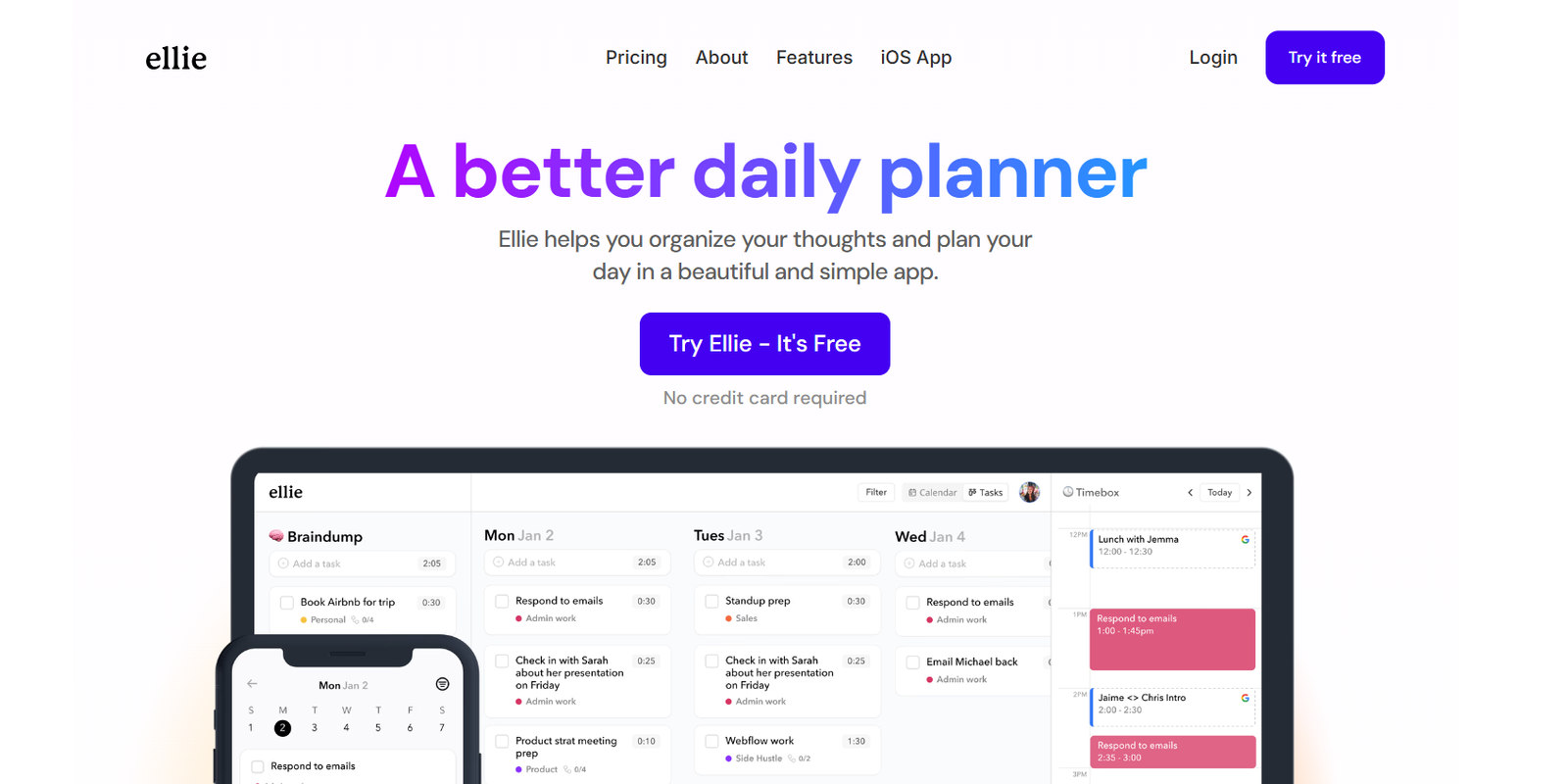
Ellie is a minimalist daily planner built around the principles of time blocking and deep work. Designed to help users focus and be intentional with their time, Ellie offers a clean interface where tasks are scheduled directly onto a daily timeline. Instead of managing endless to-do lists, Ellie encourages users to allocate time for each task, making it easier to stay productive and avoid multitasking. Built for creators, freelancers, students, and professionals, Ellie simplifies daily planning into a mindful, structured routine.
Features
Ellie offers a curated set of features that promote intentional productivity and reduce digital clutter.
Time Blocking Interface
Drag and drop tasks into your day using a timeline view, visually organizing your work hours.
Split View
View your task list and time-blocked schedule side-by-side to plan with clarity.
Task Inbox
Capture new tasks quickly and move them into your schedule when ready.
Focus Mode
Hide distractions by showing only the task you’re currently working on.
Built-in Prioritization
Organize your day by dragging high-priority tasks to the top and allocating time blocks accordingly.
Intuitive Keyboard Shortcuts
Plan faster and navigate through your tasks using simple keyboard commands.
Dark Mode
Switch to a dark theme to reduce eye strain during late work sessions.
Sync Across Devices
Access Ellie from desktop or mobile browsers, keeping your plan updated wherever you are.
How It Works
Ellie helps users plan their day by combining a task list with a timeline. Each day starts with a clean slate, encouraging users to think critically about how they want to spend their time. Tasks are first added to the inbox. From there, users can drag tasks onto the timeline, assigning specific time blocks for focused work.
The interface shows the current time, making it easier to stay on schedule. As the day progresses, users can adjust tasks, move blocks, or mark items as complete. Focus mode helps by showing only one task at a time, keeping attention fixed on the task at hand.
Ellie doesn’t try to manage projects or long-term goals. Instead, it keeps you focused on doing great work today.
Use Cases
Ellie is ideal for people who want to increase focus, reduce decision fatigue, and be more mindful of how they spend their time.
Students
Plan study sessions, lectures, and personal time with visual structure and clarity.
Freelancers
Block out time for client work, emails, and breaks to ensure balanced productivity.
Creators
Allocate focused blocks for writing, design, or content creation without multitasking.
Remote Workers
Structure your work-from-home days with clear boundaries and focused sessions.
Entrepreneurs
Organize chaotic workdays by planning key tasks ahead and eliminating distractions.
Pricing
Ellie is available in both free and paid plans.
Free Plan
Includes basic features such as time blocking, focus mode, split view, and task inbox.
Pro Plan
Costs $6 per month or $48 per year
Includes recurring tasks, keyboard shortcuts, multiple planning views, and priority support
Designed for power users who want additional planning features
You can find full details or subscribe directly at https://ellieplanner.com
Strengths
Ellie’s strength lies in its simplicity and clear focus on time blocking and deep work. It avoids complex project management features and instead helps users build a disciplined daily routine. The interface is fast, clean, and optimized for minimal distraction. By encouraging users to time-block each day, Ellie promotes realistic planning and task completion.
It’s accessible via browser on all devices and requires no installation, making it easy to get started.
Drawbacks
Ellie may not suit users looking for long-term planning, team collaboration, or project tracking features. It doesn’t include integrations with calendars or external task managers. As a result, users managing multiple tools may miss connectivity. The feature set is intentionally limited, which is great for focus but not ideal for users needing advanced task or goal management.
Comparison with Other Tools
Compared to tools like Sunsama, Todoist, or Notion, Ellie stands out for its simplicity and singular focus on daily planning through time blocking. Sunsama is more comprehensive, integrating with calendars and task apps, but can be overwhelming. Todoist is excellent for managing tasks and projects but lacks the strong time-blocking focus. Notion is flexible and powerful, but its general-purpose design requires customization. Ellie is purpose-built for those who want to plan their day in minutes and stay focused without distractions.
Customer Reviews and Testimonials
Ellie has received positive feedback from productivity-focused communities and indie users. Many praise its minimalism, speed, and how it helps them stay on track during work hours. Users often highlight the visual timeline as a game-changer for daily planning and appreciate how the app encourages realistic scheduling. Early adopters from Hacker News, Reddit, and Twitter describe Ellie as a simple tool that has helped reduce overwhelm and increase deep work sessions.
User testimonials emphasize how Ellie promotes healthier work habits and consistent daily progress.
Conclusion
Ellie is a powerful tool for anyone looking to improve focus and productivity through mindful daily planning. With its clean interface and time-blocking structure, it helps users take control of their day and prioritize what truly matters. Though it lacks features for project or team collaboration, it excels at personal daily execution. If your goal is to spend less time planning and more time doing, Ellie provides a distraction-free experience that supports deep work and intentional productivity.