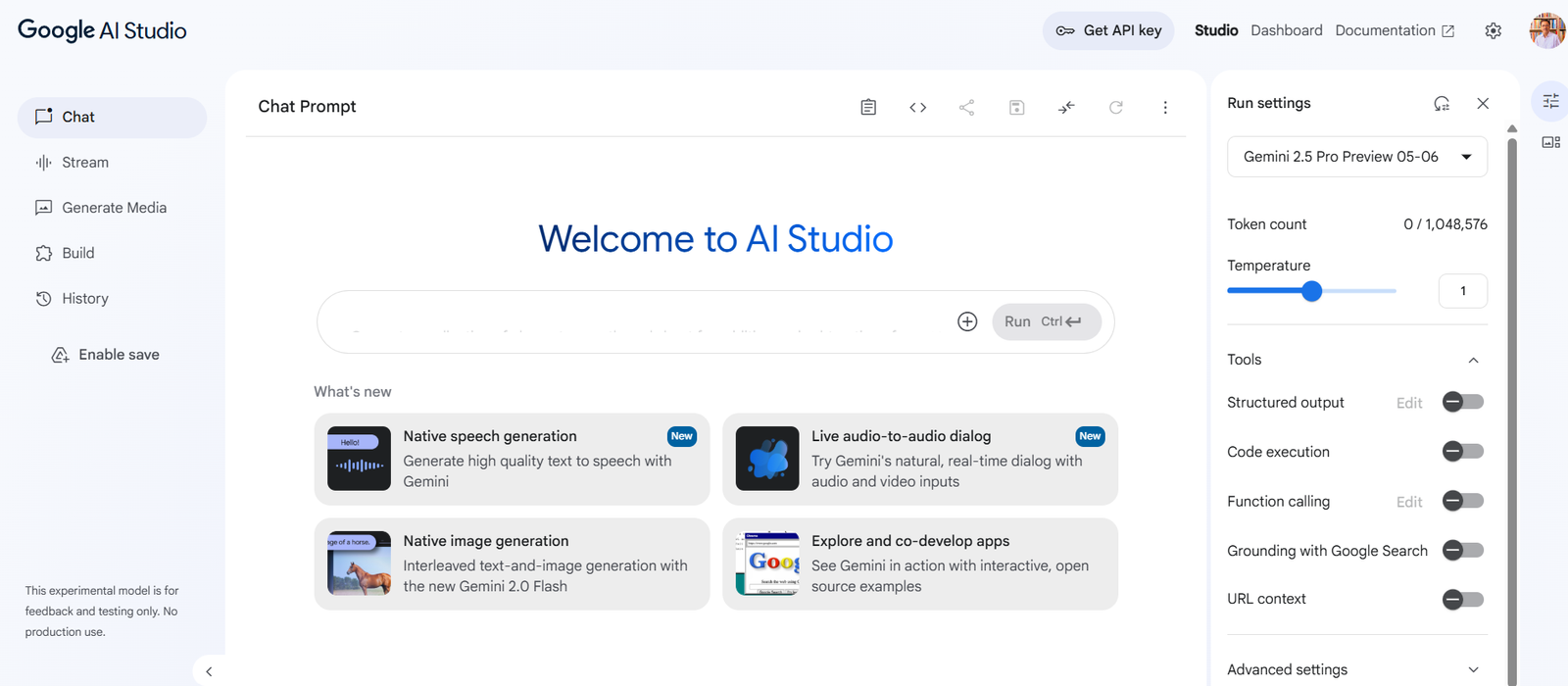
Google AI Studio is a web-based development environment that allows users to quickly test and refine prompts using Google’s Gemini models (e.g., Gemini 1.5). It’s designed to serve as a lightweight prototyping tool for developers and teams building generative AI features without the overhead of full-scale development.
With AI Studio, users can interact with multimodal models that support text, image, and audio inputs, test outputs instantly, and export their prompts into working code for integration into apps. It’s a key part of Google’s broader Gemini ecosystem, which includes Vertex AI for production-grade AI development and deployment.
Google AI Studio emphasizes simplicity, security, and speed—allowing developers to quickly move from idea to working prototype in minutes.
Features
Gemini Model Access
Work directly with Gemini 1.5 models, including their multimodal capabilities (text, image, audio input support).
Prompt Testing Interface
A user-friendly browser environment for entering and adjusting prompts, viewing model responses, and tweaking configurations.
Multimodal Input Support
Supports various input types including plain text, JSON, code snippets, images, and soon, audio.
Code Export Functionality
Generate ready-to-use code in Python or other supported languages to call the Gemini API directly from your applications.
System Instructions and Prompt Templates
Customize system-level behavior with role instructions and use prebuilt prompt templates for tasks like summarization or Q&A.
Prompt Management and Versioning
Save, edit, duplicate, and organize prompt versions for iterative development and collaboration.
Free Tier Access with Google Account
Anyone with a Google account can access AI Studio for free to experiment with Gemini models.
Google API Key Integration
Use Google AI Studio to obtain your API key and connect with the Gemini API from your codebase or development tools.
Security and Privacy Controls
All prompts and data are stored securely in your Google account, ensuring user-level data protection and compliance.
How It Works
Google AI Studio operates as a simple, in-browser tool that provides access to powerful language and multimodal models via the Gemini API. Here’s a typical usage flow:
Sign in with Google Account
Visit https://aistudio.google.com and sign in using your Google credentials.Create a New Prompt Project
Select the Gemini model you want to use (such as Gemini 1.5 Pro), and start a new prompt workspace.Enter a Prompt
Type or paste your input prompt—this could be a question, task, instruction, or structured data.Add Context or Inputs
Upload images, documents, or system instructions if the task requires multimodal inputs or role guidance.Run and Refine
Hit “Submit” to get model output. Tweak the prompt, adjust model parameters (like temperature), and rerun as needed.Export Code
When satisfied, use the “Export to Code” feature to generate a Python snippet with the Gemini API call for integration into your project.Connect to Production Tools (Optional)
Move your prompt logic to Vertex AI for advanced capabilities like model tuning, fine-tuning, and deployment at scale.
Use Cases
Rapid Prototyping for AI Features
Quickly design and test generative AI features such as chatbots, summarizers, or creative writing tools.
Code Generation and Review
Use Gemini’s code understanding capabilities to build coding assistants, reviewers, or translators.
Customer Support Automation
Develop and refine prompts to generate intelligent, context-aware replies to user queries.
Education and Learning Tools
Create tutors or quiz generators that respond to educational content across various formats.
Data Extraction and Transformation
Use AI Studio to prototype prompts that extract structured data from unstructured text or documents.
Creative Content Generation
Generate blog posts, social media content, and story outlines by iterating on creative prompts.
Multimodal Applications
Prototype interactions that involve both text and image inputs, such as visual question answering or document summarization.
Pricing
Google AI Studio itself is free to use for prototyping purposes. Users can sign in with their Google account and begin experimenting immediately. However, when moving to production or accessing the Gemini API programmatically, usage costs apply.
Free Tier
Access to Gemini 1.5 Pro for prompt design and testing
Limited usage credits for API exploration
No setup required beyond signing in with Google
Gemini API Pricing (via Google Cloud)
Charges are based on model usage (input/output tokens)
Different models (e.g., Gemini 1.5 Flash vs. 1.5 Pro) have different pricing tiers
Pay-as-you-go or via Google Cloud billing
For full API pricing details, visit:
https://cloud.google.com/vertex-ai/docs/generative-ai/pricing
Strengths
User-Friendly Interface
No coding required to begin exploring powerful models. Intuitive UI for building and testing prompts.
Access to Gemini Models
Direct interface with Google’s state-of-the-art large language and multimodal models.
Free for Exploration
Enables developers and product teams to test ideas with zero upfront cost.
Rapid Code Export
Instantly generate working code from your prompt tests to move into development faster.
Integration with Google Cloud
Seamless transition to Vertex AI for production-grade deployments, fine-tuning, and API usage.
Multimodal Capabilities
Unlike many competitors, supports image and audio inputs alongside text.
Secure and Privacy-Conscious
Data stored securely under your Google account with Google-grade data protection.
Drawbacks
Limited to Google Models
Only supports Gemini models—users cannot compare performance across other LLM providers (like OpenAI or Anthropic) within the interface.
Not Designed for Full-Scale Development
AI Studio is a prototyping tool; production features like model monitoring, fine-tuning, and scaling must be done in Vertex AI.
No Collaboration Tools Yet
Currently lacks built-in team collaboration, sharing, or comment features for prompt projects.
Limited Input Customization
Advanced settings (like few-shot examples or tool use) are better supported through the Gemini API or Vertex AI rather than AI Studio itself.
Comparison with Other Tools
Google AI Studio vs OpenAI Playground
Both are browser-based tools for prompt testing. AI Studio provides direct access to Gemini models and multimodal support, while OpenAI Playground supports GPT models and better tool integration like function calling.
Google AI Studio vs Claude Console (Anthropic)
Claude Console offers prompt testing for Claude models. AI Studio focuses on Google’s ecosystem and provides faster integration with Google Cloud tools.
Google AI Studio vs LangChain or PromptLayer
AI Studio is designed for interactive prompt prototyping, not workflow orchestration or prompt observability. LangChain and PromptLayer are developer tools for production LLM workflows.
Google AI Studio vs Vertex AI
AI Studio is for experimentation. Vertex AI is for deploying, managing, and scaling AI models in production with advanced controls and infrastructure support.
Customer Reviews and Testimonials
Early adopters and developers praise Google AI Studio for its ease of use and rapid prototyping capabilities:
“AI Studio gave us a fast way to test prompts before integrating them into our customer support system.”
— Developer, SaaS Startup
“The export-to-code feature is incredibly useful. We built a functioning prototype in under 30 minutes.”
— Product Manager, E-learning Platform
“Gemini’s multimodal support and Google’s secure environment made this our go-to tool for AI experimentation.”
— ML Engineer, HealthTech Firm
“As someone new to AI, I was able to explore model capabilities without any installation or setup.”
— Educator, University Program
Conclusion
Google AI Studio is an essential tool for anyone looking to experiment with large language models—especially within the Google ecosystem. By offering a lightweight, no-code environment to test Gemini models, it accelerates innovation and simplifies the journey from idea to implementation.
Whether you’re a developer prototyping new AI features or a business evaluating generative AI capabilities, Google AI Studio helps you test, refine, and deploy faster—with the full power of Google’s AI infrastructure behind you.