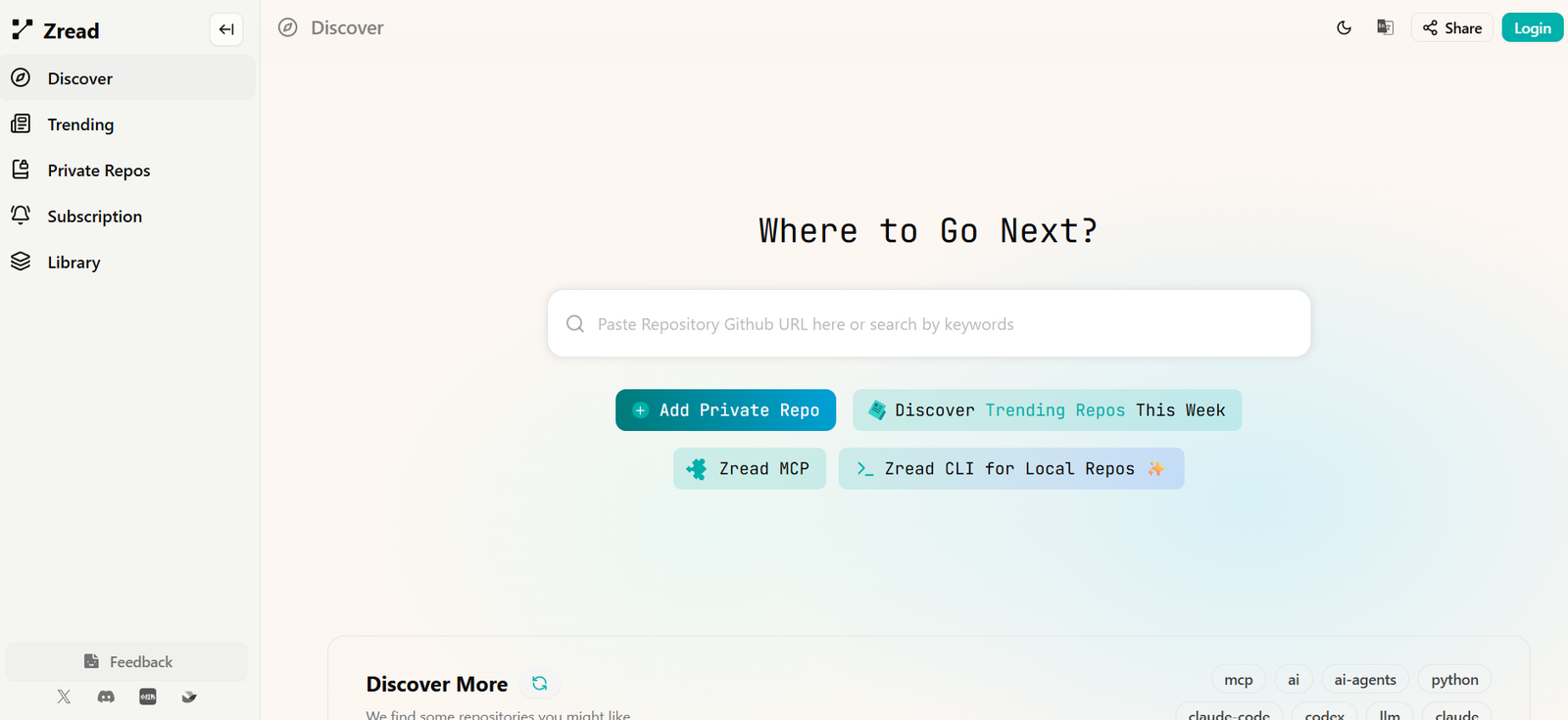
Zread is an AI-powered developer tool designed to make complex software repositories easier to understand.
Instead of manually browsing hundreds of files, folders, classes, and functions, developers can give Zread a GitHub repository and receive structured documentation explaining what the project does, how it is organized, and how its important components work together.
The platform is particularly useful when developers encounter an unfamiliar open-source project or join an existing software team and need to understand a large codebase quickly.
Users can paste a GitHub repository URL into Zread or search for repositories directly. Zread analyzes the codebase and creates a navigable documentation experience covering areas such as project overview, architecture, core modules, workflows, configuration, and implementation details.
Users can also ask AI questions about the repository instead of manually searching through source files.
Zread supports private repositories as well as public projects.
For local projects, the Zread CLI can generate documentation directly from a local repository. This makes it useful for internal codebases that may not be publicly available on GitHub.
Zread also provides an MCP server. Compatible AI development tools can use Zread’s repository search and code-understanding capabilities directly within their existing workflow.
Overall, Zread acts as an AI-powered reading and documentation layer between developers and large codebases.
Features
AI Repository Understanding
Zread analyzes software repositories and transforms their contents into easier-to-understand technical documentation.
This helps developers understand unfamiliar projects without reading every source file manually.
GitHub Repository Analysis
Users can paste a GitHub repository URL into Zread.
The platform then analyzes the repository and creates a structured reading experience.
Repository Overview
Zread can generate a high-level explanation of what a project does.
This provides a useful starting point before developers investigate individual modules.
Project Structure
The platform explains how directories, packages, modules, and important files are organized.
This can make large repositories considerably easier to navigate.
Core Module Documentation
Zread identifies important parts of a project and creates documentation explaining their responsibilities.
Architecture Explanation
Generated documentation can explain how major components of a software project relate to each other.
Workflow Documentation
Zread can describe important workflows implemented within a repository.
This is useful when understanding the code requires following logic across multiple files.
Source-Aware Documentation
Generated pages can reference the underlying source files used to create an explanation.
This allows developers to move from the AI-generated explanation back to the actual implementation.
Ask AI
Zread provides an AI question-and-answer interface for repositories.
Developers can ask questions about the codebase instead of manually locating every relevant file.
Repository-Specific Questions
Questions can focus on areas such as:
What the repository does
How a feature works
Where functionality is implemented
How modules interact
How configuration works
Which files are important
How a workflow is structured
Difficulty Levels
Documentation pages can indicate an approximate reading level such as Beginner, Intermediate, or Advanced.
This helps users decide which sections to read first.
Structured Reading Path
Generated documentation can recommend what users should explore next.
This creates a guided learning experience rather than presenting unrelated AI summaries.
Source File References
Documentation pages identify source files associated with the explanation.
Developers can use these references to inspect the original code when greater technical detail is required.
Public Repository Discovery
Zread provides discovery features for exploring repositories.
Users can search for projects rather than entering a GitHub URL manually.
Trending Repositories
The platform includes a Trending section for discovering repositories receiving attention.
Private Repository Support
Zread supports private repositories.
This makes it potentially useful for development teams working on proprietary software rather than only public open-source projects.
Repository Library
Users can maintain a Library of repositories they are interested in or working with.
Zread CLI
Zread provides a command-line interface for local repository workflows.
The CLI is particularly useful when developers want to generate project documentation from code stored on their own machine.
Local Repository Documentation
Developers can run Zread from inside a local project directory.
The CLI can analyze the project and generate a set of documentation for the repository.
Automatic CLI Guidance
Running the main Zread command inside a project can suggest the appropriate next action.
Depending on the repository’s state, this can include logging in, generating documentation, or opening existing documentation.
Local Documentation Browser
After documentation has been generated, users can open it in a browser through the CLI.
The documentation can contain sections such as Overview, Project Structure, Core Modules, and Conventions.
Team Onboarding
Local documentation can provide new developers with an organized entry point into an existing codebase.
Instead of explaining the entire architecture manually, teams can use generated documentation as a starting resource.
AI Coding Context
Generated documentation can provide AI coding tools with clearer context about the structure and conventions of a project.
This can help coding agents understand a repository before attempting modifications.
Zread MCP
Zread provides a Model Context Protocol server.
MCP allows compatible AI applications to use Zread’s repository-understanding capabilities as external tools.
Documentation Search Through MCP
The Zread MCP search_doc capability allows an AI assistant to search documentation, code, and comments within a repository.
It can help answer questions about:
Repository purpose
Installation
Core modules
Important workflows
Documentation
Recent issues and commits
Contributor background
Repository Structure Through MCP
The get_repo_structure capability allows compatible AI assistants to inspect the structure of a repository or individual directory.
An AI coding agent can first understand the hierarchy and then decide which files require deeper investigation.
File-Level Analysis
Zread MCP can open individual files for more detailed analysis.
This allows an AI assistant to move from high-level documentation into the actual implementation.
AI Coding Tool Integration
Because Zread uses MCP, its repository intelligence can be used with compatible development environments and AI coding tools.
The official documentation specifically discusses workflows involving tools such as Cursor and Claude Code.
Zread Skill
Zread also provides an official skill for easier use with AI coding agents.
The CLI documentation describes using it with coding environments such as Claude Code, Codex, and OpenClaw.
How It Works
- Open Zread.
- Paste the URL of a GitHub repository into the search field.
- Alternatively, search for a repository by keyword.
- Zread analyzes the repository.
- The platform creates structured AI-generated documentation.
- Start with the repository overview to understand the project’s purpose.
- Explore project structure and architecture sections.
- Open individual modules and technical topics for deeper explanations.
- Review the source files listed alongside generated explanations when verification is required.
- Use Ask AI to ask specific questions about the repository.
- Follow suggested reading paths to explore related concepts.
- Save relevant repositories to your Library when appropriate.
For local projects, developers can install the Zread CLI.
They can then enter the local project directory and run Zread to generate documentation.
For AI coding assistants, developers can configure Zread MCP so the assistant can search repository documentation, inspect repository structure, and retrieve specific files.
Use Cases
Understanding Open-Source Projects
Developers can paste an unfamiliar GitHub repository into Zread and quickly learn what it does.
Developer Onboarding
New team members can use generated documentation to understand an existing project before making changes.
Legacy Code Understanding
Developers working with poorly documented codebases can use Zread to build an initial map of the project’s structure.
Architecture Exploration
Software engineers can use generated documentation to understand how major modules interact.
Code Research
Developers evaluating an open-source library can investigate its implementation before deciding whether to adopt it.
AI Coding Assistants
Zread MCP can provide repository context to compatible AI development tools.
Local Projects
The Zread CLI allows developers to generate documentation from code stored locally.
Private Repositories
Development teams can use private-repository support for internal software projects, subject to the applicable privacy and security requirements.
Technical Documentation
Teams can generate baseline documentation for projects that have limited written documentation.
Code Review Preparation
Developers can understand unfamiliar modules before reviewing changes made within them.
Learning From GitHub
Students and developers can explore high-quality open-source projects and use structured explanations to understand how production software is organized.
Contributor Onboarding
People interested in contributing to open-source software can use Zread to understand the architecture before submitting their first contribution.
Pricing
Zread provides public repository exploration through its web platform, while some advanced developer integrations have separate access requirements.
A clear, complete standalone pricing structure for every Zread web feature is not consistently published on the publicly accessible pages reviewed.
Zread MCP
Zread MCP is currently available to users who have purchased a GLM Coding Plan.
Users configure their GLM token when connecting Zread MCP to a compatible local client.
MCP usage is billed according to the number of requests.
Specific quotas and current prices are determined by the applicable GLM Coding Plan.
CLI
Zread provides installation instructions for its CLI through npm and Homebrew.
Users should check the current Zread account and associated plan information for any usage restrictions related to documentation generation or private repositories.
Because plan availability and MCP quotas can change, users should confirm current pricing before purchasing access specifically for Zread MCP or production use.
Strengths
Makes large codebases easier to understand.
Transforms repositories into structured documentation.
Works with GitHub repositories.
Supports private repositories.
Provides a CLI for local codebases.
Generates project overviews automatically.
Explains repository structure.
Documents important modules and workflows.
Connects explanations with relevant source files.
Provides an AI question-and-answer interface.
Allows developers to ask repository-specific questions.
Creates guided reading paths.
Useful for onboarding new developers.
Can help document poorly documented projects.
MCP integration makes repository intelligence available to AI coding assistants.
MCP supports documentation and code search.
AI assistants can inspect repository structure before opening files.
Individual files can be retrieved for deeper analysis.
Useful for both human developers and AI coding agents.
Can reduce the initial time required to understand unfamiliar open-source projects.
Drawbacks
AI-generated documentation can contain mistakes.
Zread itself warns that AI responses may contain errors.
Developers should verify important technical conclusions against the actual source code.
Generated documentation can become outdated when a repository changes substantially.
Very large or rapidly changing repositories may require regeneration or updated analysis.
AI explanations may simplify complicated architectural decisions.
Generated documentation cannot fully replace documentation written by developers who understand the history and design decisions behind a project.
Private repositories require additional consideration around permissions, security, and organizational policies.
Some advanced functionality, particularly Zread MCP, requires access through a separate GLM Coding Plan.
A simple public pricing page covering every Zread feature is not clearly available.
Developers requiring highly precise code analysis should treat Zread as a navigation and understanding aid rather than an authoritative substitute for inspecting the source.
Comparison with Other Platforms
Zread competes broadly with AI code-understanding tools, repository documentation generators, coding assistants, and code-search platforms.
Its focus is different from a conventional AI coding assistant.
Tools such as Cursor or Claude Code primarily help developers write, modify, debug, and reason about code. Zread focuses more specifically on turning an existing repository into something that is easier to read and understand.
Its MCP integration allows these two approaches to work together. A coding assistant can use Zread to search repository documentation, inspect the project structure, and retrieve files before attempting a coding task.
Compared with traditional documentation generators, Zread does more than extract comments and API signatures. It uses AI to explain architecture, modules, workflows, and implementation concepts in natural language.
Compared with manually asking a general AI chatbot about individual source files, Zread provides a repository-level structure and persistent documentation experience.
The combination of web-based GitHub exploration, local CLI documentation, and MCP access for coding agents is its most important differentiator.
Customer Reviews and Testimonials
A substantial collection of independently verified customer testimonials is not prominently available on Zread’s official website.
The platform instead allows users to explore real repositories that have already been processed by Zread.
These public examples provide a practical way to evaluate the quality and depth of generated documentation before relying on the service for a development project.
Users should remember that Zread explicitly states that AI-generated responses may contain mistakes.
For professional software development, the most useful evaluation is therefore to test Zread against a repository the developer already understands and compare its explanations with the actual source code.
Conclusion
Zread is an AI-powered codebase understanding and documentation platform designed to solve a common developer problem: understanding an unfamiliar repository quickly.
Users can provide a GitHub repository and receive structured documentation explaining the project’s purpose, architecture, important modules, workflows, and implementation details. They can then ask AI questions and trace explanations back to relevant source files.
The Zread CLI extends this approach to local projects, making it useful for internal development workflows and team onboarding.
Zread MCP adds another important layer. Instead of documentation being useful only to human developers, compatible AI coding assistants can search Zread documentation, inspect repository structures, and retrieve individual files as part of their own reasoning process.
The platform does not eliminate the need to read source code. AI-generated explanations can be incomplete or incorrect, and important technical decisions should always be verified against the repository itself.
Overall, Zread is most useful for software developers, engineering teams, open-source contributors, students, and users of AI coding agents who want a faster way to navigate, understand, and document complex codebases.