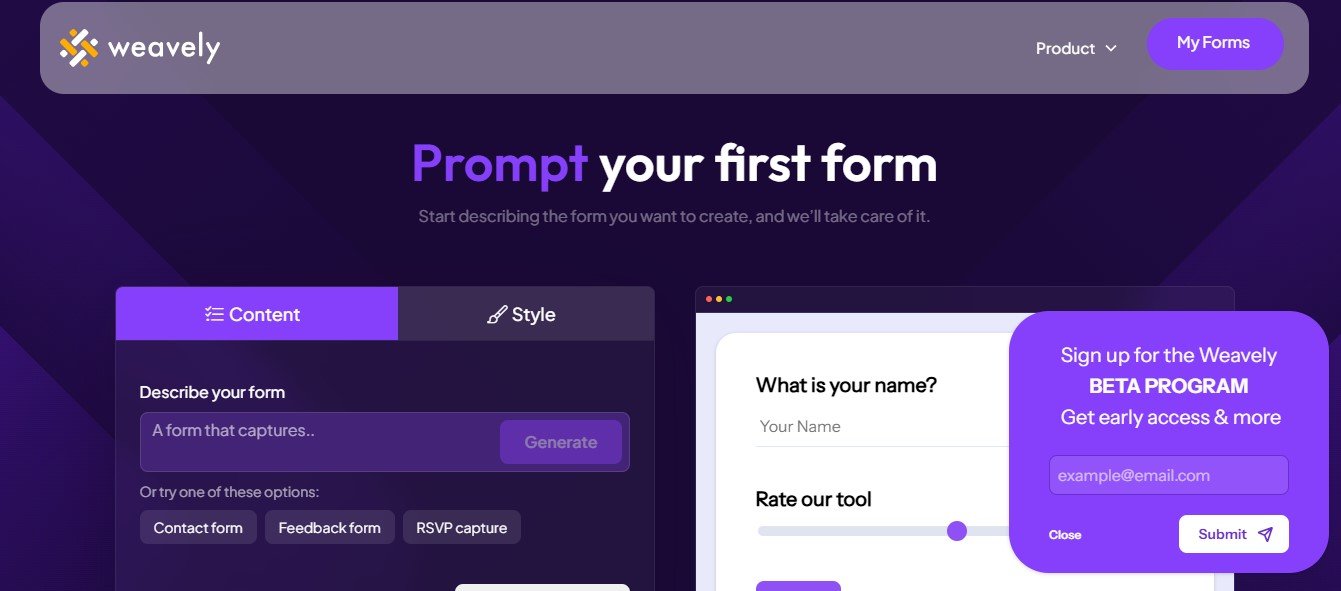
Weavely is an AI-powered form builder that integrates directly into Figma, allowing users to create and publish interactive web forms without coding. By streamlining the design-to-deployment process, Weavely enables designers, marketers, and businesses to create personalized, engaging forms efficiently. With advanced features like conditional logic, answer piping, and seamless integrations, Weavely provides a powerful solution for anyone looking to enhance their form creation workflow.
Features of Weavely
1. AI Form Generation
Weavely leverages AI to generate form elements and content quickly. This feature reduces the manual work required to build web forms, making it easier for users to create fully functional, interactive forms.
2. Seamless Figma Integration
As a Figma plugin, Weavely allows users to design forms directly in Figma and publish them without leaving the design environment. This seamless integration helps maintain design consistency and streamlines workflows.
3. Advanced Form Logic
Weavely supports conditional logic and answer piping, allowing users to create dynamic forms that adapt based on responses. This makes forms more personalized and engaging for users, improving data collection quality.
4. Custom Branding and Design Freedom
Weavely provides complete design freedom, enabling users to customize forms to align with brand aesthetics. With access to Figma’s robust design tools, users can create unique, visually appealing forms.
5. Data Integration and Management
Weavely offers native integrations with popular tools like Notion, Airtable, Google Sheets, and Zapier. These integrations allow for seamless data management and automated workflows.
6. Easy Publishing and Sharing
Once a form is designed, users can publish it with just a few clicks. Weavely provides shareable links and embed options, making it easy to distribute forms and collect responses.
7. Collaboration Tools
Weavely supports team collaboration, enabling multiple users to work on form designs simultaneously within Figma. This is particularly useful for agencies and design teams.
How Weavely Works
- Install the Plugin – Add the Weavely plugin to your Figma workspace.
- Design the Form – Use Figma’s design tools to create the form layout and elements.
- Apply Functionality – Assign form functionalities like input fields, conditional logic, and answer piping using the Weavely plugin.
- Publish the Form – Once the design is complete, publish the form directly from Figma.
- Share and Collect Responses – Generate shareable links or embed the form into your website to start collecting responses.
- Analyze Data – Use Weavely’s integrations to export and analyze collected data in tools like Google Sheets or Airtable.
Use Cases of Weavely
- User Research – Create customized surveys and feedback forms to gather user insights.
- Marketing Campaigns – Design branded lead capture forms that align with your marketing materials.
- Customer Feedback – Build post-purchase feedback forms to improve customer satisfaction.
- Event Registration – Create visually appealing event registration forms with personalized fields.
- Internal Forms – Design internal forms for employee feedback, onboarding, or task tracking.
Pricing Plans
Weavely offers flexible pricing to suit different user needs:
- Free Plan – Ideal for beginners, includes up to 5 forms and 100 responses per month.
- Starter Plan (€10/month) – Includes unlimited forms, 1,000 responses per month, file upload capabilities, and removal of Weavely branding.
- Professional Plan (€30/month) – Offers unlimited forms, 5,000 responses per month, 3 seats, custom domains, and enhanced features.
- Enterprise Plan – Custom pricing for larger organizations with high response limits and dedicated support.
Strengths of Weavely
✅ No-Code Solution – Perfect for users with no coding experience, allowing them to create interactive forms effortlessly.
✅ Seamless Figma Integration – Designers can build and publish forms directly from Figma, maintaining a consistent workflow.
✅ Advanced Logic Features – Supports dynamic forms with conditional logic and answer piping.
✅ Extensive Integrations – Easily connect forms to tools like Airtable, Google Sheets, and Zapier.
✅ Custom Branding – Ensure forms align with your brand identity by customizing designs and removing Weavely branding on paid plans.
Drawbacks of Weavely
❌ Figma Dependency – Requires a Figma account and familiarity with the platform, which might be a barrier for non-designers.
❌ Limited Standalone Functionality – Weavely functions primarily as a Figma plugin and may not be suitable for users seeking a standalone form builder.
❌ Response Limits on Free Plan – The free version has limits on the number of forms and responses, which may not be sufficient for larger projects.
Comparison with Other Tools
Compared to traditional form builders like Google Forms or Typeform, Weavely stands out for its design flexibility and seamless Figma integration. Unlike other tools that provide limited customization options, Weavely allows designers to fully control the look and feel of their forms. Additionally, Weavely’s advanced logic features and data integrations make it a powerful option for businesses looking to streamline data collection workflows.
While tools like Typeform are better for quick form creation, Weavely excels in providing a more personalized and branded form-building experience.
Customer Reviews and Testimonials
Users have praised Weavely for its seamless integration with Figma and its ability to create dynamic, interactive forms quickly. Many appreciate the custom branding options and the platform’s flexibility in handling complex form logic.
One designer shared, “Weavely has completely changed how I handle form creation. Being able to design and publish forms without leaving Figma is a game-changer.”
Another user commented, “I love the conditional logic feature. It makes forms more personalized, which has improved our response rates.”
Conclusion
Weavely is a powerful tool for designers, marketers, and businesses looking to streamline their form creation process. By integrating directly with Figma, Weavely allows users to design, customize, and publish interactive forms without the need for coding.
Its advanced features, such as conditional logic, answer piping, and extensive data integrations, make it a versatile solution for creating dynamic and personalized forms. While it may have some limitations, such as its dependency on Figma, Weavely’s strengths in customization, branding, and workflow efficiency make it a valuable tool for design teams and agencies.
If you’re looking for a form builder that offers design freedom, seamless integration, and advanced functionality, Weavely is an excellent choice to enhance your form-building workflow.