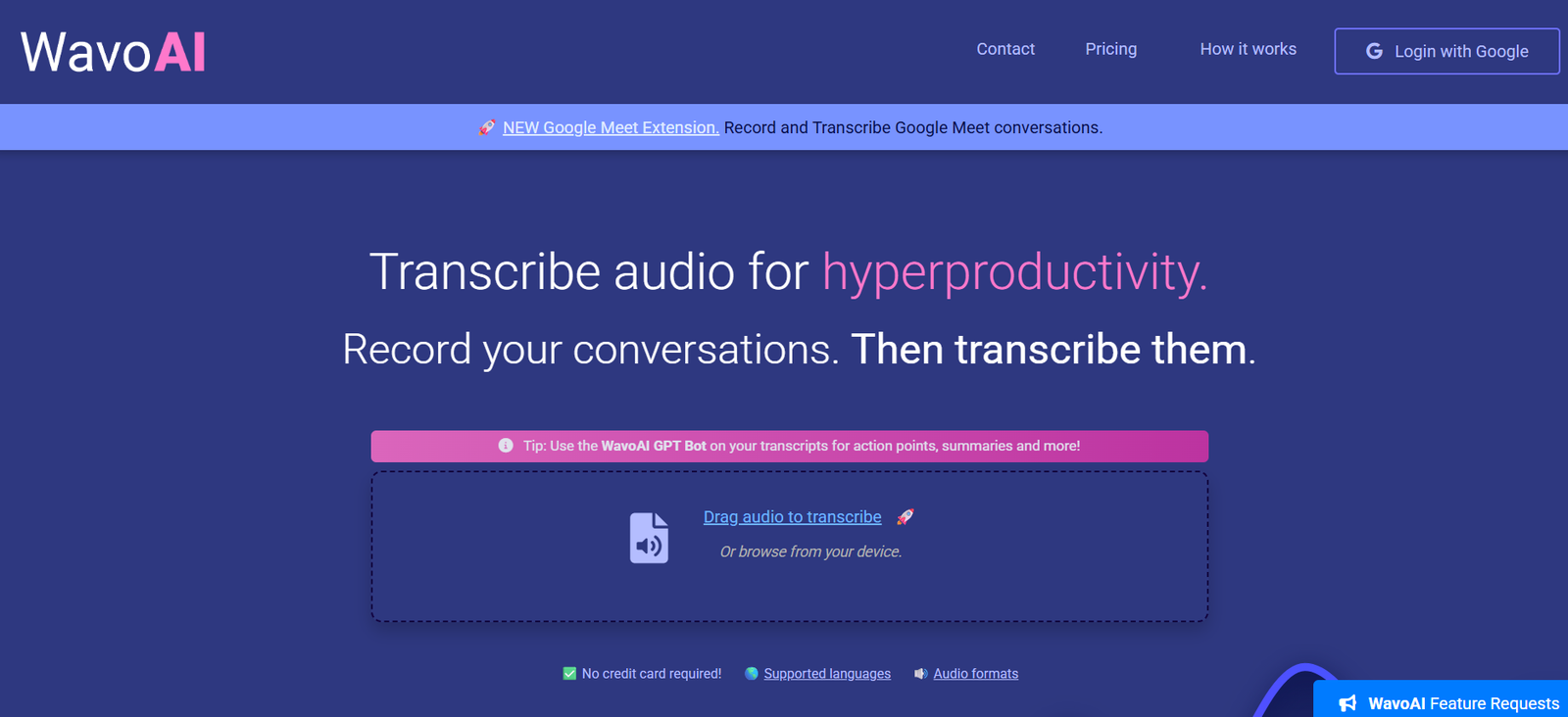
WavoAI is an AI-powered audio transcription and analysis platform designed to turn recorded conversations into useful, searchable information. It combines automatic speech-to-text transcription with an interactive AI assistant that can summarize recordings, identify important points and extract actionable information.
Instead of simply converting audio into written text, WavoAI helps users work with the information contained inside a recording. Once an audio file has been transcribed, users can explore summaries, action points, tasks and other insights generated from the conversation.
The platform includes speaker identification, also known as diarization, which helps distinguish between different people in a recording. It also provides transcript annotations and supports multiple languages, accents and dialects.
WavoAI is useful for professionals who regularly work with meetings, interviews, lectures, podcasts, research conversations and other long recordings. Its potential users include journalists, researchers, writers, podcast editors, marketers, video producers, translators and business teams.
The platform also offers a Google Meet extension for recording and transcribing online conversations.
Features
AI-Powered Transcription
WavoAI automatically converts recorded speech into written transcripts. It is designed to work with different languages, accents and dialects, making it suitable for a variety of professional and personal transcription needs.
Speaker Identification
The platform includes speaker diarization, which identifies different speakers within a conversation. This makes transcripts easier to understand when working with interviews, meetings, focus groups and multi-person discussions.
Interactive AI Assistant
One of WavoAI’s main features is its interactive AI assistant. Instead of manually reading an entire transcript, users can work with AI to explore the information contained in the recording.
This can be particularly useful when dealing with lengthy interviews, meetings or research recordings.
AI Summaries
WavoAI can generate summaries from completed transcripts. Users can quickly understand the main subjects discussed without reading every part of a long conversation.
Action Points
The AI can identify important actions arising from conversations. This can help business teams turn recorded meetings into practical follow-up tasks.
To-Do Identification
WavoAI can extract potential tasks and to-do items from transcripts, making recorded conversations more useful for productivity and project management.
Transcript Annotations
Users can work with annotations within their transcripts. This helps organize important sections and makes lengthy recordings easier to navigate.
Multiple Language Support
WavoAI supports transcription across multiple languages and is designed to accommodate different accents and dialects.
This makes it useful for international teams, researchers, translators and professionals working with multilingual audio.
Google Meet Extension
WavoAI provides a Google Meet extension that allows users to record and transcribe Google Meet conversations.
This can be useful for online meetings, interviews, team discussions and other remote conversations.
Time-Coded Transcripts
For applications such as podcast and video production, WavoAI provides time-coded transcripts. These can help editors locate specific sections of audio or video more efficiently.
Workflow Integration
WavoAI is designed to fit into existing professional workflows. The company presents integrations and workflow compatibility as part of its productivity-focused approach.
How It Works
Users first create a WavoAI account.
They can then record a conversation or upload an existing audio recording to the platform.
The audio file can be dragged into the transcription interface or selected directly from the user’s device.
WavoAI processes the recording and converts the spoken content into written text.
Where multiple people are speaking, speaker identification helps separate their contributions within the transcript.
Users can review and navigate the completed transcript and work with transcript annotations.
The integrated AI assistant can then analyze the conversation and produce summaries, insights, action points and to-do items.
For Google Meet conversations, users can use the available extension to record and transcribe meetings.
The resulting information can then be used for research, content production, reporting, meeting follow-up or other professional workflows.
Use Cases
Business Meetings
Teams can transcribe recorded meetings and use AI to extract summaries, important decisions, action points and tasks.
Journalists
Journalists can convert interviews, press conferences and recorded conversations into written transcripts. Speaker identification makes multi-person interviews easier to review.
Academic Researchers
Researchers can use WavoAI for lectures, interviews and focus groups. AI analysis can help identify important themes, patterns and key points within recorded material.
Podcast Editors
Podcast creators can use time-coded transcripts to locate specific sections of an episode. AI summaries can also help organize podcast content.
Writers and Authors
Authors can record spoken ideas and convert them into written material. AI tools can help organize these thoughts and create a foundation for outlines or future drafts.
Video Producers
Video creators can use transcripts to support subtitle creation, scripting and post-production workflows.
Marketing Professionals
Marketing teams can transcribe customer interviews, focus groups and feedback sessions. AI analysis can help surface themes and useful customer insights.
Public Relations Professionals
PR teams can transcribe media interviews, press interactions and other communications for documentation and subsequent analysis.
Translators
Language professionals can convert spoken material into written transcripts before beginning the translation process.
Event Organizers
Speeches, presentations and event discussions can be converted into searchable written records and summarized for post-event documentation.
Social Media Teams
Recorded videos, live streams and other spoken content can be transcribed and repurposed into written material for social media workflows.
Pricing
WavoAI currently offers Trial, Pro and Enterprise options.
Trial: Free
The free Trial plan includes:
1 hour transcription limit
Partial AI content analysis
No credit card is required to start using the trial.
Pro: $8.99 per Month
The Pro plan is priced at $8.99 per month and includes:
Unlimited audio
Unlimited transcripts
Full AI analysis
Users can cancel the subscription at any time.
Enterprise: Custom Pricing
The Enterprise plan is intended for organizations dealing with high volumes and long transcripts.
It provides access to more advanced content analysis capabilities. Enterprise pricing is not publicly specified, so interested organizations need to contact WavoAI for details.
Strengths
WavoAI combines transcription and AI-powered analysis instead of limiting the platform to basic speech-to-text conversion.
Speaker identification makes it useful for meetings, interviews and conversations involving multiple participants.
Interactive AI analysis can reduce the amount of time required to manually review lengthy recordings.
The ability to extract summaries, action points and to-do items is particularly useful for business meetings and professional conversations.
Support for multiple languages, accents and dialects expands its usefulness for international users.
Time-coded transcripts can help podcast editors and video producers navigate long recordings.
The Google Meet extension provides an additional option for recording and transcribing online conversations.
The free trial allows users to process up to one hour of transcription before moving to a paid plan.
At $8.99 per month, the Pro plan offers unlimited audio and transcripts according to the current official pricing information.
Drawbacks
The free version is limited to one hour of transcription and provides only partial AI content analysis.
Users who need full AI analysis and unrestricted transcription will need the paid Pro plan.
As with other automatic transcription services, results can be affected by background noise, poor microphones, overlapping conversations, unusual terminology or difficult accents.
AI-generated summaries and action points may occasionally miss context or interpret a conversation incorrectly. Important information should therefore be checked against the original recording and transcript.
The official website provides limited technical detail about some integrations and supported audio formats on its main public pages.
Organizations handling confidential or regulated conversations should also review WavoAI’s current privacy and data-handling policies before uploading sensitive recordings.
Comparison with Other Platforms
Many transcription platforms focus primarily on converting audio into text. WavoAI extends this process by adding an interactive AI layer that helps users understand and work with the resulting transcript.
Its combination of transcription, speaker identification, annotations, summaries, action points and to-do extraction makes it closer to an AI conversation analysis tool than a basic transcription service.
Compared with meeting-focused AI assistants, WavoAI has broader potential uses because uploaded recordings can come from interviews, podcasts, academic research, events and other sources.
Compared with specialized podcast or video transcription platforms, WavoAI places greater emphasis on AI-generated insights and interactive analysis.
The best choice will depend on the user’s needs. Someone requiring only occasional transcription may prefer a simple speech-to-text service, while professionals who regularly need to analyze long recordings may find WavoAI’s AI features more useful.
Customer Reviews and Testimonials
WavoAI provides a public feedback and feature-request area where users can leave comments and suggestions.
The feedback displayed on the platform includes positive comments about transcription accuracy and overall satisfaction with the service. Users have also submitted requests for additional languages, export options, transcript search, audio playback and other improvements.
These comments appear within WavoAI’s own feedback environment rather than on an independent review platform, so they should be considered user feedback published through the company’s website.
Conclusion
WavoAI is a practical AI transcription platform for users who want more than a basic written version of their audio recordings. It combines speech-to-text conversion with speaker identification, transcript annotations and an interactive AI assistant for extracting useful information.
Its ability to generate summaries, action points and to-do items makes it particularly relevant for business meetings, interviews and research. Journalists, researchers, podcast editors, writers, marketers, video producers and other professionals working with large amounts of recorded content may also find it valuable.
The free trial provides a convenient way to test the platform with up to one hour of transcription, while the $8.99 monthly Pro plan is aimed at users requiring unlimited audio, unlimited transcripts and full AI analysis.
Overall, WavoAI is worth considering for people who want to turn long recordings into organized transcripts and actionable AI-generated insights rather than simply converting speech into text.