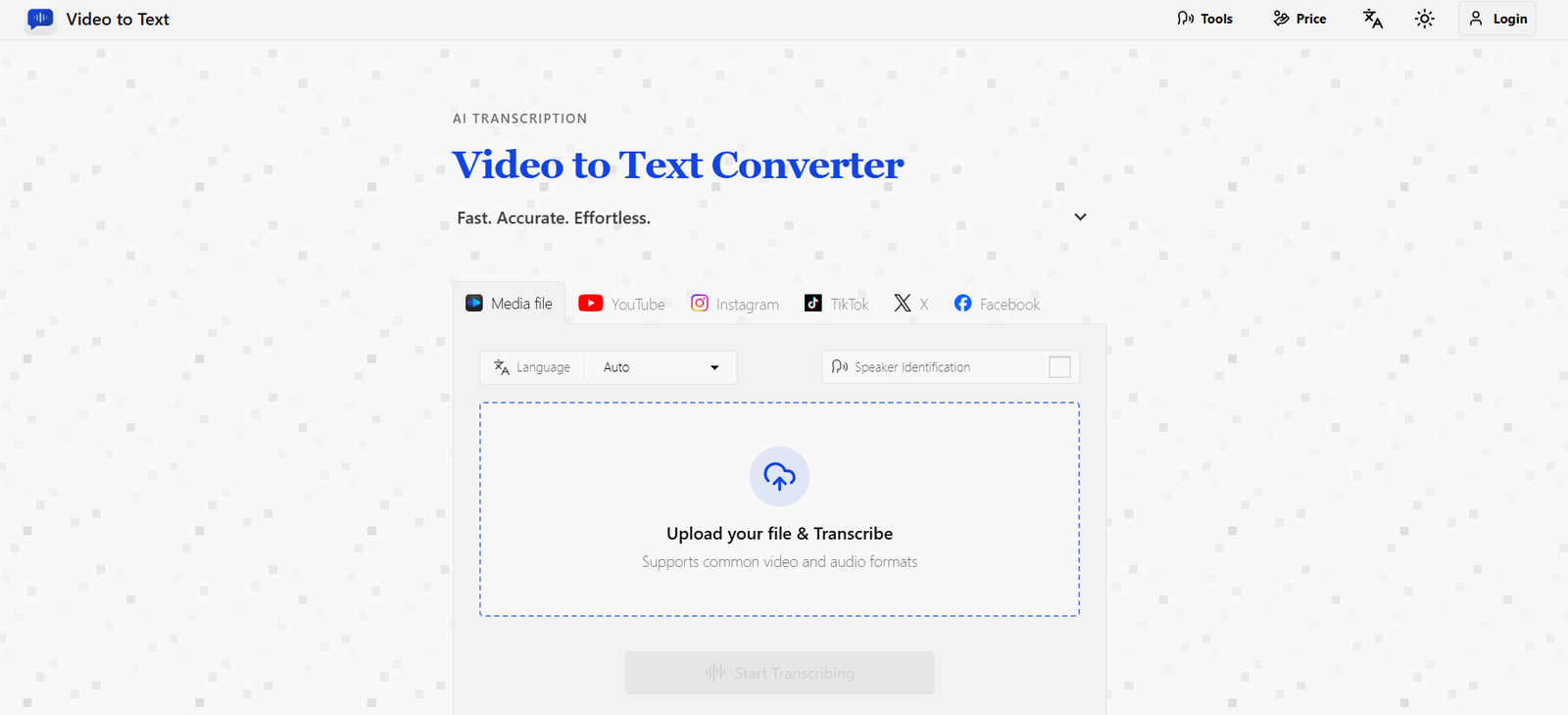
Video2Text is an online AI transcription tool that converts spoken content from videos and audio recordings into searchable, editable text.
Users can upload a media file, choose a language, enable speaker identification and let the AI generate a transcript automatically.
The platform supports 99 languages for uploaded media and provides automatic language detection. It can also handle recordings where speakers switch between multiple languages.
One of its useful features is speaker diarization. When enabled, Video2Text identifies different speakers and separates their dialogue, making transcripts easier to follow for interviews, meetings, podcasts and panel discussions.
Timestamps are included to connect transcript text with specific moments in the source recording. This is particularly useful for subtitle creation, video editing and reviewing long recordings.
Finished transcripts can be exported as TXT, SRT, VTT or CSV.
Video2Text also supports public social-media videos. Instead of downloading a video first, users can paste a public link from YouTube, TikTok, Instagram, X or Facebook and generate a transcript.
The platform uses straightforward pay-as-you-go pricing rather than requiring a monthly subscription. New users receive 30 free transcription minutes.
Features
AI Video Transcription
Video2Text converts speech inside video files into written text using AI speech recognition.
This reduces the time required to manually transcribe interviews, courses, meetings and other recordings.
Audio Transcription
The service is not limited to video.
Users can upload common audio formats and convert podcasts, voice recordings, interviews and lectures into text.
99 Languages
Uploaded-media transcription supports 99 languages.
These include widely used languages such as English, Spanish, Portuguese, French, German, Italian, Chinese and Japanese.
Automatic Language Detection
Users do not always need to know the language before processing a recording.
Automatic detection can identify the spoken language in supported content.
Multilingual Recognition
Video2Text can process recordings containing more than one language.
This is useful for bilingual interviews, international meetings and conversations where speakers switch languages.
Speaker Identification
Speaker diarization identifies different speakers in a conversation.
Instead of producing one continuous block of text, the transcript can indicate who said what.
Speaker identification must be enabled before transcription if the user wants speaker labels in the exported transcript.
Built-In Timestamps
Generated transcripts contain timestamps.
These make it easier to locate specific parts of the original recording.
YouTube Transcription
Users can paste a public YouTube video or YouTube Shorts link and generate a transcript.
TikTok Transcription
Public TikTok videos can be converted into searchable text without requiring a manual media upload.
Instagram Transcription
Video2Text supports public Instagram videos and Reels.
X Video Transcription
Public videos posted on X can be converted into transcripts.
Facebook Transcription
The platform also supports public Facebook videos and Reels.
Social-Media URL Processing
Social-media transcription uses a particularly simple workflow.
Users paste a public URL rather than downloading and uploading the source video manually.
TXT Export
Transcripts can be downloaded as plain TXT files.
This is useful for editing, research, note-taking and content repurposing.
SRT Export
Users can export SRT subtitle files.
These can be imported into many video-editing and publishing applications.
VTT Export
WebVTT export is available for web-based captions and subtitle workflows.
CSV Export
Structured transcript information can also be exported as CSV.
This can be opened in spreadsheet applications or used in data-processing workflows.
Large File Support
Uploaded files can be as large as:
5 GB
This makes the platform suitable for many high-quality recordings.
Long Recording Support
Individual media files can be up to:
10 hours
This is useful for lectures, conferences, interviews and other long-form recordings.
Fast Processing
Video2Text emphasizes rapid AI transcription.
The company states that a one-hour audio recording can often be processed in well under a minute.
Actual processing time depends on factors such as upload speed, file size and network conditions.
Temporary File Storage
Uploaded files are temporarily stored so that the transcription workflow can operate.
Users are encouraged to export results after processing rather than relying on the platform as permanent transcript storage.
Supported Formats
Video2Text supports common video and audio file formats.
Video Formats
Supported formats include:
MP4
MOV
MKV
WEBM
M4V
The exact supported-format list shows some minor variation between individual documentation pages, so users with less common formats should verify compatibility in the current upload interface.
Audio Formats
Supported audio formats include:
MP3
WAV
M4A
FLAC
OGG
AAC
OPUS
Some documentation also specifically lists OGA.
Export Formats
Transcripts can be exported as:
TXT
SRT
VTT
CSV
How It Works
- Open Video2Text.
- Sign in to your account.
- New users automatically receive 30 free transcription minutes.
- Upload a supported video or audio file.
- Alternatively, paste a public YouTube, TikTok, Instagram, X or Facebook video URL.
- Select the spoken language if you know it.
- Use automatic language detection when appropriate.
- Choose multilingual detection for recordings containing multiple languages.
- Enable speaker identification if you want different speakers labeled.
- Start the transcription.
- The AI analyzes the audio and converts speech into text.
- Review the generated transcript and timestamps.
- Export the result in TXT, SRT, VTT or CSV format.
Use Cases
YouTube Creators
Creators can turn spoken video content into transcripts and subtitle files.
Social Media Creators
Public TikTok, Instagram, X and Facebook videos can be converted into reusable text.
Podcast Transcription
Podcasters can convert episodes into written transcripts for websites, show notes and content repurposing.
Interviews
Journalists and researchers can transcribe recorded interviews and use speaker labels to distinguish participants.
Meetings
Teams can turn meeting recordings into searchable written records.
Webinars
Long webinars can be converted into transcripts for later reference.
Online Courses
Educators can create text versions and captions for recorded lessons.
Lectures
Students and teachers can transform lectures into searchable study material.
Subtitle Creation
SRT and VTT exports make the platform useful for creating captions.
Journalism
Reporters can transcribe recorded interviews and quickly locate important statements using timestamps.
Research
Researchers working with recorded interviews can convert conversations into text for analysis.
Content Repurposing
Creators can turn spoken videos into source material for articles, summaries, social posts and other content.
Language Learning
Learners can follow spoken recordings alongside transcripts to study vocabulary and comprehension.
Multilingual Content
Automatic and multilingual recognition can help teams process recordings involving several languages.
Pricing
Video2Text uses pay-as-you-go pricing.
There is no monthly subscription requirement.
Free Credits
30 minutes free
New users receive 30 free transcription minutes after signing in.
The free minutes do not expire.
Starter
$9.90 one-time
Includes:
200 transcription minutes
Approximately 20 minutes per $1
Recommended
$19.90 one-time
Includes:
600 transcription minutes
Approximately 30 minutes per $1
Best Value
$99 one-time
Includes:
6,000 transcription minutes
Approximately 60 minutes per $1
How Credits Work
For uploaded video and audio:
1 credit/minute = 1 minute of media
The current homepage also states that public social-media video transcription from YouTube, Instagram, TikTok, Facebook and X costs:
1 credit per video
with no stated video-length limit for that URL-based workflow.
Speaker Identification
Speaker identification does not cost extra.
It is included in the normal transcription usage.
Timestamps
Timestamps are also included without a separate charge.
Failed Transcriptions
Video2Text states that users are charged only after transcription has been successfully completed.
If an upload or transcription fails, the corresponding balance is not deducted.
Credit Expiration
Purchased transcription minutes remain in the user’s account until used.
Free minutes also do not expire.
Refunds
Video2Text provides a 14-day refund window for purchased credits, but only when the credits from that specific purchase have not been used.
Once any portion of a purchased credit package has been consumed, that order is no longer eligible for a refund.
Strengths
Supports both video and audio transcription.
99-language support for uploaded media.
Automatic language detection.
Supports multilingual recordings.
Speaker identification included.
Built-in timestamps.
TXT export.
SRT subtitle export.
VTT subtitle export.
CSV export.
Supports YouTube links.
Supports TikTok links.
Supports Instagram links.
Supports X videos.
Supports Facebook videos.
Accepts files up to 5 GB.
Supports recordings up to 10 hours.
30 free minutes for new users.
Free minutes do not expire.
No monthly subscription required.
Pay-as-you-go pricing.
Purchased minutes remain available until used.
Higher-volume packages significantly reduce per-minute cost.
No additional charge for speaker labels.
No additional charge for timestamps.
Failed transcription jobs are not charged.
14-day refund window for completely unused purchases.
Suitable for creators, students, journalists and teams.
Simple upload, transcribe and export workflow.
Drawbacks
Transcription accuracy depends on source audio quality.
Heavy background noise can reduce accuracy.
Strong accents or unclear speech may require manual corrections.
Overlapping speakers can make speaker identification more difficult.
Speaker labels must be enabled before transcription if they are required in the exported file.
AI transcripts should be reviewed before publication.
Highly technical terminology and unusual names may be transcribed incorrectly.
The service does not provide a full professional video-editing environment.
Its primary purpose is transcription rather than comprehensive meeting management.
Uploaded files are processed through cloud infrastructure rather than entirely on the user’s device.
Media may be sent to third-party AI technology suppliers for speech transcription.
The documentation contains some minor inconsistencies in its exact list of supported video formats.
Users should export important transcripts rather than treating the service as permanent cloud storage.
Privacy
Video2Text’s current Privacy Policy was last updated on March 28, 2026.
The service can collect account information including name, email address, profile image and internal account identifiers.
When users request transcription, the platform processes information including uploaded media, filenames, file size, media duration, selected language and speaker-label settings.
Uploaded media is stored through cloud infrastructure so that transcription can be completed.
Media and transcript information may also be sent to AI technology providers that perform speech transcription on behalf of Video2Text.
The platform keeps limited transcription-related records in the user’s browser for recent-history and export functionality.
These local records are designed to expire after approximately 72 hours or can be cleared sooner by the user.
Payment processing is handled through external payment providers.
Video2Text states that it does not store complete payment-card information on its own servers.
Users processing highly confidential interviews, meetings or recordings should review the current privacy terms before uploading sensitive material.
Comparison with Other Platforms
Video2Text competes with transcription platforms such as Otter.ai, Descript, Notta and Happy Scribe.
Its main advantage is simplicity.
The platform concentrates on converting media into usable transcripts without requiring users to adopt a larger meeting-management or video-editing ecosystem.
Pay-as-you-go pricing is another differentiator.
Many transcription platforms use monthly subscriptions, while Video2Text lets occasional users purchase minutes only when required.
The $99 package is particularly inexpensive on a per-minute basis for users processing large volumes of media.
Social-media URL transcription is another useful feature. Users can paste public YouTube, TikTok, Instagram, X and Facebook links rather than manually downloading and re-uploading each video.
Compared with Descript, Video2Text provides a much simpler transcription-focused workflow, while Descript offers a substantially broader audio and video editing environment.
Compared with Otter.ai, Video2Text is less focused on live meetings and collaborative meeting intelligence and more focused on straightforward transcription of existing media.
Overall, it is best suited to users who prioritize simple transcription, flexible exports and pay-as-you-go pricing.
Customer Reviews and Testimonials
A substantial collection of independently verified customer reviews is not prominently presented on Video2Text’s official website.
The product is independently developed and currently focuses its website primarily on transcription functionality, documentation and transparent usage pricing rather than customer testimonials.
Because new users receive 30 free minutes, prospective users can evaluate transcription accuracy directly before purchasing additional minutes.
Users should test the service with their own typical recordings, especially if they work with multiple speakers, strong accents, technical terminology, background noise or mixed languages.
Conclusion
Video2Text is a straightforward AI transcription service for converting video and audio into searchable, exportable text.
Its main features include transcription in 99 languages, automatic language detection, multilingual recognition, speaker identification and built-in timestamps.
It also provides strong export flexibility. Users can download plain TXT transcripts, structured CSV files or SRT and VTT subtitle files.
Another useful capability is direct social-media transcription. Public YouTube, TikTok, Instagram, X and Facebook videos can be processed from their links without first downloading the media manually.
Pricing is simple and subscription-free. New users receive 30 free minutes, while paid packages currently cost $9.90 for 200 minutes, $19.90 for 600 minutes and $99 for 6,000 minutes.
The service supports large files up to 5 GB and recordings of up to 10 hours, making it suitable for everything from short social videos to long interviews and lectures.
Its main limitations are typical of automated transcription. Accuracy can decline with poor audio, overlapping speakers, unusual terminology and strong background noise, so important transcripts should be reviewed manually.
Overall, Video2Text is a practical option for creators, journalists, students, educators, researchers and businesses that want fast AI transcription with multilingual support, subtitle exports and flexible pay-as-you-go pricing without committing to a recurring subscription.