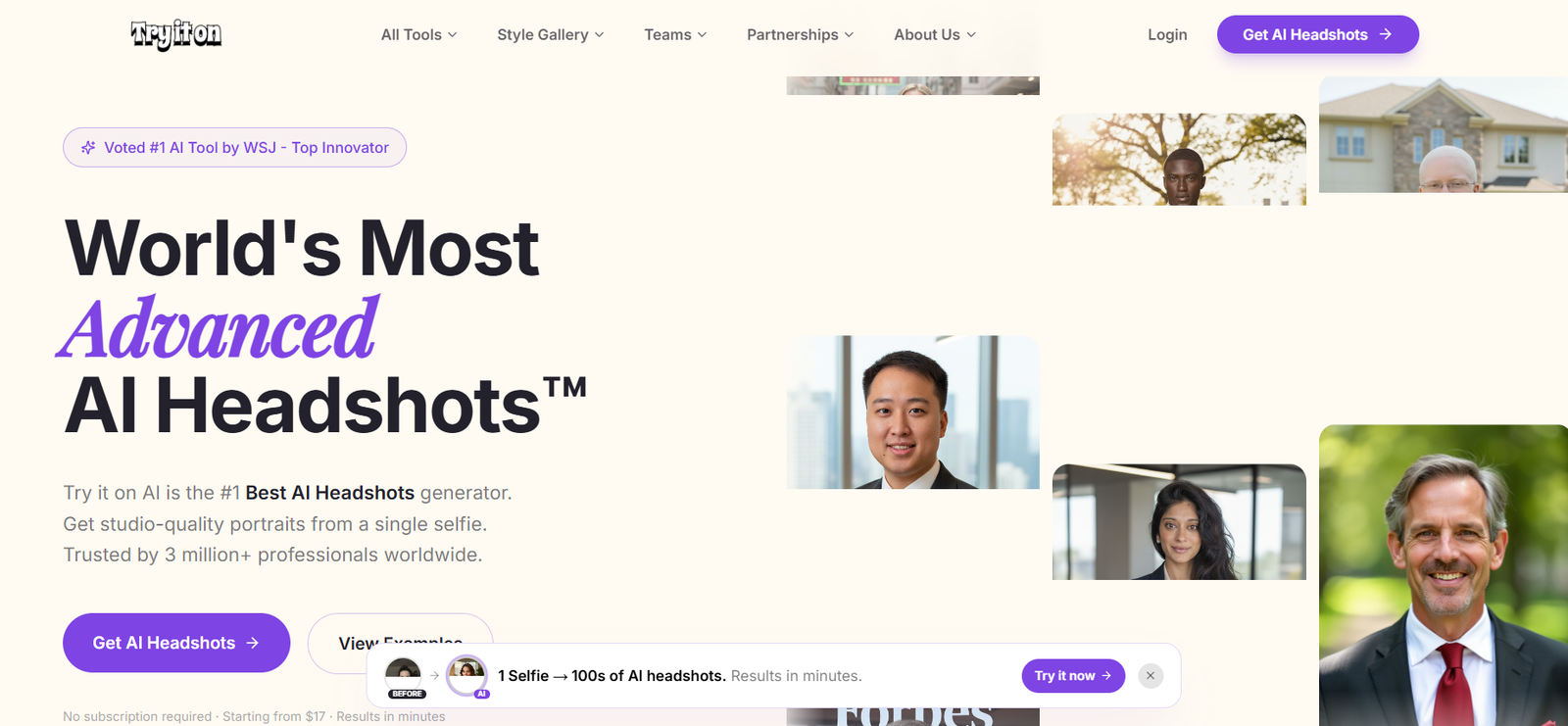
Try it on AI is an AI powered photography platform focused on creating professional headshots and personalized portraits from ordinary selfies.
The platform provides an alternative to traditional studio photography for professionals who need polished portraits for LinkedIn, company websites, business profiles, marketing materials and personal branding.
One of its major features is the ability to create professional portraits from a single selfie through its newer generation technology. Depending on the selected workflow, users can receive numerous variations featuring different professional outfits, backgrounds and visual styles.
Try it on AI is not limited to individual headshots. It provides solutions for companies and teams that need visually consistent employee portraits without arranging a physical photoshoot for everyone.
The platform also offers Creative Studio for customized AI portraits and AI based editing tools for improving existing photographs. Human editing is available with selected services for users who want additional refinement.
Try it on AI states that its technology has been used by more than three million professionals and more than 500 global teams.
Features
AI Headshot Generator
Try it on AI generates professional portraits using artificial intelligence.
Users provide suitable selfies and the platform creates studio style photographs without requiring an in person photography session.
One Selfie Headshots
The latest workflow allows users to create professional AI portraits from a single suitable selfie.
This significantly simplifies the input process compared with AI headshot generators that require numerous photographs for model training.
Express AI Headshots
Express AI Headshots are designed for users who need professional portraits quickly.
The platform can generate a large collection of headshots featuring different styles, clothing and backgrounds.
Professional Business Portraits
Users can create conventional corporate headshots featuring professional outfits and business appropriate backgrounds.
These are useful for LinkedIn, company websites, speaker profiles and professional directories.
Semi Professional Portraits
Try it on AI also provides smart casual styles.
These can be useful for professionals who want an approachable image without the formality of a traditional corporate portrait.
Creative and Casual Styles
Users can generate more relaxed and creative photographs for personal branding, social media and content marketing.
Hollywood Glam
The platform includes editorial inspired portrait styles for users seeking a more polished or fashion focused appearance.
Creative Studio
Creative Studio expands the platform beyond standard headshots.
Users can create personalized AI portraits with greater flexibility around outfits, scenes, backgrounds and visual concepts.
AI Image Editor
Try it on AI provides AI editing capabilities for users who want to modify existing photographs.
This gives users another option besides generating an entirely new collection of portraits.
Human Touch Editing
Selected services include access to human editors.
Professional editors can refine AI generated headshots when users need additional corrections or adjustments.
4K Quality
The platform supports high resolution portrait output suitable for professional digital applications.
Multiple Clothing Options
AI generated headshots can present users in different professional and casual clothing styles.
This reduces the need to physically prepare multiple outfits for a photography session.
Multiple Backgrounds
Users can choose or generate portraits with different backgrounds.
This can help adapt the same person’s headshots for different professional environments.
Team Headshots
Try it on AI provides dedicated headshot services for companies and organizations.
Team members can submit their photographs remotely rather than gathering in one location for a traditional corporate photoshoot.
Consistent Team Branding
Administrators can establish a consistent portrait style across a team.
This can help organizations maintain a uniform visual identity across company websites, employee directories and marketing materials.
Bulk Team Processing
The team solution supports larger groups and bulk workflows.
This can be particularly useful for distributed and remote organizations.
Team Administration
Businesses can manage employee headshots through centralized team functionality.
This simplifies portrait coordination when employees are located in different cities or countries.
Industry Specific Headshots
Try it on AI provides portrait options designed for different professional sectors.
Examples include:
Finance
Legal services
Healthcare
Real estate
Corporate teams
These styles are designed to reflect the visual expectations of different professions.
Personal Branding
Creative portraits can be generated for entrepreneurs, consultants, creators and other professionals building a recognizable online identity.
Editing Credits
Selected packages include editing capabilities so users can refine preferred photographs after generation.
Portrait Style Selection
Users can choose among different visual directions before generating their final headshots.
This provides greater control over the professional impression created by the image.
How It Works
Upload a Selfie
Users begin by uploading a suitable photograph. The latest supported workflows can generate headshots from a single selfie.
Choose a Portrait Style
Select the type of portrait required, such as professional business, semi professional, creative or another available collection.
Select Outfits and Backgrounds
Depending on the selected workflow, users can choose appropriate clothing and background options.
Generate the Headshots
The AI processes the photograph and generates multiple professional portrait variations.
Review the Results
Users can compare the generated photographs and identify their preferred headshots.
Edit the Image
AI editing tools can be used to make additional changes where supported.
Request Human Editing
Users with eligible packages can have selected photographs refined by human editors.
Download the Portrait
The preferred images can then be downloaded for professional use.
Use Across Professional Profiles
Finished headshots can be used for appropriate applications such as LinkedIn, business websites, company directories and marketing materials.
Use Cases
LinkedIn Headshots
Professionals can replace casual profile photographs with more polished AI generated portraits.
Corporate Websites
Businesses can create consistent employee photographs for team and leadership pages.
Remote Teams
Employees can submit selfies from different locations while maintaining a standardized company portrait style.
Executives
Business leaders can generate professional portraits for company biographies, conferences and media profiles.
Entrepreneurs
Founders can create headshots for websites, investor presentations, speaking engagements and personal branding.
Freelancers
Independent professionals can generate polished profile photographs without paying for a traditional studio session.
Real Estate Professionals
Agents and brokers can create approachable professional portraits for property listings, websites and marketing materials.
Lawyers
Legal professionals can generate formal business portraits for firm websites and professional directories.
Healthcare Professionals
Doctors, nurses, therapists and healthcare executives can create professional photographs for organizational profiles.
Finance Professionals
Bankers, advisers, analysts and executives can generate formal portraits suitable for professional business environments.
Students and Job Seekers
Users entering the workforce can create professional profile images for LinkedIn, resumes and career platforms.
Content Creators
Creative Studio can provide personalized visual content for creators and personal brands.
Pricing
Try it on AI currently uses a combination of one time headshot purchases and subscription based creative services.
The main website states that AI headshots start from approximately $17, with no subscription required for the basic headshot offering.
The dedicated studio currently lists the following starting prices:
Express AI Headshots
Starting at $35 per photoshoot
Users upload suitable photographs and receive a collection of professional AI headshots.
This is a one time photoshoot purchase rather than a recurring subscription.
Corporate Teams
Starting at $26 per person
The team service is designed for businesses that need consistent, on brand employee portraits.
Volume pricing and enterprise options may be available for larger organizations.
Creative Studio
Starting at $37 per month
Creative Studio is the subscription based option for users who want customized portraits, different outfits, scenes and creative visual content.
Image Editor
The AI image editor can be started for free.
Additional editing capabilities or human editing may involve paid options.
Pricing, promotional discounts and package allowances can change, so users should verify the final price and included generations before purchasing.
Strengths
Professional Headshot Specialization
Try it on AI is focused specifically on professional AI photography rather than being a general purpose image generator.
One Selfie Generation
The newer workflow can produce professional headshots from a single suitable photograph.
Large Number of Portrait Options
Users can receive numerous variations instead of relying on one final photograph.
No Studio Visit
Professional portraits can be generated remotely without arranging a photographer or physical studio.
Fast Turnaround
The latest workflows can produce results within minutes.
Professional and Creative Styles
Users can choose formal business headshots or more relaxed personal branding images.
Human Editing Available
Human editors provide an additional layer of refinement beyond automated AI generation.
Team Support
Businesses can create consistent employee portraits across distributed teams.
Industry Specific Options
Dedicated portrait styles are available for professions such as finance, healthcare, legal services and real estate.
No Subscription Required for Standard Headshots
Individual users can purchase a headshot package without committing to recurring monthly payments.
Drawbacks
AI Results Can Vary
Not every generated photograph will perfectly represent the user’s real appearance.
Facial Details Need Review
Users should carefully examine eyes, teeth, hair, glasses and other facial details before using a generated image professionally.
Clothing Is AI Generated
Professional outfits shown in the final portraits may not be clothing the person actually owns or wore during the original photograph.
Authenticity Considerations
Users should avoid selecting images that substantially misrepresent their real appearance, particularly for professional profiles.
Creative Studio Requires Subscription
Users who need ongoing custom portrait generation may need the monthly Creative Studio plan.
Human Editing May Cost More
More advanced manual refinement may depend on the selected package or additional editing services.
Pricing Varies by Workflow
The main website and dedicated Studio show different starting prices because they cover different products and packages. Users should check the exact selected service before paying.
Comparison with Other Platforms
Try it on AI differs from general AI image generators by specializing in professional photography and headshots.
General text to image tools can create portraits, but they are not necessarily designed to preserve a user’s recognizable identity across a large collection of business photographs.
Compared with traditional professional photography, Try it on AI eliminates the need to schedule a studio, travel to a photographer, prepare multiple physical backgrounds or coordinate entire teams in one location.
Its team functionality is particularly useful for remote companies because employees can submit photographs independently while the organization maintains a consistent portrait style.
Another differentiator is the combination of AI generation and human editing. Users can generate many images quickly and then have selected results refined where supported.
Traditional photography still offers advantages in authenticity, precise lighting control and guaranteed representation of the person’s real appearance. Try it on AI instead prioritizes speed, convenience, variety and remote accessibility.
Customer Reviews and Testimonials
The official Try it on AI website displays multiple customer testimonials.
Kevin Gert, identified as a business owner, describes receiving headshots that looked like him while also providing useful styling variations.
Joanne W., identified as a Real Estate Director, describes using the service to create consistent portraits for a remote global team.
Amanda S., a nurse and mother, highlights the convenience, value and customer service provided by the platform.
David L., identified as CEO of Primeone Realty, describes the generated photographs as comparable in appearance to professional studio photography.
The website also features testimonials from professionals working in areas such as healthcare, legal services, finance and real estate.
These testimonials are published by Try it on AI and represent individual customer experiences. Results can vary depending on the uploaded photograph, selected style and generation settings.
Conclusion
Try it on AI is a specialized AI photography platform for people and organizations that need professional portraits without organizing conventional photoshoots.
Its strongest feature is simplicity. The latest generation technology can create numerous professional headshots from a single suitable selfie, making the process particularly convenient for busy professionals and distributed teams.
The platform offers business, semi professional, creative and industry specific portrait styles, while Creative Studio provides greater flexibility for personal branding and marketing content.
Businesses can also use the team solution to create consistent employee portraits across offices and remote workforces without coordinating a photographer at every location.
Try it on AI is particularly suitable for executives, entrepreneurs, job seekers, consultants, real estate professionals, lawyers, healthcare professionals, finance professionals and corporate teams.
Its one time headshot pricing also makes it useful for people who need a new professional photograph but do not want another monthly software subscription.
Overall, Try it on AI provides a practical combination of AI headshot generation, creative portrait tools, team photography and optional human editing for users who want professional visual content quickly and remotely.