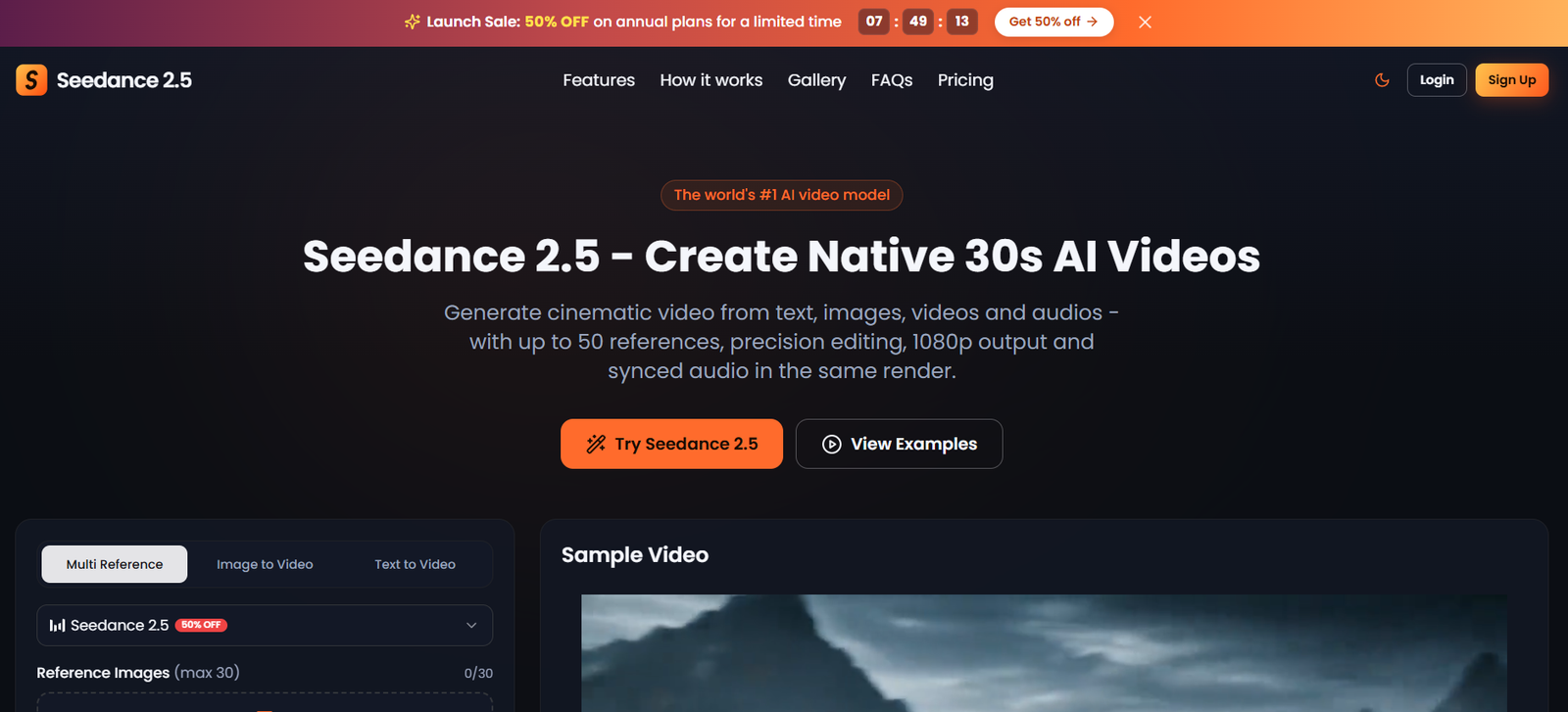
Seedance 2.5 is an AI video generation platform designed to turn written prompts and visual references into short videos. It is aimed at content creators, marketers, filmmakers, designers and businesses that want to produce video content without depending entirely on traditional filming and editing methods.
The platform supports text to video and image to video generation. Users can also provide video clips and audio files as references to guide the creation process. According to the website, individual video shots can last up to 30 seconds, with output resolutions of up to 1080p.
One of the platform’s notable capabilities is its support for multiple reference materials. Users can combine images, video clips and audio to help guide the appearance, movement and sound of a generated scene. This can be useful for creating promotional videos, visual stories and other content that requires a particular style or subject.
Seedance 2.5 also supports prompt based video editing. Users can describe changes to an existing clip, adjust visual elements or extend a scene through written instructions. Its integrated audio generation aims to produce sound that matches the accompanying visuals, potentially reducing the need for separate audio editing.
The platform is designed to make AI video creation accessible to users with different levels of technical experience. However, results can vary according to prompt quality, reference materials and scene complexity. Users may need several attempts to achieve the desired outcome.
It is also important to distinguish the website, seedance-2-5.io, from the underlying AI model developer. The platform should be evaluated according to its own pricing, privacy policy, features and licensing conditions before users upload sensitive materials or purchase a subscription.
Features
Text to Video Generation
Seedance 2.5 generates videos from written descriptions. Users can specify the subject, setting, action, lighting and camera movement to turn an idea into a visual scene without recording it in person.
Image to Video Generation
Users can upload images and animate them into videos. This feature can be useful for product photography, illustrations, concept art, portraits and promotional visuals.
Multiple Reference Inputs
The website advertises support for multiple reference materials, including images, video clips and audio files. These references can help guide the appearance, movement and sound of generated scenes.
Video Generation up to 30 Seconds
The platform advertises individual video shots lasting up to 30 seconds. This gives creators room to develop more complete scenes, although longer projects may still require several clips and additional editing.
Synchronized Audio Generation
Seedance 2.5 can generate audio alongside video. Depending on the prompt and generation settings, this may include dialogue, environmental sounds and sound effects.
Prompt Based Video Editing
Users can describe desired changes in natural language. Supported workflows advertised by the platform include modifying visual elements, changing the style of footage and extending existing shots.
Camera and Motion Direction
Written prompts can include camera movements, subject actions and scene composition. These instructions help users guide the visual presentation, although precise execution is not guaranteed.
Multiple Resolutions and Aspect Ratios
The website lists 480p, 720p and 1080p output options, along with different aspect ratios. These formats can support landscape videos, vertical social media content and square visuals.
Example Gallery
The platform provides example videos and prompts that users can explore for inspiration. These examples can help new users understand how to describe scenes and develop their own creative ideas.
Credit Based Generation
Seedance 2.5 offers starter credits, subscription plans and additional credit options. The number of videos users can generate depends on their available credits and the settings used.
Commercial Usage Claims
The pricing page advertises commercial use with paid plans. However, the website’s Terms and Conditions contain a restriction on commercial exploitation without prior written consent. Users should obtain clarification before relying on the service for commercial projects.
How It Works
Step 1: Visit the website
Open the Seedance 2.5 website and create an account to access the available video generation features. Check whether free starter credits are available for your account.
Step 2: Enter a prompt or upload references
Describe the video you want to create, including the subject, action, environment, lighting and camera movement. You can also upload images, video clips or audio files to guide the result.
Step 3: Choose video settings
Select the available duration, resolution and aspect ratio according to your project requirements and credit balance.
Step 4: Generate the video
Submit your prompt and reference materials. The platform processes the inputs and generates a video based on your instructions.
Step 5: Review and refine the output
Watch the generated video and check its visual quality, movements and audio. If the result does not meet your expectations, revise the prompt or use the available editing features to make changes.
Step 6: Download your video
Download the finished video for your project. Before using it in advertisements or paid client work, confirm that the applicable licensing terms permit your intended use.
Use Cases
Social Media Content Creation
Content creators can use Seedance 2.5 to develop short videos for Instagram Reels, YouTube Shorts and other social media platforms. It can help transform creative ideas into visual content without requiring a physical shoot for every concept.
YouTube Video Production
YouTubers can create introductory sequences, illustrative scenes, background footage and visual storytelling elements. Generated clips can supplement recorded footage and help explain ideas visually.
Digital Marketing
Marketing professionals can experiment with promotional videos, advertising concepts and alternative creative approaches. Reference images may help guide the appearance of products and campaign visuals.
E-commerce Product Videos
Online sellers can animate product images and create promotional visuals for websites and social media. Generated videos should be reviewed carefully to ensure that product details, colours and proportions remain accurate.
Filmmaking and Storyboarding
Independent filmmakers can use the platform to explore visual concepts, experiment with camera movements and develop preliminary scenes before beginning a larger production.
Advertising Agencies
Creative agencies can produce initial campaign concepts and explore alternative visual treatments for client presentations. Final outputs may require additional editing and professional review.
Education and Online Learning
Teachers and training professionals can create illustrative videos to explain processes, demonstrate concepts and make presentations more engaging. Audio generation may help when lessons benefit from sound alongside visuals.
Digital Art and Design
Designers can animate artwork, experiment with different visual styles and develop moving versions of concept images. Reference based generation can help guide the overall appearance of a scene.
Pricing
Seedance 2.5 advertises free starter credits, paid subscriptions and additional credit options. The following annual subscription prices are displayed on the website as promotional offers.
Lite Plan
The Lite plan is advertised at $9.90 per month when billed annually, amounting to $118.80 per year. It includes 200 credits per month, with an advertised capacity of up to 20 videos or 200 images monthly.
Pro Plan
The Pro plan is advertised at $19.90 per month when billed annually, amounting to $238.80 per year. It includes 700 credits per month, with an advertised capacity of up to 70 videos or 700 images monthly.
Max Plan
The Max plan is advertised at $49.90 per month when billed annually, amounting to $598.80 per year. It includes 2,000 credits per month, with an advertised capacity of up to 200 videos or 2,000 images monthly.
Paid plans advertise features such as access to available models, private generation, watermark free downloads, priority processing and customer support. The pricing page also advertises commercial usage.
These prices may change, and monthly billing or credit packages may have different rates. The stated generation quantities are estimates rather than guaranteed output limits for every type of generation.
Important licensing clarification: The pricing page advertises commercial use, but the Terms and Conditions restrict commercial exploitation of the service or its outputs without prior written consent. Users should obtain written clarification from the provider before purchasing a plan for commercial projects.
Strengths
Flexible input options: Support for text, images, videos and audio references provides several ways to guide video creation.
Longer individual shots: The advertised maximum duration of 30 seconds offers flexibility for developing scenes without immediately combining multiple short clips.
Integrated audio generation: Generating sound alongside video may simplify production and reduce the need for separate audio synchronization.
Natural language editing: Users can describe desired changes in ordinary language rather than relying entirely on complicated editing controls.
Creative direction: Reference materials and camera instructions provide additional ways to guide the appearance and movement of generated scenes.
Multiple output formats: Different resolutions and aspect ratios make the platform suitable for a range of digital content requirements.
Accessible workflow: A browser based interface allows users to experiment with AI video creation without investing in a traditional filming setup.
Starter credits: New users may be able to test the platform before purchasing a subscription, depending on the current offer.
Drawbacks
Unclear commercial licensing: The conflict between the pricing page and Terms and Conditions creates uncertainty for businesses and professional creators. This should be resolved before using the platform for paid projects.
Credit consumption: Repeated generations and experiments can use credits quickly, particularly when users need several variations of a scene.
Inconsistent results: Generated videos may contain visual errors, unexpected movements or changes in the appearance of characters and objects.
Limited precision: The platform may not consistently reproduce exact text, intricate product details or complex movements.
Duration limitations: Individual shots are advertised for up to 30 seconds, so longer projects may require several generations and additional editing.
Variable processing times: The website does not guarantee a fixed generation time for every request.
Annual payment commitments: The advertised monthly prices for annual subscriptions represent a monthly equivalent rather than necessarily the amount paid each month.
Privacy considerations: Users should review the platform’s privacy policy to understand how uploaded files, prompts and generated content may be collected and processed.
Third party service risks: Users should independently evaluate the provider’s reliability, customer support, payment terms and licensing conditions rather than assuming that the platform has the same policies as the underlying model developer.
Comparison with Other Platforms
Seedance 2.5 can be compared with other AI video generation platforms, including Runway, Kling AI, Pika and Sora. Each platform has its own generation capabilities, editing workflow, pricing structure and access conditions.
Seedance 2.5 vs Runway
Runway offers AI video generation and editing tools for creative production. Seedance 2.5 emphasizes reference based generation, longer individual shots and integrated audio. Users should compare the available editing controls and output quality to determine which workflow better suits their projects.
Seedance 2.5 vs Kling AI
Kling AI is another option for creating videos from text and images. Seedance 2.5 advertises multiple reference inputs and synchronized audio generation. The practical difference depends on the task, prompt adherence, output quality and credit costs.
Seedance 2.5 vs Pika
Pika provides AI video creation and creative effects. Seedance 2.5 may be useful for projects that benefit from combining multiple reference materials with audio generation. The better choice depends on the creative features and editing options each platform provides.
Seedance 2.5 vs Sora
Sora is an OpenAI video generation product, whereas seedance-2-5.io is a separate website offering access to Seedance 2.5. Users should compare the products’ actual features, access arrangements, output quality and pricing rather than assuming they are equivalent.
Which Platform Is Better?
Seedance 2.5 may be worth considering for users who want to experiment with reference guided video generation, longer scenes and integrated audio. Other platforms may be more suitable depending on editing requirements, visual consistency and budget.
There is no single best tool for every project. Testing the same prompt across different platforms can help users assess quality and cost. Commercial licensing should also be checked carefully before choosing a service for professional work.
Customer Reviews and Testimonials
The official website displays testimonials attributed to people working in filmmaking, marketing, content creation, e-commerce and instructional design.
These testimonials describe perceived benefits such as creating longer scenes, exploring advertising concepts, reducing audio synchronization work and developing instructional videos more efficiently.
However, the testimonials are published on the platform’s own website, and their independent authenticity has not been established. They should be treated as promotional testimonials rather than independently verified customer reviews.
Potential users should test the service themselves and assess whether its features, output quality and pricing meet their requirements.
Conclusion
Seedance 2.5 is an AI video generation platform designed to transform written ideas and reference materials into short videos. Its advertised features include text to video generation, image animation, multiple reference inputs, synchronized audio and prompt based editing.
The platform may be useful for social media creators, YouTubers, marketers, designers, educators and businesses seeking an alternative to traditional video production for selected projects. Its advertised support for individual shots of up to 30 seconds and resolutions of up to 1080p makes it worth exploring for short form visual content.
However, users should have realistic expectations. AI generated footage may require several attempts, visual details can be inconsistent, and credit consumption can increase the cost of larger projects.
The most important consideration is commercial licensing. Although the pricing page advertises commercial usage, the Terms and Conditions restrict commercial exploitation without prior written consent. Users should resolve this inconsistency directly with the provider before using generated videos for advertisements, client deliverables or other commercial activities.
Overall, Seedance 2.5 is worth testing for AI assisted video creation and creative experimentation. Users should begin with a small project, assess the quality of the results and review the pricing, privacy and licensing conditions before committing to a paid subscription.