
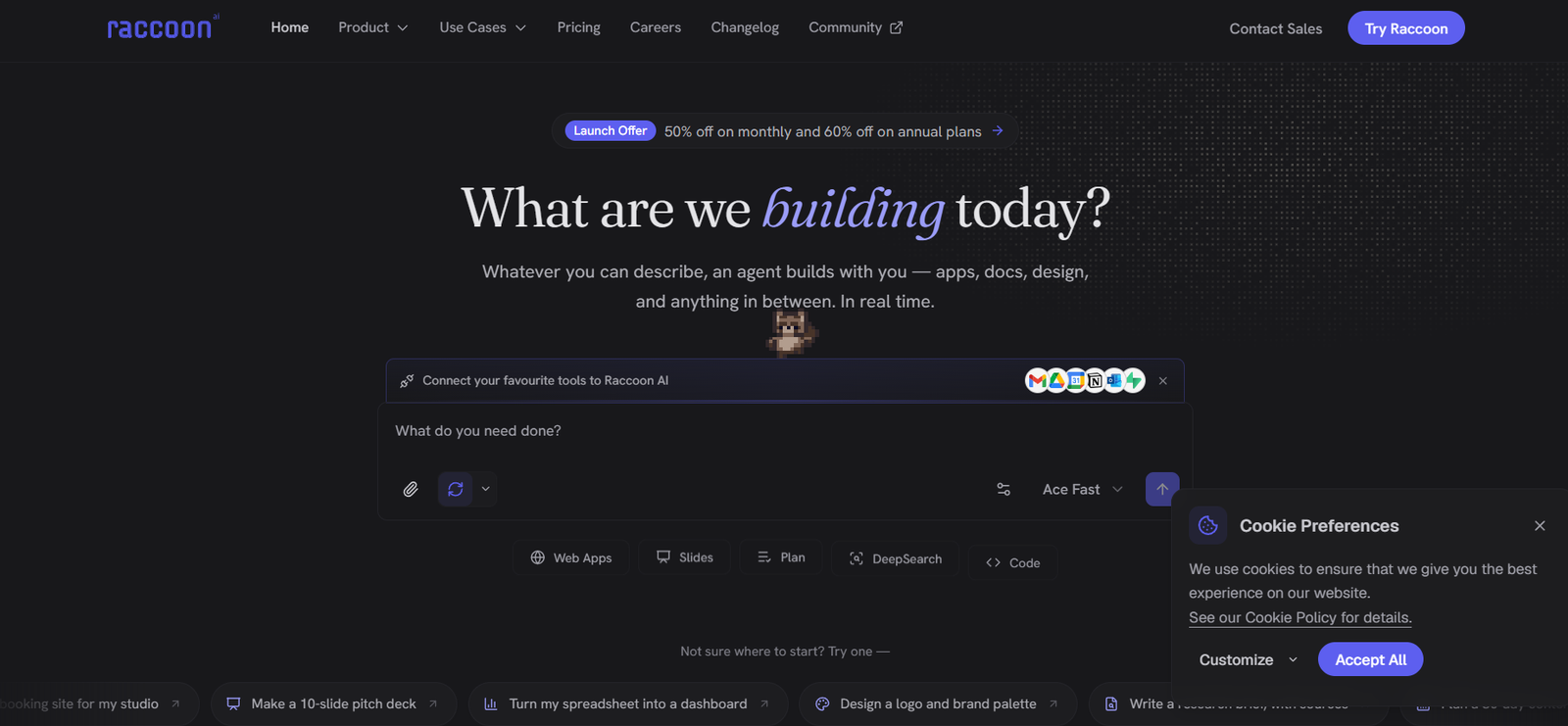
Raccoon AI is a general-purpose collaborative AI agent designed to turn ideas and instructions into completed digital work. Instead of simply answering questions, the platform can research information, create documents and presentations, analyze data, design visual content, write code, build web applications and automate workflows.
Users can describe what they need using natural language, voice, sketches, screenshots or uploaded files. Raccoon AI then creates a plan, performs the required tasks inside its cloud-based workspace and allows users to review or redirect the work while it is being completed.
The platform can connect with business applications such as Gmail, Google Drive, Google Calendar, GitHub and many other services. It also maintains context between sessions and supports reusable skills, helping users teach the AI specific workflows and preferences.
Raccoon AI is suitable for entrepreneurs, developers, marketers, researchers, analysts, creators and business teams that want an AI agent capable of completing multi-step projects rather than only generating text.
Features
General-Purpose AI Agent
Raccoon AI can handle different types of work within one environment, including research, writing, coding, design, data analysis, application development and workflow automation.
Natural Language Instructions
Users can explain what they want in ordinary language. The platform also supports voice input, sketches, screenshots and uploaded files, reducing the need for complicated prompt engineering.
Web App Builder
Users can describe an application idea and allow Raccoon AI to plan, design and build a working web application. Completed applications can be published to a live link, while eligible plans support custom domains.
AI Presentations
Raccoon AI can create professional presentations and slide decks from user instructions, making it useful for business proposals, reports, pitches and educational content.
Document Creation
The platform can generate reports, research documents, articles, business materials and other written content based on user instructions and supporting information.
Deep Research
Raccoon AI can perform web research, compare information and prepare research outputs with supporting citations. This can be useful for market research, competitor analysis and business intelligence.
Data Analysis
Users can provide spreadsheets or datasets and ask Raccoon AI to clean, analyze and visualize the information. It can also create reports, dashboards and analytical outputs.
Coding Assistant
Raccoon AI can write, debug and refactor code, run tests and assist with software projects. Its cloud workspace provides an environment where the agent can work on technical tasks.
AI Design
The platform can generate visual concepts and design materials for projects such as websites, brand assets and digital content.
AI Image and Video Creation
Raccoon AI supports image and video generation, allowing users to create multimedia content alongside documents, applications and other project assets.
50+ Connectors
The platform supports more than 50 connectors for external tools and services. Examples shown on the official website include Gmail, Google Drive, Calendar, GitHub, Slack, Notion, Figma, Google Sheets, Outlook, Supabase, Airtable, Stripe, Salesforce, Shopify and others.
Reusable Skills
Users can teach Raccoon AI specific workflows, brand guidelines, design systems and other working methods. These skills can then be reused in future projects.
Persistent Memory
Raccoon AI can retain relevant preferences and context between sessions, reducing the need to repeatedly explain the same working requirements.
Cloud Computer
For complex tasks, Raccoon AI creates a cloud-based working environment where it can manage files, applications, databases and other project resources.
Visible Planning
The AI creates a checklist for larger tasks so users can see how the project is progressing and understand what the agent is working on.
Real-Time Steering
Users can intervene while a project is being completed. They can provide new instructions, request changes or redirect the AI without necessarily restarting the entire workflow.
Rewind and Fork
Projects can be returned to an earlier stage or branched into a new direction. This makes it easier to experiment with alternative ideas while keeping the original work.
Multi-Agent Workflows
Raccoon AI can assign parts of larger tasks to specialized helper agents that work in parallel and combine their results into the main project.
Application Deployment
Completed applications can be published to a live link. Higher plans also provide options for deploying applications using custom domains.
How It Works
Step 1: Create a Raccoon AI account and start a new task.
Step 2: Describe what you want to create using text, voice, files, screenshots or sketches.
Step 3: Connect relevant services such as Gmail, Drive, Calendar or GitHub when the project requires external information.
Step 4: Raccoon AI creates a plan and displays the steps it intends to complete.
Step 5: The AI performs the work using its cloud workspace. Depending on the task, it may research information, write content, analyze data, design assets or develop code.
Step 6: Review the work while the agent is operating and provide additional instructions when changes are needed.
Step 7: Rewind or create a separate branch if you want to explore another approach.
Step 8: Download the completed content or publish supported applications directly to a live link or custom domain.
Use Cases
Entrepreneurs: Founders can build landing pages, prototypes, presentations, business documents and research reports from simple instructions.
Developers: Programmers can generate code, debug applications, run tests and build web applications.
Marketers: Marketing professionals can prepare content calendars, campaign materials, research competitors and create promotional content.
Researchers: Users can perform web research, analyze sources and generate structured research reports with citations.
Data Analysts: Teams can transform spreadsheets and datasets into analysis, charts, reports and dashboards.
Content Creators: Creators can produce articles, scripts, images, videos and other digital content.
Sales Teams: Sales professionals can create proposals, scripts, account research and meeting preparation materials.
Business Teams: Organizations can connect existing tools and automate repetitive workflows across different applications.
Financial Professionals: Users can create financial models, KPI frameworks, valuation tools and analytical reports.
Real Estate Professionals: Agents and property businesses can create property videos, neighborhood reports, rental documents and related materials.
Pricing
Raccoon AI currently offers several pricing options.
Free
The Free plan costs $0 and is available without a time limit. It includes standard usage limits, one concurrent task, application deployment, access to ACE Fast and email support.
Plus
The regular listed price is $19 per month. A limited promotional price of $9.50 per month is currently displayed for the first three months.
It includes everything in Free along with higher usage limits, access to all modes, workspace connectors and access to ACE Think and ACE Max.
Plus 5x
The regular listed price is $39 per month, with a current promotional price of $19.50 per month for the first three months.
It includes higher usage limits, up to five concurrent tasks, custom domains, improved models, larger context windows and early access to new features.
Plus 10x
The regular listed price is $79 per month, with a current promotional price of $39.50 per month for the first three months.
It provides significantly higher usage limits, up to ten concurrent tasks, access to advanced models and larger context windows, priority support and a Slack channel with the founders.
Teams
Raccoon AI for Teams is designed for startups and smaller teams. It includes centralized billing, team controls, usage visibility and additional data protections. Pricing is available by contacting sales.
Enterprise
Enterprise plans provide additional capabilities such as SAML/SSO, organizational customization, dedicated training and onboarding. Pricing is customized according to organizational requirements.
Promotional discounts are temporary, so users should verify current prices before subscribing.
Strengths
Raccoon AI handles a wide variety of tasks rather than focusing on a single AI use case.
It can move beyond answering questions and perform multi-step work.
Users can build web applications from natural language instructions.
It combines research, writing, coding, design, data analysis and media generation.
More than 50 connectors allow users to work with existing applications and data.
Persistent memory helps maintain useful context between sessions.
Reusable skills allow organizations to teach the agent their preferred workflows.
Multi-agent capabilities can divide complex projects into smaller parallel tasks.
Users can monitor and redirect projects while the AI is working.
Applications can be deployed directly from the platform.
A free plan provides an accessible way to test the service.
Drawbacks
The broad range of capabilities may require some learning for users who only need a simple AI assistant.
Usage limits depend on the selected subscription plan.
More advanced AI models and larger context windows require paid plans.
Custom domains require a higher subscription tier.
Teams and enterprise pricing is not publicly listed.
Connecting business accounts and services requires users to consider access permissions and data privacy carefully.
AI-generated research, code, analysis and business content should still be reviewed before professional use.
Comparison with Other Platforms
Raccoon AI differs from conventional AI chat assistants because its focus is on completing projects rather than only producing conversational responses. It provides a cloud workspace where the AI can plan tasks, manage files, analyze information, build applications and generate different types of content.
Compared with specialized AI coding platforms, Raccoon AI covers a broader range of work, including presentations, documents, research, design, video, images and data analysis. Compared with basic no-code AI builders, it also offers integrations, persistent memory, reusable skills and multi-agent workflows.
This makes Raccoon AI particularly relevant for users who want one AI environment capable of moving between creative, technical and business tasks.
Customer Reviews and Testimonials
The official website states that Raccoon AI is used by more than 40,000 professionals and builders and displays organizations such as Amazon, Moody’s, Tata Steel, UC Berkeley, Paytm, Meltwater, Freepik and others in its user section.
However, detailed customer reviews and independently verified testimonials are not clearly available on the official website.
Conclusion
Raccoon AI is a versatile collaborative AI agent for users who want to turn ideas into completed digital work rather than simply receive AI-generated answers. Its ability to research, write, analyze data, design, code, build applications, generate multimedia and automate workflows makes it useful across many professional tasks.
The platform is particularly suitable for founders, developers, marketers, researchers, analysts and business teams that regularly work across multiple applications and content formats. Its combination of a cloud workspace, 50+ connectors, persistent memory, reusable skills and multi-agent workflows makes Raccoon AI an interesting option for people seeking a more action-oriented AI workspace.


