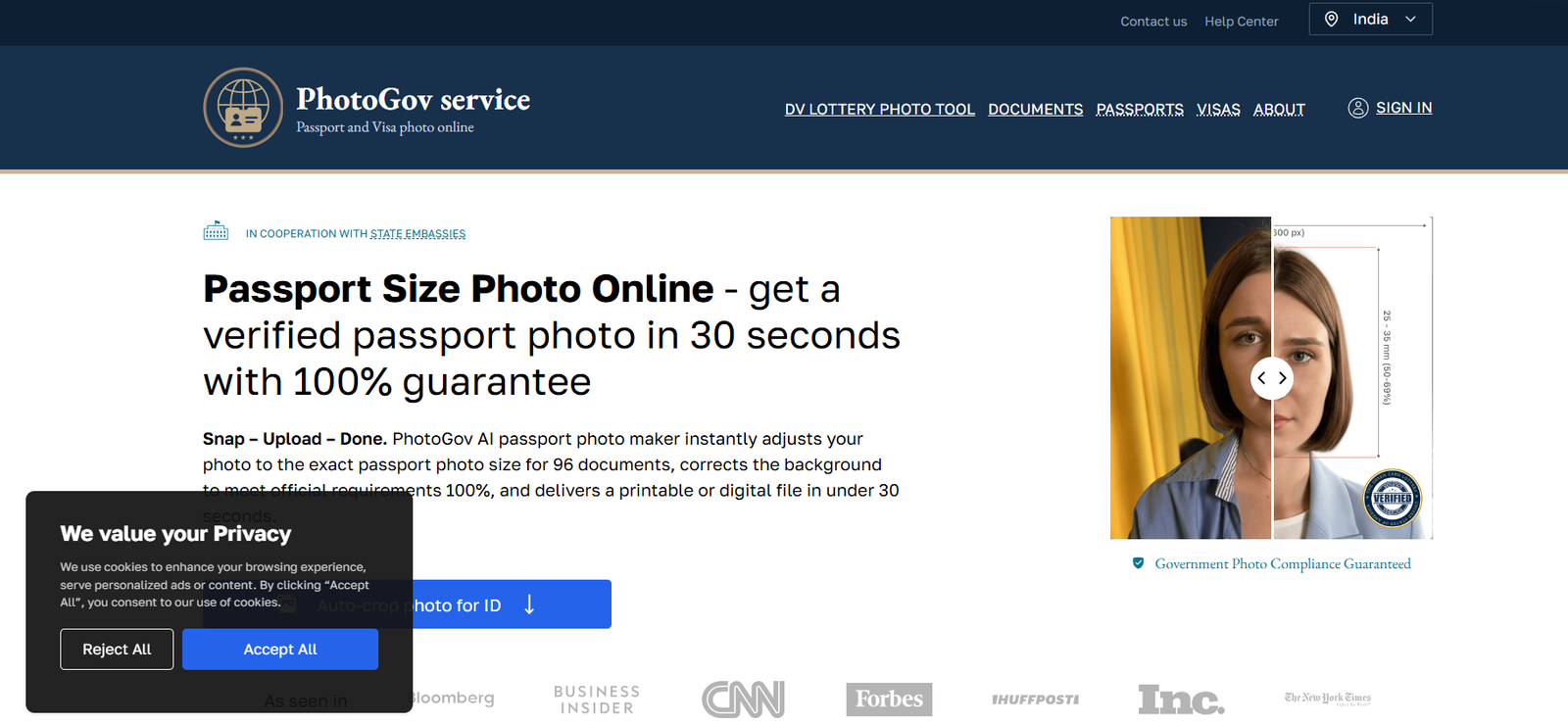
PhotoGov is a web-based tool that uses AI to convert regular photos into compliant passport, visa, and ID photos that meet the guidelines of various government agencies around the world. The platform allows users to upload a casual or professional image and instantly receive a corrected and formatted version that adheres to official photo requirements.
Each country has unique guidelines for ID photos. These may include rules on image dimensions, facial positioning, head size, background color, and resolution. Manually editing or aligning a photo to these specifications is not only time-consuming but also prone to errors. PhotoGov automates this entire process and ensures a high acceptance rate.
PhotoGov supports a wide range of document types, including international passports, visa applications, residency permits, ID cards, driver’s licenses, and Green Card photos. It is particularly valuable for people applying online, renewing travel documents, or submitting forms to embassies and immigration departments.
Features
PhotoGov offers AI-based photo formatting. When a user uploads a photo, the system automatically detects the face, adjusts the position, removes the background, and applies the correct size and format. This ensures the final image meets government guidelines for the selected country and document.
The platform includes background removal and replacement. Most government photo requirements demand a uniform white or light-colored background. PhotoGov cleans and standardizes the background without the need for green screens or complex editing tools.
It supports compliance for over 190 countries. Users can select their target country and document type, and the AI will adjust the photo accordingly. This includes not only passport photos but also visa, immigration, and ID photos for countries such as the United States, Canada, UK, Australia, and Schengen nations.
Users receive instant digital download. After processing, the final image is ready to download immediately in high-resolution format, optimized for printing or online submissions.
The interface is fast and user-friendly. There is no need to create an account or install any software. Users simply visit the site, upload a photo, select a document type, and get their result in seconds.
The platform also offers photo previews and crop adjustment. Users can manually tweak the crop area if needed, though the default AI crop is often accurate.
How It Works
The process begins by visiting the PhotoGov website. Users select the country and the type of document they need the photo for, such as a passport, visa, or ID.
They then upload a recent photo from their phone or computer. The uploaded photo should have good lighting and a clear view of the face, with a neutral expression.
Once uploaded, PhotoGov’s AI automatically scans the image, detects the face, and aligns the image to match the requirements of the selected document. It adjusts brightness, contrast, and background, and applies the correct cropping based on local regulations.
The AI also verifies the photo for technical compliance, such as correct head size, eye position, and shoulder visibility. After adjustments are complete, the platform generates a downloadable image in JPG format, ready for printing or digital submission.
Users receive their photo within seconds. The file can be used for online applications or printed using standard photo printing services.
Use Cases
Travelers preparing to apply for or renew a passport can use PhotoGov to create a compliant photo at home, avoiding a trip to the photo studio.
Students applying for visas to study abroad often face strict documentation requirements. PhotoGov ensures their visa photos meet embassy standards.
Professionals applying for work visas or Green Cards in the U.S. and other countries can instantly create photos that meet official employment-based immigration standards.
Individuals applying for driving licenses or national ID cards can use the platform to generate standardized photos without the need for a physical photo booth.
Parents preparing child passport photos benefit from PhotoGov’s ability to handle tricky subjects like infants or toddlers by auto-aligning the face and correcting background errors.
Frequent travelers and remote workers applying for residency permits or dual citizenship in different countries can generate country-specific photos from one central tool.
Pricing
As of October 2025, PhotoGov offers simple, transparent pricing. Users pay per photo, with no subscription or account required. A single photo download costs $4.99.
There is no charge for uploading and previewing a photo. Payment is only required once the user is satisfied with the preview and wants to download the final formatted image.
PhotoGov does not currently offer tiered plans or subscriptions. The one-time payment structure makes it ideal for occasional users who only need a passport or visa photo every few years.
For the most up-to-date pricing, users can visit the PhotoGov official website.
Strengths
PhotoGov is convenient and fast. Users can generate a government-approved photo in seconds without leaving home.
It supports global compliance, making it a one-stop solution for international travelers or those applying for documents across multiple countries.
The AI system is highly accurate, reducing the chances of photo rejection due to technical errors like incorrect head size, poor lighting, or non-compliant backgrounds.
The platform is beginner-friendly. No technical or design skills are needed, and users don’t need to understand the specifics of each country’s photo requirements.
PhotoGov is cost-effective compared to visiting a photo studio, especially for users who need digital files or are applying online.
There is no registration required, which speeds up the process and makes the tool more accessible.
Drawbacks
PhotoGov does not offer physical photo printing. Users who need printed copies will have to use a local print shop or online photo printing service.
There is currently no mobile app, which could limit convenience for users who prefer app-based workflows.
Users must ensure their uploaded photo meets basic quality standards. Poor lighting, blurry images, or extreme angles may not produce good results even with AI enhancement.
There is no built-in document submission or integration with government websites. Users must manually upload the photo to their application forms.
The platform does not store photo history or offer editing after download, so users must complete any changes before confirming payment.
Comparison with Other Tools
Unlike mobile apps such as Passport Photo Maker or IDPhotoStudio that require downloads and manual cropping, PhotoGov operates entirely online and automates most of the formatting process using AI.
Compared to visiting a physical studio or pharmacy photo booth, PhotoGov offers a cheaper and faster alternative, particularly for users who only need a digital file.
PhotoGov is more accurate than general-purpose photo editing apps, which may not understand government compliance rules. Its focus on regulatory standards makes it more reliable for official documentation.
Other tools may offer free services with watermarks or low resolution, while PhotoGov offers high-resolution, watermark-free downloads for a one-time affordable price.
Customer Reviews and Testimonials
While the PhotoGov website does not currently list detailed customer testimonials, early users have shared feedback through online forums and review sites.
Many customers appreciate the speed and simplicity of the platform, stating that it helped them avoid last-minute photo rejections by embassies or passport offices.
Travel bloggers and digital nomads have mentioned that it’s a helpful tool when traveling abroad and needing visa photos on short notice.
Users also report that the photos were accepted without issue by government agencies, suggesting a high compliance rate for the platform’s output.
As the platform grows, more user reviews are expected to appear on directories like Product Hunt or G2.
Conclusion
PhotoGov is a powerful and practical solution for anyone needing a government-compliant ID photo quickly and affordably. With its AI-driven formatting and support for over 190 countries, the platform takes the guesswork out of preparing passport, visa, or license photos.
Whether you are renewing a passport, applying for a visa, or preparing identification documents for school or work, PhotoGov provides a fast and accurate way to generate photos that meet official requirements. Its pay-per-download model and instant access make it ideal for both occasional users and frequent travelers.