
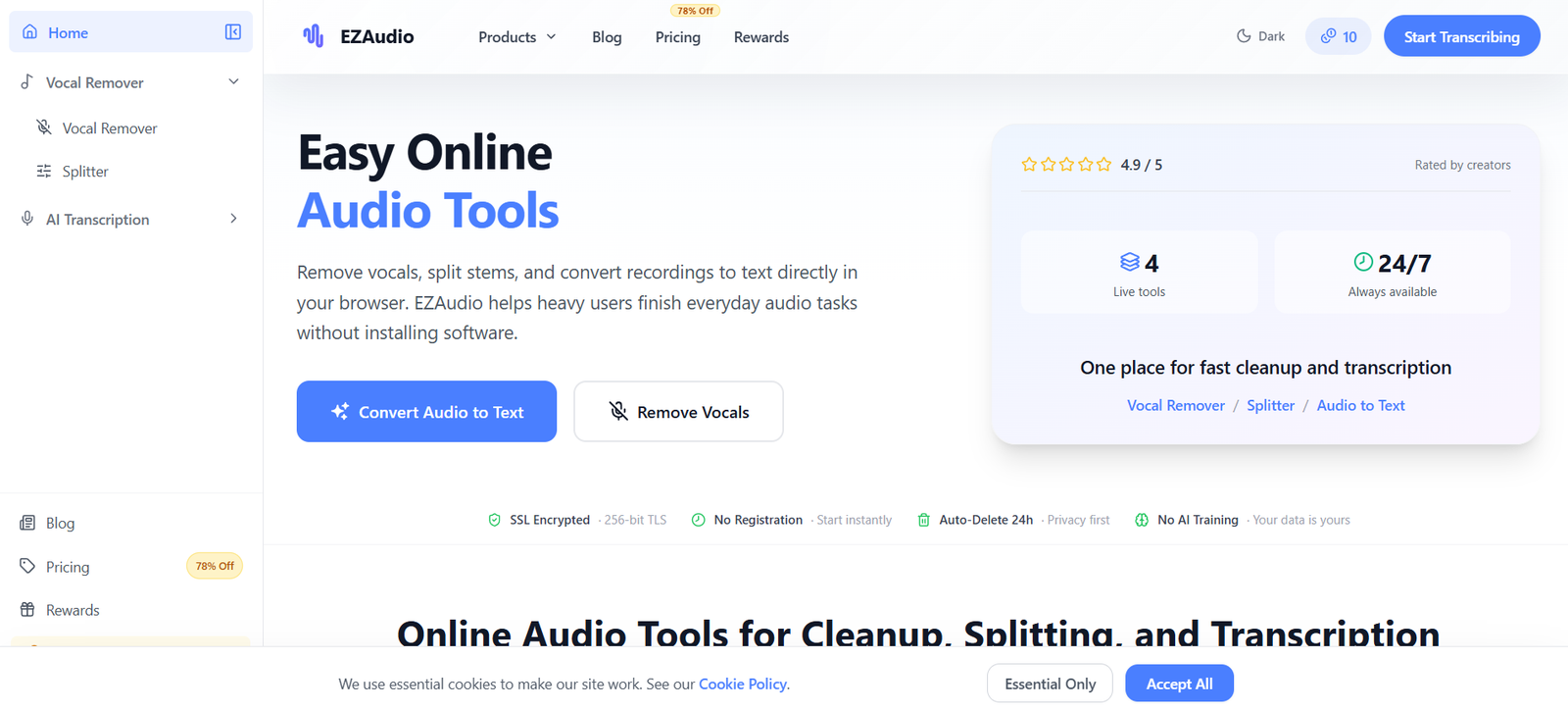
EZAudio is an online AI audio processing platform designed for people who want to perform common audio tasks without installing complex desktop software. It brings several focused tools into one browser based workspace, including an AI Vocal Remover, Audio Splitter and Audio to Text Converter.
The Vocal Remover separates singing vocals from instrumental music, allowing users to create karaoke tracks, backing music or isolated vocals. The Audio Splitter goes further by separating a mixed song into individual stems such as vocals, drums, bass and other instruments.
EZAudio also provides AI transcription for turning spoken recordings into readable text. This can be useful for meetings, interviews, voice notes, lessons, podcasts and other recorded material.
The platform is designed for musicians, podcasters, content creators, students, producers and editors who need quick audio processing without learning a full digital audio workstation.
EZAudio works on desktop computers, tablets and mobile devices through a web browser. Uploaded files are encrypted during transfer and automatically deleted within 24 hours. The platform also states that uploaded content is not used for AI model training.
Features
AI Vocal Remover
EZAudio’s Vocal Remover separates a song into vocal and instrumental tracks.
Users can upload a song and create an instrumental version for karaoke, rehearsal or covers. Alternatively, they can isolate the vocal track for remixing, editing or studying a vocal performance.
AI Audio Splitter
The Audio Splitter separates a mixed music track into individual stems.
Its standard workflow separates vocals, drums, bass and other instruments. The platform also supports separation workflows involving up to six stems, depending on the selected processing option.
This can help musicians and producers isolate individual elements of a recording without manually editing the complete mix.
AI Audio to Text
EZAudio includes an Audio to Text Converter for transforming spoken recordings into readable text.
It is intended for recordings such as interviews, meetings, voice notes, lessons and content production material.
Browser Based Processing
All major EZAudio tools work through a web browser.
Users do not need to install a large desktop editor, audio plugin or dedicated application before processing a file.
Multiple Audio Formats
The Vocal Remover and Splitter support popular formats including:
MP3
WAV
FLAC
OGG
M4A
This makes it easy to work with commonly used music files without converting them into a special format first.
Stem Preview
After separating a song, users can preview the individual stems.
The result interface allows users to listen to separated audio and adjust individual stem volumes before downloading the output.
Vocal Isolation
Users can isolate the singer’s voice from the instrumental parts of a song.
This can be useful for remix ideas, vocal analysis, content editing and other creative workflows.
Instrumental Creation
The Vocal Remover can create an instrumental version by separating the main vocals from the accompanying music.
Musicians and karaoke creators can use the resulting track for practice, covers and performances.
Drum and Bass Isolation
The Splitter can separate drums and bass from a complete music mix.
Musicians can use these isolated tracks to study arrangements, rehearse individual parts or prepare production references.
Audio Transcription
Spoken recordings can be converted into text, providing a simple workflow for people who need searchable notes or written versions of audio.
No Registration for Basic Access
EZAudio allows users to access its browser based tools without requiring registration for every basic interaction.
Creating an account provides additional bonus credits and makes it easier to use the service repeatedly.
Free Daily Credits
EZAudio provides daily free credits, allowing users to perform limited audio processing without purchasing a subscription.
Registered users also receive bonus credits.
Cross Platform Access
Because EZAudio runs through the browser, it can be accessed from desktops, tablets and mobile devices.
Users are not restricted to Windows, macOS or another specific operating system.
Privacy Focus
EZAudio states that uploaded files are protected with SSL encryption during transfer.
Files are automatically deleted within 24 hours, and the company states that user uploads are not used to train AI models.
How It Works
Step 1: Open EZAudio
Visit the EZAudio website using a desktop, tablet or mobile browser.
Step 2: Select a tool
Choose Vocal Remover, Splitter or Audio to Text depending on the result required.
Step 3: Upload a file
Select a supported audio file from your device.
For music separation, common formats include MP3, WAV, FLAC, OGG and M4A.
Step 4: Let AI process the audio
EZAudio analyzes the uploaded recording using the selected AI tool.
For Vocal Remover, it separates vocals from the instrumental track.
For Splitter, it separates the song into individual musical stems.
For Audio to Text, it converts spoken audio into readable text.
Step 5: Preview the result
For stem separation, users can listen to the resulting tracks and adjust their relative volumes.
Step 6: Download or use the output
Save the processed audio or use the generated transcript according to the selected tool.
Use Cases
Musicians
Musicians can isolate vocals, drums, bass and other musical elements to study how a song is arranged or practice individual parts.
Karaoke Creators
Users can remove the main vocals from songs to create instrumental backing tracks for karaoke.
Singers
Singers can create backing tracks for rehearsal, covers and performance practice.
Music Producers
Producers can separate existing music into stems for remix ideas, production references, mashups and editing experiments.
DJs and Remix Creators
DJs can isolate different parts of tracks when preparing remix concepts and creative edits.
Users should ensure they have appropriate rights when modifying or redistributing copyrighted music.
Podcasters
Podcasters can convert recorded episodes into text for show notes, outlines, articles and searchable archives.
Content Creators
Creators can use both the music separation and transcription features when preparing audio for short videos, social content and other media projects.
Students
Students can convert recorded lessons and voice notes into readable text for easier review.
Business Professionals
Users can turn recorded meetings or voice notes into text instead of manually transcribing the complete recording.
Audio Editors
Editors who only need quick separation or transcription can perform these tasks online without opening a full desktop audio production suite.
Pricing
EZAudio offers Free, Starter, Pro and Business subscription plans as well as one time credit packages.
Free
The Free plan costs $0 per month and does not require a credit card.
It includes:
20 credits per day
50 bonus credits after registration
Up to 50 credits for each successful referral
Additional bonus credits through eligible social tasks
Up to 3 tasks per day
Access to all currently available features
Daily free credits do not accumulate.
Starter
The Starter plan costs $9 per month.
It includes:
1,000 credits per month
20 additional daily credits
No daily task limit
All features
Priority processing
All export formats
Pro
The Pro plan costs $29 per month.
It includes:
5,000 credits per month
50 additional daily credits
No daily task limit
All features
Premium support
All export formats
Business
The Business plan costs $99 per month.
It includes:
20,000 credits per month
100 additional daily credits
Unlimited tasks
All features
Priority support
Team collaboration is listed as coming soon.
Pay As You Go
EZAudio also sells one time credit packages:
100 credits: $5
250 credits: $10
600 credits: $20
Credits purchased through these one time packages do not expire.
Subscription pricing and credit allowances can change, so users should check the current pricing before purchasing.
Strengths
EZAudio combines several commonly needed audio tools in one simple browser based platform.
Users can remove vocals, separate musical stems and transcribe spoken recordings without installing different applications for each task.
The free daily credit system makes it possible to use the service for occasional audio tasks without immediately purchasing a subscription.
Its Pay As You Go option is also useful for people who do not want another recurring monthly subscription. Purchased credit packs do not expire.
Browser based operation makes EZAudio accessible across different devices and operating systems.
Automatic deletion of uploaded files within 24 hours and the stated policy against using files for AI training are positive privacy considerations.
The simple workflow also makes the platform accessible to users who have little experience with professional audio editing software.
Drawbacks
EZAudio is designed for focused audio tasks rather than complete professional music production.
Users who need detailed waveform editing, multitrack mixing, effects, mastering, automation or advanced audio restoration will still need a dedicated digital audio workstation or professional editor.
The Vocal Remover is recommended for tracks up to 10 minutes and currently limits individual uploads to 80 MB.
The Splitter is also recommended for tracks up to 10 minutes and currently supports files up to 100 MB.
AI stem separation may not perfectly isolate every instrument. Results can vary depending on the complexity, recording quality and arrangement of the original song.
The platform uses credits, so frequent or high volume users may need a paid plan.
Team collaboration under the Business plan is currently listed as coming soon rather than an established feature.
Comparison with Other Platforms
EZAudio competes with online audio processing services that provide vocal removal, stem separation and AI transcription.
Compared with a full digital audio workstation such as Logic Pro, Ableton Live or FL Studio, EZAudio is much simpler. Users upload a file, select an AI process and download the result rather than manually configuring tracks, plugins and audio routing.
However, professional desktop software provides significantly deeper editing, mixing and production control.
Compared with dedicated vocal removal services, EZAudio has the advantage of combining vocal separation with broader stem splitting and speech transcription within the same platform.
Compared with dedicated transcription platforms, its transcription offering is part of a wider audio toolkit rather than a specialized meeting or transcription management environment.
EZAudio is therefore most suitable for users who value convenience and quick browser based processing over advanced professional editing controls.
Customer Reviews and Testimonials
The official EZAudio homepage displays an overall rating of 4.9 out of 5 and describes it as being rated by audio creators.
However, detailed individual customer testimonials or sufficient information about the number and source of these reviews are not clearly presented on the official website.
Therefore, detailed customer reviews and testimonials are not clearly available on the official website.
Conclusion
EZAudio is a convenient collection of AI powered audio tools for users who want quick results without installing complex editing software.
Its Vocal Remover can separate singing from instrumental music, while the Splitter can isolate vocals, drums, bass and other parts of a track. The Audio to Text tool adds another practical capability by converting spoken recordings into readable text.
This combination makes EZAudio useful for musicians, karaoke creators, singers, producers, podcasters, students, editors and content creators.
The Free plan is suitable for testing and occasional tasks, while Starter and Pro provide more credits for regular users. Pay As You Go credit packs provide another useful option for people who prefer not to maintain a subscription.
EZAudio is not intended to replace a professional digital audio workstation, but that is also part of its appeal. For people who simply need to remove vocals, split a song or transcribe a recording quickly, its browser based workflow provides a straightforward alternative to more complicated audio software.


