Bramble is an AI-enhanced online tutoring platform designed to improve virtual learning experiences for tutors and students. Unlike traditional video conferencing tools, Bramble is purpose-built for education, offering a suite of tools that support teaching, learning, and reviewing sessions. With a focus on tutoring, it offers real-time collaboration, automatic lesson recording, and intelligent search powered by AI.
Developed in the UK, Bramble supports both one-on-one and group tutoring, offering features that simplify scheduling, streamline communication, and track learning outcomes. At its core, Bramble blends live online teaching with AI-powered insights that help tutors assess student progress and optimize instruction over time.
Bramble is used by independent tutors, tutoring companies, schools, and universities to deliver engaging, high-quality educational experiences online.
Features
Bramble includes a range of features tailored specifically for tutoring and education:
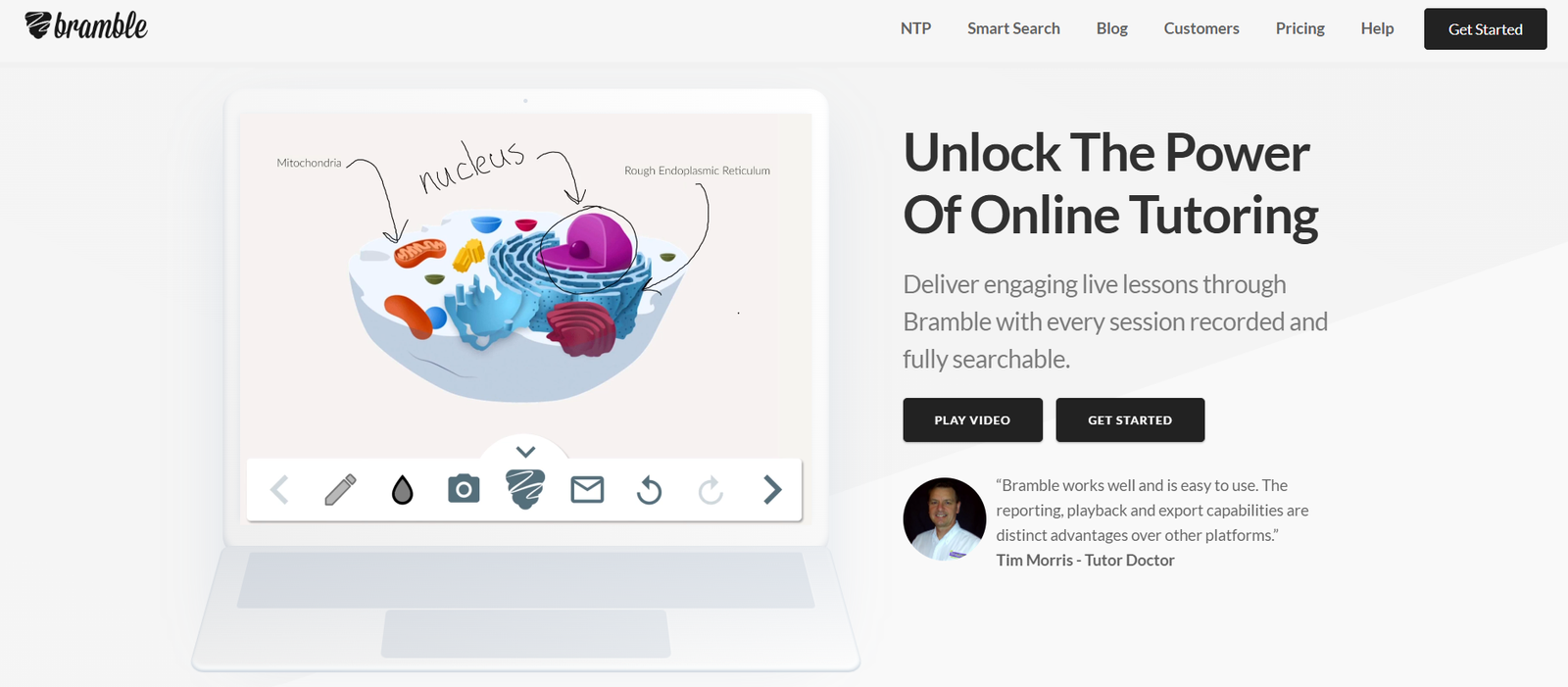
Live Online Lessons: Bramble provides a high-performance, browser-based environment for live lessons. It includes voice, video, and an interactive whiteboard where both tutor and student can write, draw, and annotate.
Smart Lesson Recording: Every session on Bramble is automatically recorded. These recordings are searchable, enabling students to revisit any part of a lesson by typing keywords.
Session Playback with Smart Search: Bramble’s Smart Search feature uses speech recognition and AI to index lesson recordings. Students can search for specific topics, terms, or phrases and jump directly to those moments in the playback.
Collaborative Whiteboard: The digital whiteboard offers a shared space where both tutor and student can work on problems together in real time. It supports pen tools, text, image insertion, and more.
Content Upload and Sharing: Tutors can upload PDFs, images, and documents into the lesson space, making it easier to work with past papers, worksheets, and revision materials.
No Software Installation: Bramble is fully web-based, so students and tutors can join sessions through a link without needing to download or install anything.
Analytics Dashboard: Tutors receive insights into student engagement, speaking time, and topics covered across sessions, helping them track progress over time.
Lesson Scheduling: Bramble offers scheduling features that allow tutors and students to set up lessons and manage availability.
Tutor Management Tools: For tutoring companies and organizations, Bramble includes admin features to manage tutors, track usage, and analyze lesson data.
How It Works
Using Bramble is straightforward for both tutors and students:
Step 1 – Set Up an Account: Tutors sign up on Bramble and can start creating lessons immediately. Tutoring organizations can also set up multi-user accounts for managing teams.
Step 2 – Schedule a Lesson: Tutors can schedule sessions using Bramble’s calendar or simply send a lesson link to students.
Step 3 – Start the Lesson: At the scheduled time, both tutor and student join the online lesson room via browser. No software installation is required.
Step 4 – Use Interactive Tools: During the lesson, tutors and students interact using the whiteboard, voice chat, and shared content.
Step 5 – Automatic Recording: The session is recorded in real time, and Bramble’s AI indexes the content for later search and playback.
Step 6 – Review and Analyze: After the session, students can review the lesson using Smart Search, while tutors can check analytics to evaluate student engagement.
Use Cases
Bramble serves a wide range of educational and professional contexts:
Private Tutors: Individual tutors use Bramble to deliver high-quality online lessons with minimal setup, helping students learn from anywhere.
Tutoring Agencies: Organizations use Bramble to coordinate large teams of tutors, deliver consistent lesson quality, and monitor performance through analytics.
Schools and Universities: Educational institutions use Bramble to supplement classroom learning or offer one-on-one tutoring support remotely.
Homeschooling: Parents and educators involved in homeschooling use Bramble to access subject-matter experts and deliver structured lessons.
Revision and Exam Preparation: Students can use Bramble’s Smart Search to revisit key topics and prepare for exams using previous lesson recordings.
Corporate Training: Though focused on education, Bramble can also be used for skills training, onboarding, and professional development in corporate settings.
Pricing
Bramble offers a usage-based pricing model that accommodates individual tutors and large organizations alike.
Free Plan: Bramble offers a free tier that allows tutors to host lessons with full access to whiteboard, recording, and Smart Search features, limited to 300 recording minutes.
Pay-As-You-Go: After the free quota is exhausted, users are charged based on the number of recording minutes. As of the latest pricing:
£0.02 per recorded minute (UK pricing)
Equivalent international rates are applied based on location
Custom Pricing for Organizations: Tutoring companies and institutions can contact Bramble for custom plans with centralized billing, admin dashboards, and enterprise-level analytics.
For the latest pricing details, visit the Bramble Pricing Page.
Strengths
Bramble offers several key advantages over general-purpose video platforms:
Built for Education: Unlike Zoom or Teams, Bramble is designed specifically for tutoring, with a focus on interactivity and lesson review.
Automatic Recording and Smart Search: The ability to record, transcribe, and search through lessons is a standout feature for students and educators alike.
No Downloads Needed: Browser-based access simplifies onboarding and reduces technical issues.
High-Quality Whiteboard: Designed for education, the whiteboard is responsive, real-time, and supports collaborative learning.
Tutor and Student Analytics: Insights into lesson engagement and speaking time help tutors personalize instruction.
Scalable for Organizations: Tutoring businesses benefit from management features, analytics dashboards, and usage tracking.
Drawbacks
Despite its benefits, Bramble has a few limitations:
Limited Free Usage: The 300-minute limit in the free plan may not be sufficient for regular tutoring sessions.
No Mobile App: While the platform is mobile-friendly in browsers, there is no dedicated mobile app at this time.
Dependent on Internet Quality: As with all live platforms, session quality can be affected by poor internet connections.
No Built-in Payment System: Bramble does not include tools for payment processing or invoicing, requiring tutors to manage payments separately.
Subject-Specific Tools: Bramble doesn’t include math equation editors or subject-specific widgets, which may limit use for some STEM subjects.
Comparison with Other Tools
Bramble competes with both general video conferencing tools and other tutoring platforms. Compared to Zoom or Google Meet, Bramble offers a more education-focused environment with features like Smart Search, lesson recording, and whiteboard tools.
When compared to other tutoring platforms like Lessonspace or TutorBird, Bramble stands out with its automatic transcription and search capabilities. Lessonspace, for instance, also has collaborative whiteboards and video chat, but lacks Bramble’s Smart Search functionality. TutorBird focuses more on administrative features like scheduling and billing, while Bramble emphasizes lesson delivery and review.
For tutors who prioritize teaching quality and review capabilities, Bramble provides a more focused and efficient solution.
Customer Reviews and Testimonials
Bramble is widely praised by educators, tutors, and students for its effectiveness in delivering engaging and interactive online lessons. Tutors appreciate the simplicity of setting up lessons and the Smart Search feature, which they say has transformed how students review material.
According to reviews on sites like Trustpilot and user feedback on Bramble’s website, the lesson recording and playback features are among the most valued aspects of the platform. Students mention that being able to revisit lessons before exams is a major advantage.
Tutoring companies have highlighted Bramble’s analytics as a useful tool for monitoring tutor performance and ensuring lesson quality.
Some feedback has pointed to areas for improvement, such as mobile optimization and billing integration.
Conclusion
Bramble is a purpose-built tutoring platform that elevates online education through its combination of live instruction, AI-driven lesson recording, and searchable playback. Its focus on enhancing both teaching and learning sets it apart from traditional video conferencing tools.
While there are limitations like free usage caps and lack of in-app payments, the platform’s core strengths—such as Smart Search, interactive whiteboards, and analytics—make it a top choice for tutors and education providers seeking a professional-grade online learning environment.
For tutors, tutoring companies, and institutions looking to deliver high-quality, reviewable, and efficient online lessons, Bramble is a powerful solution tailored for education.