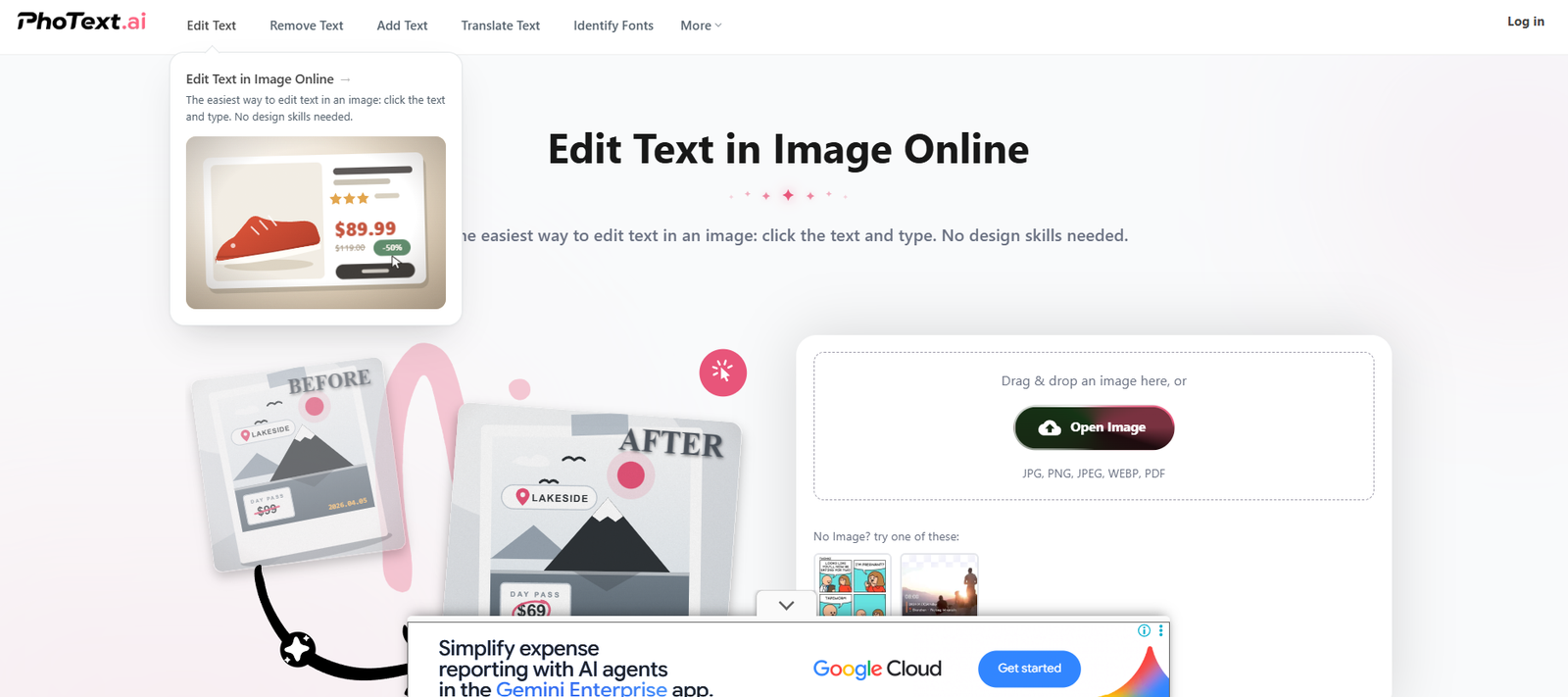
PhoText is an AI-powered online image text editor designed to make text inside photos, screenshots, posters, product images and scanned documents editable.
Instead of opening an image in a professional graphics editor and manually removing the original text, users can click the words they want to change and type the replacement.
PhoText uses OCR and AI to identify text and its visual characteristics. It attempts to match the original font, size, color, weight, perspective, shadow and other effects while reconstructing the background behind the old text.
The platform also provides conversational AI editing. Users can describe a change in plain language, such as asking the AI to replace a price, fix a spelling mistake, remove an object or change a background. The system then performs the required image-editing steps automatically.
Beyond text replacement, PhoText includes image translation, font identification, text extraction, PDF text editing, object removal, background editing, style transfer, photo enhancement and reference-image compositing.
The platform works in a web browser on desktop and mobile devices and supports common image formats as well as PDFs.
Features
AI Text Editing
PhoText allows users to edit text embedded inside an image.
Instead of recreating the complete graphic, users can select the existing words and replace only the required text.
Conversational Image Editing
Users can describe the desired change in natural language.
For example, they can ask the AI to replace one price with another, fix a word, change a background or remove an unwanted object.
The AI handles the selection, removal, background reconstruction and replacement automatically.
Click-to-Edit Text
Users who prefer more direct control can click text detected inside an image and type the replacement.
This makes image text editing feel closer to editing a document.
AI Font Matching
PhoText analyzes the typography in an image and attempts to identify a matching or visually similar font.
Users can also access the Font Finder manually.
1,000+ Commercial-Use Fonts
PhoText provides a growing library of more than 1,000 fonts that the platform states are licensed for commercial use.
Upload Custom Fonts
Users can upload their own TTF or OTF font files.
This can be particularly useful for brands that need to maintain consistent typography.
Use Device Fonts
PhoText can access supported fonts installed on the user’s device, allowing additional typography choices without uploading every font manually.
Style Matching
When replacing text, the AI attempts to reproduce characteristics such as:
Font
Color
Size
Weight
Position
Perspective
Shadow
Gloss
Spacing
Other visual effects
This helps the new text blend with the original design.
Smart Background Reconstruction
Removing existing text can leave an empty or damaged area.
PhoText uses content-aware background reconstruction to rebuild the region before inserting replacement text.
This can work with backgrounds containing textures, lighting and other visual details.
High-Precision OCR
PhoText uses OCR to recognize text embedded in images.
The platform is designed to handle small, angled, curved and multilingual text as well as more conventional layouts.
Image Translation
Users can translate text appearing inside an image while attempting to preserve the original design and layout.
This can be useful for localizing posters, product images, social media graphics and marketing material.
Image-to-Text Converter
PhoText can extract text from photographs, screenshots, scans and PDF pages.
Extracted text can be copied or saved as a text file.
The tool attempts to preserve line breaks and reading order.
Text Removal
Users can erase unwanted text from an image.
AI reconstructs the area behind the removed words.
Add Text
New text can be added to existing images.
Users can control typography and visual effects such as color, stroke, shadow, gradient, opacity and rotation.
Text Templates
PhoText provides ready-made text styles that can be added to an image and customized.
Poster Text Editor
The platform provides a dedicated workflow for editing posters.
Users can update titles, subtitles, dates, locations, prices and other information while attempting to retain the existing design.
Product Image Text Editor
Ecommerce sellers can change prices, promotional messages, badges and product information on existing product images.
Screenshot Text Editor
PhoText can recognize and edit text contained in screenshots.
This can be useful for correcting typos or updating mockups and demonstration images.
PDF Text Editor
PhoText provides an OCR-based PDF editor.
It can recognize text in scanned PDF documents and allow users to modify selected areas while preserving the surrounding layout.
Watermark Removal
The platform includes a tool for removing unwanted watermarks from images where the user has the legal right to do so.
Object Removal
Users can mark unwanted objects or describe what they want removed through the AI chat.
The system attempts to reconstruct the background automatically.
Object Replacement
Existing objects can also be replaced through prompt-based editing.
Background Editing
Users can replace or modify backgrounds without manually masking every part of the image.
Color Changes
AI instructions can be used to modify selected colors and backgrounds.
Style Transfer
PhoText can transform photographs into visual styles such as watercolor, oil painting, sketch and anime.
Photo Enhancement
The platform includes tools for restoring old photographs, increasing resolution and retouching portraits.
Reference Image Compositing
Users can provide up to three reference images and ask the AI to combine people, products or visual styles into another image.
High-Resolution Export
Edited content can be exported at high quality while preserving the original image dimensions where supported.
Web and Mobile Access
PhoText works through a browser on computers and mobile devices.
How It Works
Step 1: Upload an Image
Open PhoText and upload the image containing the text you want to change.
Supported formats include JPG, JPEG, PNG, WebP and PDF, with some specialized tools also accepting BMP.
Step 2: Let PhoText Detect the Text
The platform analyzes the image and identifies editable text regions.
Step 3: Select the Text
Click the words you want to modify.
Step 4: Type the Replacement
Enter the new text.
PhoText attempts to match the existing typography and visual style automatically.
Step 5: Adjust if Required
Users can manually change font, color, size, position, spacing and other formatting properties.
Step 6: Use AI for More Complex Changes
Instead of manually editing, describe the required change in the AI chat.
Step 7: Review the Background
Check that the removed text area has been reconstructed naturally.
Step 8: Compare the Result
Review the edited image against the original.
Step 9: Download
Export the completed image when satisfied with the result.
Use Cases
Fixing Typos in Images
Correct spelling mistakes without recreating the original graphic.
Poster Updates
Change dates, locations, titles or other information on existing posters.
Ecommerce Product Images
Update product prices, promotional labels and selling points.
Marketing Creative
Reuse existing campaign graphics while changing selected text.
Social Media Graphics
Correct or update text inside existing social media posts.
Image Localization
Translate advertising graphics and product images for different languages.
Screenshot Editing
Correct text or update legitimate demonstration screenshots and mockups.
PDF Editing
Modify text in scanned PDFs where the user has permission to edit the document.
Font Identification
Identify fonts used in existing designs.
Text Extraction
Extract text from screenshots, scanned pages and photographs.
Photo Restoration
Improve older photographs using AI enhancement tools.
Background Editing
Change or clean up image backgrounds without advanced graphics-editing skills.
Pricing
PhoText provides basic image text editing tools for free.
The official website describes the core editing functionality as free and states that advanced AI features receive a free trial quota.
However, clear standardized public pricing for all advanced AI features is not prominently disclosed on the currently accessible official pages.
Users should therefore check the live editor or account interface for the latest AI credit allowances, paid options and usage costs before purchasing.
Pricing details should not be assumed from third-party websites because PhoText’s plans and AI usage allowances can change.
Privacy
PhoText states that it does not collect user photographs, device information or geolocation for targeted advertising or data resale.
Uploaded content is retained temporarily rather than permanently.
The current AI Image Editor states that images belonging to logged-in users can be retained for up to 30 days, while images from non-logged-in users are retained for approximately one day.
Some other PhoText pages mention shorter default clearing periods for particular workflows, so users handling sensitive material should check the current privacy terms for the specific tool they are using.
Commercial Use
PhoText states that fonts distributed directly through its platform are licensed for commercial use.
Content produced using those platform-provided resources can also be used commercially according to the company’s published information.
For fonts uploaded by users or detected from their own devices, users remain responsible for the applicable font licence.
Users must also have the necessary rights to the original photographs, designs, logos, documents and other material they edit.
Strengths
Specialized Image Text Editing
PhoText focuses specifically on one of the more difficult image-editing tasks: changing existing text without recreating the complete design.
Easy Click-to-Edit Workflow
Users can click detected text and type a replacement.
Conversational AI Editing
Complex edits can be requested in natural language.
Automatic Font Matching
The platform reduces the need to manually search for typography matching the original image.
Background Reconstruction
AI attempts to repair the area behind removed text automatically.
Manual Controls Available
Users can still adjust font, color, size, spacing and other properties when automatic results need refinement.
Image Translation
Translation can be performed while attempting to retain the original visual layout.
Broad Editing Toolkit
Text editing is supplemented by object removal, background editing, style transfer, enhancement and other AI tools.
PDF Support
The OCR-based PDF editor extends the platform beyond conventional image formats.
Browser Based
No professional desktop image-editing application needs to be installed.
Drawbacks
Automatic font matching may not always reproduce the exact original typeface.
Complex backgrounds, unusual typography, highly stylized text and low-resolution images can make accurate replacement more difficult.
OCR can make mistakes when text is very small, blurred, distorted or partially hidden.
AI background reconstruction may occasionally introduce visible artifacts.
The platform does not currently present a simple, comprehensive public pricing table for all advanced AI usage, making it harder to estimate costs before using paid functionality.
PhoText is excellent for targeted image changes but does not replace a full professional design application for complex multi-layer graphic-design projects.
Users should also be careful when editing screenshots, certificates, financial records, identification material or other sensitive documents. Editing should only be performed for legitimate purposes and should not be used to create deceptive or fraudulent records.
Comparison with Other Platforms
PhoText differs from traditional image editors such as Photoshop because its main focus is making existing text inside a flattened image editable.
In a conventional graphics editor, changing text in a JPG or screenshot can require manually erasing the original words, reconstructing the background, identifying the font, matching typography and positioning the replacement.
PhoText attempts to automate these steps with OCR and generative AI.
Compared with general-purpose AI image editors, PhoText provides more specialized controls for text recognition, font matching, text formatting and document-style editing.
It also combines automatic AI editing with manual typography controls, which can be useful when the generated result needs additional refinement.
Professional design software remains more appropriate when users need precise layer control, advanced typography, complex masks or detailed production workflows.
Customer Reviews and Testimonials
A substantial collection of independently verified customer reviews and testimonials is not clearly presented on the official PhoText website.
The platform provides tutorials, examples and demonstrations of its image-editing capabilities, but these should not be treated as independent evidence of customer satisfaction.
Because many of the core tools can be tried without payment, prospective users can test the platform directly with non-sensitive images before relying on it for important design work.
Conclusion
PhoText is an AI-powered image text editor designed to make words embedded inside photos, screenshots, posters, product images and scanned documents easier to modify.
Its main advantage is the ability to replace text without manually recreating the entire image.
The platform combines OCR, AI font matching, style analysis and background reconstruction to make replacement text blend with the existing design. Users can either click the text directly or describe the desired change conversationally.
PhoText goes beyond basic text replacement with image translation, text extraction, PDF editing, font identification, object removal, background editing, photo enhancement, style transfer and reference-image compositing.
Its browser-based workflow makes it particularly accessible to users who do not have professional Photoshop or graphic-design skills.
The main limitations are occasional OCR or font-matching errors on difficult images and the lack of a clearly accessible comprehensive pricing table for advanced AI usage.
For marketers, ecommerce sellers, designers, content creators and everyday users who frequently need to fix or replace text in existing images without access to the original design file, PhoText provides a focused and convenient AI editing solution.