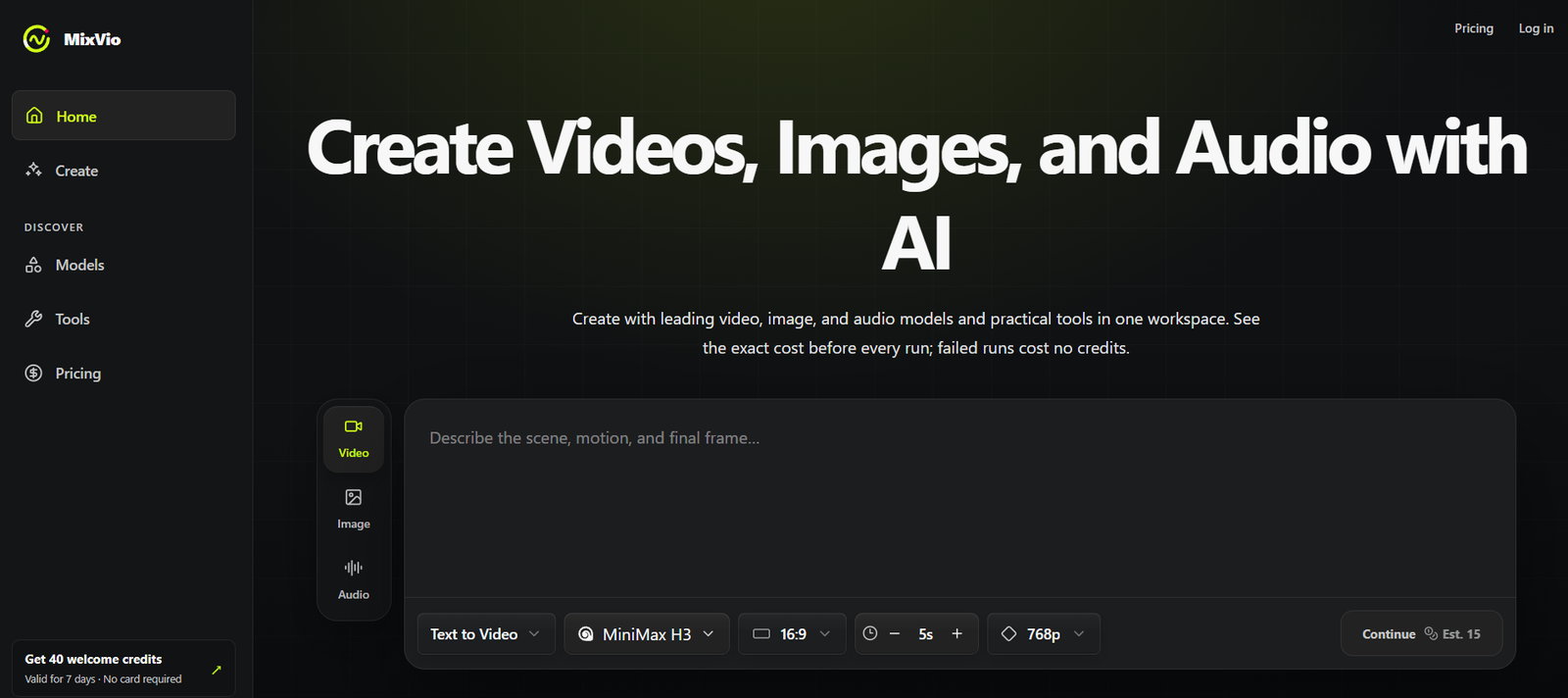
MixVio is an all-in-one AI creative platform for generating videos, images, voiceovers, music, and other media from a single workspace.
Instead of requiring creators to subscribe to and switch between multiple AI platforms, MixVio provides access to a growing catalog of leading third-party generation models.
Its current model library includes options such as Wan 3.0, MiniMax H3, Seedance 2.5, FLUX 3, Gemini Omni Flash, Kling 3.0, Seedance 2.0, Veo 3.1 Fast, GPT Image 2, Seedream 5.0 Pro, Nano Banana 2, Eleven v3, and Seed Audio 1.0.
Users can create short videos from text or reference images, generate and edit images, produce voiceovers, create audio scenes, and enhance existing media.
MixVio also provides practical tools such as Text to Video, Image to Video, Video Upscaler, Background Remover, and Image Upscaler.
Every generation has a clearly displayed credit cost before submission. Credits are charged when the generation succeeds, while reserved credits are automatically released if the task fails.
MixVio is designed for independent creators, marketers, small businesses, and creative professionals who want access to multiple AI media models without managing separate creative platforms.
Features
Multiple AI Models
MixVio brings several leading video, image, and audio model families into one platform.
Users can select a specific model or allow MixVio’s Auto option to choose an appropriate model based on quality, speed, and credit usage.
Text to Video
Users can describe a scene in natural language and generate a short AI video.
Available video capabilities vary according to the selected model.
Image to Video
Existing images can be animated using compatible AI video models.
This is useful for product images, portraits, illustrations, concept art, and other still visuals.
AI Video Generation
MixVio supports multiple video models with different resolutions, durations, reference options, and native-audio capabilities.
Current models support outputs ranging from short clips to videos of up to 30 seconds, depending on the model.
Wan 3.0
Wan 3.0 supports 2–30 second videos at resolutions from 480p to 1080p.
It can work from text, frames, reference packs, documents, or webpages and supports native audio.
Kling 3.0
Kling 3.0 supports 5, 10, and 15-second generations and resolutions reaching up to 4K under supported configurations.
Seedance Models
MixVio provides access to Seedance models for cinematic and longer AI video generation.
Seedance 2.5 supports clips of up to 30 seconds with native audio and large reference packs.
Veo 3.1 Fast
Google’s Veo 3.1 Fast is available as another option for short-form AI video creation.
AI Image Generation
Users can generate still images from prompts using several supported image models.
GPT Image 2
GPT Image 2 can be used for campaign imagery, detailed generation, and precise image editing, with supported outputs reaching up to 4K.
Seedream 5.0 Pro
Seedream 5.0 Pro is available for image generation, including dense compositions and multilingual text use cases.
Nano Banana 2
Nano Banana 2 provides prompt-following image generation and editing with supported resolutions reaching up to 4K.
Image Editing
Compatible models allow users to modify existing images rather than generating everything from scratch.
Background Remover
Users can remove the background from product photographs, portraits, and other images and create transparent PNG files.
AI Image Upscaler
Existing images can be enhanced to produce higher-resolution versions.
AI Video Upscaler
Users can enhance an existing video when they already like its composition but need a sharper output.
Supported video upscaling can reach up to 4K.
AI Voiceovers
MixVio provides voice-generation capabilities through models such as Eleven v3.
Users can turn scripts into emotion-tagged voiceovers.
AI Audio Generation
Seed Audio 1.0 allows creators to generate more complex sound scenes containing dialogue, ambience, music, and sound-effect cues.
Original Music
MixVio also supports original AI-generated music as part of its broader audio workflow.
Native Audio Video Models
Some supported video models can create synchronized audio as part of the video-generation process.
Reference Uploads
Compatible generation routes allow users to upload their own images, videos, or audio as source material.
Private Workspace
Uploaded files and generated results remain within the user’s private workspace and are not automatically listed publicly.
Batch Generation
Higher plans support batch generation, allowing creators to produce several items more efficiently.
Exact Credit Quotes
MixVio displays the exact credit requirement before a user submits a generation.
No Credits Charged for Failed Runs
Credits are reserved when a job starts but automatically released when generation fails.
How It Works
Step 1: Create an Account
Users can create a free account without entering a credit card.
Step 2: Choose the Media Type
Select video, image, or audio depending on the desired output.
Step 3: Choose a Tool or Model
Users can begin with a specific task such as Text to Video or Image to Video, or browse available AI models first.
Step 4: Enter a Prompt
Describe the video, image, voiceover, or audio result you want.
Step 5: Add Reference Media
When supported, upload an image, video, audio file, or other reference material.
Step 6: Configure the Generation
Select available settings such as duration, resolution, model, and other model-specific controls.
Step 7: Review the Credit Cost
MixVio displays an exact credit quote before generation begins.
Step 8: Generate
Submit the job and allow the selected AI model to create the requested asset.
Step 9: Enhance if Required
Use tools such as Video Upscaler, Image Upscaler, or Background Remover when additional processing is needed.
Step 10: Download the Result
Paid users can export eligible content without a MixVio plan watermark and use generated assets commercially subject to the platform’s terms.
Use Cases
Social Media Videos
Creators can produce short AI clips for Reels, TikTok, Shorts, and other social platforms.
Marketing Videos
Businesses can generate promotional clips and campaign visuals without maintaining subscriptions to several separate AI tools.
AI Advertisements
Marketing teams can combine generated video, imagery, voiceovers, and audio for advertising concepts.
Product Images
Businesses can generate, edit, upscale, or remove backgrounds from product imagery.
Image Animation
Still photographs and illustrations can be transformed into animated video clips.
Creative Concept Development
Designers and creative teams can rapidly test different visual directions before committing to full production.
Voiceovers
Creators can turn scripts into AI-generated narration.
Audio Scenes
Users can create dialogue, ambience, sound effects, and music cues for videos, advertisements, games, and prototypes.
AI Music
Creators can experiment with original AI-generated music.
Video Enhancement
Existing clips can be upscaled when the composition is already suitable but higher resolution is needed.
Image Enhancement
Low-resolution or soft images can be processed into cleaner, higher-resolution versions.
Creative Agencies
Agencies can access different AI model families from a single environment for multiple client projects.
Pricing
MixVio currently offers Free, Starter, Pro, and Ultra plans.
Free: $0
The Free plan provides 40 welcome credits.
These credits are valid for seven days and do not recur.
No credit card is required.
Users receive access to all currently available models when their credit balance is sufficient for the selected generation.
Free users can run one job at a time and receive lower-priority generation.
Images are limited to up to 1K, while video is limited to up to 480p and six seconds.
Free images include a visible MixVio watermark, while free voiceovers include an audible MixVio disclosure. Free videos do not receive a MixVio plan watermark.
Free assets are retained for approximately seven days.
Commercial use is not included.
Starter: $20 per month
Starter includes 400 credits per month.
MixVio estimates this at approximately ten 5-second videos under its stated Kling 3.0 Standard 720p reference configuration.
Users can run up to two concurrent jobs.
Starter includes all available models, standard queue priority, higher-resolution video options, watermark-free exports, commercial use, private history, and email support.
Pro: $40 per month
Pro includes 1,000 credits per month.
MixVio estimates this at approximately twenty-five 5-second videos using its stated reference configuration.
Users receive up to four concurrent jobs and priority generation.
Pro also supports batch generation of up to six items.
It includes commercial use, watermark-free exports, all available models, higher-resolution options, private history, and priority email support.
Ultra: From $100 per month
The standard Ultra configuration includes 3,000 credits per month.
MixVio estimates this at approximately seventy-six 5-second videos under its stated reference configuration.
Users can run up to eight concurrent jobs.
Ultra provides the highest queue priority and batch generation of up to twelve items.
It also includes all available models, watermark-free exports, commercial use, higher-resolution options, private history, and priority support.
Higher Ultra credit configurations are also available.
Yearly Billing
MixVio currently advertises yearly plans at 50% off the equivalent monthly total.
Annual plans are billed yearly, while included credits are still granted monthly.
Additional Credit Packs
Paid subscribers can purchase additional credit packs.
Subscription credits expire at the end of the applicable billing period and do not roll over.
Purchased credit packs follow their own expiry conditions.
Strengths
Multiple Leading Models in One Platform
Users do not need to move between numerous websites to experiment with different video, image, and audio models.
Video, Image and Audio Together
MixVio supports several stages of multimedia creation from the same workspace.
Transparent Credit Costs
Users see the exact number of credits required before submitting a job.
Failed Jobs Do Not Cost Credits
Reserved credits are automatically released when generation fails.
Free Access to Available Models
Free users can test currently available models when their welcome-credit balance is sufficient.
Useful Enhancement Tools
Background removal and image/video upscaling make the platform useful beyond pure generation.
Commercial Rights on Paid Plans
Paid plans include commercial use subject to MixVio’s terms.
Private Workspace
Uploads and results are not automatically published in a public gallery.
Model Choice
Creators can select the model that best matches their desired quality, speed, duration, and credit budget.
Drawbacks
MixVio uses a credit-based system, and premium models or high-resolution generations can consume credits quickly.
The Free plan provides only 40 welcome credits, which expire after seven days.
Free outputs are intended for evaluation rather than commercial publishing.
Monthly subscription credits do not roll over.
Different AI models have different resolutions, durations, input requirements, and credit costs, so users may need some experimentation to determine which model best suits a project.
MixVio primarily provides access to third-party AI models rather than developing every underlying generation model itself. Changes made by model providers can therefore affect availability, capabilities, and pricing.
As with other generative AI platforms, output quality can vary, and complex scenes may require several attempts.
Privacy
MixVio states that uploads and generated results remain in the user’s private workspace and are not publicly listed.
Prompts, settings, and necessary media are sent to the selected AI provider when required to complete a generation.
MixVio states that it does not use customer content to train a model owned by MixVio.
Free and paid content have different retention periods. Free creations are generally retained for around seven days, while paid creations remain accessible longer while the account remains active, subject to applicable storage, deletion, legal, and safety conditions.
Users should only upload images, faces, voices, brands, and other materials they own or have permission to use.
Comparison with Other Platforms
MixVio differs from AI platforms built around a single proprietary generation model.
Instead, it acts as a unified creative workspace where users can access multiple third-party models for video, images, and audio.
This approach is useful because different models have different strengths. One video model may provide longer clips or native audio, while another may offer higher resolution or better reference-image control.
Similarly, users can move between different image and audio models without maintaining completely separate creative workflows.
MixVio also combines generation with practical utilities such as background removal and image and video upscaling.
Its main value is therefore convenience and model choice rather than dependence on a single AI engine.
Creators who already subscribe directly to several individual AI model providers should compare credit costs and capabilities before deciding whether consolidating their workflow through MixVio provides better value.
Customer Reviews and Testimonials
Customer reviews and substantial independent testimonials are not clearly available on the official MixVio website.
The website primarily demonstrates the platform through generated video and image examples rather than publishing a large collection of customer testimonials.
Prospective users can evaluate the service through its Free plan, which provides 40 welcome credits without requiring a credit card.
Conclusion
MixVio is an all-in-one AI creative workspace that brings video, image, and audio generation together with practical media-enhancement tools.
Its strongest advantage is model choice. Users can access a growing catalog that currently includes models such as Wan 3.0, MiniMax H3, Seedance, Kling, Veo, GPT Image, Seedream, Nano Banana, Eleven, and Seed Audio.
The platform can handle tasks ranging from text-to-video and image animation to image generation, background removal, upscaling, voiceovers, and AI audio creation.
Its transparent credit system is another useful feature. The exact cost appears before generation, and failed runs do not consume reserved credits.
The main limitations are the relatively small Free allowance, expiring subscription credits, and potentially high credit consumption when using advanced models or demanding settings.
For creators, marketers, agencies, and small businesses that want to experiment with multiple leading AI media models without constantly moving between separate platforms, MixVio provides a convenient unified workspace.