
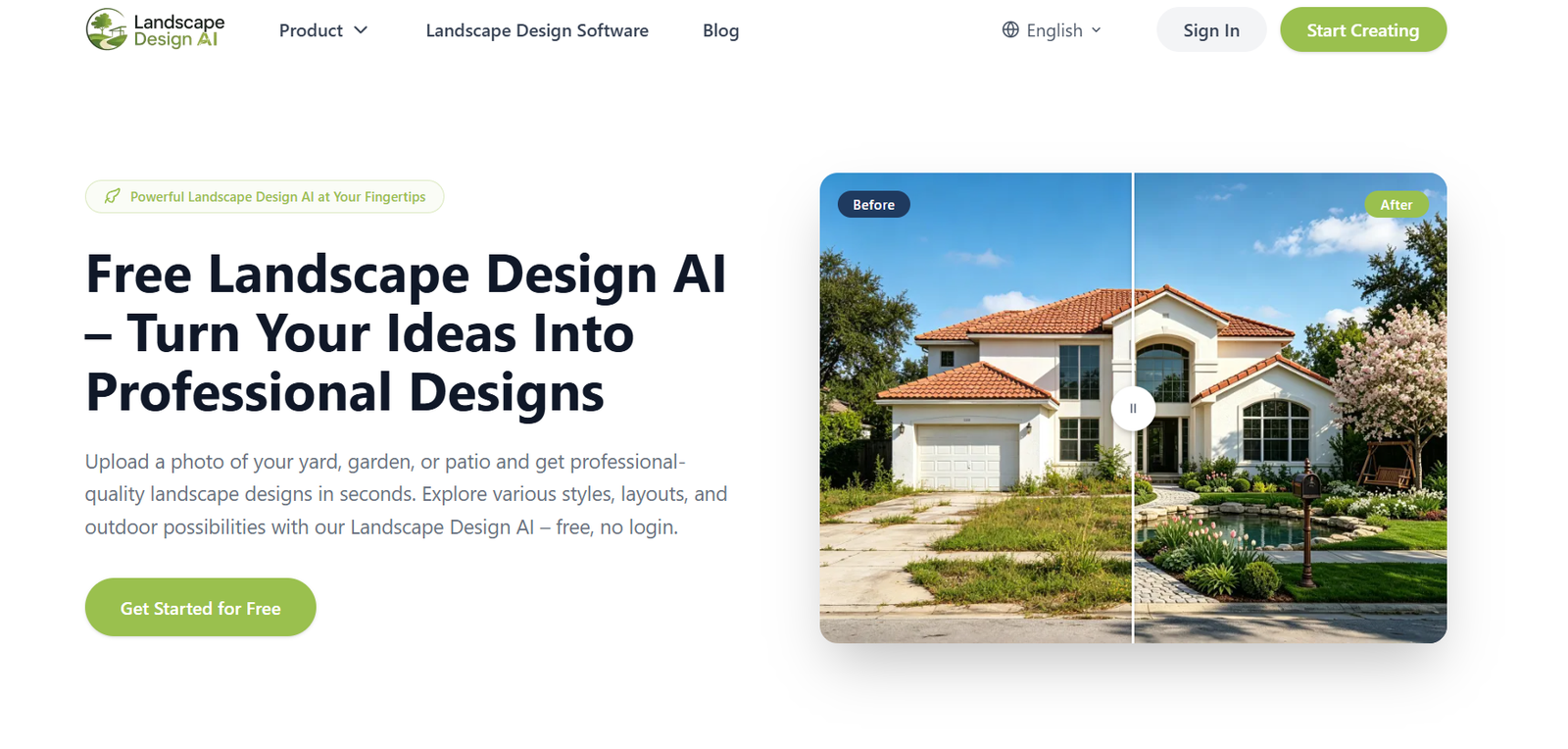
Landscape Design AI is an online AI landscape generator that helps users visualize new designs for gardens, backyards, front yards, patios, balconies, and other outdoor spaces.
The process starts with a photograph of the existing space. Users upload the image, select details such as the type of space, intended use, preferred style, location, sunlight, and terrain, and then let the AI create a redesigned version of the area.
The platform offers more than 30 design styles, covering options such as modern, English, cottage, Japanese, Mediterranean, tropical, coastal, desert, Scandinavian, and naturalistic landscapes. Users who have a more specific idea can also describe it through a custom prompt.
Landscape Design AI is designed for homeowners as well as professionals who want a quick way to explore outdoor design ideas before committing to physical changes. It can be useful for landscaping inspiration, client presentations, property visualization, garden planning, and early discussions with contractors.
The generated images are visual concepts rather than technical landscape plans. They can help users understand how a redesigned outdoor space might look, but they should not replace professional architectural, engineering, horticultural, or construction advice.
Features
Photo to Landscape Design
Users can upload an existing photograph and transform it into a new landscape concept. Supported uploads include JPG, PNG, and WebP images.
30+ Landscape Styles
The platform offers more than 30 preset styles. Available examples include modern, English, cottage, Mediterranean, Japanese, tropical, desert, coastal, Scandinavian, ranch, rock garden, and naturalistic designs.
Custom Design Prompts
Users are not restricted to preset styles. They can describe specific landscaping ideas through a custom prompt and ask the AI to incorporate those preferences into the generated concept.
Different Outdoor Space Types
Landscape Design AI works with several types of outdoor areas, including backyards, front yards, gardens, patios, side yards, and balconies.
Intended Use Selection
Users can specify how they intend to use the outdoor area. This gives the AI additional context when preparing a design concept.
Location Awareness
The design interface allows users to provide or detect their location. According to the platform, location and climate information can help it suggest landscape concepts better suited to local conditions.
Sunlight Settings
Users can provide information about sunlight conditions. This can help the AI take the environment into account when preparing landscaping ideas.
Terrain Selection
The interface also considers terrain conditions, allowing users to provide information about the physical characteristics of the space.
Photorealistic Visualization
Instead of producing only sketches or basic layouts, the tool focuses on realistic before-and-after visualizations that help users imagine how a redesigned property could look.
High-Resolution Downloads
Completed designs can be downloaded as high-resolution images, making them easier to share with family members, clients, contractors, or other stakeholders.
Watermark-Free Results
The official website states that generated designs can be downloaded without watermarks.
AI Yard Design
A dedicated yard design tool helps users explore broader transformations of residential outdoor areas.
AI Garden Design
The garden-focused option is designed for users who want to experiment with planting arrangements, landscape styles, pathways, and other garden elements.
AI Outdoor Design
Users can visualize outdoor environments involving yards, gardens, patios, pools, outdoor kitchens, and related spaces.
AI Exterior Design
The platform also provides an AI exterior design option for exploring changes to the appearance of a property’s exterior.
How It Works
Step 1: Upload a Photo
Users upload a clear photograph of the outdoor area they want to redesign. The image can be cropped so the AI focuses on the relevant part of the property.
Step 2: Choose the Space Type
Select whether the project involves a backyard, garden, patio, front yard, or another supported outdoor area.
Step 3: Select the Intended Use
Users provide information about how they want the redesigned space to function.
Step 4: Pick a Landscape Style
Choose from more than 30 available styles, such as modern, Japanese, Mediterranean, cottage, coastal, or tropical.
Step 5: Provide Environmental Information
Users can specify their location, sunlight conditions, and terrain to provide additional context.
Step 6: Add Specific Instructions
If required, users can describe particular plants, paths, seating areas, hardscape features, or other ideas through a custom prompt.
Step 7: Generate the Design
The AI processes the photograph and selected preferences and produces a redesigned visualization.
Step 8: Try Alternative Concepts
Users can change styles or instructions and generate additional versions to compare different landscaping ideas.
Step 9: Download and Share
The preferred result can be downloaded as a high-resolution image and used as a visual reference when discussing the project with others.
Use Cases
Homeowners
Homeowners can photograph their existing yard or garden and explore possible transformations before spending money on landscaping work.
DIY Gardeners
People planning their own garden improvements can experiment with different visual directions and layouts before purchasing plants and materials.
Landscape Designers
Professionals can use AI generated concepts during early brainstorming or client conversations to communicate possible visual directions quickly.
Real Estate Professionals
Agents and property developers can visualize how an empty or outdated outdoor area might look after landscaping improvements.
Contractors
A generated image can provide an early visual reference when discussing a client’s preferences, although contractors still need proper specifications and measurements before construction.
Property Developers
Developers can explore different landscape styles for residential properties and use visual concepts during early planning or presentations.
Home Renovators
People renovating a property can experiment with outdoor areas alongside other improvements to understand how different styles may complement the home.
Patio Planning
Users can explore different approaches to seating, greenery, pathways, and other elements when planning a patio makeover.
Garden Inspiration
Users who are unsure what style they want can generate several concepts and compare modern, cottage, Japanese, Mediterranean, tropical, and other approaches.
Pricing
Landscape Design AI is currently offered as a free service with generation limits rather than conventional paid subscription plans.
Users can make two free generations without creating an account.
After signing in, users receive an additional two free generations. Signed-in users also currently receive two free generations each day. Unused daily generations do not roll over to the next day.
The official Terms of Use state that the company may change these free allowances and may introduce paid plans or additional usage tiers in the future.
Therefore, there are currently no clearly published standard paid subscription plans on the official website.
Strengths
Easy to Use
The workflow requires little technical knowledge. Users mainly need to upload a photograph and select their design preferences.
Free to Start
Users can generate initial concepts without creating an account, making the tool easy to test.
Wide Range of Styles
More than 30 landscape styles give users substantial room to experiment with different visual directions.
Uses Existing Property Photos
Designs are generated around the user’s actual outdoor space rather than starting only from a generic template.
Custom Prompts
Users can move beyond preset styles by describing their own landscaping ideas.
Environmental Inputs
Location, sunlight, and terrain options provide additional context for creating outdoor concepts.
High-Resolution Results
The ability to download high-resolution images makes generated concepts more practical for presentations and discussions.
Useful for Professionals and Homeowners
The simple interface can serve casual homeowners while also helping landscape and property professionals with early visualization.
Drawbacks
The most important limitation is that generated images are design concepts, not construction-ready landscape plans. The company’s terms specifically state that outputs are not architectural plans, engineering documents, surveys, or professional landscaping advice.
AI generated concepts may also contain plants, layouts, materials, or structural ideas that are unsuitable for a particular property. Users should verify important decisions with qualified professionals.
Designs may not be accurately scaled. Measurements, drainage, soil conditions, underground services, building regulations, structural requirements, irrigation, and other practical issues need separate assessment.
The free service also has generation limits. Signed-in users receive a limited number of refreshed generations rather than unrestricted daily generation under the terms currently published.
Another consideration is usage rights. The current Terms of Use state that generated designs may be used for personal, non-commercial purposes, while commercial use may require a separate agreement. Professionals intending to use outputs commercially should therefore verify the applicable rights with Landscape Design AI.
Comparison with Other Platforms
Landscape Design AI belongs to a growing category of AI tools that visualize home, garden, exterior, and landscape renovations from photographs.
Traditional landscape design software often provides detailed drawing, measurement, CAD, planting, and planning capabilities. Such software can be valuable for professionals but usually requires more expertise and time.
Landscape Design AI takes a simpler approach. Instead of manually constructing a landscape plan, users upload an existing photograph, provide their preferences, and receive an AI generated visualization.
Its selection of more than 30 styles, custom prompts, location settings, sunlight information, terrain options, and dedicated yard, garden, outdoor, and exterior tools provides users with several ways to guide the result.
However, it should not be considered a replacement for professional CAD, landscape architecture, or construction planning software. Its strongest role is early visualization and idea exploration rather than precise technical design.
Customer Reviews and Testimonials
Landscape Design AI displays several user testimonials on its official website.
The featured feedback is attributed to users identified as a Landscape Architect, DIY Homeowner, and Real Estate Developer.
The testimonials highlight areas such as faster landscape visualization, greater confidence before beginning a home project, clearer before-and-after presentations, and the ability to demonstrate potential landscaping improvements for properties.
These testimonials are presented directly by Landscape Design AI and should therefore be treated as company-selected customer feedback rather than independent review data.
Conclusion
Landscape Design AI is a useful visual planning tool for anyone who wants to see how an outdoor space could look before beginning a landscaping project.
Its simple photo-based workflow, more than 30 styles, custom prompts, environmental settings, photorealistic output, and high-resolution downloads make it accessible even to users without professional landscape design experience.
Homeowners, DIY gardeners, landscape professionals, contractors, real estate developers, and property professionals can use it to explore ideas and communicate a desired visual direction.
Its greatest value is in visualization rather than technical planning. Generated designs should be treated as inspiration and early concepts, especially when a real project involves structural changes, plant suitability, drainage, measurements, safety, or regulatory requirements.
For users who want a quick and currently free way to experiment with different garden, yard, patio, and outdoor styles using a photograph of their actual property, Landscape Design AI provides a simple starting point.


