
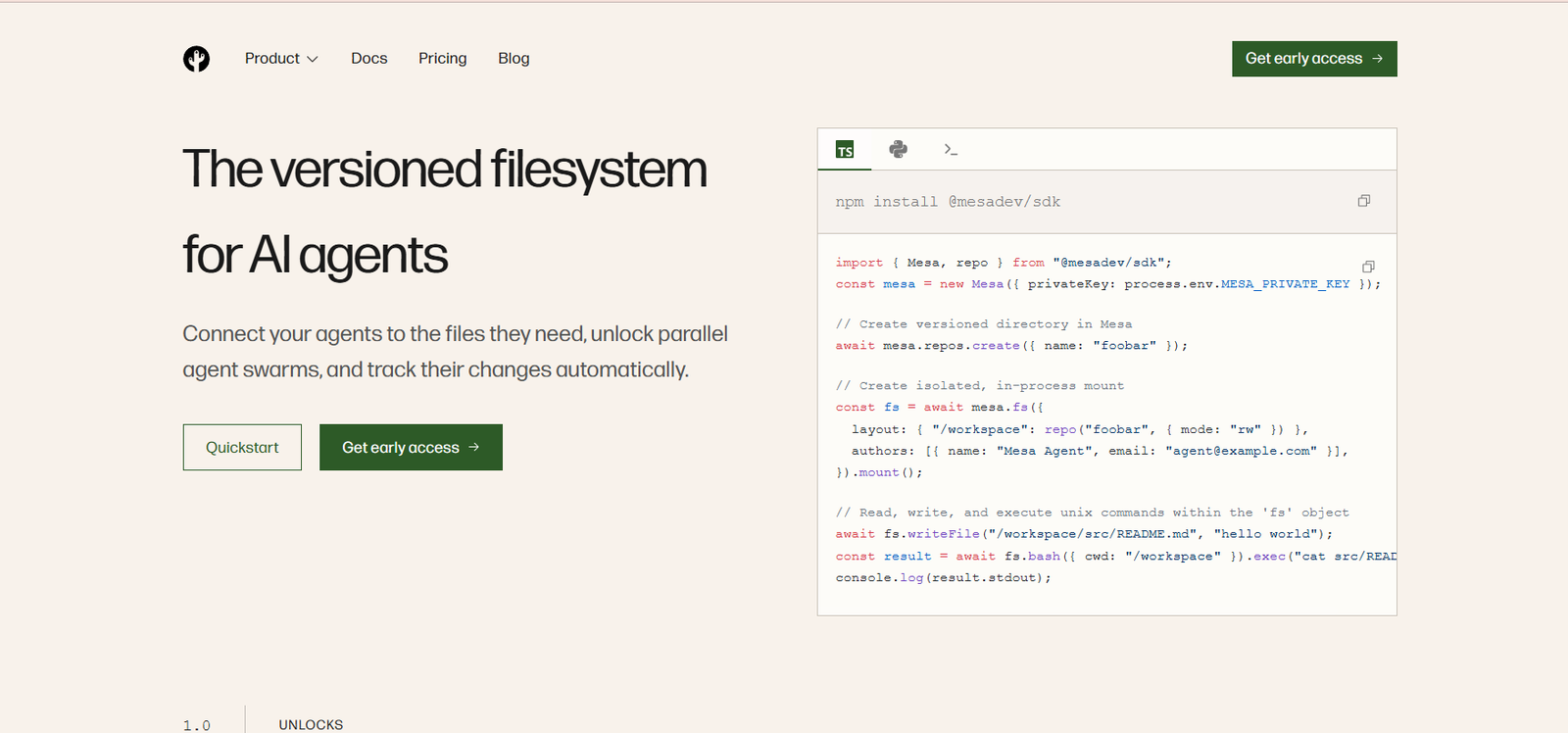
Mesa is infrastructure designed specifically for AI agents that need reliable, persistent access to files. It combines the familiar behavior of a filesystem with version control capabilities such as branching, history, diffs, checkpoints, merging, and rollback.
The platform addresses an important challenge in agent-based applications. AI agents often run inside temporary computing environments, but the files they create and modify may need to survive long after those environments disappear. Mesa separates persistent file storage from temporary compute so agents can reconnect to the same data across different runs.
Mesa is particularly useful for developers building coding agents, knowledge work agents, personal assistants, prompt-to-app systems, data analysis agents, build systems, and multi-agent workflows.
Instead of requiring an entire repository to be cloned before an agent starts working, Mesa can progressively provide files as they are requested. This helps agents access large repositories quickly while maintaining version history automatically.
Mesa also supports parallel agent workflows. Developers can create isolated branches or workspaces for multiple agents, allow them to work independently, compare their results, and select or merge the preferred output.
Features
Versioned Filesystem
Mesa combines persistent file storage with version control. Changes made by agents can be tracked automatically, giving developers access to history, branching, merging, diffs, and previous filesystem states.
Virtual Filesystem
Mesa provides a virtual filesystem that can mount repositories as local directories. Agents and development tools can interact with files using familiar filesystem operations without first cloning the entire repository.
On-Demand File Materialization
Files are loaded when they are required instead of downloading an entire repository in advance. This can reduce startup time when agents work with large projects.
Parallel Agent Workspaces
Developers can fork a workspace and run multiple AI agents on isolated branches. Each agent can work independently without overwriting another agent’s changes.
Checkpoints and Rollbacks
The filesystem can be checkpointed during an agent workflow. If an agent makes an unwanted change, developers can return to an earlier state instead of rebuilding the environment manually.
Human-in-the-Loop Reviews
Mesa supports workflows where an agent’s work can pause for human review. A person can approve changes, request modifications, or apply policy checks before allowing the agent to continue.
Version History
Agent activity can be preserved as a sequence of file changes. This creates an audit trail that can help developers understand what changed and restore earlier versions when necessary.
Any File Format
Mesa is not limited to source code. It can version documents, spreadsheets, images, datasets, models, media, configuration files, and other file types.
Large File Support
The platform supports large files with random access and built-in deduplication. This can be useful when AI workflows involve datasets, models, media, or large project repositories.
POSIX Compatible Filesystem
MesaFS is designed to work with standard Unix filesystem operations. Existing agents, editors, build tools, command line utilities, and other software can therefore interact with files through familiar interfaces.
Git Compatibility
Mesa can operate with standard Git workflows. Developers can use common operations such as clone, fetch, push, and branch through compatible Git clients.
Git Repository Synchronization
Mesa supports synchronization with Git based upstream services such as GitHub and GitLab, allowing developers to connect agent work with existing development workflows.
SDK and REST API
Developers can integrate Mesa directly into AI applications through its SDK and APIs rather than relying exclusively on conventional Git commands.
TypeScript and Python Support
Mesa provides developer tooling for commonly used programming environments, including TypeScript and Python.
Concurrent Writers
The infrastructure is designed to support many agents writing concurrently. This is particularly important for applications that run multiple agents or agent swarms in parallel.
Shared Agent Memory and Skills
Developers can store agent memories, skills, learned context, and related resources inside versioned files. Multiple agents can then read and update these resources.
Fine-Grained Access Controls
Enterprise environments can restrict access according to repositories, branches, paths, and permissions, helping organizations control what individual agents can access.
Bring Your Own Cloud
Enterprise customers can deploy Mesa within their own AWS, Google Cloud, or Azure environment while keeping their data and audit trail within their infrastructure.
How It Works
Step 1: Create a Mesa Account
Developers can begin through Mesa’s early access program and set up an account for their application.
Step 2: Create a Repository
A developer creates a versioned repository or directory where the files required by an AI agent will live.
Step 3: Connect Mesa
Mesa can be integrated using its SDK, API, Git interface, or virtual filesystem depending on the application architecture.
Step 4: Mount the Filesystem
The repository can be mounted as a local-style filesystem. Files are then made available to the agent as they are needed.
Step 5: Let the Agent Work
The AI agent can read, create, edit, delete, or otherwise work with files using normal filesystem operations.
Step 6: Track Changes
Mesa automatically maintains version history behind the filesystem, allowing changes to be tracked without requiring the agent to manually manage every Git operation.
Step 7: Create Parallel Workspaces
For multi-agent workflows, developers can fork the filesystem so several agents can work on isolated versions of the same project simultaneously.
Step 8: Review the Results
Developers or human reviewers can compare changes, inspect diffs, request modifications, and approve the preferred result.
Step 9: Merge or Roll Back
Approved changes can move forward, while problematic changes can be rolled back to an earlier filesystem state.
Use Cases
Coding Agents
AI coding agents can access source code, modify files, run workflows, and preserve their changes without repeatedly cloning entire repositories.
Parallel Agent Swarms
Developers can run multiple agents against separate branches of the same workspace. Results can then be compared before selecting the best approach.
Knowledge Work Agents
Agents working with documents, reports, spreadsheets, images, and other business files can use Mesa to maintain version history and support human approval.
Personal AI Assistants
Persistent files can provide personal assistants with long-term documents, memories, skills, and working context across different sessions.
Prompt-to-App Platforms
AI app builders can create isolated workspaces for each generated project while retaining complete file history.
Data Analysis Agents
Data agents can work with datasets, scripts, generated reports, spreadsheets, and other analytical files while preserving each stage of their work.
Human Review Workflows
Organizations can pause an agent after important file changes and allow a human reviewer to approve or reject the work before execution continues.
Build Systems
Build and CI systems can access versioned files without always requiring a complete repository clone.
Agent Memory
AI applications can store memories, learned instructions, reusable skills, and contextual information in files that persist and evolve over time.
Large Repository Workflows
Teams working with large repositories can use on-demand file materialization so agents do not need to download every file before starting useful work.
Pricing
Mesa currently offers Free, Scale, and Enterprise pricing.
Free: $0 per month
The free tier includes:
50 GB of repository blob storage.
Up to 1,000 repositories.
200 GB of monthly egress for Git and REST API usage.
Unlimited reads through Mesa’s virtual filesystem.
The free tier is included with every account.
Scale: Pay As You Go
Usage beyond the free allowance is currently charged at:
$0.20 per GB per month for repository blob storage.
$0.11 per GB for data leaving Mesa through Git and the REST API.
Reads made through Mesa’s virtual filesystem are not charged as egress.
Inbound traffic, including pushes and writes to Mesa, is not charged.
There are no stated minimum commitments for standard usage.
Enterprise: Custom Pricing
Enterprise pricing is available for organizations operating Mesa at larger scale.
Enterprise options can include volume discounts, committed-use pricing, Bring Your Own Cloud deployments, dedicated support, custom service agreements, and procurement support.
Pricing may change, so users should confirm the latest rates on Mesa’s official pricing page before deploying production workloads.
Strengths
Built Specifically for AI Agents
Mesa is designed around machine-driven workflows rather than simply adapting traditional human-focused repository infrastructure.
Filesystem and Version Control Together
Developers do not have to choose between familiar filesystem access and version history. Mesa combines both approaches.
Supports Parallel Agents
Isolated branches and workspaces make the platform particularly useful for multi-agent and agent swarm architectures.
Fast Workspace Creation
Agents can begin accessing required files without waiting for an entire large repository to be cloned.
Automatic Version History
Agent changes can be tracked without requiring every AI agent to understand or manage traditional Git workflows directly.
Human Oversight
Approval workflows, diffs, checkpoints, and rollbacks make it easier to introduce human review into autonomous agent systems.
Supports More Than Code
Documents, spreadsheets, images, datasets, models, media, and other files can exist within the same versioned environment.
Git Compatibility
Teams can continue using existing Git based workflows while introducing Mesa for agent-oriented workloads.
Generous Free Tier
The free allowance of 50 GB storage, 1,000 repositories, and 200 GB monthly Git and API egress can provide developers with room to test the platform.
Enterprise Security
Mesa states that it is SOC 2 Type II compliant and provides encryption, access logging, fine-grained permissions, and Bring Your Own Cloud deployment options.
Drawbacks
Mesa is infrastructure for developers rather than a consumer-facing AI application. Non-technical users looking for an AI assistant or ready-made automation platform are unlikely to benefit from it directly.
The platform also introduces a new infrastructure layer into an AI application. Development teams need to integrate and manage Mesa appropriately rather than simply installing a standalone desktop application.
Although Mesa supports synchronization with Git-based services, broader native synchronization with sources such as Google Drive and S3 is not currently presented as fully built-in across the platform.
Windows support for its filesystem tooling has also been described as a roadmap item, while macOS and Linux are supported.
Mesa is currently presented through an early access process, which may make it less appropriate for teams that require a fully mature, widely established infrastructure platform immediately.
Comparison with Other Platforms
Mesa sits between traditional Git hosting services and cloud filesystem infrastructure.
Git platforms are designed primarily around human software development workflows involving repositories, commits, branches, and pull requests. They provide excellent version control but may not be optimized for thousands of autonomous agents performing concurrent file operations.
Traditional cloud storage and filesystem services provide durable file access, but they may not include the branching, merging, diffs, checkpoints, and version-control semantics required for complex agent workflows.
Mesa attempts to combine these two worlds. It provides a mountable filesystem while maintaining version history underneath. This means agents can work with ordinary files while developers retain the ability to inspect, compare, approve, merge, or reverse their changes.
Its parallel workspace approach is especially relevant for agent swarms. Instead of forcing several agents to modify the same files, each agent can receive an isolated branch and work independently.
Mesa is therefore less of a replacement for a conventional AI coding assistant and more of an infrastructure layer for companies building their own AI agents and agent-based products.
Customer Reviews and Testimonials
Customer reviews and testimonials are not clearly available on the official website.
Conclusion
Mesa is a specialized infrastructure platform for developers building AI systems that need persistent, versioned, and highly concurrent file access.
Its main advantage is the combination of filesystem simplicity with version-control capabilities. AI agents can work with files using familiar operations while Mesa handles persistence, branching, history, checkpoints, diffs, and rollback underneath.
This makes Mesa particularly relevant for coding agents, knowledge workers, AI personal assistants, prompt-to-app platforms, data analysis agents, agent swarms, and other applications where several autonomous systems may need to read and modify the same body of information.
For developers building serious agent-based applications, Mesa addresses a problem that becomes increasingly important as AI moves from generating answers to actively editing files and completing multi-step work. Its free tier also gives development teams an accessible way to experiment before moving to larger usage-based or enterprise deployments.


