
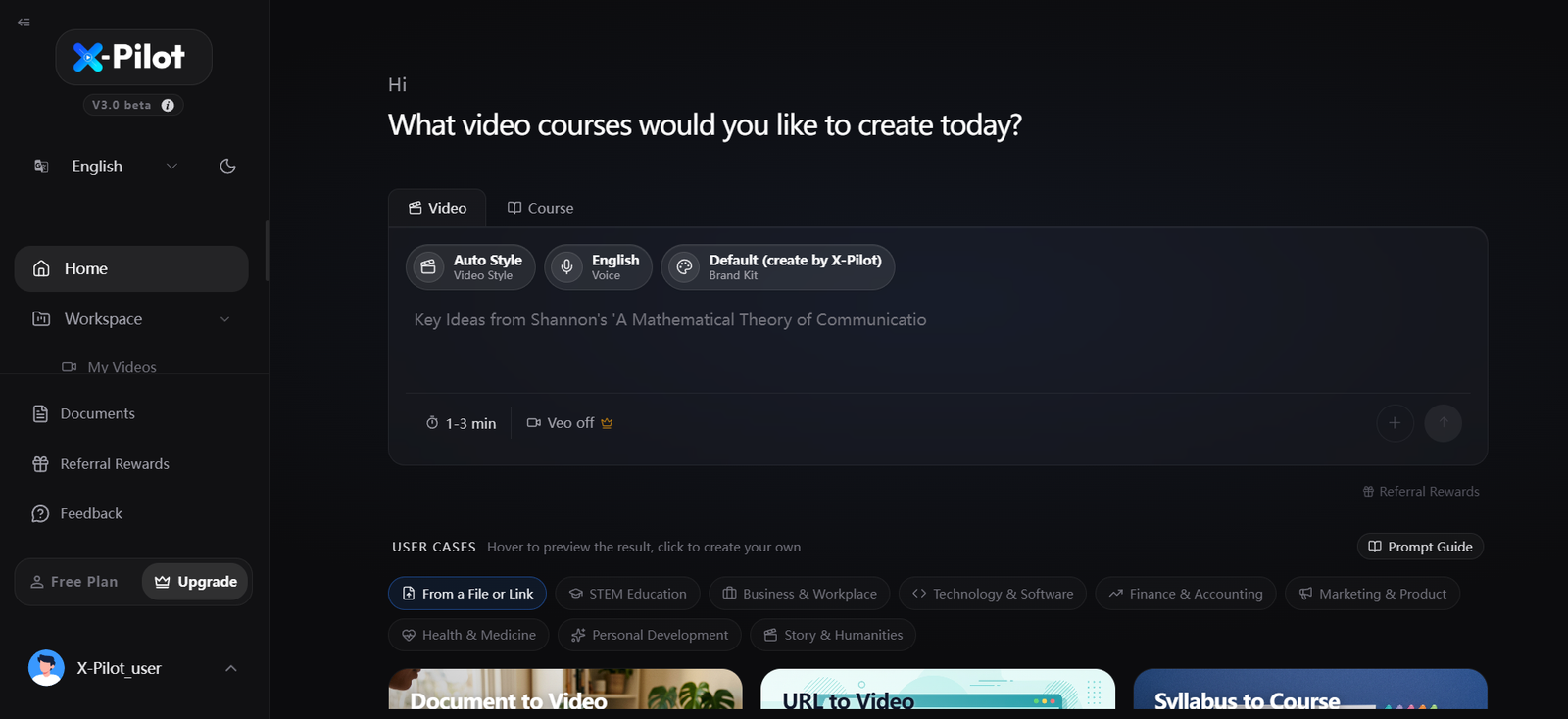
X-Pilot is an AI video creation platform designed mainly for educational, course, and training content. It helps users turn existing knowledge into structured videos without requiring traditional video production skills.
Users can begin with a topic or provide source material such as a PDF, PowerPoint presentation, Word document, URL, Markdown file, or plain text. X-Pilot uses AI to organize the material into an outline, plan individual scenes, generate narration, and create visual explanations.
An important part of the platform is its focus on editable and reviewable content. Instead of simply producing a finished AI video that is difficult to change, X-Pilot allows users to inspect the outline and individual scenes before export. Changes can be requested using normal language, making it easier to correct explanations, reorganize content, or modify individual visual elements.
X-Pilot is particularly suited to teachers, course creators, trainers, instructional designers, researchers, consultants, marketing teams, and learning and development professionals who need to turn knowledge-heavy material into understandable videos.
Features
Document to Video
Users can convert existing documents into video projects. Supported inputs include PDF, PowerPoint, Word documents, Markdown, plain text, and other supported source formats.
URL to Video
A supported web page can be used as source material for creating an educational or explanatory video. This can reduce the need to manually copy information into a video script.
Text to Video
Users can start with lecture notes, paragraphs, an outline, or a topic. X-Pilot structures the information into an editable video project.
Syllabus to Course
Course creators and educators can use a syllabus to organize educational material into chapter-based video projects. Each selected chapter can be developed and reviewed separately.
Long-Form Video Creation
X-Pilot supports individual course or training videos of up to approximately 20 minutes, making it suitable for lessons that require more depth than short social media videos.
AI Generated Outlines
Before producing the final video, X-Pilot can structure source material into an outline. Users can review and modify this structure before continuing.
Editable Scenes
Individual scenes remain editable. Users can change explanations, titles, diagrams, formulas, narration, and other supported elements instead of regenerating the entire project.
Natural Language Editing
Users can describe desired changes in ordinary language. This can make editing easier for teachers and professionals who are not experienced with conventional video editing software.
Knowledge Visualizations
X-Pilot provides built-in visualization components for presenting information through diagrams, charts, formulas, code, process visuals, annotated figures, and other educational elements.
Code-Rendered Visuals
Approved knowledge scenes can be rendered from structured code rather than relying entirely on generative pixel-based video. This approach can provide greater control over elements such as text, equations, labels, diagrams, and sequences.
AI Voice and Voice Cloning
Paid plans provide premium AI voice cloning, allowing creators to use customized voices for course and training videos. The number of available voice clones depends on the subscription.
Multiple Languages
The application provides language options for creating content for different audiences. Voice and language settings can be selected while preparing a project.
Video Preview
Users can preview their revised scenes and check important information before creating the final video.
HD MP4 Export
Paid plans support HD video export without a watermark. Completed projects can be exported as MP4 files for manual uploading to learning platforms, websites, or other destinations.
Custom Branding
Paid plans include custom branding options, helping organizations and professional creators maintain a consistent identity across their training or educational content.
Team Features
The Business plan provides shared credits, member seats, and team management features for organizations producing videos collaboratively.
How It Works
Step 1: Create an Account
Users register with X-Pilot and can begin with its free entry option without providing a credit card.
Step 2: Choose Video or Course Mode
The application allows users to create an individual video or organize material into course-oriented projects.
Step 3: Provide the Source Material
Users can enter a topic, paste text, provide a supported URL, or upload source material such as a PDF, PowerPoint, Word document, or Markdown file.
Step 4: Configure the Video
Users can choose options such as language, voice, video style, approximate length, and available branding settings.
Step 5: Generate the Structure
X-Pilot analyzes the material and prepares an outline and proposed scenes.
Step 6: Review the Content
Users review the outline, narration, scenes, and visual explanations. Important technical or factual information should be checked against the original source.
Step 7: Request Changes
Changes can be described in plain language. Users can refine the overall structure or target specific scenes and elements.
Step 8: Preview the Video
The revised project can be previewed so users can inspect the content before approving the final version.
Step 9: Export
After review, the completed video can be exported as an MP4 file and uploaded manually to the user’s preferred learning, training, website, or video platform.
Use Cases
Teachers
Teachers can convert lesson notes, presentations, and educational documents into visual lessons that include narration and structured explanations.
Course Creators
Independent creators can transform written course material into professional video lessons and organize chapters into a video series.
Corporate Training
Companies can create employee training videos from existing documents, policies, presentations, and internal educational material.
Compliance Training
Organizations can convert SOPs, policies, and compliance documentation into structured training videos while keeping the generated material reviewable.
Learning and Development Teams
L&D professionals can create training resources from internal knowledge without having to produce every video manually.
Professors and Researchers
Complex academic topics can be presented through diagrams, formulas, charts, code, and other knowledge visualizations.
Exam Preparation
Tutors and educational organizations can turn syllabus material into individual video lessons for examination preparation.
Technical Tutorials
Software, IT, engineering, and other technical subjects can be explained using code, diagrams, processes, formulas, and structured visual scenes.
Instructional Designers
Instructional designers can use X-Pilot to create initial video structures and then refine individual scenes according to learning requirements.
Marketing and Product Teams
Teams can create product education, customer training, and explanatory content when the material requires more structured teaching than a conventional promotional video.
Pricing
X-Pilot currently offers a free entry option and four main paid plans.
Free
The free option currently provides one free video generation. No credit card is required to start.
Creator: $19 per month
The Creator plan includes 1,000 credits per month, HD video export, removal of the watermark, custom branding, and up to three premium AI voice clones.
According to X-Pilot’s current credit estimates, a simple video generally consumes around 50 credits per minute.
Professional: $49 per month
The Professional plan includes 3,000 monthly credits and everything available in Creator. It also supports more complex video production involving features such as Veo, 3D content, and AI image generation. Up to six premium AI voice clones are included.
Ultra: $129 per month
The Ultra plan provides 9,000 credits per month, complex video support, up to six premium voice clones, and priority support.
Business: From $159 per month
The Business plan currently includes 12,000 shared monthly credits, the account owner plus two member seats, team management features, and the functionality included in Ultra.
Additional member seats are currently listed at $15 per month each, and teams can manage additional members according to the limits stated by X-Pilot.
Annual billing is also available with a listed saving compared with monthly billing.
Users can purchase additional one-time credit packs. Unlike regular monthly subscription credits, these additional purchased credits are stated to remain available rather than expiring at the end of each subscription month.
Pricing and credit requirements can change, so users should confirm current costs before subscribing.
Strengths
Designed for Knowledge-Heavy Videos
X-Pilot is specifically focused on courses, training, education, and explanatory content rather than functioning only as a general AI video generator.
Multiple Input Formats
Being able to start from PDFs, presentations, documents, URLs, text, or a topic makes the platform useful for people who already have educational material.
Review Before Export
Users can examine outlines, scenes, and visual explanations before producing the final video.
Detailed Scene Editing
The ability to modify individual scenes and elements can reduce the need to regenerate an entire project when only a small change is required.
Natural Language Editing
Users do not necessarily need advanced video editing knowledge because many changes can be requested using written instructions.
Strong Visual Explanation Tools
Diagrams, formulas, charts, code, and process visualizations can be valuable for technical and educational subjects.
Longer Video Support
Support for videos up to around 20 minutes makes X-Pilot more practical for lessons and training modules than tools focused mainly on short clips.
Free Starting Option
One free video generation gives new users a way to explore the workflow before purchasing a subscription.
Drawbacks
X-Pilot is specialized in course, educational, explainer, and training video production. Users primarily interested in cinematic AI videos, entertainment clips, social media effects, or conventional video editing may need a different platform.
The platform is not a learning management system. It produces video projects and MP4 files, but users need another service if they want to host courses, manage students, issue certificates, or operate a complete online learning platform.
Although AI helps structure the content, X-Pilot emphasizes user verification. Teachers, trainers, and subject experts should still review factual and technical information before publishing a generated video.
The credit system can also make costs dependent on video length and complexity. Complex videos using technologies such as Veo, 3D, or AI generated images can consume more credits than simpler projects.
Comparison with Other Platforms
X-Pilot operates in a different area from many general AI video generators. Platforms centered on AI avatars often emphasize virtual presenters, while generative video models may focus more heavily on realistic scenes, cinematic visuals, and creative video generation.
X-Pilot focuses primarily on turning knowledge into editable course and training videos. Its workflow emphasizes source material, structured outlines, individual scenes, knowledge visualization, review, and final MP4 export.
This approach may be particularly useful when exact text, diagrams, formulas, code, charts, or technical processes are important. Users can inspect and modify these elements rather than depending entirely on a generated video sequence.
Compared with research-oriented AI tools that can summarize documents or generate overview content, X-Pilot goes further toward producing an editable video project. However, users who mainly want research, avatar presentations, cinematic generation, or a complete LMS may find specialized alternatives more suitable.
Customer Reviews and Testimonials
X-Pilot displays customer feedback and testimonials on its official website and currently reports a 4.5 out of 5 rating based on 31 ratings, with a link to reviews on G2.
Testimonials presented on the website come from users working in areas such as marketing, training, content creation, and business. Common themes in the displayed feedback include ease of use, faster video creation, the ability to begin from a simple idea, and reduced production effort.
The official website also presents examples involving exam preparation and certification training.
These testimonials should be considered customer feedback highlighted by X-Pilot rather than a complete representation of independent user opinion.
Conclusion
X-Pilot is worth considering for people who need to transform existing knowledge into structured video content. Its combination of document-to-video conversion, AI generated outlines, editable scenes, natural language revisions, narration, knowledge visualization, and HD MP4 export makes it particularly relevant to educational and professional training workflows.
Teachers, course creators, instructional designers, corporate trainers, L&D teams, researchers, consultants, and technical educators are likely to benefit most from the platform.
Its strongest advantage is not simply generating a video automatically. It gives users opportunities to inspect, edit, and verify what the AI creates. For educational and technical content where clarity and accuracy matter, this reviewable workflow can make X-Pilot a useful alternative to more general AI video generators.


