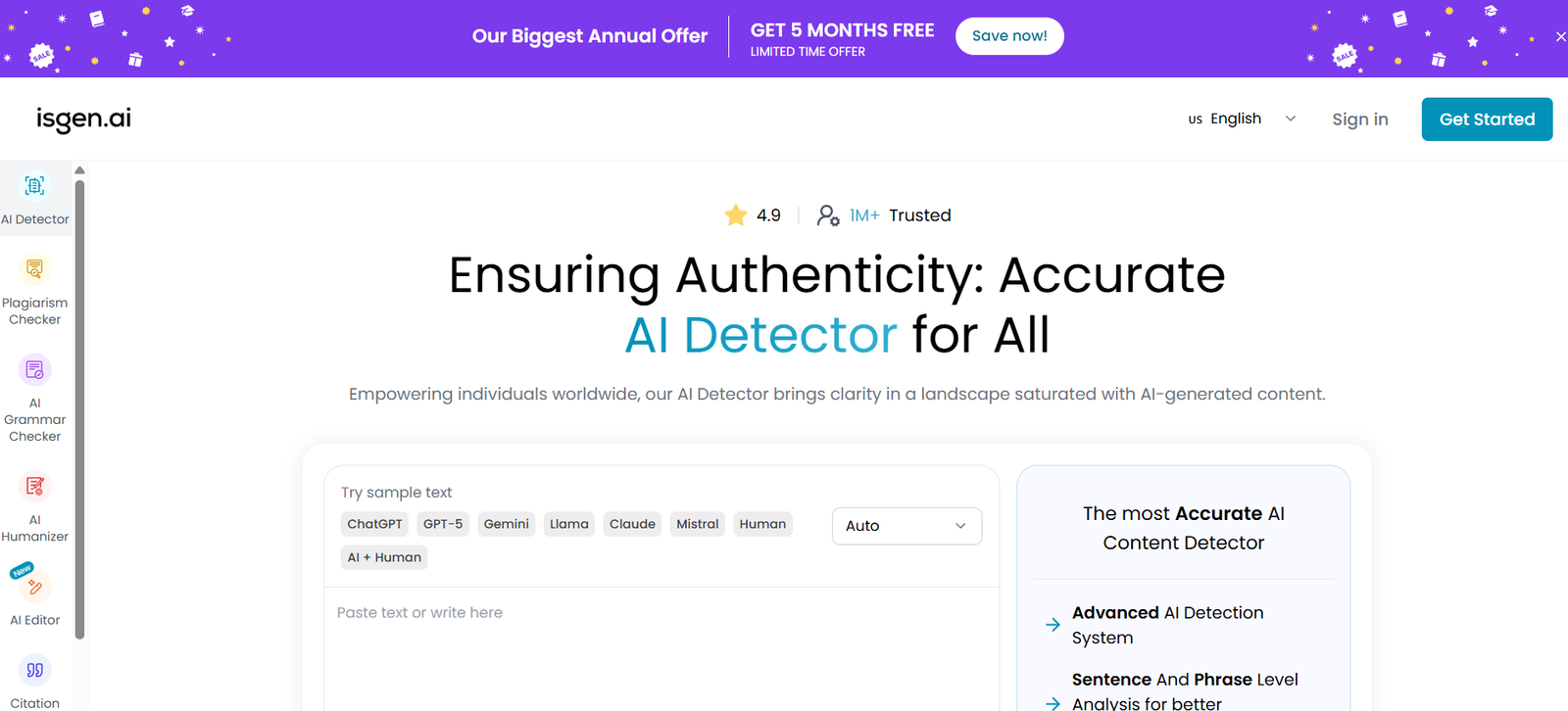
ISGEN is an AI detection and writing platform designed for students, educators, writers, researchers and professionals who want to analyze, improve and verify written content.
Its main feature is an AI Content Detector that examines text and estimates whether it appears to be human-written, AI-generated or a mixture of both. Instead of providing only a single overall score, ISGEN can analyze content at sentence and phrase level to help users understand which sections contribute most strongly to the AI detection result.
The platform supports more than 80 languages for AI detection and is designed to identify content produced by a range of large language models, including ChatGPT, GPT-5, Claude, Gemini, DeepSeek, Llama, Grok, Mistral and Qwen.
ISGEN has also developed a broader writing toolkit around its detector. This includes an AI Humanizer, plagiarism checker, grammar checker, proofreader, citation generator, AI image detector and an integrated AI Editor.
The AI Editor brings several of these functions into one document workspace. Users can write or import documents, check selected passages for AI, humanize or proofread content and export the document while preserving formatting.
Features
AI Content Detector
ISGEN analyzes written content to estimate whether it was produced by a human, generated by AI or contains a mixture of both.
Users receive percentage-based results showing Human, AI and Mixed classifications.
Sentence-Level Analysis
Instead of relying entirely on an overall AI score, ISGEN examines individual sentences. This allows users to identify specific parts of a document that contribute to the detection result.
Phrase-Level Analysis
Premium detection features provide more detailed phrase-level insights. Users can examine portions of individual sentences that may be influencing the AI probability.
Support for 80+ Languages
ISGEN’s AI detection technology supports more than 80 languages. This makes the platform useful for international educators, students, writers and organizations working with multilingual content.
Multiple AI Model Detection
The platform is designed to recognize writing patterns associated with many major AI systems, including ChatGPT, GPT-5, Claude, Gemini, DeepSeek, Llama, Grok, Mistral and Qwen.
ISGEN states that its detection models are continually updated as newer AI models become available.
AI Humanizer
ISGEN includes an AI Humanizer that rewrites AI-assisted or unnatural text to improve tone, rhythm, clarity and readability while attempting to preserve the original meaning.
The Humanizer supports more than 60 languages.
AI Editor
The integrated AI Editor allows users to write, edit, detect, humanize and proofread content from one workspace.
Users can start with a blank document or import an existing DOCX file.
Formatting Preservation
A useful feature of the AI Editor is its ability to preserve document formatting during editing.
Headings, lists, tables, bold text, citations and other formatting can remain intact while users check, rewrite and proofread sections.
AI Proofreader
The proofreading tool checks grammar, spelling, punctuation, clarity and sentence structure. It can be used directly inside the AI Editor.
Plagiarism Checker
ISGEN includes plagiarism checking for users who want to identify potentially duplicated or improperly reused material alongside AI-generated content.
AI Grammar Checker
The grammar checking tool helps identify and correct grammar, spelling, punctuation and other writing problems.
Citation Generator
Users can create citations through ISGEN’s citation generation tool. This can be useful for students, researchers and academic writers preparing references.
AI Image Detector
ISGEN also includes an AI Image Detector as part of its wider detection toolkit.
Bulk AI Detection
Educators and organizations can process multiple documents using bulk AI scanning rather than checking every document individually.
Batch File Upload
Paid plans support batch uploads, which can be particularly useful for teachers or organizations reviewing large numbers of documents.
Shareable and Downloadable Reports
Detection results can be turned into reports that users can share or download for documentation and review.
Document History
Depending on the subscription, ISGEN can maintain document history for a limited period, allowing users to return to previous work.
How It Works
Step 1: Paste or Upload Content
Users can paste text directly into ISGEN or upload supported documents. Bulk and batch options are also available for eligible plans.
Step 2: Select the Language
Choose the appropriate language from the supported options.
Step 3: Start AI Detection
Select the AI detection function to analyze the submitted content.
Step 4: Review the Overall Score
ISGEN provides a percentage breakdown showing how much of the analyzed content is classified as Human, AI or Mixed.
Step 5: Examine Detailed Analysis
Users can move beyond the overall score and inspect sentence-level results. Premium features provide additional phrase-level analysis.
Step 6: Identify Problematic Sections
Impact scores help users understand which sentences or phrases contribute most strongly to the AI classification.
Step 7: Edit or Proofread
Users can open content in the AI Editor to improve grammar, clarity and overall writing quality.
Step 8: Humanize Where Appropriate
The AI Humanizer can rewrite selected passages to make the language more natural while attempting to maintain the original meaning.
Step 9: Export the Document
Documents created or edited within the AI Editor can be exported to DOCX while retaining their formatting.
Use Cases
Students
Students can review their assignments for AI-detection patterns, check plagiarism, proofread writing and generate citations before submitting academic work.
AI detection results should not, however, be treated as proof of academic misconduct.
Educators
Teachers and educational institutions can use ISGEN to examine assignments and identify passages that may warrant further review.
ISGEN itself acknowledges that AI detectors are not 100% accurate and recommends that educators allow students to explain their writing process rather than penalizing them solely on the basis of an AI score.
Writers
Writers can use the AI Editor, Humanizer and Proofreader to improve clarity, grammar, tone and readability.
Researchers
Researchers can use plagiarism checking, citation generation, proofreading and AI detection while preparing academic documents.
Content Teams
Content professionals can review AI-assisted drafts and identify sections that may need additional human editing.
Businesses
Businesses can use the writing and proofreading tools to improve reports, articles, communications and other professional documents.
Multilingual Users
Support for more than 80 languages in AI detection makes ISGEN particularly relevant for users working with content outside English.
Educational Institutions
Bulk scanning and batch uploads can help institutions process multiple documents more efficiently than checking assignments individually.
Pricing
ISGEN provides free access to some tools along with Academic, Ultimate and Writing subscription plans.
The following prices are based on annual billing.
Academic
The Academic plan costs $8 per month when billed annually.
It provides 350,000 total words, Advanced AI Detection, Premium Plagiarism Checker, detailed phrase-level analysis, AI Editor, Citation Generator, AI Image Detector, batch file uploads, downloadable and shareable reports and up to 100 bulk AI scans.
The AI Detector supports up to 60,000 characters per submission under this plan.
Ultimate
The Ultimate plan costs $24 per month when billed annually.
It includes unlimited total words, Advanced AI Detection, AI Humanizer, Premium Plagiarism Checker, AI Grammar Checker, Citation Generator, AI Editor and AI Image Detector.
It also provides up to 150 bulk AI scans, batch uploads, reports, priority support and access to experimental features.
Writing
The Writing plan costs $15 per month when billed annually.
It focuses primarily on writing improvement and provides 50,000 total words, AI Humanizer, AI Grammar Checker, Citation Generator, AI Editor, AI Image Detector, batch file uploads and priority support.
The Writing plan does not include the full AI Detector or Plagiarism Checker according to the current pricing comparison.
Monthly billing is also available. Users should check the current pricing page because prices, allowances and features may change.
Strengths
Detailed AI detection: ISGEN goes beyond a single score by offering sentence and phrase-level analysis.
Broad language coverage: Support for more than 80 languages makes the detector useful for multilingual content.
Multiple writing tools: AI detection, humanization, plagiarism checking, proofreading, grammar correction and citation generation are available within one platform.
Integrated AI Editor: Users can write, detect, edit and proofread without constantly moving text between separate tools.
Formatting preservation: The editor can retain headings, tables, lists, citations and other formatting while content is being edited.
Bulk processing: Batch uploads and bulk scanning are useful for educators and organizations reviewing multiple documents.
DOCX workflow: Users can import and export documents rather than working only with plain text.
Free access: Users can try parts of the platform without immediately purchasing a subscription.
Drawbacks
AI detection technology is probabilistic and cannot establish with certainty whether a particular person used AI. ISGEN itself acknowledges that AI checkers are not 100% accurate.
For this reason, detection results should not be treated as definitive proof of plagiarism, cheating or academic misconduct.
Some of the more useful capabilities, including detailed phrase analysis, higher word allowances and bulk processing, require paid plans.
The different limits for detection, plagiarism checking, humanization and grammar checking can also make the pricing structure somewhat complicated for new users.
Users who only need a simple AI detector may not require the broader collection of writing tools included with higher subscription tiers.
Comparison with Other Platforms
ISGEN competes with AI detection platforms such as GPTZero, Originality.ai, Copyleaks and other tools designed to identify machine-generated writing.
Its main differentiator is the combination of detailed AI detection and a broader writing environment. Rather than only telling users that content may contain AI-generated text, ISGEN provides sentence and phrase-level analysis alongside humanization, proofreading, plagiarism checking and citation tools.
The integrated AI Editor also allows users to work on formatted documents without repeatedly copying content between separate services.
Compared with simple AI detectors, this makes ISGEN more suitable for users who want both analysis and writing assistance. Other platforms may provide different institutional features, APIs, learning management system integrations or detection methodologies.
As with every AI detector, users should avoid relying on ISGEN as the sole basis for decisions involving academic integrity or authorship.
Customer Reviews and Testimonials
The official ISGEN website displays testimonials and states that the platform is trusted by millions of students, educators and writers worldwide.
These testimonials describe experiences with the platform’s AI detection and writing capabilities. However, they are presented directly on the ISGEN website and should therefore be considered company-published customer feedback rather than independently verified reviews.
Conclusion
ISGEN is a comprehensive AI detection and writing platform for people who need more than a simple AI-generated content score. Its combination of sentence and phrase-level detection, multilingual support, plagiarism checking, humanization, proofreading, citations and document editing creates a useful workflow for reviewing and improving written content.
It may be particularly useful for students, educators, researchers, writers and content professionals who regularly work with AI-assisted writing and want to understand which parts of a document are being classified as machine-generated.
The integrated AI Editor and formatting preservation features add practical value for people working with complete assignments and professional documents.
However, AI detection results should always be interpreted carefully. ISGEN is best used as an analytical and writing-assistance tool rather than as definitive proof that a particular piece of content was written by AI.