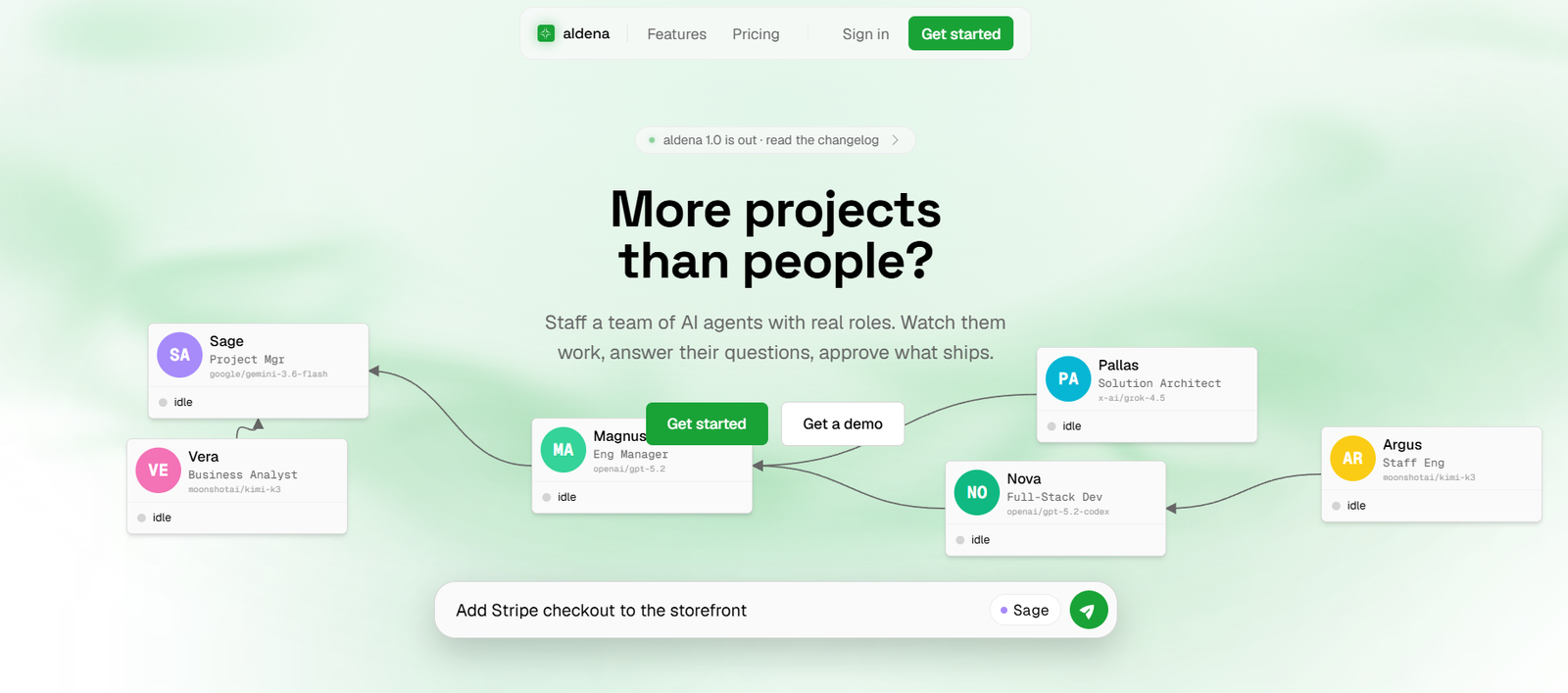
Aldena is an AI workforce platform designed to help businesses create and manage teams of specialized AI agents that can carry out real project work.
Instead of interacting with a single AI chatbot, users can create a team of named agents with different roles and responsibilities. An organization can arrange these agents in a hierarchy, such as managers, senior specialists and other team members, or operate them with a flatter structure.
Aldena is particularly focused on completing work rather than simply generating conversational answers. Its agents can work through connected business and development tools to create pull requests, deploy software, prepare documents, manage backlog items and complete other project tasks.
Each project, product or client can be placed in its own isolated “room.” Every room receives a dedicated server, its own integrations and separate memory so information from different projects does not mix.
Human control is an important part of the system. Aldena uses approval gates so agents pause at important decision points and wait for a person to review and approve the work before actions such as merging or deployment proceed.
The platform is suitable for software teams, agencies, startups and businesses that have more projects than their existing employees can comfortably manage.
Features
AI Agent Teams
Aldena allows organizations to staff projects with multiple AI agents rather than relying on one general assistant.
Each agent can have a defined role and responsibility, creating a structure that resembles a small digital project team.
Real Agent Hierarchies
Users can organize AI agents according to reporting relationships.
For example, a business can create a manager with senior and mid-level agents reporting underneath, or use a flat team structure when hierarchy is unnecessary.
No-Code Agent Orchestration
Users do not need to write orchestration code to establish how the AI team operates.
Roles and reporting relationships can be configured through the interface, while delegation and handoffs between agents occur automatically.
Isolated Project Rooms
Every client, project or product can receive a separate room.
Each room runs on its own dedicated server and maintains separate integrations and memory. This architecture is designed to prevent information from one room from leaking into another.
Dual-Layer Memory
Aldena provides two forms of memory.
Individual agents maintain private memory relevant to their work, while the room itself maintains shared context that can be accessed by the entire AI team.
This allows individual specialization while preserving common project knowledge.
Human Approval Gates
AI agents do not automatically ship every piece of work they produce.
Aldena pauses agents at decision points so users can review what has been created before approving the next action.
For software development, for example, a person can review a code change before allowing it to be merged or deployed.
Automode Approvals
Rooms include both manual and Automode approval options, giving teams flexibility in how closely individual agent actions are supervised.
Organizations should choose the appropriate approval approach according to the risk and importance of the work.
Real Project Output
Aldena agents are designed to produce actual deliverables rather than only suggestions.
Depending on their tools and permissions, agents can work on outputs such as:
Pull requests
Software deployments
Documents
Backlog items
Project tasks
GitHub Integration
AI agents can work with GitHub as part of software development workflows.
This allows agents to interact with real repositories and development processes rather than producing code only inside a chat window.
Bitbucket Integration
Bitbucket is also supported, providing another option for software development teams managing repositories through Atlassian’s platform.
Jira Integration
Agents can work with Jira, allowing AI teams to interact with project management and development tasks.
Linear Integration
Aldena supports Linear for teams using it to organize software development and product work.
Google Drive Integration
Agents can access connected Google Drive workflows, allowing teams to work with documents and other project information.
Gmail Integration
Gmail is currently included among Aldena’s supported integrations, extending agent workflows into email based work.
Notion Integration
Teams using Notion can connect it with their Aldena rooms for supported documentation and knowledge workflows.
Slack Integration
Slack is supported for teams that want their agent workflows connected with workplace communication.
Sentry Integration
Aldena supports Sentry, making it relevant to software teams that need AI agents to work with application monitoring and development information.
Vercel Integration
Vercel support allows relevant AI development teams to connect deployment workflows with their Aldena environment.
Figma Integration
Figma integration is listed as coming soon on the official website.
Skill Marketplace
Aldena provides a marketplace of skills that can be attached to individual agents.
Skills can represent real integrations or additional in-platform abilities, allowing teams to expand what a particular agent can do.
Multiple AI Models
Aldena is not built around only one underlying AI model.
Its interface demonstrates different agents using different models, allowing roles to be matched with suitable AI capabilities.
Activity Logging
Work performed through Aldena can be logged, providing visibility into the steps taken by agents.
This is important when AI agents are performing real project work rather than simply answering questions.
How It Works
Step 1: Create an Aldena account
Users can start with the free Sage plan or choose a paid plan according to team requirements.
Step 2: Create a room
Set up a separate room for a client, project or product.
The room receives isolated infrastructure, memory and integrations.
Step 3: Add AI agents
Select the AI roles needed for the project rather than staffing every possible position.
Step 4: Build the hierarchy
Define who manages whom or configure a flat team structure.
Step 5: Attach skills
Give individual agents the integrations and capabilities they require through the skill marketplace.
Step 6: Connect existing tools
Connect supported services such as GitHub, Bitbucket, Jira, Linear, Notion, Google Drive, Gmail, Slack, Sentry or Vercel according to the project.
Step 7: Give the team work
Assign a project or task and allow the AI agents to collaborate, delegate and perform the required activities.
Step 8: Answer agent questions
When agents require clarification or a decision, users can provide the necessary direction.
Step 9: Review approval gates
Check important changes before they proceed. For example, review a software diff before allowing deployment.
Step 10: Approve and ship
Once satisfied with the work, approve the relevant action and allow the workflow to continue through the connected tools.
Use Cases
Software Development Teams
Development teams can staff projects with AI managers, architects, engineers and other technical roles that work directly with development tools.
Startups
Startups with limited headcount can use specialized AI agents to fill operational gaps without creating a separate full-time position for every type of work.
Digital Agencies
Agencies can create an isolated room for each client, helping prevent client information and project context from mixing.
SaaS Companies
Software companies can use agents for development, project management, documentation and deployment workflows.
Product Teams
Product teams can create groups of AI agents with different responsibilities and allow them to collaborate on defined projects.
Development Agencies
Agencies managing several software projects can create separate environments for each project while maintaining centralized human oversight.
Project Managers
Project managers can use AI agents to handle parts of execution while continuing to review decisions and approve important deliverables.
Businesses with Limited Teams
Organizations that have more projects than available staff can use Aldena to fill selected capability gaps rather than treating the AI as one generic assistant.
Pricing
Aldena currently provides Sage, Starter, Business and Enterprise plans.
Model usage is charged separately through prepaid credits.
Sage
The Sage plan costs $0 per user per month.
It includes:
Up to 2 members
Up to 2 rooms
3 connectors per room
Up to 5 agents per room
This plan provides a practical way for small teams to experiment with Aldena.
Starter
The Starter plan costs $99 per user per month.
It includes:
Up to 10 members
Up to 20 rooms
Unlimited connectors per room
Up to 10 agents per room
Business
The Business plan costs $249 per user per month.
It includes:
Up to 50 members
Up to 100 rooms
Unlimited connectors per room
Up to 20 agents per room
Enterprise
Enterprise pricing is customized.
Members, rooms, connectors and agents can be configured according to organizational requirements.
AI Model Usage
AI model consumption is separate from the monthly subscription.
Teams maintain one prepaid balance, and AI requests deduct their actual model cost based on provider list rates.
Aldena applies a 10% platform fee when credits are purchased, with a minimum top-up of $10.
If the prepaid balance reaches zero, active work pauses and new AI requests stop. Work can resume after additional credits are added.
Strengths
Aldena’s multi-agent structure is more sophisticated than simply giving employees access to another AI chatbot.
The ability to create separate roles and reporting hierarchies makes the system suitable for projects requiring several types of expertise.
Dedicated project rooms provide useful separation for agencies and organizations managing several clients or products.
Each room having its own server, integrations and memory provides a clear approach to project isolation.
Dual-layer memory allows individual agents to maintain specialized context while sharing relevant project knowledge with the wider AI team.
Human approval gates are particularly valuable because the agents can interact with real development and business systems.
No-code orchestration makes multi-agent workflows more accessible to users who do not want to build their own agent framework.
Support for widely used tools such as GitHub, Bitbucket, Jira, Linear, Notion, Google Drive, Gmail, Slack, Sentry and Vercel gives agents access to practical workflows.
Drawbacks
Aldena is aimed primarily at businesses and project teams rather than casual AI users.
The paid plans are priced per active user, which can become relatively expensive for larger human teams.
AI model usage is charged separately from the subscription, so the monthly plan price does not represent the complete operating cost.
The 10% platform fee on credit purchases adds another cost on top of underlying model usage.
Giving autonomous agents access to repositories, email, documents and deployment tools introduces operational risks. Businesses need to configure permissions carefully and retain appropriate human supervision.
Although approval gates reduce risk, users still need to review AI generated work carefully before allowing important changes to proceed.
Figma is currently listed as coming soon, so not every advertised integration is available today.
Comparison with Other Platforms
Aldena differs from conventional AI assistants because it focuses on creating an organized AI workforce rather than giving users one chatbot.
Its approach is closer to staffing a project. Users select agents, assign roles, create reporting relationships, attach skills and give the resulting team access to real workplace tools.
Compared with individual AI coding agents, Aldena emphasizes collaboration between multiple agents. A project can contain managers, architects, developers and other specialized roles that delegate work among themselves.
Compared with generic multi-agent frameworks, Aldena removes much of the orchestration work. Users configure teams through the interface rather than writing extensive code to coordinate agent behavior.
Another important difference is room isolation. Each project or client can operate on its own server with separate memory and integrations, which is particularly useful for agencies handling confidential information from several clients.
Aldena may therefore appeal most to organizations that want multi-agent automation but do not want to build and maintain their own orchestration infrastructure.
Customer Reviews and Testimonials
Customer reviews and testimonials are not clearly available on the official website.
The website currently focuses on explaining Aldena’s multi-agent architecture, integrations, security model, approval system and pricing rather than presenting detailed customer case studies or verified reviews.
Conclusion
Aldena is an AI workforce platform for businesses that want AI agents to perform real project work rather than simply answer questions.
Its central idea is compelling: instead of one general AI assistant, organizations create a team containing agents with different roles, responsibilities, skills and reporting relationships. Those agents can then work together through tools the organization already uses.
Separate project rooms, dedicated servers, dual-layer memory and human approval gates make the platform particularly relevant for agencies, software companies, startups and teams managing several projects simultaneously.
The free Sage plan provides a useful entry point with up to five agents per room. More serious teams can move to Starter or Business plans as they require additional rooms, agents and members.
The main consideration is cost and governance. Model usage is separate from subscription fees, and agents connected to development or business systems need careful permissions and human review.
Overall, Aldena is worth exploring for teams that want to move from using AI as an individual assistant toward managing AI agents as a coordinated digital workforce.