
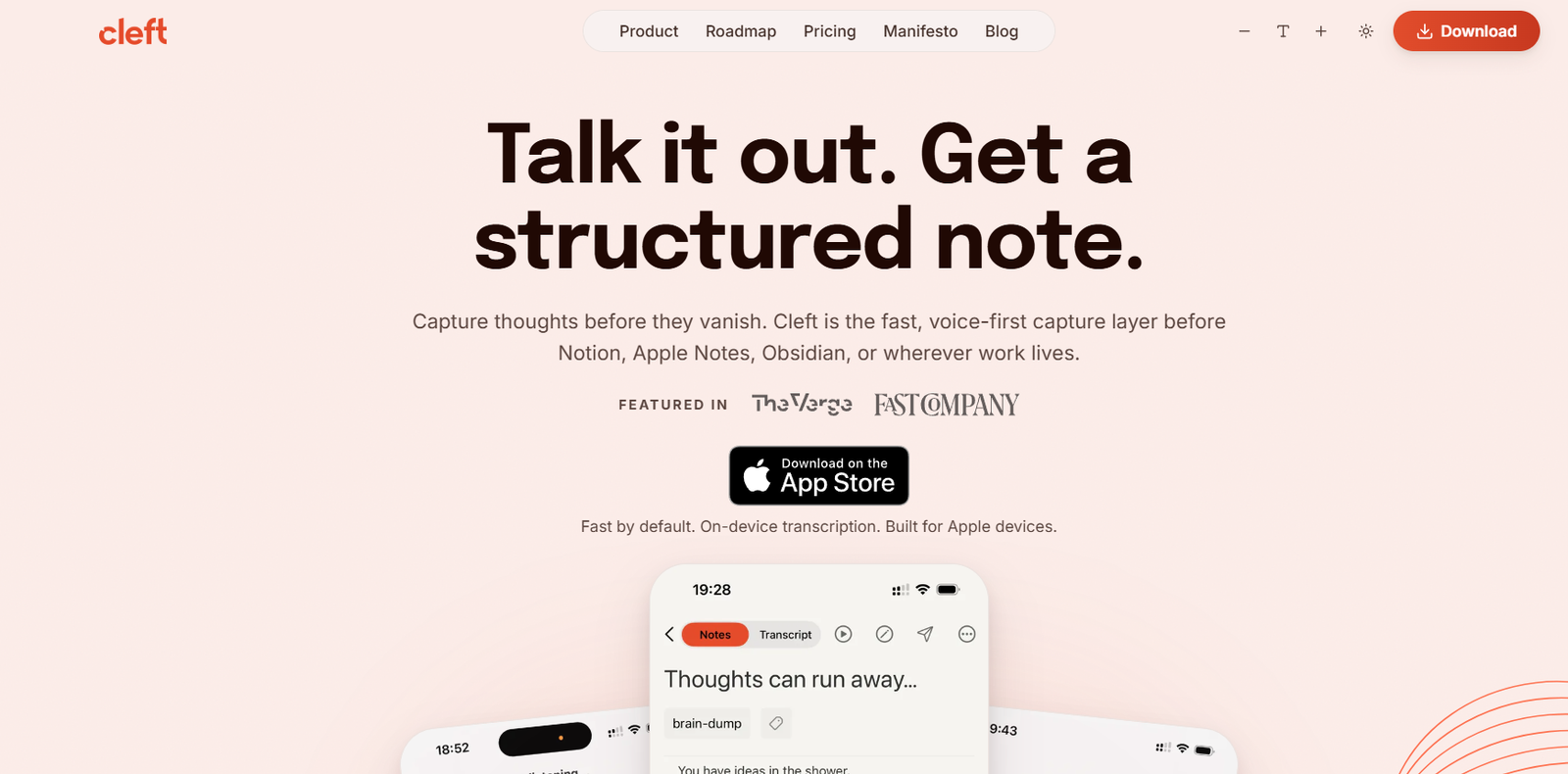
Cleft is an AI powered, voice first note taking application designed for people who find it easier to speak their thoughts than type them. Users can record ideas, tasks, reflections or longer thoughts naturally, and Cleft turns the spoken content into clean, structured notes.
Rather than functioning as a traditional note organization platform, Cleft focuses on capturing ideas quickly before they are forgotten. Once a thought has been captured and processed, the resulting note can be moved into tools such as Notion, Apple Notes, Obsidian, Bear, Drafts, Ulysses and other productivity applications.
Privacy is an important part of Cleft’s approach. Voice recordings are transcribed directly on the user’s device, so audio does not need to be uploaded to a server for transcription. The application can also record and transcribe without an internet connection.
Cleft supports 99 languages and allows users to switch languages while speaking. It is available across Apple’s ecosystem, including iPhone, iPad, Mac, Apple Watch and CarPlay.
The platform is suitable for writers, creators, professionals, students and anyone who frequently has ideas while walking, travelling or working away from a keyboard.
Features
AI Voice Notes
Users can speak naturally instead of carefully dictating polished sentences. Cleft captures the recording and converts the spoken thoughts into a more organized note.
This makes it useful for brainstorming and capturing ideas quickly.
On-Device Transcription
Cleft performs voice transcription locally on the user’s device.
Audio is not sent to a remote server for transcription, giving users greater privacy when capturing personal or professional thoughts.
Offline Transcription
Recording and transcription can work without Wi-Fi or mobile internet.
Users can therefore capture ideas while travelling, walking or working in places without reliable connectivity.
99 Languages
Cleft supports 99 languages.
Users can speak naturally and can even switch between languages during the same recording without installing separate language packs.
Structured Notes
Instead of providing only a raw transcript, Cleft can transform spoken thoughts into a more readable structure.
The resulting note can include organized sections and useful formatting.
Structured Output Style
The Structured style organizes spoken content into clear sections and bullet points.
This can be useful for brainstorming, project ideas, tasks and notes containing several separate thoughts.
Structured Prose
Structured Prose turns spoken ideas into clearer flowing paragraphs.
This can be useful when dictating the early version of an article, explanation, journal entry or longer piece of writing.
Clean Transcript
Users who want to stay closer to their original speech can select Clean Transcript.
This provides a cleaner version of the spoken recording without restructuring it as heavily.
Custom Output Styles
Cleft Plus users can create and save their own output styles.
This allows people to develop repeatable formats for particular types of notes.
Custom AI Instructions
Plus users can give Cleft reusable instructions describing how they want their notes structured.
These instructions can be up to 500 characters.
Smart Titles and Summaries
Cleft can transform loosely spoken thoughts into a note with a useful title and structured content, reducing the amount of editing required after recording.
Append and Continue
Plus users can add new recordings to an existing note.
This makes it possible to develop an idea gradually instead of creating a separate note every time another thought occurs.
Markdown Editor
Cleft includes Markdown based editing capabilities for polishing generated notes.
Users can work with headings, lists, bold text, code blocks and other formatting.
Tags and Search
Notes can be tagged according to projects or topics and searched later.
This helps users retrieve previous ideas from their growing collection.
Auto-Copy
Cleft can automatically copy a completed note to the clipboard so users can quickly paste it into another application.
Plus provides additional customization over what gets copied and how it is formatted.
Local Sync
Notes can be synchronized to local folders on iPhone, iPad and Mac.
Plus users receive additional control over folders and file formats.
Notion Integration
Cleft Plus can send completed notes directly to a user’s Notion workspace.
Zapier Integration
Zapier support allows Plus users to connect Cleft with thousands of applications and create automated workflows from captured notes.
Obsidian Workflow
Cleft can save Markdown files that can be used within an Obsidian vault.
This makes Cleft useful as a voice capture layer for people who already organize their knowledge in Obsidian.
Apple Ecosystem Integration
Cleft works across iPhone, iPad, Mac, Apple Watch and CarPlay.
Users can capture thoughts from one Apple device and continue working with them on another.
Siri and Shortcuts
Cleft supports Siri and Apple’s Shortcuts system, allowing users to create voice driven and automated note capture workflows.
Lock Screen and Widgets
Users can begin recording through convenient entry points such as the Lock Screen, widgets, Dynamic Island and Control Center.
Action Button Support
On compatible iPhones, users can configure the Action Button to begin recording quickly without navigating through the application.
Attachments
Cleft Plus allows users to attach images and files to notes, providing additional context around captured ideas.
Password-Protected Links
Plus users can share notes through links and protect sensitive shared notes with passwords.
Family Sharing
A Cleft Plus subscription supports Apple Family Sharing for up to five family members. Each family member maintains their own notes and settings.
How It Works
Users first install Cleft on a supported Apple device and sign in.
To capture an idea, the user opens Cleft and starts recording.
Instead of carefully dictating every sentence, users can speak naturally and explain the thought in whatever way feels easiest.
Cleft transcribes the recording directly on the device.
The spoken information is then processed into a cleaner note. Users can choose between Structured, Structured Prose and Clean Transcript output styles.
Once the note is ready, users can review and edit it using the Markdown editor.
Tags can be added to make the note easier to locate later.
The completed note can remain inside Cleft or be transferred to another application such as Notion, Apple Notes, Obsidian or other supported productivity tools.
Plus users can also use custom instructions, custom output styles, attachments, Zapier workflows and additional local synchronization options.
Use Cases
Writers
Writers can speak ideas, article outlines, arguments and early drafts while away from their keyboards.
Content Creators
Creators can capture video ideas, podcast concepts, scripts and content plans by speaking naturally.
Professionals
Professionals can record project thoughts, follow-up ideas and observations and then transfer structured notes into their normal productivity system.
Entrepreneurs
Founders can quickly capture product ideas, business problems and strategic thoughts while travelling or moving between meetings.
Students
Students can record their own study thoughts and convert them into structured notes for later review.
Researchers
Researchers can verbally capture observations, questions and emerging ideas while reading or working.
Personal Journaling
Users can speak personal reflections and have them converted into more readable written entries.
Task Capture
Users can dictate a collection of tasks and allow Cleft to organize the spoken information into clearer lists.
Multilingual Notes
People who naturally think or communicate in multiple languages can switch languages while recording.
Apple Watch Users
Users can capture ideas directly from their Apple Watch when taking out a phone or laptop would be inconvenient.
CarPlay Users
CarPlay support allows users to capture thoughts while travelling without needing to type.
Pricing
Cleft currently offers Basic and Cleft Plus plans.
Basic
The Basic plan costs $0.
It includes on-device transcription, structured notes, recordings up to five minutes, three built-in output styles, auto-copy, Local Sync, tags, search, export, widgets, Siri and Shortcuts.
The Free plan also supports offline use and 99 languages.
Cleft Plus
Cleft Plus costs $6.99 per month.
The annual plan costs $39.99 per year, providing a substantial saving compared with monthly billing.
Plus includes everything in Basic along with:
Recordings up to 30 minutes
Custom AI instructions
Append and continue notes
Custom output styles
Custom auto-copy options
Custom Local Sync options
Attachments
Notion integration
Zapier integration
Password-protected sharing links
Family Sharing for up to five people
Early access to new features through TestFlight
Payments are handled through Apple’s App Store. Regional prices may vary according to App Store pricing.
Strengths
One of Cleft’s biggest advantages is how quickly users can capture unstructured thoughts without worrying about formatting while speaking.
On-device transcription gives the platform a meaningful privacy advantage because voice recordings do not need to be sent to a cloud transcription server.
Offline transcription is also valuable for users who frequently work or travel without reliable internet access.
Support for 99 languages makes Cleft suitable for multilingual users, including people who switch languages naturally while thinking aloud.
The three different output styles allow users to decide how much AI restructuring they want.
Integration with Notion, Obsidian, Apple Notes and other productivity tools means users do not necessarily need to replace their existing note taking system.
Its free plan includes many of the core capabilities, while the annual Plus subscription remains relatively affordable.
Drawbacks
Cleft is currently focused on Apple’s ecosystem. Users working primarily on Windows or Android do not receive the same native application experience.
The Free plan limits individual recordings to five minutes.
Users requiring longer recordings of up to 30 minutes need Cleft Plus.
Some advanced features, including custom AI instructions, custom output styles, attachments and Notion and Zapier integrations, are also restricted to Plus.
Cleft is primarily designed for capturing thoughts rather than serving as a complete project management or knowledge management system.
Users who need extensive databases, team collaboration or complex workspace organization will generally need to send their Cleft notes to another application.
Comparison with Other Platforms
Cleft differs from traditional note taking platforms because it concentrates on capturing information rather than becoming the place where users organize everything.
Compared with Notion, Cleft provides a much faster voice first capture experience, while Notion offers a more extensive environment for databases, documents and collaboration.
Compared with Obsidian, Cleft simplifies spoken idea capture and AI restructuring, while Obsidian provides a broader system for building interconnected personal knowledge bases.
Its on-device transcription and offline operation also distinguish it from voice note applications that depend heavily on cloud based speech processing.
Cleft works particularly well as the first stage of a productivity workflow. Users can capture thoughts naturally and then send the resulting structured information to the application where they already manage their work.
Customer Reviews and Testimonials
Cleft displays several customer testimonials on its official website.
Users commonly highlight the application’s ability to take loosely spoken ideas and turn them into organized notes. One user describes using Cleft for dictated to-do lists because it can organize spoken thoughts into checklists and bullet points.
Other users praise the way Cleft converts verbal brainstorming into shorter, cleaner and more readable notes.
The official website also highlights positive independent coverage from publications and reviewers including The Verge, Fast Company and The Sweet Setup.
These testimonials are presented by Cleft itself and should be understood as company selected customer feedback rather than a complete representation of independent user reviews.
Conclusion
Cleft is a practical AI voice note application for people whose thoughts often move faster than they can type.
Instead of requiring users to carefully dictate polished sentences, Cleft lets them speak naturally and then transforms the recording into structured, readable notes.
Its combination of on-device transcription, offline operation, 99 languages, multiple output styles and Apple ecosystem integration makes it particularly useful for writers, creators, professionals, students and anyone who frequently captures ideas while away from a keyboard.
The Free plan provides enough functionality for short everyday voice notes, while Cleft Plus adds longer recordings, custom AI instructions, personalized output styles and integrations with tools such as Notion and Zapier.
For Apple users looking for a privacy conscious AI tool that turns spontaneous spoken thoughts into useful written notes, Cleft offers a focused alternative to traditional note taking applications.


