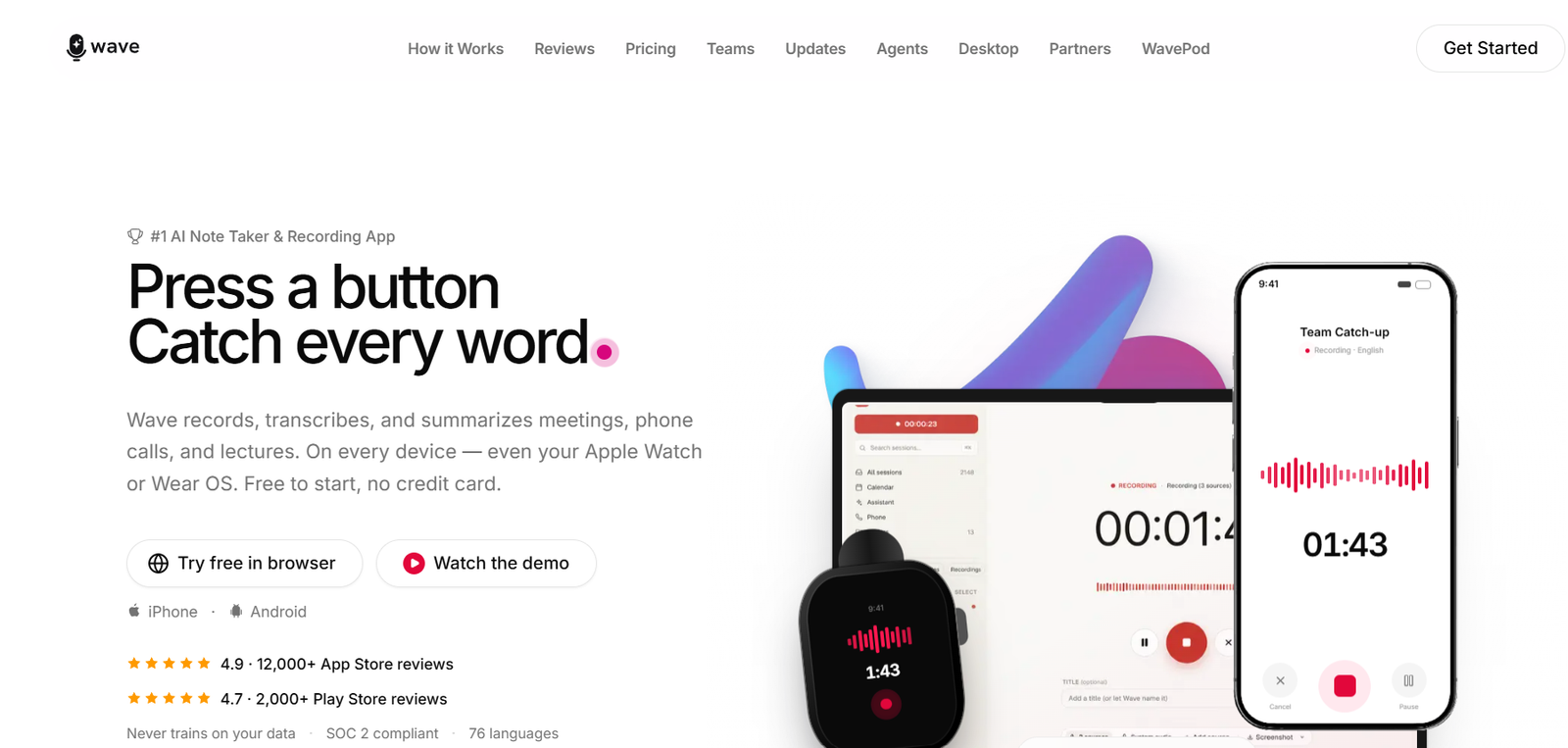
Wave is an AI powered note taking and recording platform designed to capture conversations and turn them into organized, searchable information. It can record meetings, phone calls, lectures, interviews and in person conversations, then automatically create transcripts, summaries and action items.
The platform is available across iPhone, Android, Mac, Windows, Chrome and the web. It also supports Apple Watch and Wear OS devices, allowing users to record conversations directly from a smartwatch.
Wave goes beyond simple transcription by providing AI generated summaries, customizable templates, speaker identification and an AI assistant that can search across previous recordings. Users can ask questions about earlier meetings and retrieve relevant information without manually searching through individual transcripts.
Wave supports 76 languages and can translate and summarize multilingual conversations. It is suitable for professionals, students, consultants, sales teams, coaches, journalists and organizations that want to reduce manual note taking.
Features
AI Meeting Recording
Wave records meetings and conversations so users can focus on the discussion instead of continuously writing notes.
It can capture in person discussions, online meetings, lectures and other spoken conversations.
Automatic Transcription
After recording, Wave converts speech into a written transcript. The transcript provides a searchable record that users can revisit later.
AI Summaries
Wave automatically summarizes recordings and highlights important information. This allows users to review the main points without reading an entire transcript.
Action Item Detection
The AI can identify action items and next steps mentioned during meetings. This is particularly useful for business meetings and project discussions.
Speaker Identification
Wave provides speaker labeling for conversations involving multiple participants.
Its Voice ID feature can learn frequently encountered speakers. Once a speaker is identified, Wave can automatically recognize and label that person in future recordings.
76 Languages
Wave supports transcription across 76 languages, making it useful for international teams and multilingual conversations.
Translation
Users can record conversations in different languages and use Wave to translate and summarize the content.
Wave Assistant
Wave includes an AI assistant that lets users ask questions about their recordings.
Instead of manually searching through individual meeting notes, users can ask questions about previous conversations and receive information based on relevant recordings.
Search Across Recordings
Wave Assistant can search across a user’s recording history. For example, a user could ask what was decided during several marketing meetings and retrieve information from relevant sessions.
Custom AI Summary Templates
Users can choose different formats for their AI summaries.
Available approaches include meeting notes, executive summaries, action items, sales calls, interviews and lecture notes. Users can also create and save their own formats.
Phone Call Recording
Wave can record phone conversations and generate transcripts and summaries. Availability and functionality may depend on the device, plan and region.
Online Meeting Recording
Wave can work with online meeting platforms such as Zoom, Google Meet and Microsoft Teams.
A calendar bot can automatically join supported scheduled meetings, while desktop recording provides another option for capturing meetings.
Background Recording
Wave can continue recording on supported mobile devices even when the screen is locked. This can be useful during lectures, interviews and longer conversations.
Desktop Recording
Wave provides desktop applications for Mac and Windows.
Users can capture microphone and system audio together, allowing online meetings to be recorded without necessarily relying on a meeting bot.
Smartwatch Recording
Users can record from Apple Watch and Wear OS devices, providing a convenient way to capture conversations when a phone or computer is not immediately accessible.
Import Audio and Video
Users can import existing audio and video files for transcription and summarization rather than recording everything directly through Wave.
YouTube Import
Wave can process supported YouTube links, helping users turn video content into transcripts and AI generated summaries.
PDF Import
Users can also bring PDFs into Wave, extending the AI assistant beyond recorded conversations.
Sharing
Transcripts and summaries can be shared with colleagues, clients, friends or other recipients.
Export Options
Wave supports exporting information to formats and services such as PDF, DOCX, Notion, Google Docs, OneNote and Evernote.
Claude Integration
Wave can connect with Claude so users can search, read and summarize their Wave meetings through a compatible Claude environment.
ChatGPT Compatibility
Wave also promotes compatibility with ChatGPT, providing additional ways for users to work with information captured in their recordings.
Zapier Integration
Zapier support can help businesses connect Wave with automated workflows involving other applications.
Security and Privacy
Wave states that it is SOC 2 compliant and encrypts recordings in transit and at rest.
The company also states that users’ recordings are not used to train its AI models.
How It Works
Users begin by creating a Wave account and choosing the device they want to use. Wave is available on mobile devices, computers and the web.
To capture an in person conversation, lecture or interview, the user simply starts recording.
For online meetings, users can record through the desktop application or use Wave’s meeting functionality with services such as Zoom, Google Meet and Microsoft Teams.
Users can also import an existing audio file, video, YouTube link or supported document.
Wave processes the recording and generates a transcript.
Speaker identification helps separate the participants, while Voice ID can recognize speakers who appear regularly in future recordings.
The AI then generates a summary according to the selected template. Depending on the template, the output can emphasize important points, decisions, action items or other information.
Users can later search their recording history or ask Wave Assistant questions about previous conversations.
Completed transcripts and summaries can be shared or exported to supported applications and file formats.
Use Cases
Business Meetings
Professionals can record meetings and receive transcripts, summaries and action items without manually taking extensive notes.
Students
Students can record lectures where permitted and use AI generated transcripts and summaries when reviewing course material.
Sales Teams
Sales professionals can capture customer conversations, summarize requirements and keep track of agreed next steps.
Consultants
Consultants can maintain searchable records of client meetings and quickly retrieve decisions or requirements discussed during previous sessions.
Coaches
Business and personal coaches can record sessions, generate summaries and track commitments or important discussion points across multiple client conversations.
Journalists
Journalists can record interviews and convert them into searchable transcripts, reducing the time required for manual transcription.
Accountants and Professional Services
Accountants and other professional service providers can maintain records of client discussions, planning sessions and advisory calls.
Project Teams
Teams can use Wave to identify decisions, responsibilities and action items from project meetings.
Educators
Teachers and trainers can create transcripts and summaries of lectures, workshops and educational discussions.
Interviews
Users can record professional or research interviews and obtain speaker labeled transcripts for later review.
Personal Notes
Wave can also be used to capture spoken thoughts, ideas and conversations that users want to remember and search later.
Pricing
Wave currently offers Free, Pro and Teams options.
Free
The Free plan costs $0 and provides 30 minutes of recording per month.
It includes AI transcription and summaries and works on iOS, Android and the web.
No credit card is required to start.
Pro
Wave Pro is listed at $11.67 per month when billed annually.
The plan includes unlimited recording and transcription, AI powered summaries, action items and expanded export functionality.
Pro works across iOS, Android, Mac, Windows, Chrome and the web.
Monthly and weekly billing options are also available, and prices can vary depending on platform and region.
Teams
Wave Teams is listed at $7.50 per user per month, with a minimum of five users.
The Teams option includes Pro functionality along with centralized billing and an administrative dashboard.
Users should check current pricing before subscribing because regional and platform specific pricing may vary.
Strengths
Wave combines recording, transcription, summarization and AI powered information retrieval within one platform.
Its wide device support is a significant advantage. Users can capture conversations from phones, computers, browsers and even smartwatches.
Unlimited recording and transcription on the Pro plan can be attractive to professionals who conduct meetings frequently.
Wave Assistant makes the platform more useful than a simple transcription tool because users can search and ask questions across their previous conversations.
Voice ID can reduce the repetitive work involved in labeling people who regularly appear in recordings.
Customizable summary templates make it possible to adapt AI output to different situations such as lectures, sales calls, interviews and executive meetings.
Support for 76 languages also makes Wave useful for multilingual teams and international users.
Its SOC 2 compliance and policy of not training AI models on customer recordings are important considerations for privacy conscious professional users.
Drawbacks
The Free plan provides only 30 minutes of recording per month, which may be insufficient for users who attend several meetings each week.
Many frequent users will therefore need the Pro subscription.
AI generated transcripts can still contain errors when recordings include background noise, unclear speech, specialized terminology, strong accents or several people speaking simultaneously.
Automatically generated summaries and action items should also be reviewed before being treated as definitive records of important meetings.
Some recording functionality can depend on the user’s device, operating system, subscription level and region.
Users must also consider applicable consent and privacy requirements before recording phone calls, meetings or private conversations.
Comparison with Other Platforms
Wave competes with AI meeting and transcription platforms such as Otter.ai, Fireflies.ai, Fathom, Notta and other AI note taking applications.
One of Wave’s distinguishing characteristics is the number of ways users can record. It works across phones, desktops, browsers and smartwatches and can capture online meetings, phone calls and in person conversations.
Its Wave Assistant also extends the platform beyond individual meeting summaries by allowing users to search and ask questions across their recording history.
Voice ID provides another useful capability for professionals who repeatedly meet with the same colleagues, clients or team members.
Compared with meeting tools focused primarily on video conferencing, Wave is more flexible for users who need to record both online and real world conversations.
However, teams primarily looking for advanced CRM automation, detailed sales coaching or large enterprise meeting intelligence may want to compare Wave with more specialized platforms before choosing.
Customer Reviews and Testimonials
Wave displays strong user feedback on its official website and reports ratings of approximately 4.9 out of 5 from more than 12,000 App Store reviews and 4.7 from more than 2,000 Google Play Store reviews.
Users highlighted on Wave’s website describe the platform as useful for work meetings, lectures, lessons, rehearsals and other conversations. Several reviewers specifically appreciate its ability to organize discussions into summaries, important points and action items.
Other feedback highlights the convenience of capturing complex meetings and reducing the need for manual note taking.
These ratings and testimonials indicate positive user experiences, although individual results can naturally vary depending on recording conditions and expectations.
Conclusion
Wave is a versatile AI note taker for anyone who regularly needs to capture and remember spoken information.
Instead of functioning only as a meeting transcription tool, it combines recording, speaker identification, transcription, AI summaries, action items, multilingual support and conversational search across previous recordings.
Its ability to work across iPhone, Android, Mac, Windows, browsers and smartwatches makes it particularly flexible for professionals whose conversations happen in different environments.
Wave can be useful for business professionals, consultants, sales teams, coaches, journalists, educators and students who want to spend less time writing notes and more time participating in conversations.
The Free plan provides a simple way to test the service, while Pro is better suited to people who record frequently and need unlimited transcription. For users looking for an AI assistant that can turn meetings, calls and lectures into organized and searchable knowledge, Wave is a strong option to consider.