
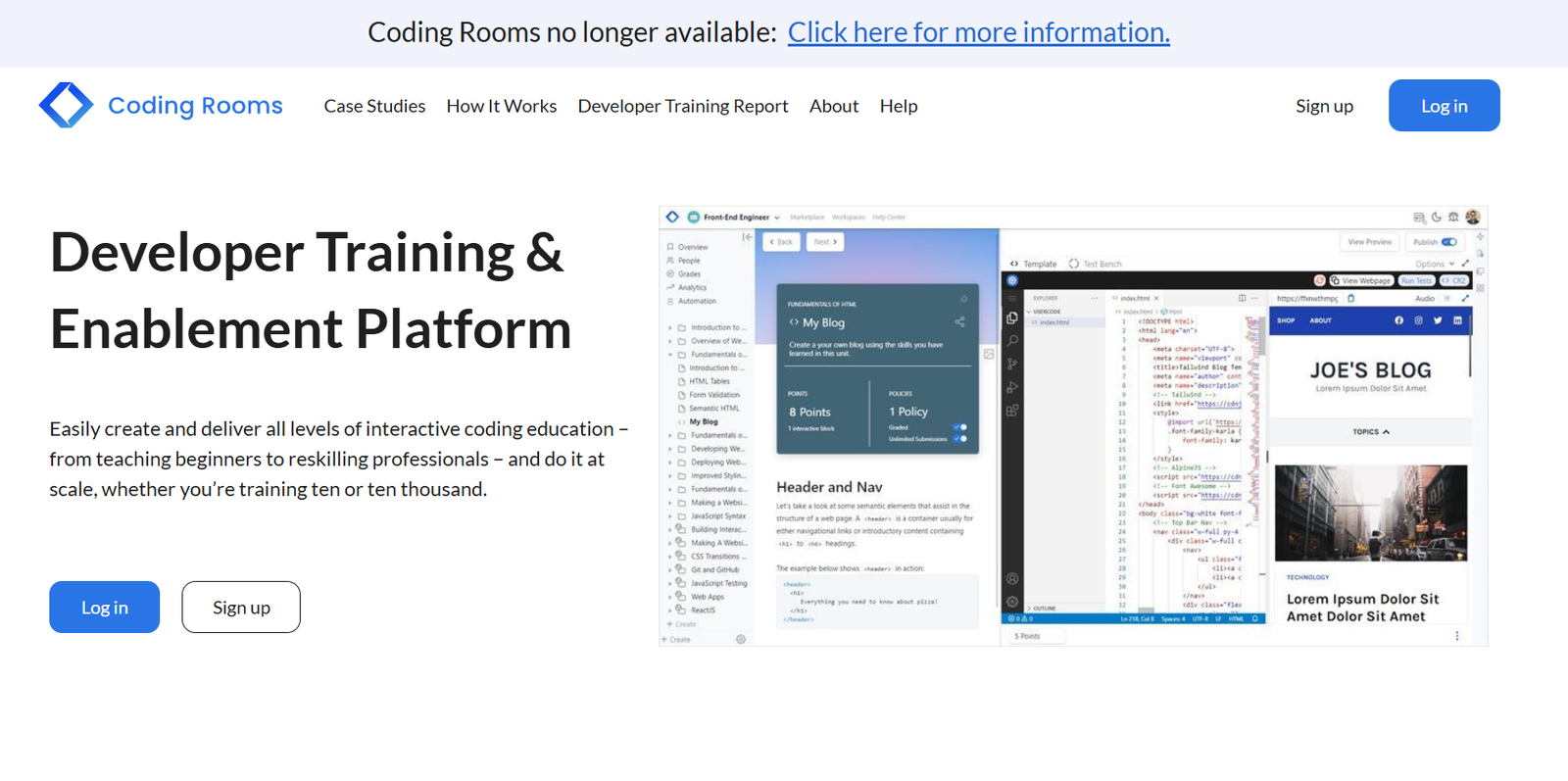
Coding Rooms is a real-time, browser-based platform designed to help instructors teach programming more effectively and students learn to code interactively. Built for education, Coding Rooms allows teachers to create coding assignments, monitor student progress live, provide instant feedback, and grade automatically — all from one platform.
Whether in a classroom, remote, or hybrid learning environment, Coding Rooms streamlines the process of teaching coding by providing a complete, cloud-based IDE with support for multiple programming languages. Students can write, run, and debug code directly in the browser without downloading or configuring any software.
The platform is used by K–12 schools, universities, bootcamps, and training organizations to teach Python, Java, C++, JavaScript, and other programming languages through hands-on learning.
Features
Real-Time IDE for Classrooms
Coding Rooms provides an in-browser development environment where students can write and execute code. Instructors can watch student code updates in real time, allowing them to identify who needs help and provide support immediately.
Live Code Monitoring and Feedback
Teachers can monitor every student’s screen simultaneously, view their code live, and send personalized hints or corrections without interrupting the lesson.
Auto-Grading System
The platform supports auto-graded assignments with customizable test cases. Teachers can build coding exercises that are automatically graded upon submission, saving time on manual grading.
Multi-Language Support
Coding Rooms supports several popular programming languages, including Python, Java, C++, JavaScript, HTML/CSS, and more, making it suitable for diverse computer science curricula.
Integrated Lesson and Assignment Builder
Instructors can build and assign lessons, quizzes, and homework directly within the platform. Lessons can include instructions, code editors, embedded media, and interactive questions.
Class Management Tools
Instructors can organize students into sections, track progress, assign due dates, and manage submissions from a central dashboard.
No Setup Required
All coding happens in the cloud. Students only need a web browser to access full-featured coding environments. This removes the barrier of software setup and works on any device, including Chromebooks.
LMS Integration
Coding Rooms integrates with learning management systems like Canvas and Moodle for syncing grades and managing enrollments efficiently.
How It Works
Educators begin by creating a free account on Coding Rooms and setting up a classroom. Within the classroom, they can create coding assignments or import existing ones. The platform includes a lesson builder where instructors can write problem statements, insert code editors, define test cases, and set grading criteria.
Students join the class via a link or course code and begin coding directly in the browser. As they work, instructors see each student’s progress in real time — including code changes, test results, and activity levels.
For assessments, Coding Rooms allows for both auto-graded and manually reviewed assignments. Teachers can leave comments, assign partial credit, and monitor completion rates. The auto-grading feature ensures consistency while freeing up instructors’ time for more personalized interaction.
Through analytics and reporting dashboards, teachers gain insights into class-wide performance and can identify common pain points to adjust instruction.
Use Cases
K–12 Computer Science Education
Teach block-based and text-based coding in middle and high school
Monitor student activity in real time during lessons
Assign homework that runs in any browser without local installs
Colleges and Universities
Deliver intro to advanced programming courses with automated grading
Conduct coding labs with live feedback and progress tracking
Integrate assignments with institutional LMS systems
Coding Bootcamps and Training Centers
Manage intensive coding cohorts with instant instructor-student collaboration
Evaluate learning with interactive exercises and quizzes
Onboard new instructors with easy-to-use class setup and lesson builder
Remote and Hybrid Learning Environments
Support online instruction with real-time code sharing
Eliminate setup issues by offering cloud-based IDEs
Maintain engagement and visibility even outside the classroom
Pricing
Coding Rooms offers both free and paid plans for individuals and institutions. Pricing is based on feature access and class size.
Free Plan
1 instructor, 1 class, up to 25 students
Real-time IDE and live monitoring
Basic assignments and manual grading
Individual Pro Plan – Starts at $19/month
Multiple classes and larger student capacity
Auto-grading with test cases
Assignment and lesson templates
Priority support
Institutional Plan – Custom Pricing
Designed for schools, universities, and training organizations
Unlimited classes and students
LMS integration and advanced analytics
Dedicated account management and training
Educators can request a quote or trial via the Coding Rooms pricing page.
Strengths
Real-time student monitoring improves engagement and support
Auto-grading saves time and ensures consistent assessment
Browser-based coding eliminates technical setup barriers
Supports a wide range of programming languages
Intuitive lesson and assignment creation tools
Designed specifically for education, not adapted from commercial IDEs
Drawbacks
Free version has limitations on class size and features
Limited version control features for advanced users
May not replace full IDEs for complex software engineering projects
Group coding collaboration features are limited compared to pair programming tools
Comparison with Other Tools
Coding Rooms vs. Replit for Education
Replit offers real-time coding and collaboration but is more general-purpose. Coding Rooms is designed specifically for instructors, with features like live monitoring, LMS integration, and auto-grading, making it better suited for structured classrooms.
Coding Rooms vs. CodeHS
CodeHS is a full curriculum platform with video lessons and structured pathways. Coding Rooms is more flexible, offering an IDE and teaching tools without a rigid curriculum, giving educators full control over content.
Coding Rooms vs. GitHub Classroom
GitHub Classroom is ideal for experienced users who want to manage code submissions through Git repositories. Coding Rooms is more accessible for beginners and focused on in-browser interaction, reducing complexity for K–12 and higher-ed instructors.
Customer Reviews and Testimonials
Educators using Coding Rooms consistently highlight its simplicity, real-time features, and impact on classroom efficiency. Teachers appreciate being able to see what each student is doing and intervene quickly when issues arise.
Testimonials on the website and platforms like Product Hunt praise the platform for removing the friction of technical setup, making it easier to focus on teaching and learning.
Instructors at schools and universities report that Coding Rooms has improved student engagement, reduced grading workload, and made remote coding instruction more effective and scalable.
Conclusion
Coding Rooms is a powerful, education-first coding platform that brings real-time collaboration, interactive learning, and efficient grading to programming classrooms. Its browser-based approach eliminates technical barriers, while features like live code monitoring, auto-grading, and lesson creation empower teachers to focus on what matters — teaching code effectively.
Whether you’re an educator running a computer science class, a school looking to digitize your curriculum, or a bootcamp aiming to deliver fast-paced instruction, Coding Rooms offers the tools you need to succeed in today’s digital classroom.


