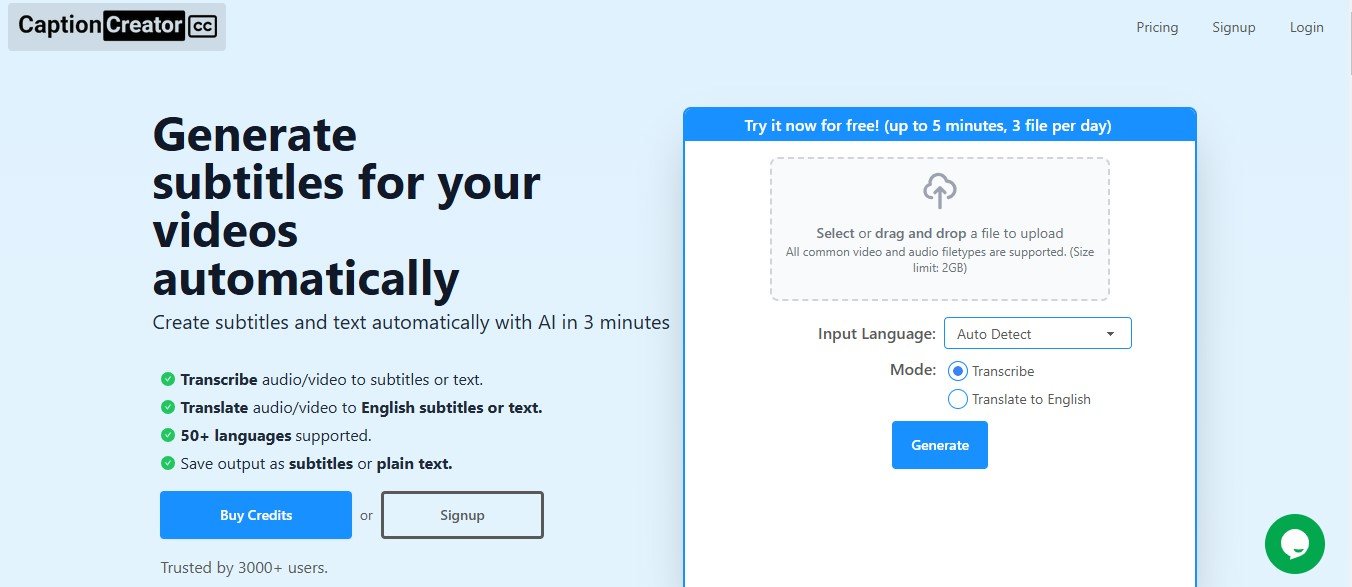
CaptionCreator.cc is an AI-powered subtitle generation tool designed to make the process of creating captions and subtitles quick, accurate, and easy. It is ideal for content creators, video editors, educators, and businesses who want to enhance the accessibility and reach of their video content.
This cloud-based platform supports various languages and allows users to customize their subtitles. From syncing captions with audio to providing export options for different file formats, CaptionCreator.cc is a complete solution for professionals and beginners alike.
Key Features of CaptionCreator.cc
CaptionCreator.cc provides a variety of features that simplify subtitle creation. Below is a breakdown of its most prominent functionalities:
1. AI-Powered Subtitle Generation
The platform uses advanced AI algorithms to automatically generate accurate subtitles from audio or video files. This feature reduces the time and effort needed to manually transcribe and sync captions.
2. Multilingual Support
CaptionCreator.cc supports multiple languages, making it an excellent choice for content creators targeting international audiences.
3. Customizable Subtitles
Users can edit subtitles to match their style preferences, such as font, size, color, and placement on the screen. This ensures captions align with the brand’s visual identity.
4. Time-Syncing Technology
The tool accurately syncs subtitles with audio or video playback, ensuring a seamless viewer experience.
5. Various Export Formats
CaptionCreator.cc allows users to export subtitles in popular formats, such as SRT, VTT, or hardcoded directly into the video, depending on their needs.
6. Cloud-Based Accessibility
Being cloud-based means users can access CaptionCreator.cc from anywhere with an internet connection, without the need for software installation.
7. Bulk Processing
For users managing multiple videos, the bulk processing feature lets them upload and subtitle several files simultaneously, boosting productivity.
8. Real-Time Preview
The platform includes a real-time preview feature, allowing users to review their subtitles and make edits before exporting the final version.
How Does CaptionCreator.cc Work?
CaptionCreator.cc streamlines the process of creating subtitles into a few simple steps:
- Upload Your Video or Audio File
Start by uploading your file to the platform. CaptionCreator.cc supports a variety of formats, such as MP4, MOV, and MP3. - AI Processing
The AI engine processes your file, generating subtitles that are synced with the audio. This step typically takes just a few minutes, depending on the file size. - Edit and Customize
After the subtitles are generated, use the built-in editor to review and make adjustments. You can customize the appearance and correct any inaccuracies in the transcription. - Export Your Subtitles
Once satisfied, export the subtitles in your desired format, such as SRT, VTT, or hardcoded into the video.
Use Cases of CaptionCreator.cc
CaptionCreator.cc caters to a wide variety of users and industries. Here are some common applications:
1. Content Creators and YouTubers
Enhance viewer engagement by adding captions to videos, ensuring they are accessible to a broader audience, including those with hearing impairments or non-native speakers.
2. Social Media Managers
With captions becoming essential for silent autoplay videos on platforms like Instagram, Facebook, and TikTok, CaptionCreator.cc makes it easy to add subtitles to social media content.
3. Online Education
Educators and e-learning platforms can use the tool to add subtitles to video lectures, making them accessible to international students and those with disabilities.
4. Corporate Training
Businesses can create subtitles for training materials and presentations to ensure effective communication among employees, especially in multilingual teams.
5. Film and Video Production
Film studios and independent video producers can use CaptionCreator.cc to generate subtitles for movies, documentaries, and promotional videos.
Pricing for CaptionCreator.cc
At the time of writing, the exact pricing information for CaptionCreator.cc is not listed on its official website. The platform may offer various pricing models, such as pay-per-use or subscription plans, tailored to different user needs.
For the most accurate and updated pricing details, visit the official CaptionCreator.cc Pricing Page.
Strengths of CaptionCreator.cc
- Ease of Use: The platform is user-friendly and doesn’t require any technical expertise.
- Fast Processing: AI-powered technology ensures quick generation of captions.
- Customizable Options: Users have full control over the appearance of their subtitles.
- Multilingual Support: Ideal for global audiences.
- Affordable: Likely more cost-effective than hiring manual transcriptionists.
Drawbacks of CaptionCreator.cc
- Internet Dependency: Since it’s a cloud-based tool, users must have an active internet connection.
- Accuracy Limitations: Like most AI transcription tools, accuracy may be affected by poor audio quality or heavy accents.
- No Offline Access: The lack of downloadable software may be inconvenient for some users.
Comparison with Other Subtitle Tools
CaptionCreator.cc vs. Otter.ai
- Specialization: While Otter.ai focuses on transcription for meetings and conversations, CaptionCreator.cc is tailored for subtitle creation, with additional features like time-syncing and visual customization.
CaptionCreator.cc vs. Rev
- Pricing: Rev provides human transcription services, which are highly accurate but significantly more expensive. CaptionCreator.cc’s AI solution is faster and more affordable.
CaptionCreator.cc vs. VEED.io
- Interface: Both tools offer user-friendly interfaces, but CaptionCreator.cc provides more customizable options for subtitles, making it better for brand-conscious users.
Customer Reviews and Testimonials
User feedback on CaptionCreator.cc often highlights its simplicity and effectiveness in automating subtitle creation. Users appreciate its accuracy, time-saving features, and customization options. However, some reviewers have noted minor challenges with heavy accents or background noise impacting the AI’s accuracy.
For authentic user reviews, consider checking platforms like Product Hunt or the official CaptionCreator.cc website.
Conclusion
CaptionCreator.cc is an excellent solution for anyone looking to create subtitles or captions efficiently. With its AI-powered automation, customization options, and support for multiple languages, it stands out as a reliable tool for content creators, businesses, and educators alike. While it does have minor limitations, such as dependency on internet connectivity and occasional accuracy issues, the overall strengths of the platform make it a valuable addition to any video production workflow.
If you’re looking to enhance your video content with subtitles, CaptionCreator.cc is a tool worth trying. Visit their official website for more details: CaptionCreator.cc.