
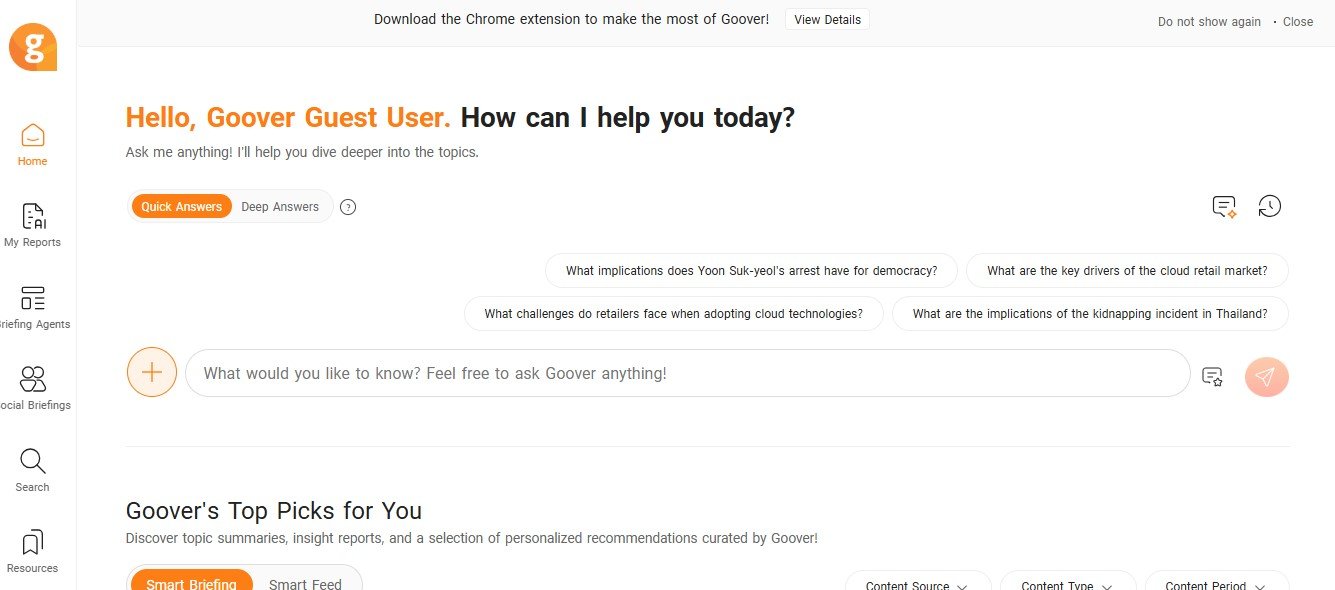
GoOver AI is an AI-driven feedback and review platform designed to optimize collaboration and streamline workflows. It leverages artificial intelligence to provide actionable feedback, track changes, and facilitate better communication among team members.
With its focus on improving feedback loops and enabling more efficient reviews, GoOver AI is perfect for teams working on projects, documents, creative assets, or any deliverables that require a structured review process.
Features of GoOver AI
GoOver AI is packed with features that make the feedback and review process faster, more accurate, and more collaborative:
- AI-Powered Feedback
- Automatically generate suggestions and actionable feedback on documents, designs, or projects.
- Real-Time Collaboration
- Collaborate with team members in real time by commenting, editing, and reviewing files simultaneously.
- Task Tracking
- Assign tasks, track review progress, and ensure deliverables stay on schedule.
- Version Control
- Track changes across multiple versions of a document or project to ensure clarity and accountability.
- Customizable Review Templates
- Use pre-built templates tailored for different industries and project types to streamline the review process.
- Contextual Comments
- Add inline comments directly within documents or designs to provide precise and relevant feedback.
- AI Insights and Recommendations
- Receive insights about recurring issues, productivity patterns, or areas for improvement in your workflows.
- Integrations
- Connect with tools like Google Docs, Microsoft Word, Slack, and Trello to integrate GoOver AI into your existing workflow.
- Progress Analytics
- Use analytics to track the progress of reviews, measure productivity, and monitor collaboration patterns.
- Secure File Sharing
- Share files and feedback securely with team members and stakeholders using permission-based access.
How Does GoOver AI Work?
GoOver AI simplifies the feedback and review process with a user-friendly and intuitive interface. Here’s how it works:
- Upload Your Content
- Start by uploading your document, design, or project file to GoOver AI.
- Enable AI Feedback
- Let the AI analyze the content and generate actionable feedback or suggestions based on its analysis.
- Collaborate with Your Team
- Invite team members to comment, review, and edit in real time while keeping all feedback centralized.
- Track Changes and Progress
- Monitor updates, changes, and task completions with built-in task tracking and version control tools.
- Export and Share
- Once the review process is complete, export the final version or share it securely with stakeholders.
Use Cases of GoOver AI
GoOver AI caters to a variety of industries and teams looking to improve their review workflows. Here are some common use cases:
- Document Reviews
- Streamline editing and feedback workflows for reports, articles, and research papers.
- Creative Design Approvals
- Collaborate on designs, mockups, and visual content by providing precise, actionable feedback.
- Team Collaboration
- Enhance cross-functional collaboration on projects by centralizing feedback and keeping everyone aligned.
- Marketing Campaigns
- Review and refine campaign materials, ad creatives, and social media content with team feedback.
- Product Development
- Improve product designs and prototypes by collecting structured feedback from stakeholders.
- Client Deliverables
- Share project drafts with clients securely and manage their feedback in one place.
Pricing
GoOver AI offers flexible pricing plans to suit different user needs, from individuals to large teams. Here’s an overview of its pricing structure (as of January 2025):
- Free Plan
- Basic feedback and collaboration tools for up to 3 users and 1 project.
- Best for individuals or small teams testing the platform.
- Pro Plan: $9/user per month
- Includes advanced AI feedback, version control, and integrations with third-party tools.
- Ideal for freelancers and small teams.
- Business Plan: $19/user per month
- Offers team collaboration, customizable templates, and analytics tools.
- Designed for growing teams and organizations.
- Enterprise Plan: Custom Pricing
- Tailored solutions with dedicated support, API access, and advanced security options.
- Best for large enterprises with complex workflows.
Visit the GoOver AI pricing page for the latest updates.
Strengths of GoOver AI
- AI-Driven Feedback: Automates parts of the review process, making it faster and more efficient.
- Centralized Collaboration: Keeps all feedback and discussions in one place, reducing confusion.
- User-Friendly Interface: Easy for both technical and non-technical users to adopt.
- Integrations: Works seamlessly with popular tools like Google Workspace and Slack.
- Scalability: Flexible pricing plans and features to scale with growing teams.
Drawbacks of GoOver AI
- Limited Free Plan: Free tier lacks some of the advanced features that teams might require.
- Onboarding for AI Feedback: Users unfamiliar with AI tools may need time to fully leverage the platform’s capabilities.
- Cost for Large Teams: Pricing can increase significantly for organizations with a large number of users.
Comparison with Other Tools
Here’s how GoOver AI compares to similar platforms:
- Google Docs: Google Docs offers collaborative editing but lacks the AI-driven feedback and analytics that GoOver AI provides.
- Trello: Trello excels at task management, while GoOver AI focuses on detailed feedback and version control.
- io: Frame.io is tailored for video reviews, whereas GoOver AI is more versatile and handles a wider range of content types.
Customer Reviews and Testimonials
Here’s what users are saying about GoOver AI:
- Emma R., Content Manager: “GoOver AI has completely transformed our document review process. The AI suggestions save us so much time!”
- John T., Creative Director: “Our design team loves how easy it is to collaborate and track feedback. It’s streamlined approvals for our campaigns.”
- Sophia L., Product Manager: “With GoOver AI, we can handle client feedback more effectively and keep all revisions organized in one place.”
Conclusion
GoOver AI is a powerful platform that revolutionizes the way teams provide and manage feedback. With features like AI-powered insights, real-time collaboration, and version control, it makes the review process faster, smarter, and more efficient. Whether you’re working on documents, creative assets, or client deliverables, GoOver AI centralizes feedback and ensures seamless collaboration.
While the free plan is great for testing, the paid plans unlock advanced features that are perfect for teams looking to improve their workflows and productivity.
Ready to streamline your feedback process? Visit the official GoOver AI website to get started today!


