
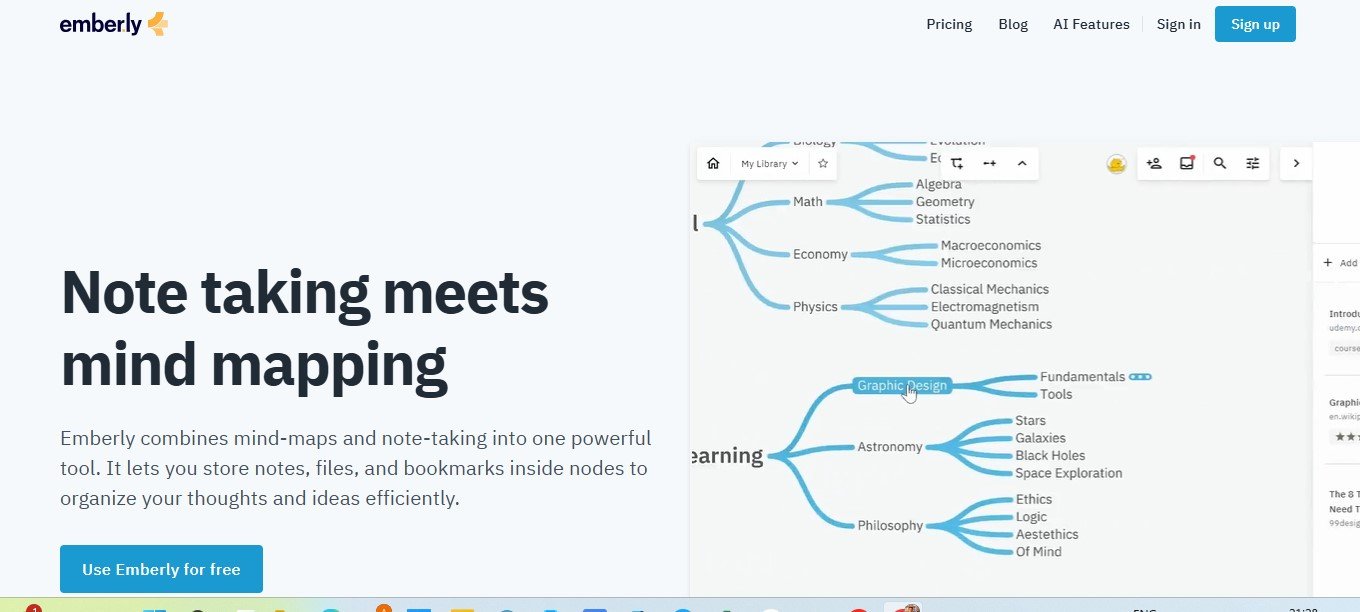
Emberly is a digital knowledge management platform that allows users to organize, visualize, and collaborate on ideas. Unlike traditional tools, Emberly combines mind-mapping, note-taking, and file organization into one seamless interface, making it easier to structure and access your information.
It’s designed for both individual and team use, offering flexible layouts, integrations, and collaborative features to meet a variety of needs, from brainstorming ideas to managing complex projects.
Features of Emberly
Emberly is packed with features to help you stay organized and productive:
- Visual Organization
- Create mind maps, timelines, and boards to visually organize your ideas.
- Use color-coded tags and connectors to structure and categorize information effectively.
- Knowledge Library
- Store and manage notes, files, and links in a centralized knowledge library.
- Add custom labels to group related resources together for easy retrieval.
- Collaboration Tools
- Collaborate with team members in real time on shared projects and boards.
- Leave comments, share feedback, and edit content together seamlessly.
- Templates for Efficiency
- Access pre-designed templates for common use cases, such as project planning, research, or brainstorming.
- Cross-Device Sync
- Sync your projects across multiple devices, ensuring you always have access to the latest updates.
- Integrations
- Integrate with tools like Google Drive, Dropbox, Trello, and Slack to enhance productivity and streamline workflows.
- Search and Filtering
- Quickly find notes, files, or projects with advanced search and filtering options.
- Offline Access
- Work on your projects even without an internet connection; updates are synced once you’re back online.
- Secure Sharing
- Share specific boards, files, or knowledge spaces securely with others using customizable permissions.
- Customizable Layouts
- Adapt the workspace to fit your unique needs by choosing between grids, lists, or hierarchical views.
How Does Emberly Work?
Emberly is designed to make knowledge management and collaboration simple and intuitive. Here’s how it works:
- Sign Up and Create a Space
- Register on Emberly and create a knowledge space where you can organize your ideas or collaborate with a team.
- Add Content
- Upload notes, files, and links or create visual layouts like mind maps and timelines to structure your information.
- Collaborate with Others
- Invite teammates or collaborators to your project, assign tasks, and share ideas in real time.
- Organize and Customize
- Use tags, categories, and templates to organize your content in a way that suits your workflow.
- Share and Export
- Share your projects securely with external stakeholders or export your content to other tools.
Use Cases of Emberly
Emberly is versatile enough to support a variety of industries, projects, and workflows. Here are some common use cases:
- Project Management
- Plan projects, track progress, and collaborate with teams using boards and timelines.
- Knowledge Management
- Store and categorize research, notes, and resources in a centralized knowledge base.
- Brainstorming and Ideation
- Use visual tools like mind maps to brainstorm ideas and explore creative solutions.
- Educational Tools
- Students and educators can organize study materials, lecture notes, and collaborative research projects.
- Content Creation
- Writers and marketers can use Emberly to plan and manage content calendars, store references, and organize drafts.
- Team Collaboration
- Enhance teamwork by creating shared knowledge spaces where everyone can contribute and stay aligned.
Pricing
Emberly offers flexible pricing plans to cater to individuals, teams, and businesses. Below is an overview of its pricing (as of January 2025):
- Free Plan
- Includes basic features, 1 workspace, and limited storage.
- Great for personal use or small projects.
- Pro Plan: $9/month
- Offers unlimited workspaces, advanced customization, and integrations.
- Perfect for individuals or freelancers.
- Team Plan: $19/month per user
- Adds collaboration tools, shared workspaces, and advanced permissions.
- Ideal for small to medium-sized teams.
- Enterprise Plan: Custom Pricing
- Tailored for large organizations with advanced security, dedicated support, and custom integrations.
Visit the Emberly pricing page for the most up-to-date information.
Strengths of Emberly
- User-Friendly Interface: Its intuitive design makes it easy to organize and visualize ideas.
- Versatile Layouts: Supports multiple formats like mind maps, boards, and timelines for flexibility.
- Collaboration Features: Real-time collaboration enhances teamwork and productivity.
- Integration Capabilities: Works seamlessly with popular third-party tools.
- Free Plan Availability: Allows users to explore basic features at no cost.
Drawbacks of Emberly
- Limited Free Plan: Advanced features like integrations and storage upgrades are only available in paid plans.
- Cost for Larger Teams: Monthly fees for team plans may add up for larger organizations.
- Learning Curve for New Users: Some features may take time to master for non-technical users.
Comparison with Other Tools
Here’s how Emberly compares to other knowledge management tools:
- Notion: Notion offers more robust database capabilities, but Emberly excels in visual organization and brainstorming.
- Trello: Trello focuses on task management, while Emberly offers a broader range of knowledge organization and visual tools.
- Miro: Both platforms support visual collaboration, but Emberly integrates more seamlessly with knowledge management workflows.
Customer Reviews and Testimonials
Here’s what users are saying about Emberly:
- Emily R., Project Manager: “Emberly’s mind maps are a game-changer for brainstorming sessions. My team loves how easy it is to collaborate in real time.”
- John T., Educator: “I use Emberly to organize my lecture notes and share study materials with students. It’s simple and effective!”
- Sophia L., Freelancer: “As a content creator, Emberly helps me plan and organize my projects seamlessly. The visual layouts are amazing!”
Conclusion
Emberly is a powerful and intuitive platform for knowledge organization, visual collaboration, and project management. Whether you’re a solo user looking to manage ideas or a team aiming to streamline workflows, Emberly provides the tools you need to succeed.
With features like visual organization, collaborative tools, and integrations, Emberly is perfect for individuals, educators, and teams across industries. Start with the free plan or upgrade to unlock its full potential.
Ready to streamline your knowledge management? Visit Emberly today to get started!


