
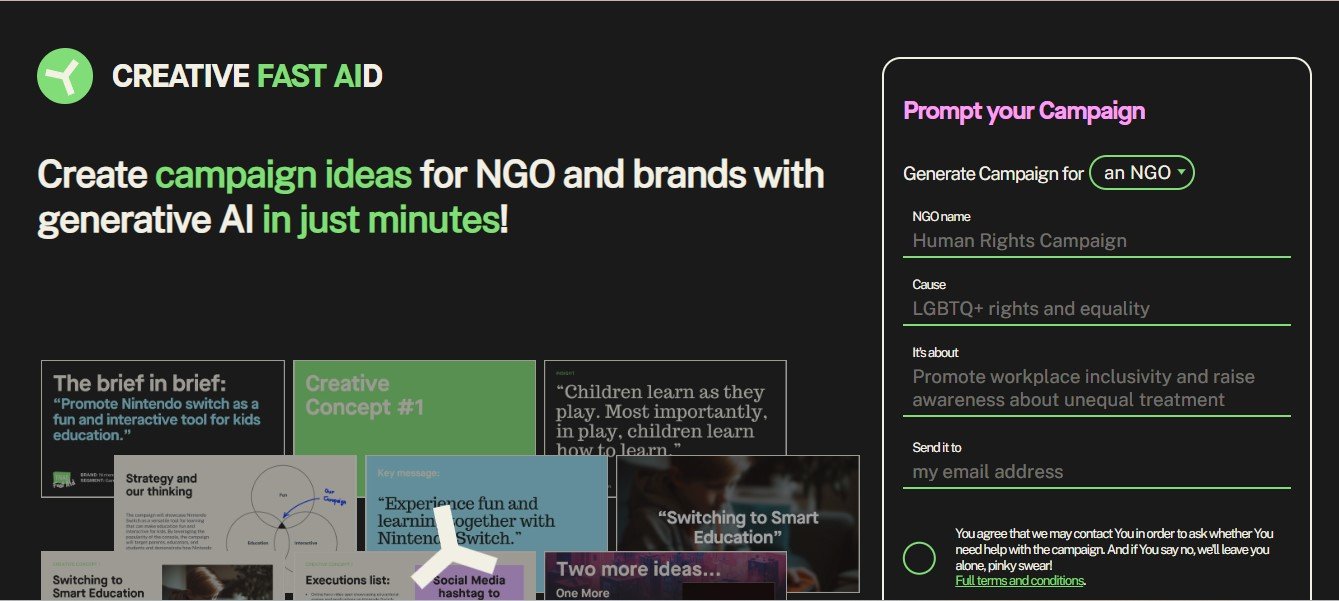
In the digital-first world, creative content drives engagement, sales, and brand visibility. However, producing high-quality designs, engaging copy, and professional assets can be time-consuming, especially for small businesses and individual creators. CreativeFastAid is here to revolutionize the way you approach creative tasks.
CreativeFastAid is an AI-powered platform designed to help users streamline creative workflows, generate unique designs, and create tailored content at lightning speed. Whether you’re a designer, marketer, or entrepreneur, this platform empowers you to unleash your creativity while saving time and effort.
In this blog, we’ll explore everything about CreativeFastAid—its features, pricing, strengths, drawbacks, and use cases—so you can decide if it’s the right tool to supercharge your creative projects.
What is CreativeFastAid?
CreativeFastAid is an AI-powered creative assistant that helps businesses and individuals generate designs, content, and marketing materials with ease. The platform leverages artificial intelligence to automate repetitive creative tasks, provide design recommendations, and deliver professional-quality results in minutes.
From logo creation and social media visuals to ad banners and website elements, CreativeFastAid simplifies complex design processes and caters to users with any skill level—no professional design experience required. Its goal is to make creativity accessible and efficient for everyone.
Features of CreativeFastAid
CreativeFastAid offers a wide range of features that streamline creative and design workflows:
- AI-Driven Design Generator
- Generate professional designs instantly by inputting your ideas or requirements.
- Create logos, social media graphics, banners, business cards, and more.
- Customizable Templates
- Access an extensive library of pre-designed templates for different industries and use cases.
- Edit and personalize templates to align with your brand identity.
- Branding Toolkit
- Upload your brand assets (logo, fonts, and color schemes) to ensure consistency across all creative projects.
- Content Creation Assistance
- Use AI to generate high-quality written content for captions, blog posts, ads, and product descriptions.
- Drag-and-Drop Editor
- Customize your designs easily with the user-friendly drag-and-drop editor, allowing you to adjust layouts, fonts, images, and more.
- Social Media Integration
- Create, schedule, and publish posts directly from CreativeFastAid to platforms like Instagram, Facebook, and Twitter.
- Stock Image and Asset Library
- Access a vast collection of royalty-free images, icons, and assets to enhance your designs.
- Collaborative Tools
- Share designs with your team, gather feedback, and collaborate in real-time to finalize creative projects.
- Multi-Format Export
- Download designs in multiple file formats, including PNG, JPG, and PDF, optimized for print or digital use.
- Creative Insights
- Get AI-driven recommendations on how to improve your designs, such as layout adjustments, color suggestions, or font pairings.
How Does CreativeFastAid Work?
CreativeFastAid is designed to make the creative process easy and efficient. Here’s how it works:
- Sign Up and Onboard
- Create an account on the CreativeFastAid platform and complete the onboarding process by setting up your brand preferences.
- Select a Template or Start from Scratch
- Choose from the library of templates or start with a blank canvas to create your custom design.
- Input Your Ideas
- Use AI-powered prompts to generate content and design ideas. Provide input like the type of design, target audience, or desired outcome.
- Customize Your Design
- Use the drag-and-drop editor to adjust colors, fonts, images, and layouts.
- Generate Content
- Let CreativeFastAid’s AI create engaging text for captions, product descriptions, or headlines to accompany your designs.
- Export or Publish
- Download your designs in high resolution or publish them directly to your social media or website.
- Track Performance (Optional)
- If integrated with your social accounts, use CreativeFastAid’s analytics to track how your designs perform online.
Use Cases of CreativeFastAid
CreativeFastAid is versatile and can be used across a variety of industries and creative needs. Here are some common use cases:
- Social Media Marketing
- Create engaging visuals and captions for Instagram, Facebook, Twitter, and LinkedIn in minutes.
- Branding and Identity
- Design logos, business cards, and brand guidelines for startups or businesses rebranding.
- E-commerce Product Promotions
- Generate promotional banners, product descriptions, and ads to boost online sales.
- Event Promotion
- Create event posters, invitations, and promotional materials for webinars, conferences, or local events.
- Small Business Advertising
- Design flyers, brochures, and banners for local businesses to reach new customers.
- Freelancers and Agencies
- Deliver high-quality client work faster by using AI-generated designs and templates.
Pricing
CreativeFastAid offers flexible pricing plans for individuals, small businesses, and agencies. Below is an overview of their plans (accurate as of January 2025):
- Free Plan
- Limited access to basic templates and design features.
- Includes watermarked downloads and limited exports.
- Pro Plan: $12/month
- Access to premium templates, full customization tools, and watermark-free downloads.
- Includes brand toolkit and basic AI content generation.
- Business Plan: $35/month
- Advanced features like team collaboration, social media scheduling, and analytics.
- Includes multi-format downloads and access to the full stock asset library.
- Enterprise Plan: Custom Pricing
- Tailored for large organizations with additional team seats, integrations, and priority support.
Visit the CreativeFastAid pricing page for the latest details.
Strengths of CreativeFastAid
- Time-Saving: AI automation accelerates the design process, enabling faster content production.
- Ease of Use: The intuitive interface and drag-and-drop editor make it accessible to users with any skill level.
- Custom Branding: Ensures brand consistency with the ability to upload and reuse logos, colors, and fonts.
- Affordability: Competitive pricing plans that cater to individuals, small businesses, and larger teams.
- Creative Insights: AI-driven recommendations help improve design quality and engagement.
Drawbacks of CreativeFastAid
- Limited Free Plan: The free version comes with watermarked downloads and fewer features, which might not suit heavy users.
- Over-Reliance on Templates: While the templates are helpful, some users may find them limiting for highly original projects.
- Learning Curve for Advanced Tools: While basic features are easy to use, advanced tools like analytics and collaboration might require some training.
Comparison with Other Tools
Here’s how CreativeFastAid stacks up against similar tools in the market:
- Canva: Canva is a popular design tool with a broader range of templates and design types, but CreativeFastAid stands out with its AI-powered content generation and creative insights.
- Crello (VistaCreate): Both platforms offer templates and drag-and-drop editors, but CreativeFastAid adds more customization options and collaboration tools.
- Adobe Express: Adobe Express provides more advanced design features, but it has a steeper learning curve compared to the user-friendly CreativeFastAid.
Customer Reviews and Testimonials
Here’s what users are saying about CreativeFastAid:
- Jane M., Small Business Owner: “CreativeFastAid has completely transformed the way I design promotional materials. It’s quick, easy, and affordable!”
- Mark R., Freelancer: “I can deliver client projects faster with CreativeFastAid. The AI tools save me hours of work.”
- Sophia T., Social Media Manager: “I love the brand toolkit feature. It ensures all our social media posts are on-brand, and the scheduling feature is a bonus!”
Conclusion
CreativeFastAid is an excellent tool for anyone looking to streamline their creative workflows. Whether you’re designing marketing materials, creating social media content, or building a brand identity, its AI-powered features and user-friendly interface make it a valuable asset.
While the free plan may be limiting for advanced users, the paid plans provide excellent value for individuals, small businesses, and teams. If you’re looking for an affordable, time-saving platform that combines design and content creation, CreativeFastAid is definitely worth a try.
For more details or to get started, visit the official CreativeFastAid website.


